
.Net 开发Windows Service
1、首先创建一个Windows Service
2、创建完成后切换到代码视图,代码中默认有OnStart和OnStop方法执行服务开启和服务停止执行的操作,下面代码是详细解释:
using System;
using System.IO;
usingSystem.ServiceProcess;
using System.Text;
usingSystem.Timers;
namespaceTestService
{
public partial class Service1 : ServiceBase
{
public Service1()
{
InitializeComponent();
}
protected override voidOnStart(string[] args)
{
//服务开启执行代码
StartDoSomething();
}
protected override void OnStop()
{
//服务结束执行代码
}
protected override void OnPause()
{
//服务暂停执行代码
base.OnPause();
}
protected override void OnContinue()
{
//服务恢复执行代码
base.OnContinue();
}
protected override void OnShutdown()
{
//系统即将关闭执行代码
base.OnShutdown();
}
private void StartDoSomething()
{
System.Timers.Timer timer = newSystem.Timers.Timer(10000); //间隔10秒
timer.AutoReset = true;
timer.Enabled = false; //执行一次
timer.Elapsed += newElapsedEventHandler(WriteSomething);
timer.Start();
}
private void WriteSomething(objectsource, System.Timers.ElapsedEventArgs e)
{
FileStream fs = null;
try
{
fs = newFileStream("d:/1.txt", FileMode.OpenOrCreate);
string strText = @"//实例化一个文件流--->与写入文件相关联
FileStream fs = newFileStream(sf.FileName, FileMode.Create);
//实例化一个StreamWriter-->与fs相关联
StreamWriter sw = newStreamWriter(fs);
//开始写入
sw.Write(this.textBox1.Text);
//清空缓冲区
sw.Flush();
//关闭流
sw.Close();
fs.Close();";
//获得字节数组
byte[] data = newUTF8Encoding().GetBytes(strText);
//开始写入
fs.Write(data, 0, data.Length);
//清空缓冲区、关闭流
fs.Flush();
fs.Close();
fs.Dispose();
}
catch
{
}
finally
{
if (fs != null)
{
fs.Close();
fs.Dispose();
}
}
}
}
}
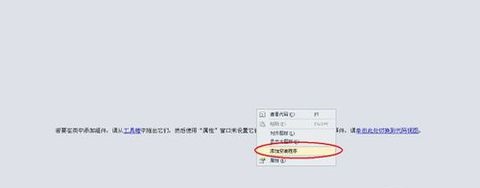
3、然后切换到设计视图,右键点击下图中圈选的“添加安装程序”
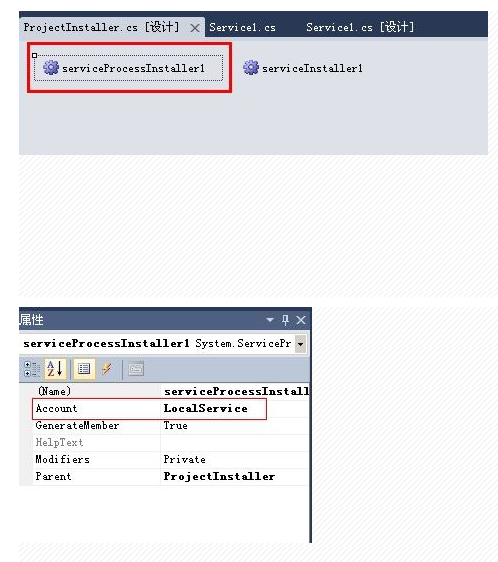
4、选中下图第一个控件,点击F4,右边切换到属性视图;更改属性视图中的Account属性为LocalService(本地服务)
5、
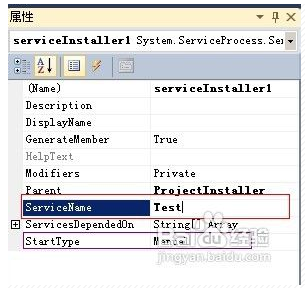
选中上面第二个控件,点击F4,右边切换到属性视图。更改ServiceName为你自己喜欢的服务名称,记住不要和系统的冲突了哦~,亲!StartType默认为手动,你可以更改为自动
(Automatic)或禁用(Disabled)
6、编译项目,然后win+R输入cmd进入命令窗口。去对应.net版本下的目录中找到InstallUtil.exe,我项目采用的是 .net 2.0,故路径为C:\WINDOWS\Microsoft.NET\Framework\v2.0.50727
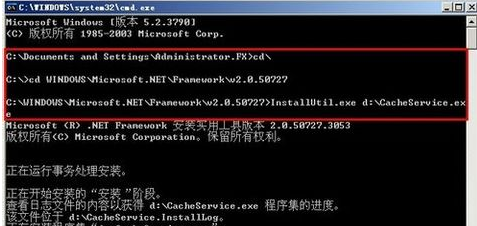
Cmd命令
installutil WindowsService_test.exe (安装Windows服务)
installutil /u WindowsService_test.exe (卸载Windows服务)
.Net 开发Windows Service的更多相关文章
- .NET开发Windows Service程序 - Topshelf
在实际项目开发过程中,会经常写一些类似定时检查,应用监控的应用.这类应用在windows平台通常都会写成window service程序. 在百度上搜索一下'c#开发windows service', ...
- 使用C#编程语言开发Windows Service服务
转载-https://www.cnblogs.com/yubao/p/8443455.html Create Windows Service project using Visual Studio C ...
- C# Windows service 开发笔录
本文将详细图解,开发Windows service的过程. 功能:数据库查询数据后,经过处理,每天定时发送邮件. 一.WinForm调试 1.新建Windows service项目 2.新建WinFo ...
- Python3 写Windows Service服务程序
用Python开发Windows Service,用Python来做这个事情必须要借助第三方模块pywin32,下载路径:https://pypi.org/project/pywin32/#files ...
- Windows Service的转换与部署
开发Windows Service,可能会碰到以下两种情况. 1. 直接开发一个Windows Service 网上有很多教程,可以参考这个: http://www.cnblogs.com/sorex ...
- Windows Service 开发,安装与调试
Visual Studio.net 2010 Windows Service 开发,安装与调试 本示例完成一个每隔一分钟向C:\log.txt文件写入一条记录为例,讲述一个Windows Servic ...
- 如何托管ASP.NET Core应用到Windows Service中
(此文章同时发表在本人微信公众号"dotNET开发经验谈",欢迎右边二维码来关注.) 题记:正在构思一个中间件的设计,考虑是否既可以使用最新的技术,也可以兼顾传统的部署模式.所以有 ...
- 使用Visual Studio 2015 Community 开发windows服务
昨天研究在.NET下开发Windows服务程序,期间遇到一些小问题,这里仅将自己的开发过程和需要注意的地方写下和广大网友分享…… 1.基础 Windows服务是指系统启动时能够自己运行的程序.W ...
- 使用Python写Windows Service服务程序
1.背景 如果你想用Python开发Windows程序,并让其开机启动等,就必须写成windows的服务程序Windows Service,用Python来做这个事情必须要借助第三方模块pywin32 ...
随机推荐
- 今天终于看了一下tanh函数的形式,双曲正切函数
tanh = sinh / cosh sinh = Hyperbolic sin cosh = Hyperbolic cos
- 模式识别hw2-------基于matconvnet,用CNN实现人脸图片性别识别
主要来源模式识别课程大作业,本文首先感谢当初的助教和一起完毕作业的队友 matconvnet在matlab下封装了CNN常见算法,网址http://www.vlfeat.org/matconvnet/ ...
- jstat命令的使用及VM Thread分析
http://www.javatang.com/archives/2017/10/20/12131956.html 前面提到了一个使用jstack的shell脚本,通过命令可以很快地定位到指定线程对应 ...
- mac 上python编译报错No module named MySQLdb
mac 上python编译报错No module named MySQLdb You installed python You did brew install mysql You did expor ...
- 2017.4.18 putty和fileZilla的使用
putty:用来连接环境. fileZila:用来传递文件. (1)连接环境 centOS 7 点击putty.exe,输入地址.用户名.密码进行连接.端口输入22.用账号和密码登录. 进入到目录下, ...
- AngularJS, Ember.js, Backbone这类新框架与 jQuery的重要区别在哪里?
jQuery主要是用来操作DOM的,如果单单说jQuery的话就是这样一个功能,它的插件也比较多,大家也都各自专注一个功能,可以说jQuery体系是跟着前端页面从静态到动态崛起的一个产物,他的作用就是 ...
- php正则表达式基本
一.正则表达式的组成 1.分隔符,可以是除了字母,数字,反斜线及空白以外的任何字符,比如/,!,#,%,|,~等;通常有/,!,~ 2.表达式:由一些特殊字符和非特殊字符组成. 3.修饰符:用于开启或 ...
- react-native 项目实战 -- 新闻客户端(6) -- 完善ListView头部视图
1.因为需要定时器,所以我们要cd到当前项目根目录下安装这个类库: $ npm i react-timer-mixin --save 2.Component/ScrollImage.js /** * ...
- 根域名服务器 根服务器一般指根域名服务器 (DNS)
Why There Are Only 13 DNS Root Name Servers -------------------------------------------------------- ...
- android tooggle button
1 http://stackoverflow.com/questions/9938315/toggle-button-in-iphone-style 2 http://blog.csdn.net/bi ...