
HUE配置文件hue.ini 的hbase模块详解(图文详解)(分HA集群和非HA集群)
不多说,直接上干货!
我的集群机器情况是 bigdatamaster(192.168.80.10)、bigdataslave1(192.168.80.11)和bigdataslave2(192.168.80.12)
然后,安装目录是在/home/hadoop/app下。
官方建议在master机器上安装Hue,我这里也不例外。安装在bigdatamaster机器上。
Hue版本:hue-3.9.0-cdh5.5.4
 需要编译才能使用(联网)

 说给大家的话:大家电脑的配置好的话,一定要安装cloudera manager。毕竟是一家人的。
同时,我也亲身经历过,会有部分组件版本出现问题安装起来要个大半天时间去排除,做好心里准备。废话不多说,因为我目前读研,自己笔记本电脑最大8G,只能玩手动来练手。
纯粹是为了给身边没高配且条件有限的学生党看的! 但我已经在实验室机器群里搭建好cloudera manager 以及 ambari都有。
大数据领域两大最主流集群管理工具Ambari和Cloudera Manger
Cloudera安装搭建部署大数据集群(图文分五大步详解)(博主强烈推荐)
Ambari安装搭建部署大数据集群(图文分五大步详解)(博主强烈推荐)
https://www.cloudera.com/documentation/enterprise/latest/topics/cdh_ig_hue_config.html#concept_ezg_b2s_hl
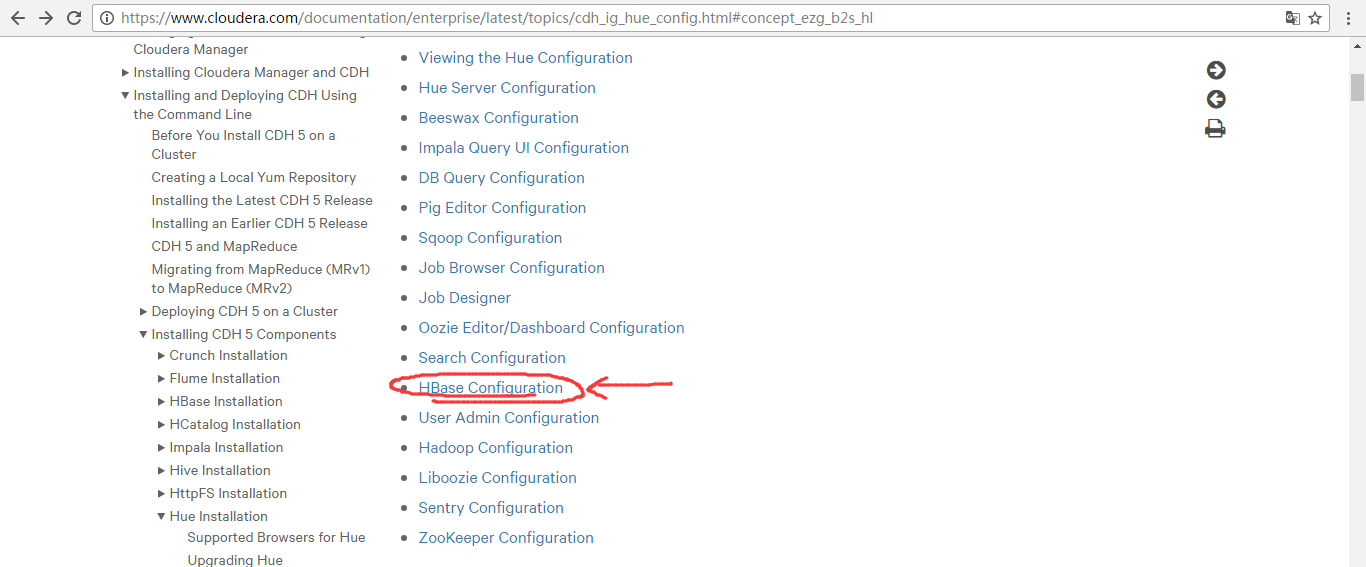
在hbase模块里,一定要重视这三步:

首先,来看看官网的参考步骤
一、以下是默认的配置文件
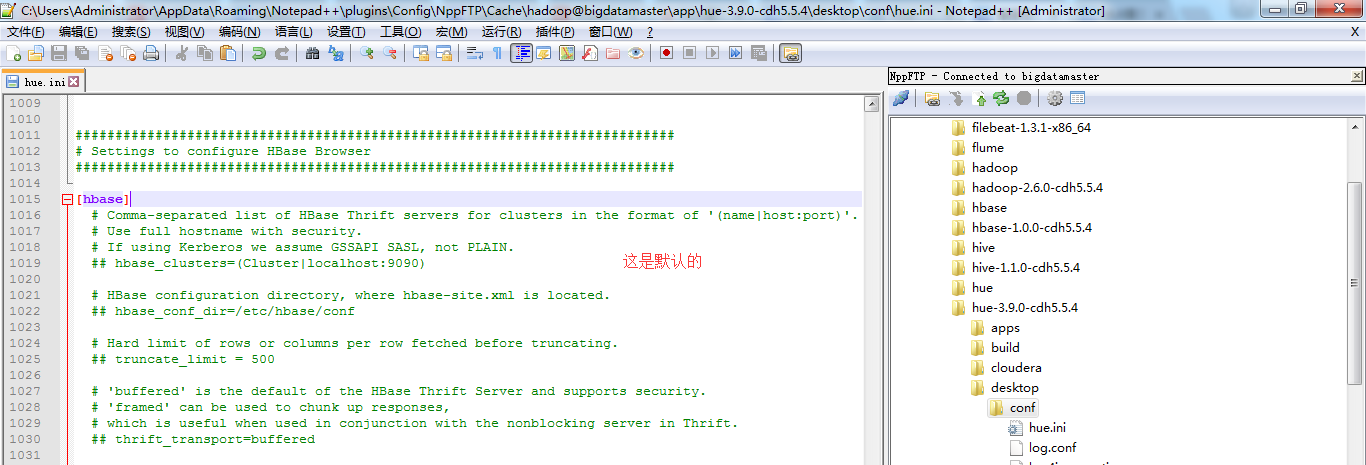
###########################################################################

# Settings to configure HBase Browser

###########################################################################

[hbase]

  # Comma-separated list of HBase Thrift servers for clusters in the format of '(name|host:port)'.

  # Use full hostname with security.

  # If using Kerberos we assume GSSAPI SASL, not PLAIN.

  ## hbase_clusters=(Cluster|localhost:)

  # HBase configuration directory, where hbase-site.xml is located.

  ## hbase_conf_dir=/etc/hbase/conf

  # Hard limit of rows or columns per row fetched before truncating.

  ## truncate_limit =

  # 'buffered' is the default of the HBase Thrift Server and supports security.

  # 'framed' can be used to chunk up responses,

  # which is useful when used in conjunction with the nonblocking server in Thrift.

  ## thrift_transport=buffered
二、以下是跟我机器集群匹配的配置文件(非HA集群下怎么配置Hue的hbase模块)
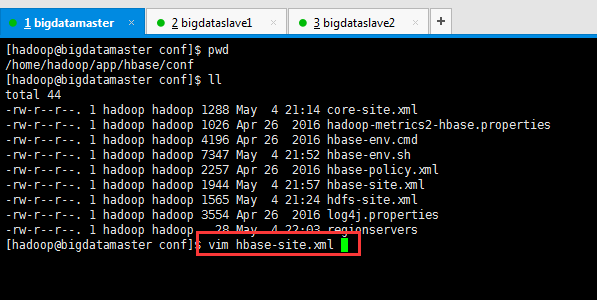
HBase配置文件修改,需要在hbase-site.xml中增加如下东西。
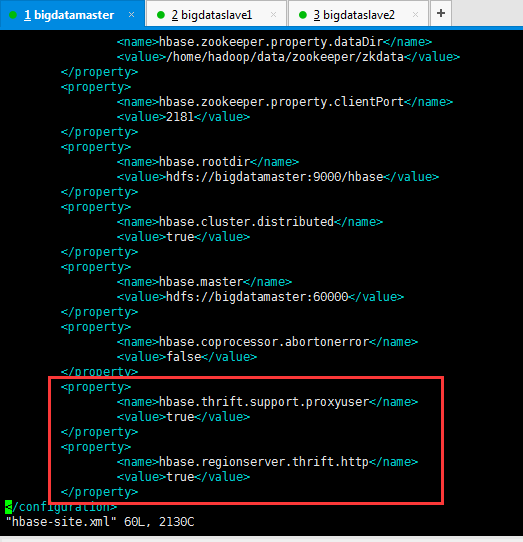
        <property>

                <name>hbase.thrift.support.proxyuser</name>

                <value>true</value>

        </property>

        <property>

                <name>hbase.regionserver.thrift.http</name>

                <value>true</value>

        </property>
这里bigdatamaster、bigdataslave1和bigdataslave2都操作。
同时,前提是这些机器,都要已经安装过hbase-thrift。
yum install hbase-thrift -y

这里bigdatamaster、bigdataslave1和bigdataslave2都操作。(有些资料说,是这样安装。其实,现在HBase里都可以自带集成好了,没必要这么安装了)
大家,学东西时,一定不要似懂非懂,明白个之所以然。
为什么要添加这些东西,因为HUE要访问HBase的thrift服务。
参见:http://gethue.com/hbase-browsing-with-doas-impersonation-and-kerberos/
这边的 (Cluster|bigdatamaster:9090) 里面的 Cluster并不是你的HDFS集群名字,只是一个显示在HUE界面上的文字,所以可以随便写,我这边保留 Cluster字样,后面的bigdatamaster:9090是thrift的访问地址,如果有多个用逗号分隔。如下:
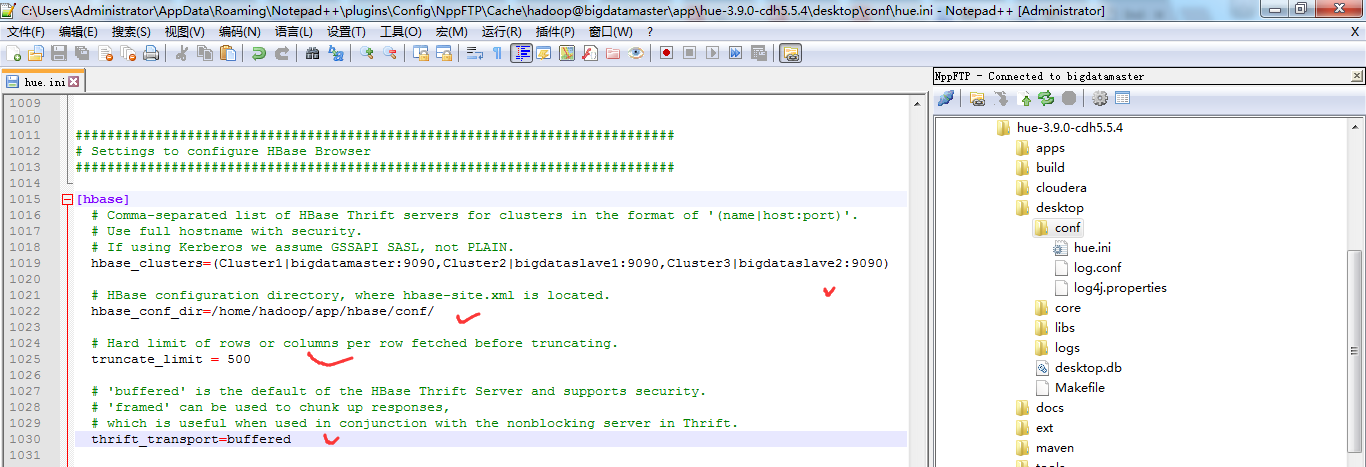
###########################################################################

# Settings to configure HBase Browser

###########################################################################

[hbase]

  # Comma-separated list of HBase Thrift servers for clusters in the format of '(name|host:port)'.

  # Use full hostname with security.

  # If using Kerberos we assume GSSAPI SASL, not PLAIN.

  hbase_clusters=(Cluster1|bigdatamaster:9090,Cluster2|bigdataslave1:9090,Cluster3|bigdataslave2:9090)

  # HBase configuration directory, where hbase-site.xml is located.

  hbase_conf_dir=/home/hadoop/app/hbase/conf/

  # Hard limit of rows or columns per row fetched before truncating.

  truncate_limit = 500

  # 'buffered' is the default of the HBase Thrift Server and supports security.

  # 'framed' can be used to chunk up responses,

  # which is useful when used in conjunction with the nonblocking server in Thrift.

  thrift_transport=buffered
或者
当然咯,大家也可以仅仅只在bigdatamaster上安装hbase-thrift,然后在Hue里配置时,如下即可。
HBase配置文件修改,需要在hbase-site.xml中增加如下东西。
        <property>

                <name>hbase.thrift.support.proxyuser</name>

                <value>true</value>

        </property>

        <property>

                <name>hbase.regionserver.thrift.http</name>

                <value>true</value>

        </property>
这里只在bigdatamaster操作。
同时,前提是只要这台机器,已经安装过hbase-thrift。
yum install hbase-thrift -y

这里仅仅bigdatamaster操作。(有些资料说,是这样安装。其实,现在HBase里都可以自带集成好了,没必要这么安装了)
修改【HUE_HOME/desktop/conf/】目录下的hue.ini文件中[hbase]中的配置
HUE 配置文件设置,找到hbase标签,配置如下
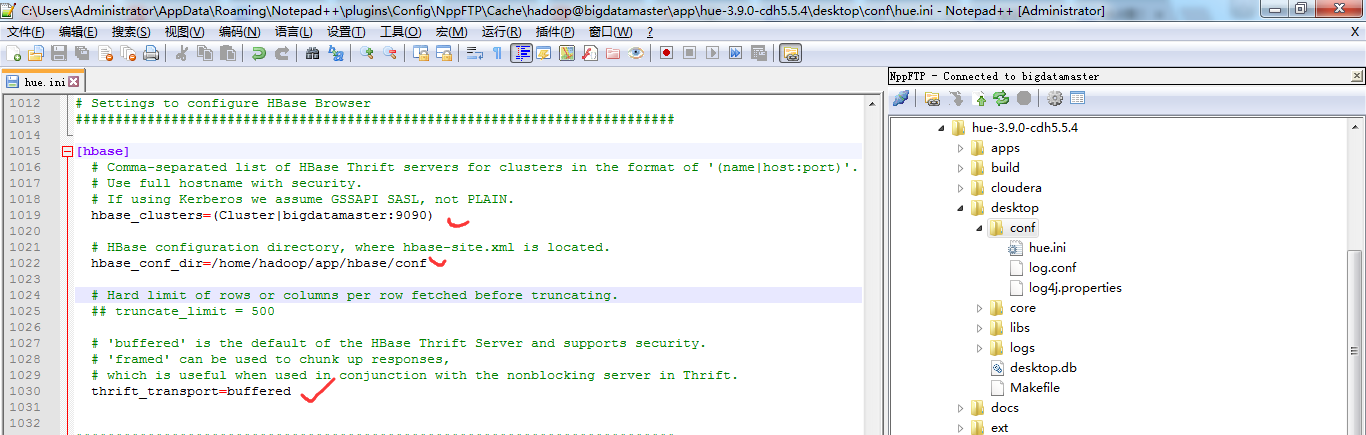
###########################################################################

# Settings to configure HBase Browser

###########################################################################

[hbase]

  # Comma-separated list of HBase Thrift servers for clusters in the format of '(name|host:port)'.

  # Use full hostname with security.

  # If using Kerberos we assume GSSAPI SASL, not PLAIN.

  hbase_clusters=(Cluster|bigdatamaster:)

  # HBase configuration directory, where hbase-site.xml is located.

  hbase_conf_dir=/home/hadoop/app/hbase/conf

  # Hard limit of rows or columns per row fetched before truncating.

  ## truncate_limit =

  # 'buffered' is the default of the HBase Thrift Server and supports security.

  # 'framed' can be used to chunk up responses,

  # which is useful when used in conjunction with the nonblocking server in Thrift.

  thrift_transport=buffered
注意:hbase_clusters参数值中的Cluster只是在Hue的界面中显示的集群名称而已,可以修改成自己需要的。
也就是说,一般保持默认Cluster。即我这里是,Cluster包括bigdatamaster、bigdataslave1和bigdataslave2。
而,我的hbase是安装在bigdatamaster、bigdataslave1和bigdataslave2上。
需要启动HBase的进程服务

[hadoop@bigdatamaster hbase]$ pwd

/home/hadoop/app/hbase

[hadoop@bigdatamaster hbase]$ bin/start-hbase.sh

starting master, logging to /home/hadoop/app/hbase/logs/hbase-hadoop-master-bigdatamaster.out

bigdataslave1: starting regionserver, logging to /home/hadoop/app/hbase/bin/../logs/hbase-hadoop-regionserver-bigdataslave1.out

bigdataslave2: starting regionserver, logging to /home/hadoop/app/hbase/bin/../logs/hbase-hadoop-regionserver-bigdataslave2.out

[hadoop@bigdatamaster hbase]$
只需bigdatamaster操作就好。
因为,是需要在hbase集群已经启动的基础上,再启动thrift,默认端口为9090。
还需要启动HBase的thrift服务
$HBASE_HOME/bin/hbase-daemon.sh start thrift

[hadoop@bigdatamaster hbase]$ pwd

/home/hadoop/app/hbase

[hadoop@bigdatamaster hbase]$ $HBASE_HOME/bin/hbase-daemon.sh start thrift

starting thrift, logging to /home/hadoop/app/hbase/logs/hbase-hadoop-thrift-bigdatamaster.out

[hadoop@bigdatamaster hbase]$
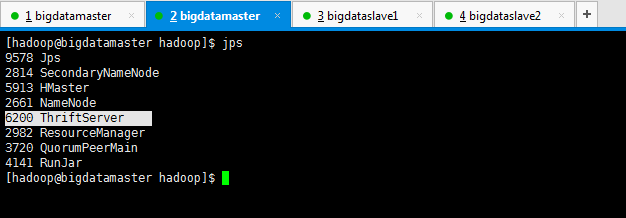
这个操作,bigdatamaster、bigdataslave1和bigdataslave2都操作。(如果只安装在bigdatamaster的话,就只需要启动这台即可。)
对于上述做个总结
一般在Hue里配置hbase模块,无论是我这篇博客,还是网上其他相当的博客都是只配置到此为止,可以把HBase配置成功了。
但是呢,我这里,带大家进一步从官网深入来配置。
https://www.cloudera.com/documentation/enterprise/latest/topics/cdh_ig_hue_config.html#concept_ezg_b2s_hl
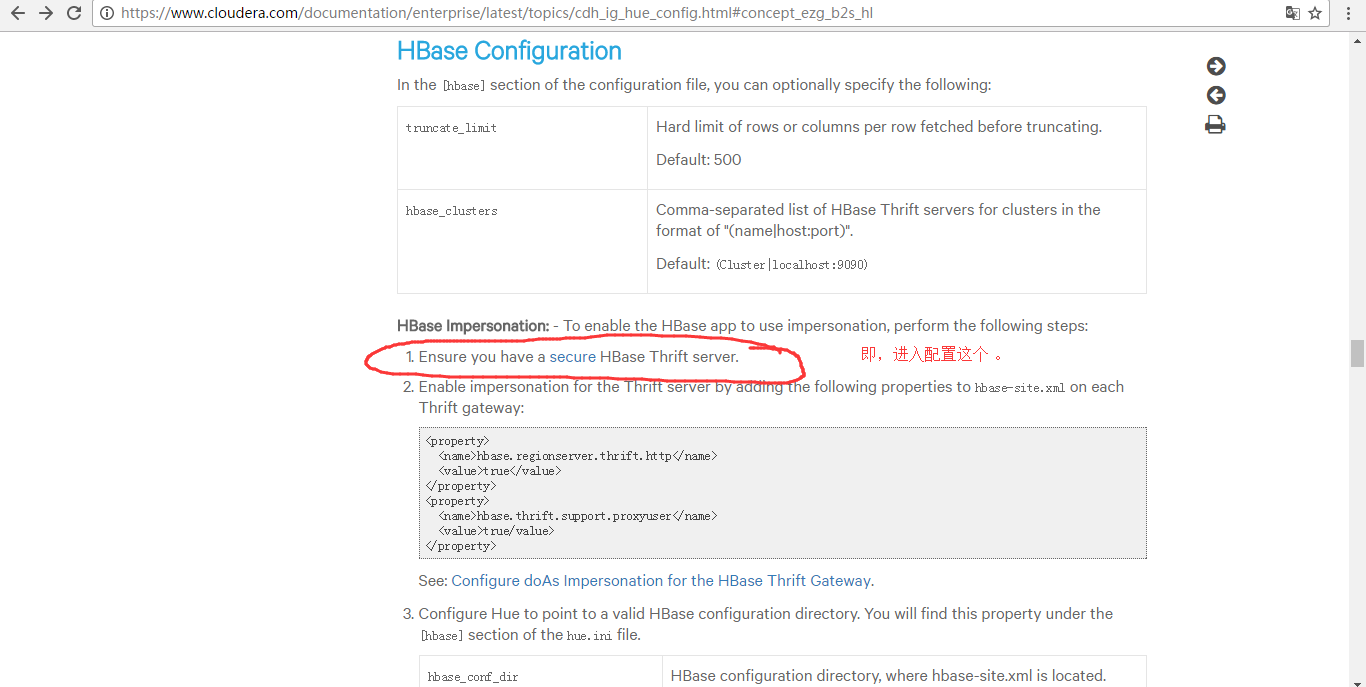
配置到hbase-site.xml里
<property>

    <name>hbase.security.authentication</name>

    <value>kerberos</value>

</property>

<property>

    <name>hbase.regionserver.kerberos.principal</name>

    <value>hbase/_HOST@HADOOP.COM</value>

</property>

<property>

    <name>hbase.regionserver.keytab.file</name>

    <value>/home/hadoop/app/hbase/conf/hbase.keytab</value>

</property>

<property>

    <name>hbase.master.kerberos.principal</name>

    <value>hbase/_HOST@HADOOP.COM</value>

</property>

<property>

    <name>hbase.master.keytab.file</name>

    <value>/home/hadoop/app/hbase/conf/hbase.keytab</value>

</property>
这一步,是有点难度,要开启kerberos。我这里暂时还没搞定这点。
http://www.tuicool.com/articles/YVbmIzm
因为,要牵扯到,Kerberos server的安装等,
https://yq.aliyun.com/articles/25542
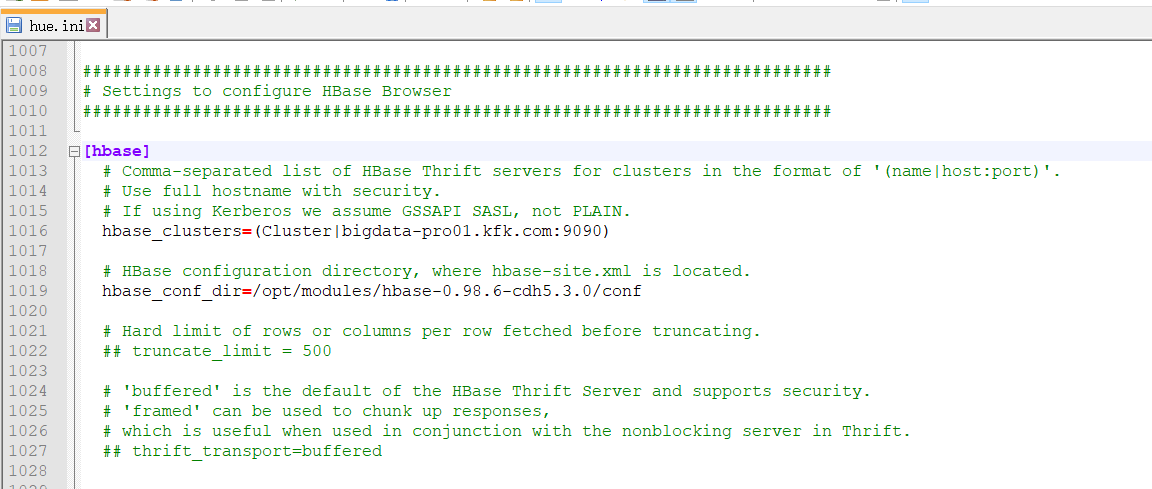
三、以下是跟我机器集群匹配的配置文件(HA集群下怎么配置Hue的hbase模块)
跟非HA配置是一样的。
###########################################################################

# Settings to configure HBase Browser

###########################################################################

[hbase]

  # Comma-separated list of HBase Thrift servers for clusters in the format of '(name|host:port)'.

  # Use full hostname with security.

  # If using Kerberos we assume GSSAPI SASL, not PLAIN.

  hbase_clusters=(Cluster|bigdata-pro01.kfk.com:)

  # HBase configuration directory, where hbase-site.xml is located.

  hbase_conf_dir=/opt/modules/hbase-0.98.-cdh5.3.0/conf

  # Hard limit of rows or columns per row fetched before truncating.

  ## truncate_limit =

  # 'buffered' is the default of the HBase Thrift Server and supports security.

  # 'framed' can be used to chunk up responses,

  # which is useful when used in conjunction with the nonblocking server in Thrift.

  ## thrift_transport=buffered
然后,停掉hbase进程,再开启hbase进程。
因为,我的HBase是HA集群。
所以先在主节点1上,启动hbase

然后,再在主节点2上启动hbase
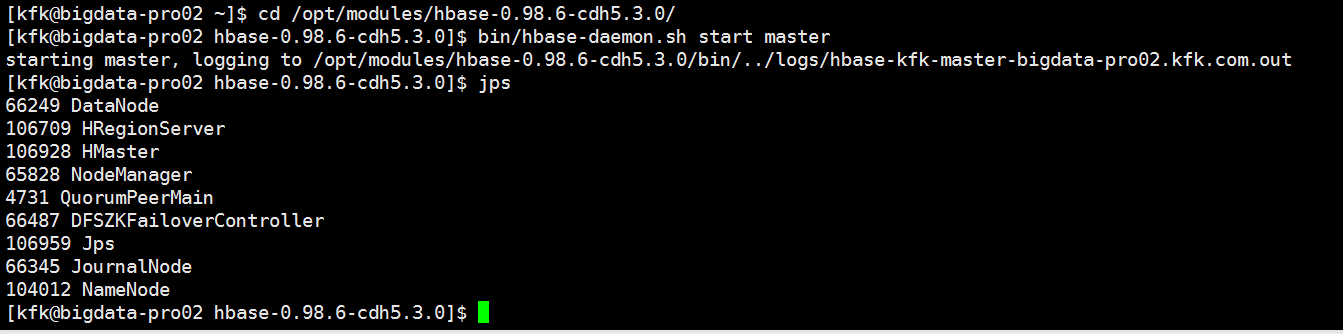
具体,启动,见
Apache版本的Hadoop HA集群启动详细步骤【包括Zookeeper、HDFS HA、YARN HA、HBase HA】(图文详解)
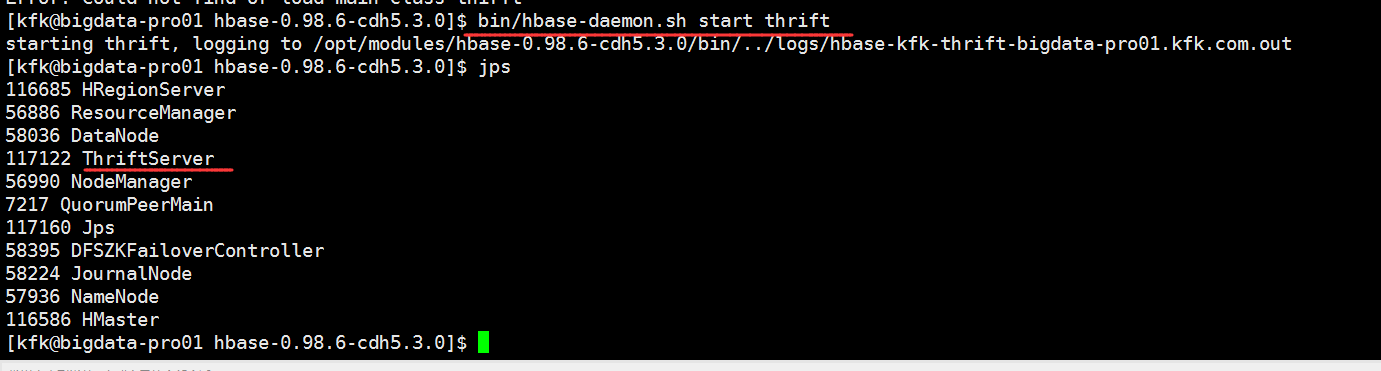
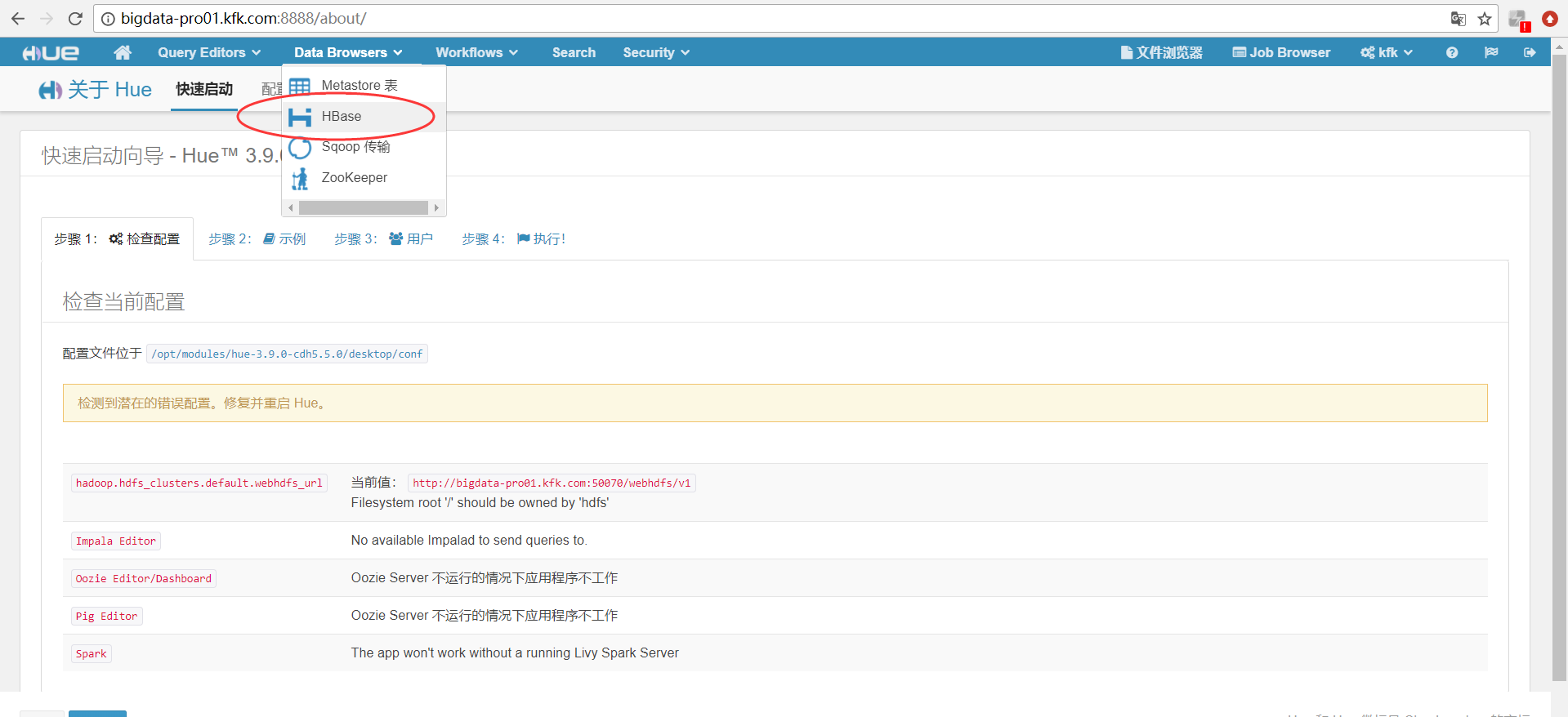
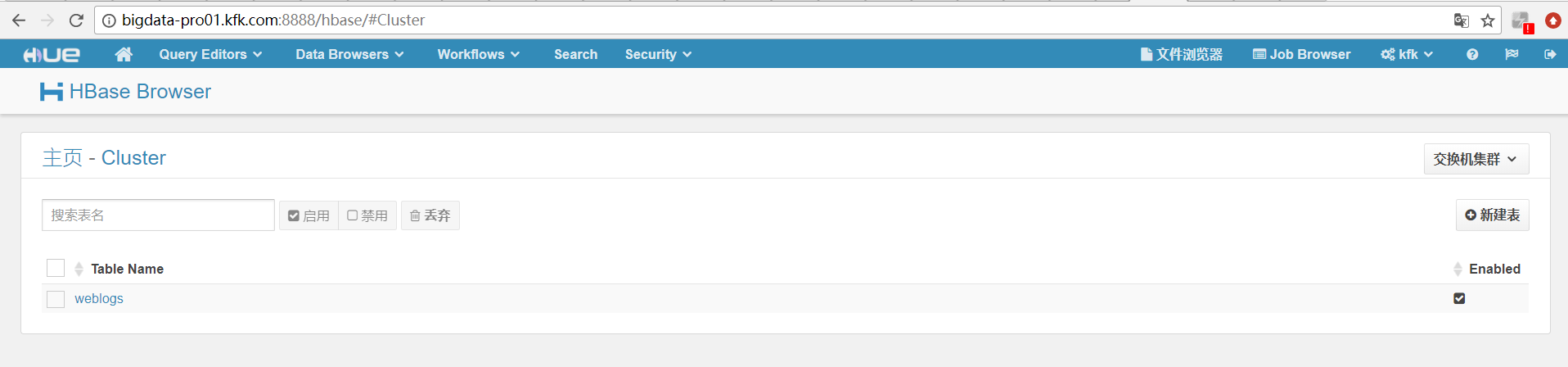
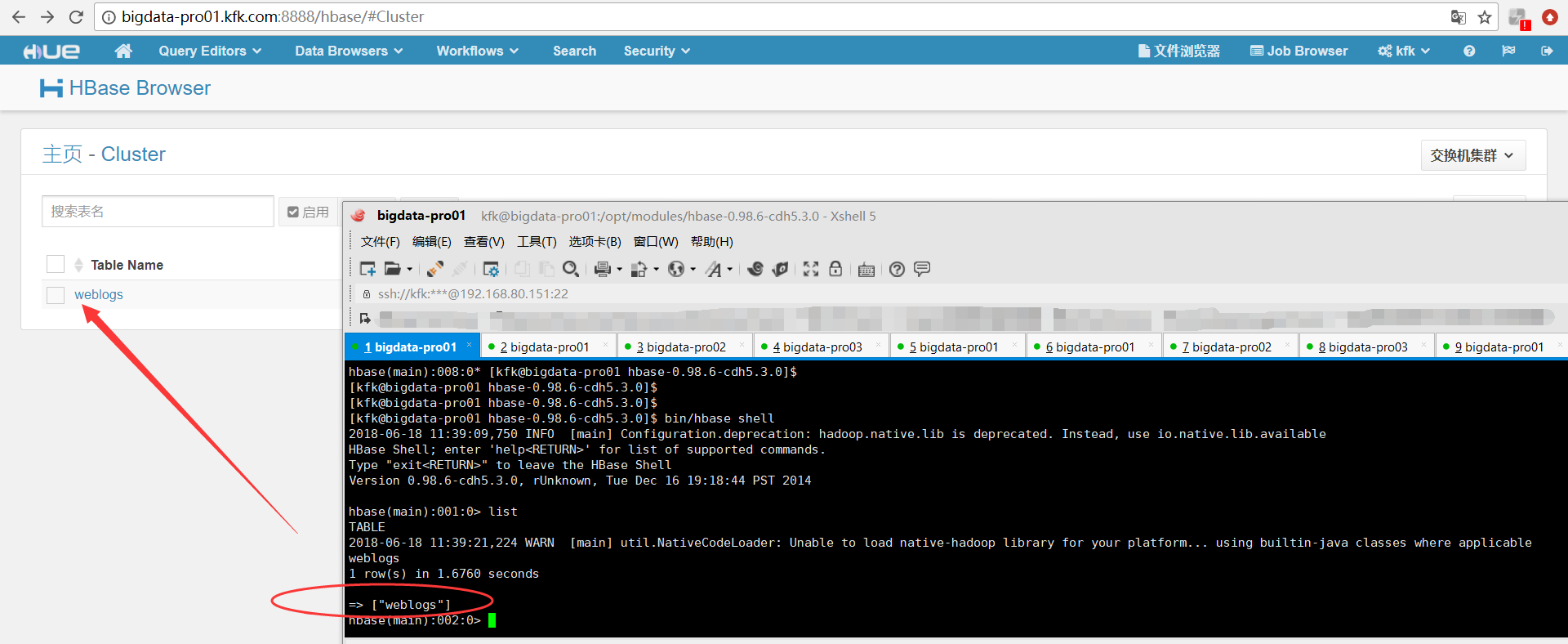
再开启hbase的thrift服务
同时,大家可以关注我的个人博客:
http://www.cnblogs.com/zlslch/ 和 http://www.cnblogs.com/lchzls/ http://www.cnblogs.com/sunnyDream/
详情请见:http://www.cnblogs.com/zlslch/p/7473861.html
人生苦短,我愿分享。本公众号将秉持活到老学到老学习无休止的交流分享开源精神,汇聚于互联网和个人学习工作的精华干货知识,一切来于互联网,反馈回互联网。
目前研究领域:大数据、机器学习、深度学习、人工智能、数据挖掘、数据分析。 语言涉及:Java、Scala、Python、Shell、Linux等 。同时还涉及平常所使用的手机、电脑和互联网上的使用技巧、问题和实用软件。 只要你一直关注和呆在群里,每天必须有收获
对应本平台的讨论和答疑QQ群:大数据和人工智能躺过的坑(总群)(161156071)



HUE配置文件hue.ini 的hbase模块详解(图文详解)(分HA集群和非HA集群)的更多相关文章
- HUE配置文件hue.ini 的hdfs_clusters模块详解(图文详解)(分HA集群和非HA集群)
不多说,直接上干货! 我的集群机器情况是 bigdatamaster(192.168.80.10).bigdataslave1(192.168.80.11)和bigdataslave2(192.168 ...
- HUE配置文件hue.ini 的yarn_clusters模块详解(图文详解)(分HA集群和非HA集群)
不多说,直接上干货! 我的集群机器情况是 bigdatamaster(192.168.80.10).bigdataslave1(192.168.80.11)和bigdataslave2(192.168 ...
- HUE配置文件hue.ini 的Spark模块详解(图文详解)(分HA集群和HA集群)
不多说,直接上干货! 我的集群机器情况是 bigdatamaster(192.168.80.10).bigdataslave1(192.168.80.11)和bigdataslave2(192.168 ...
- HUE配置文件hue.ini 的impala模块详解(图文详解)(分HA集群)
不多说,直接上干货! 我的集群机器情况是 bigdatamaster(192.168.80.10).bigdataslave1(192.168.80.11)和bigdataslave2(192.168 ...
- HUE配置文件hue.ini 的filebrowser模块详解(图文详解)(分HA集群和非HA集群)
不多说,直接上干货! 我的集群机器情况是 bigdatamaster(192.168.80.10).bigdataslave1(192.168.80.11)和bigdataslave2(192.168 ...
- HUE配置文件hue.ini 的hive和beeswax模块详解(图文详解)(分HA集群和非HA集群)
不多说,直接上干货! 我的集群机器情况是 bigdatamaster(192.168.80.10).bigdataslave1(192.168.80.11)和bigdataslave2(192.168 ...
- HUE配置文件hue.ini 的database模块详解(包含qlite、mysql、 psql、和oracle)(图文详解)(分HA集群和非HA集群)
不多说,直接上干货! Hue配置文件里,提及到,提供有postgresql_psycopg2, mysql, sqlite3 or oracle. 注意:Hue本身用到的是sqlite3. 在哪里呢, ...
- HUE配置文件hue.ini 的zookeeper模块详解(图文详解)(分HA集群)
不多说,直接上干货! 我的集群机器情况是 bigdatamaster(192.168.80.10).bigdataslave1(192.168.80.11)和bigdataslave2(192.168 ...
- HUE配置文件hue.ini 的pig模块详解(图文详解)(分HA集群和非HA集群)
不多说,直接上干货! 一.默认的pig配置文件 ########################################################################### ...
随机推荐
- nodejs中如何使用mysql数据库[node-mysql翻译]
nodejs中如何使用mysql数据库 db-mysql因为node-waf: not found已经不能使用,可以使用mysql代替. 本文主要是[node-mysql]: https://www. ...
- C语言中线程和进程的区别
线程是指进程内的一个执行单元也是进程内的可调度的实体,与进程的区别 1) 调度:线程作为调度和分配的基本单位,进程作为拥有资源的基本单位 2) 并发性:不仅进程之间可以并发执行,同一个进程之间的多个线 ...
- 快速学会在JSP中使用EL表达式
在没有学会EL表达式之前,我们想在JSP文件中获取servlet或者其他JSP页面传来的值,通常都是在JSP页面中编写java代码来实现.而在jsp页面编写Java 代码,这种做法时不规范的,将会产生 ...
- hdu 5014 异或序列
http://acm.hdu.edu.cn/showproblem.php?pid=5014 从最大的一个数开始找能配对使他们的异或值最大的一个数 最后输出 #include <cstdio&g ...
- spring mvc静态资源请求和<mvc:annotation-driven>
自己看了官方文档,也到网上查了下,目前理解如下: <mvc:annotation-driven/>相当于注册了DefaultAnnotationHandlerMapping和Annotat ...
- Android SQLiteOpenHelper Sqlite数据库升级onUpgrade
Android Sqlite数据库升级,在Android APP开发之中,非常常见: 在确定原来的数据库版本号之后,在原来数据库版本号+1,就会执行onUpgrade方法,进行数据库升级操作: 在on ...
- C#写文本文件,如何换行(添加换行符)
把文本写到文件中,如果是几段文字拼合起来输出到文件中,通常每段非结尾文字后需要添加换行符,不然几段文字都变成一段. 在 C# 中,文本换行有两种方法,一种在需要换行的文本后面添加换行符 \r\n 即可 ...
- SQL 取两日期的记录
SELECT TOP 1000 [ID] ,[SourcePageID] ,[PlatformType] ,[CreateTime] FROM [home_sendor ...
- BitAdminCore框架更新日志20180516
前言 经过多次的重构,目前BitAdminCore框架已经基本上稳定,近期对代码进行多次重构,让代码保持更整洁. 为促进框架的推广,更好的实现价值分享,即日起推出更新日志系列,每次更新内容进行描述. ...
- 什么是fortran语言之fortran语言入门
Fortran源自于“公式翻译”(英语:FormulaTranslation)的缩写,是一种编程语言.它是世界上最早出现的计算机高级程序设计语言,广泛应用于科学和工程计算领域.FORTRAN语言以其特 ...