
HUE配置文件hue.ini 的yarn_clusters模块详解(图文详解)(分HA集群和非HA集群)
不多说,直接上干货!
我的集群机器情况是 bigdatamaster(192.168.80.10)、bigdataslave1(192.168.80.11)和bigdataslave2(192.168.80.12)
然后,安装目录是在/home/hadoop/app下。
官方建议在master机器上安装Hue,我这里也不例外。安装在bigdatamaster机器上。
Hue版本:hue-3.9.0-cdh5.5.4
 需要编译才能使用(联网)

 说给大家的话:大家电脑的配置好的话,一定要安装cloudera manager。毕竟是一家人的。
同时,我也亲身经历过,会有部分组件版本出现问题安装起来要个大半天时间去排除,做好心里准备。废话不多说,因为我目前读研,自己笔记本电脑最大8G,只能玩手动来练手。
纯粹是为了给身边没高配且条件有限的学生党看的! 但我已经在实验室机器群里搭建好cloudera manager 以及 ambari都有。
大数据领域两大最主流集群管理工具Ambari和Cloudera Manger
Cloudera安装搭建部署大数据集群(图文分五大步详解)(博主强烈推荐)
Ambari安装搭建部署大数据集群(图文分五大步详解)(博主强烈推荐)
首先,这是官网提供的参考步骤
http://archive.cloudera.com/cdh5/cdh/5/hue-3.9.0-cdh5.5.0/manual.html

一、以下是默认的配置文件
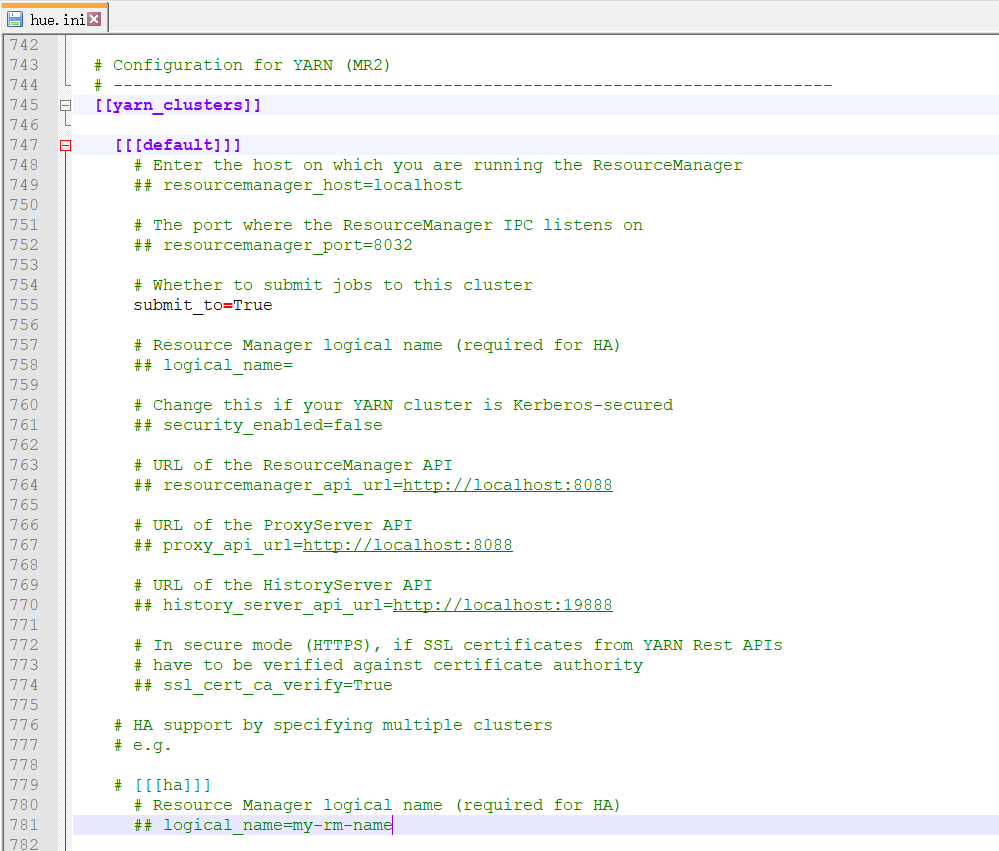
 # Configuration for YARN (MR2)

  # ------------------------------------------------------------------------

  [[yarn_clusters]]

    [[[default]]]

      # Enter the host on which you are running the ResourceManager

      ## resourcemanager_host=localhost

      # The port where the ResourceManager IPC listens on

      ## resourcemanager_port=

      # Whether to submit jobs to this cluster

      submit_to=True

      # Resource Manager logical name (required for HA)

      ## logical_name=

      # Change this if your YARN cluster is Kerberos-secured

      ## security_enabled=false

      # URL of the ResourceManager API

      ## resourcemanager_api_url=http://localhost:8088

      # URL of the ProxyServer API

      ## proxy_api_url=http://localhost:8088

      # URL of the HistoryServer API

      ## history_server_api_url=http://localhost:19888

      # In secure mode (HTTPS), if SSL certificates from YARN Rest APIs

      # have to be verified against certificate authority

      ## ssl_cert_ca_verify=True

    # HA support by specifying multiple clusters

    # e.g.

    # [[[ha]]]

      # Resource Manager logical name (required for HA)

      ## logical_name=my-rm-name
二、以下是跟我机器集群匹配的配置文件(非HA集群下怎么配置Hue的yarn_clusters模块)


最终我的非HA配置信息如下
  # Configuration for YARN (MR2)

  # ------------------------------------------------------------------------

  [[yarn_clusters]]

    [[[default]]]

      # Enter the host on which you are running the ResourceManager

      resourcemanager_host=bigdatamaster

      # The port where the ResourceManager IPC listens on

      resourcemanager_port=

      # Whether to submit jobs to this cluster

      submit_to=True

      # Resource Manager logical name (required for HA)

      ## logical_name=

      # Change this if your YARN cluster is Kerberos-secured

      ## security_enabled=false

      # URL of the ResourceManager API

      resourcemanager_api_url=http://bigdatamaster:8088

      # URL of the ProxyServer API

      proxy_api_url=http://bigdatamaster:8088

      # URL of the HistoryServer API

      history_server_api_url=http://bigdatamaster:19888

      # In secure mode (HTTPS), if SSL certificates from YARN Rest APIs

      # have to be verified against certificate authority

      ## ssl_cert_ca_verify=True

    # HA support by specifying multiple clusters

    # e.g.

    # [[[ha]]]

      # Resource Manager logical name (required for HA)

      ## logical_name=my-rm-name
三、以下是跟我机器集群匹配的配置文件(HA集群下怎么配置Hue的yarn_clusters模块)
hadoop-2.6.0.tar.gz的集群搭建(5节点)
这里需要说明一下,[[[default]]] 和 [[ha]]中各配置一个RM。

logical_name名字就是你集群中yarn-site.xml中配置的
<property>

        <name>yarn.resourcemanager.ha.rm-ids</name>

        <value>rm1,rm2</value>

</property>
URL of the ResourceManager API 这里配置资源管理的地址和端口,对应yarn-site.xml中的
<property>

         <name>yarn.resourcemanager.webapp.address.rm1</name>

         <value>djt11:</value>

</property>

<property>

         <name>yarn.resourcemanager.webapp.address.rm2</name>

         <value>djt12:</value>

</property>
那么就要如下来配置
# URL of the ResourceManager API

resourcemanager_api_url=djt11:8088,djt12:8088
URL of the HistoryServer API 这里配置历史记录资源管理的地址和端口,对应mapred-site.xml中的
<property>

              <name>mapreduce.jobhistory.webapp.address</name>

              <value>djt13:</value>

</property>
所以,我的HA最终如下配置
# Configuration for YARN (MR2)

# ------------------------------------------------------------------------

[[yarn_clusters]]

[[[default]]]

# Enter the host on which you are running the ResourceManager

resourcemanager_host=cluster1

# The port where the ResourceManager IPC listens on

resourcemanager_port=

# Whether to submit jobs to this cluster

submit_to=True

# Resource Manager logical name (required for HA)

logical_name=rm1

# Change this if your YARN cluster is Kerberos-secured

## security_enabled=false

# URL of the ResourceManager API

resourcemanager_api_url=http://djt11:8088

# URL of the ProxyServer API

proxy_api_url=http://djt13:8088

# URL of the HistoryServer API

history_server_api_url=http://bigdatamaster:19888

# In secure mode (HTTPS), if SSL certificates from YARN Rest APIs

# have to be verified against certificate authority

## ssl_cert_ca_verify=True

# HA support by specifying multiple clusters

# e.g.

# [[[ha]]]

# Resource Manager logical name (required for HA)

logical_name=rm2

resourcemanager_api_url=http://djt12:23188

history_server_api_url=http://djt13:19888

submit_to=True
成功!
或者,HA集群也可以如下来做
我们首先查看yarn-site.xml

<configuration>

<!-- Site specific YARN configuration properties -->

    <property>

        <name>yarn.resourcemanager.cluster-id</name>

        <value>rs</value>

    </property>

    <property>

        <name>yarn.resourcemanager.ha.rm-ids</name>

        <value>rm1,rm2</value>

    </property>

    <property>

        <name>yarn.resourcemanager.hostname.rm1</name>

        <value>bigdata-pro01.kfk.com</value>

    </property>

    <property>

        <name>yarn.resourcemanager.hostname.rm2</name>

        <value>bigdata-pro02.kfk.com</value>

    </property>

    <property>

        <name>yarn.resourcemanager.zk.state-store.address</name>

        <value>bigdata-pro01.kfk.com:,bigdata-pro02.kfk.com:,bigdata-pro03.kfk.com:</value>

    </property>

    <property>

        <name>yarn.resourcemanager.zk-address</name>

        <value>bigdata-pro01.kfk.com:,bigdata-pro02.kfk.com:,bigdata-pro03.kfk.com:</value>

    </property>

    <property>

        <name>yarn.resourcemanager.recovery.enabled</name>

        <value>true</value>

    </property>

    <property>

        <name>yarn.resourcemanager.store.class</name>

        <value>org.apache.hadoop.yarn.server.resourcemanager.recovery.ZKRMStateStore</value>

    </property>

    <property>

        <name>yarn.resourcemanager.ha.enabled</name>

        <value>true</value>

    </property>

    <property>

        <name>yarn.nodemanager.aux-services</name>

        <value>mapreduce_shuffle</value>

    </property>

    <property>

        <name>yarn.nodemanager.aux-services.mapreduce_shuffle.class</name>

        <value>org.apache.hadoop.mapred.ShuffleHandler</value>

    </property>

</configuration>
以上,我的yarn-site.xml配置文件。
然后,修改配置hue.ini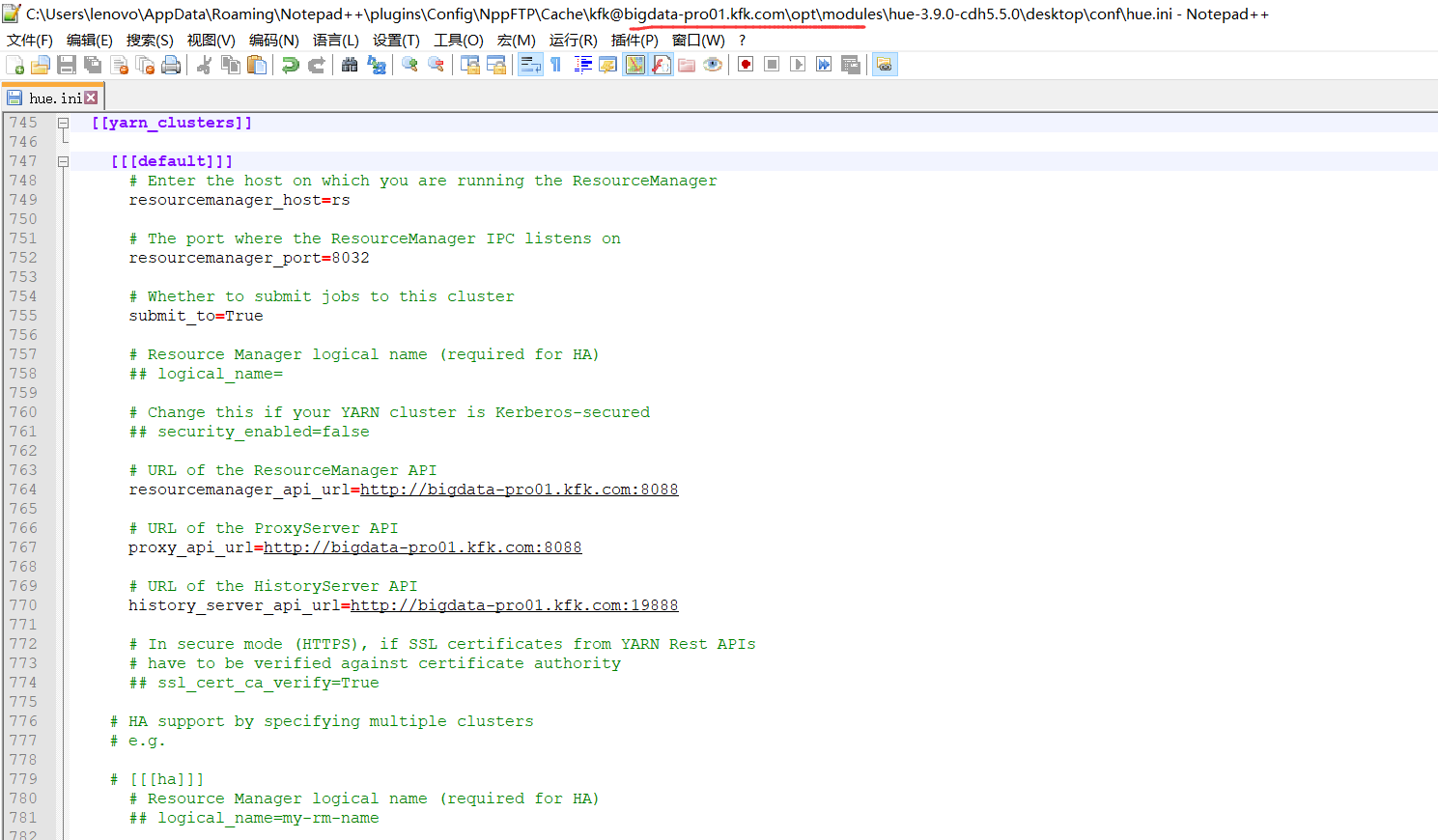
# Configuration for YARN (MR2)

  # ------------------------------------------------------------------------

  [[yarn_clusters]]

    [[[default]]]

      # Enter the host on which you are running the ResourceManager

      resourcemanager_host=rs

      # The port where the ResourceManager IPC listens on

      resourcemanager_port=

      # Whether to submit jobs to this cluster

      submit_to=True

      # Resource Manager logical name (required for HA)

      ## logical_name=

      # Change this if your YARN cluster is Kerberos-secured

      ## security_enabled=false

      # URL of the ResourceManager API

      resourcemanager_api_url=http://bigdata-pro01.kfk.com:8088

      # URL of the ProxyServer API

      proxy_api_url=http://bigdata-pro01.kfk.com:8088

      # URL of the HistoryServer API

      history_server_api_url=http://bigdata-pro01.kfk.com:19888

      # In secure mode (HTTPS), if SSL certificates from YARN Rest APIs

      # have to be verified against certificate authority

      ## ssl_cert_ca_verify=True

    # HA support by specifying multiple clusters

    # e.g.

    # [[[ha]]]

      # Resource Manager logical name (required for HA)

      ## logical_name=my-rm-name
配置完成后,先停止yarn,再重新启动yarn,再重新启动hue。
参考
http://gethue.com/hadoop-tutorial-yarn-resource-manager-high-availability-ha-in-mr2/
http://www.cloudera.com/content/cloudera/en/documentation/core/latest/topics/cdh_ig_hue_config.html
http://cloudera.github.io/hue/docs-3.8.0/manual.html#_hadoop_configuration

同时,大家可以关注我的个人博客:
http://www.cnblogs.com/zlslch/ 和 http://www.cnblogs.com/lchzls/ http://www.cnblogs.com/sunnyDream/
详情请见:http://www.cnblogs.com/zlslch/p/7473861.html
人生苦短,我愿分享。本公众号将秉持活到老学到老学习无休止的交流分享开源精神,汇聚于互联网和个人学习工作的精华干货知识,一切来于互联网,反馈回互联网。
目前研究领域:大数据、机器学习、深度学习、人工智能、数据挖掘、数据分析。 语言涉及:Java、Scala、Python、Shell、Linux等 。同时还涉及平常所使用的手机、电脑和互联网上的使用技巧、问题和实用软件。 只要你一直关注和呆在群里,每天必须有收获
对应本平台的讨论和答疑QQ群:大数据和人工智能躺过的坑(总群)(161156071)



HUE配置文件hue.ini 的yarn_clusters模块详解(图文详解)(分HA集群和非HA集群)的更多相关文章
- HUE配置文件hue.ini 的hdfs_clusters模块详解(图文详解)(分HA集群和非HA集群)
不多说,直接上干货! 我的集群机器情况是 bigdatamaster(192.168.80.10).bigdataslave1(192.168.80.11)和bigdataslave2(192.168 ...
- HUE配置文件hue.ini 的hbase模块详解(图文详解)(分HA集群和非HA集群)
不多说,直接上干货! 我的集群机器情况是 bigdatamaster(192.168.80.10).bigdataslave1(192.168.80.11)和bigdataslave2(192.168 ...
- HUE配置文件hue.ini 的Spark模块详解(图文详解)(分HA集群和HA集群)
不多说,直接上干货! 我的集群机器情况是 bigdatamaster(192.168.80.10).bigdataslave1(192.168.80.11)和bigdataslave2(192.168 ...
- HUE配置文件hue.ini 的impala模块详解(图文详解)(分HA集群)
不多说,直接上干货! 我的集群机器情况是 bigdatamaster(192.168.80.10).bigdataslave1(192.168.80.11)和bigdataslave2(192.168 ...
- HUE配置文件hue.ini 的filebrowser模块详解(图文详解)(分HA集群和非HA集群)
不多说,直接上干货! 我的集群机器情况是 bigdatamaster(192.168.80.10).bigdataslave1(192.168.80.11)和bigdataslave2(192.168 ...
- HUE配置文件hue.ini 的hive和beeswax模块详解(图文详解)(分HA集群和非HA集群)
不多说,直接上干货! 我的集群机器情况是 bigdatamaster(192.168.80.10).bigdataslave1(192.168.80.11)和bigdataslave2(192.168 ...
- HUE配置文件hue.ini 的zookeeper模块详解(图文详解)(分HA集群)
不多说,直接上干货! 我的集群机器情况是 bigdatamaster(192.168.80.10).bigdataslave1(192.168.80.11)和bigdataslave2(192.168 ...
- HUE配置文件hue.ini 的pig模块详解(图文详解)(分HA集群和非HA集群)
不多说,直接上干货! 一.默认的pig配置文件 ########################################################################### ...
- HUE配置文件hue.ini 的liboozie和oozie模块详解(图文详解)(分HA集群)
不多说,直接上干货! 我的集群机器情况是 bigdatamaster(192.168.80.10).bigdataslave1(192.168.80.11)和bigdataslave2(192.168 ...
随机推荐
- 软件工程 wc.exe 代码统计作业
软件工程 wc.exe 代码统计作业分享 1. Github 项目地址 https://github.com/EdwardLiu-Aurora/WordCount 更好地阅读本文,可点击这里 基本要求 ...
- Java设计模式の单利模式
单利模式:确保一个类最多只有一个实例,并提供一个全局访问点. 经典单利模式创建对象代码 public class Singleton { private static Singleton unique ...
- spring的事务传播属性
一.Propagation (事务的传播属性) Propagation : key属性确定代理应该给哪个方法增加事务行为.这样的属性最重要的部份是传播行为.有以下选项可供使用:PROPAGATION_ ...
- 权限管理系统系列之WCF通信
目录 权限管理系统系列之序言 首先说下题外话,有些园友看了前一篇[权限管理系统系列之序言]博客加了QQ群(186841119),看了我写的权限管理系统的相关文档(主要是介绍已经开发的功能),给出了一 ...
- 修改jenkins启动的默认用户
# 背景 通过yum命令安装的jenkins,通过service jenkins去启动jenkins的话,默认的用户是jenkins,但jenkins这个用户是无法通过su切换过去的 ,在某些环节可能 ...
- [ASP.NET]ASP.NET中常用的26个优化性能方法
1. 数据库访问性能优化 数据库的连接和关闭 访问数据库资源需要创建连接.打开连接和关闭连接几个操作.这些过程需要多次与数据库交换信息以通过身份验证,比较耗费服务器资源.ASP.NET中提供了连接池( ...
- 初探Angular_02 感受添加组件
首先把目光聚焦在app这个文件夹里面 1.app.module.ts 这个文件是angular根模块,告诉Angular如何组装应用 // 浏览器解析的模块 import { BrowserModul ...
- ProtoBuf序列化和反序列化方法
最近公司需要将以前的协议全都改成ProtoBuf生成的协议,再将结构体打包和解包过程终于到一些问题 ,无法使用Marshal.SizeOf计算结构体大小,最后找了一下ProtoBuf的文档,可以用它自 ...
- 【文文殿下】浅析scanf源码
本文仅做理性上的愉悦,无实际用途. scanf实际的调用 我们直接使用的scanf其实是这样写的 int __cdecl scanf ( const char *format, ... ) { va_ ...
- Sbulime Text 2 修改选中字符串的颜色
Sublime Text 2 > Preferences > Browse Packages... 假设当前试用的 Color Scheme 是 Monokai,则在 Color Sche ...