
Spring MVC-表单(Form)标签-文本框(Text Box)示例(转载实践)
以下内容翻译自:https://www.tutorialspoint.com/springmvc/springmvc_textbox.htm
说明:示例基于Spring MVC 4.1.6。
以下示例显示如何使用Spring Web MVC框架在窗体中使用文本框。首先,让我们使用Eclipse IDE,并按照以下步骤使用Spring Web Framework开发基于动态窗体的Web应用程序:
| 步骤 | 描述 |
|---|---|
| 1 | 创建一个名为HelloWeb的项目,在一个包com.tutorialspoint下,如Spring MVC - Hello World Example章节所述。 |
| 2 | 在com.tutorialspoint包下创建一个Java类Student,StudentController。 |
| 3 | 在jsp子文件夹下创建一个视图文件student.jsp,result.jsp。 |
| 4 | 最后一步是创建所有源和配置文件的内容并导出应用程序,如下所述。 |
Student.java
package com.tutorialspoint;

public class Student {

   private Integer age;

   private String name;

   private Integer id;

   public void setAge(Integer age) {

      this.age = age;

   }

   public Integer getAge() {

      return age;

   }

   public void setName(String name) {

      this.name = name;

   }

   public String getName() {

      return name;

   }

   public void setId(Integer id) {

      this.id = id;

   }

   public Integer getId() {

      return id;

   }

}
StudentController.java
package com.tutorialspoint;

import org.springframework.stereotype.Controller;

import org.springframework.web.bind.annotation.ModelAttribute;

import org.springframework.web.bind.annotation.RequestMapping;

import org.springframework.web.bind.annotation.RequestMethod;

import org.springframework.web.servlet.ModelAndView;

import org.springframework.ui.ModelMap;

@Controller

public class StudentController {

   @RequestMapping(value = "/student", method = RequestMethod.GET)

   public ModelAndView student() {

      return new ModelAndView("student", "command", new Student());

   }

   @RequestMapping(value = "/addStudent", method = RequestMethod.POST)

   public String addStudent(@ModelAttribute("SpringWeb")Student student,

   ModelMap model) {

      model.addAttribute("name", student.getName());

      model.addAttribute("age", student.getAge());

      model.addAttribute("id", student.getId());

      return "result";

   }

}
这里第一个服务方法student(),我们已经在ModelAndView对象中通过了一个名为“command” 的空白Student对象,因为如果您在JSP中使用<form:form>标签,Spring框架会期望一个名称为“command”的对象文件。所以当调用student()方法时,返回student.jsp视图。
将在HelloWeb/addStudent URL上针对POST方法调用第二个服务方法addStudent()。您将根据提交的信息准备您的模型对象。最后,将从服务方法返回“result”视图,这将导致渲染result.jsp
student.jsp
<%@taglib uri="http://www.springframework.org/tags/form" prefix="form"%>

<html>

<head>

    <title>Spring MVC Form Handling</title>

</head>

<body>

<h2>Student Information</h2>

<form:form method="POST" action="/HelloWeb/addStudent">

   <table>

    <tr>

        <td><form:label path="name">Name</form:label></td>

        <td><form:input path="name" /></td>

    </tr>

    <tr>

        <td><form:label path="age">Age</form:label></td>

        <td><form:input path="age" /></td>

    </tr>

    <tr>

        <td><form:label path="id">id</form:label></td>

        <td><form:input path="id" /></td>

    </tr>

    <tr>

        <td colspan="2">

            <input type="submit" value="Submit"/>

        </td>

    </tr>

</table>

</form:form>

</body>

</html>
这里我们使用<form:input />标签来呈现HTML文本框。例如
<form:input path="name" />
它将呈现以下HTML内容。
<input id="name" name="name" type="text" value=""/>
result.jsp中
<%@taglib uri="http://www.springframework.org/tags/form" prefix="form"%>

<html>

<head>

    <title>Spring MVC Form Handling</title>

</head>

<body>

<h2>Submitted Student Information</h2>

   <table>

    <tr>

        <td>Name</td>

        <td>${name}</td>

    </tr>

    <tr>

        <td>Age</td>

        <td>${age}</td>

    </tr>

    <tr>

        <td>ID</td>

        <td>${id}</td>

    </tr>

</table>

</body>

</html>
完成创建源和配置文件后,导出应用程序。右键单击应用程序并使用Export->WAR File选项,并将您的HelloWeb.war文件保存在Tomcat的webapps文件夹中。
现在启动您的Tomcat服务器,并确保您可以使用标准浏览器从webapps文件夹访问其他网页。现在尝试URL http://localhost:8080/HelloWeb/student,如果您的Spring Web应用程序的一切都很好,您应该会看到以下结果:
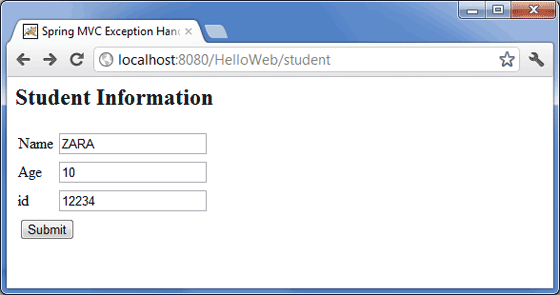
提交所需信息后,点击提交按钮提交表单。如果您的Spring Web应用程序的一切都很好,您应该会看到以下结果:
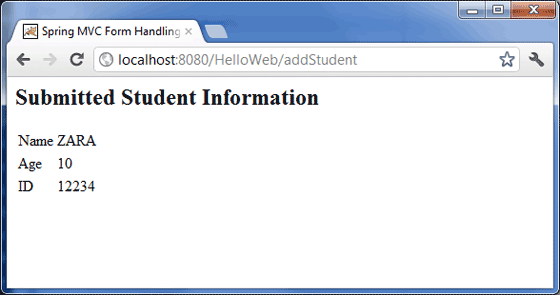
Maven示例:
https://github.com/easonjim/5_java_example/tree/master/springmvc/tutorialspoint/test4
Spring MVC-表单(Form)标签-文本框(Text Box)示例(转载实践)的更多相关文章
- spring mvc表单form值自动传到javabean-注解@ModelAttribute
直接通过Form Bean进行表单可以简化表单提交的处理,特别是对于复杂表单,过于简单的表单就不建议了,因为毕竟需要额外创建一个Form Bean.前段时间项目中有一个比较复杂的表单,有多层次而且涉及 ...
- Spring MVC表单标签
从Spring 2.0开始,Spring MVC开始全面支持表单标签,通过Spring MVC表单标签,我们可以很容易地将控制器相关的表单对象绑定到HTML表单元素中. form标签 和使用任 ...
- 使用Spring MVC表单标(转)
概述 在低版本的Spring中,你必须通过JSTL或<spring:bind>将表单对象绑定到HTML表单页面中,对于习惯了Struts表单标签的开发者来说,Spring MVC的 ...
- Spring MVC - 表单处理示例
环境搭建 环境: Intellij IDEA Spring MVC 完整的项目文件结构如下所示: Student.java package com.ktao.controller; public cl ...
- Spring MVC表单处理
以下示例演示如何编写一个简单的基于Web的应用程序,它使用Spring Web MVC框架使用HTML表单. 首先使用Eclipse IDE,并按照以下步骤使用Spring Web Framework ...
- Spring MVC表单提交
实际应用中,列表中的单条记录的修改,可能需要传很多对象参数到后台服务器,Spring MVC表单标签<form:> 提供了一种简洁的提交方式. <form id="form ...
- HTML中让表单input等文本框为只读不可编辑但可以获取value值的方法;让文本域前面的内容显示在左上角,居中
HTML中让表单input等文本框为只读不可编辑的方法 有时候,我们希望表单中的文本框是只读的,让用户不能修改其中的信息,如使input text的内容,中国两个字不可以修改 有时候,我们希望 ...
- js中对arry数组的各种操作小结 瀑布流AJAX无刷新加载数据列表--当页面滚动到Id时再继续加载数据 web前端url传递值 js加密解密 HTML中让表单input等文本框为只读不可编辑的方法 js监听用户的键盘敲击事件,兼容各大主流浏览器 HTML特殊字符
js中对arry数组的各种操作小结 最近工作比较轻松,于是就花时间从头到尾的对js进行了详细的学习和复习,在看书的过程中,发现自己平时在做项目的过程中有很多地方想得不过全面,写的不够合理,所以说啊 ...
- HTML中的表单<form>标签
一.HTML表单 HTML 表单用于搜集不同类型的用户输入. HTML 表单包含表单元素,表单元素指的是不同类型的 input 元素.复选框.单选按钮.提交按钮等等. 关于表单的更多内容可以参考htt ...
- Jquery学习笔记:操作form表单元素之一(文本框和下拉框)
一.概述 在web页面开发中,经常需要获取和设置表单元素的值(如文本框中的内容),特别是在ajax应用中,更是常态.本文系统的介绍下如何操作. 同操作其它html元素一样,操作的过程差不多. 第一步, ...
随机推荐
- B1588 [HNOI2002]营业额统计 set||平衡树
平衡树题,求每个点的前驱,照例可以用set水过...(平衡树还是不会写) 又新学了一个用法: set <int> ::iterator s1; 这样s1就可以直接附为set中的地址了.但是 ...
- 444D
分类 首先我们要对询问分类,如果相差log级别就第一种询问,否则第二种. 第一种直接暴力lower_bound,复杂度玄学 第二种归并,复杂度玄学 但是就是过了.感觉很容易卡. #include< ...
- idea导入ssm项目启动tomcat报错404
用idea写ssm项目,基于之前一直在用spring boot 对于idea如何运行ssm花费了一番功夫 启动Tom act一直在报404 我搜了网上各种解决办法都不行,花费一天多的时间解决不了 就 ...
- C# 取两位小数
double s=0.55555;result=s.ToString("#0.00");//点后面几个0就保留几位 如果要四舍五入的话,用这个double dbdata = 0.5 ...
- Django:提交表单报错:RuntimeError: You called this URL via POST, but the URL doesn’t end in a slash and you have A
Django:提交表单报错:RuntimeError: You called this URL via POST, but the URL doesn’t end in a slash and you ...
- ROS-导航功能-Gazebo
前言:仿真的整体思路,先启动仿真环境,再启动导航功能. 前提:已下载并编译了相关功能包集,如还未下载,可通过git下载:https://github.com/huchunxu/ros_explorin ...
- [Luogu 1850] noip16 换教室
[Luogu 1850] noip16 换教室 好久没有更博客了,先唠嗑一会,花了两天的空闲时间大致做完了昨年的noip真题 虽然在经过思考大部分题目都可出解(天天爱跑步除外),但是并不知道考试时候造 ...
- mybatis 传map参数
第一步在你的mapper写上: List<WeixinUserLocationList> findweixinUserLocations(@Param("params" ...
- 在64位WindowsServer2012R2中安装Oracle10g第二版(10.2.0.4.0)-20160106
1.操作系统版本 用于安装数据库的操作系统镜像文件名为:cn_windows_server_2012_r2_vl_with_update_x64_dvd_6052729.iso 安装DataCen ...
- SqlSever2005 一千万条以上记录分页数据库优化经验总结【索引优化 + 代码优化】
对普通开发人员来说经常能接触到上千万条数据优化的机会也不是很多,这里还是要感谢公司提供了这样的一个环境,而且公司让我来做优化工作.当数据库中的记录不超过10万条时,很难分辨出开发人员的水平有多高,当数 ...