
Azure EA (3) 使用Postman访问海外Azure Billing API
《Windows Azure Platform 系列文章目录》
本文介绍的是海外版的Azure Global服务,因为跨境内境外网络,访问速度会比较慢
在开始使用Azure Billing API之前,我们需要准备:
1.登录https://portal.azure.com,拿到Enrollment Number
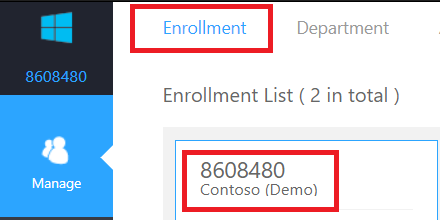
2.获取Azure Billing API Key。如下图:
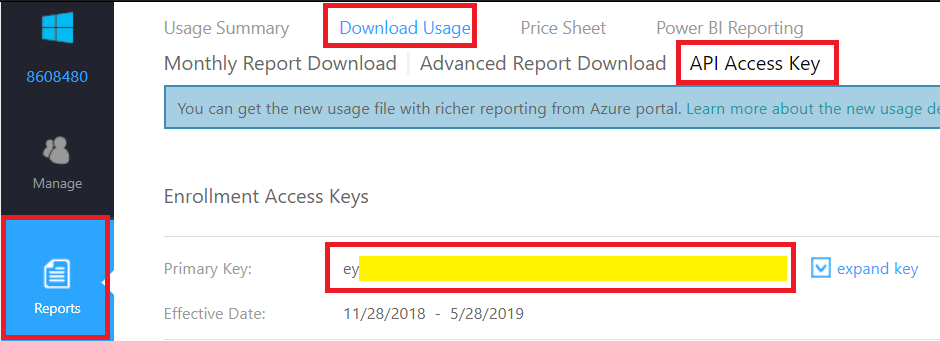
3.有关Azure海外的Billing API,请参考:https://docs.microsoft.com/en-us/azure/billing/billing-enterprise-api
这里简单介绍2个API:
(1)查看账单使用量摘要
(2)查看账单高级报告下载
一.查看账单使用量摘要:
1.REST API
| Method | Request URL |
| Get | https://consumption.azure.com/v3/enrollments/{enrollmentNumber}/balancesummary |
| 举例说明 | https://consumption.azure.com/v3/enrollments/8608480/balancesummary |
2.Request Header
| Request Header Key | Value |
| Authorization | bearer {API Key} |
3.返回结果
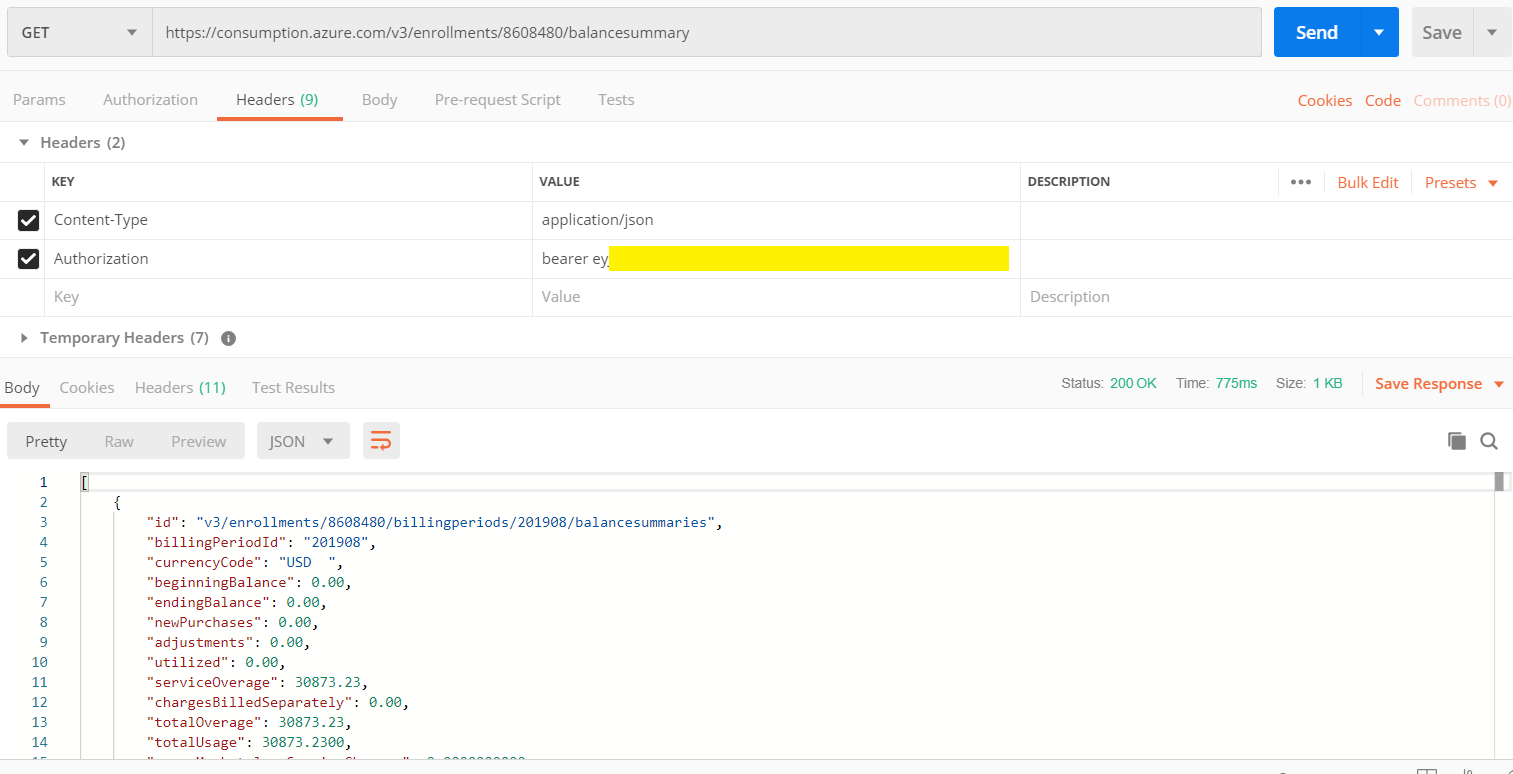
返回结果的字段说明:
| 字段名 | 字段说明 |
| id | |
| billingPeriodId | 计费周期 |
| currencyCode | 货币单位 |
| beginningBalance | 初期余额 |
| endingBalance | 期末余额 |
| newPurchases | 新购买 |
| adjustments | 调整 |
| utilized | 使用量 (从余额中扣除) |
| serviceOverage | 服务超额 |
| chargesBilledSeparately | 单独计费的费用 |
| totalOverage | 总超额 |
| totalUsage | 总使用量 (承诺使用量+超额) |
| azureMarketplaceServiceCharges | Azure应用市场服务使用量 |
| newPurchasesDetails | 新购买 |
| adjustmentDetails | 调整详细信详细信息 |
| billingPeriodStart | 计费周期开始时间 |
| billingPeriodEnd | 计费周期结束时间 |
| balanceDeduct | 余额扣除 |
二.查看账单高级报告下载
1.REST API
| Method | Request URL |
| Get | https://consumption.azure.com/v3/enrollments/{enrollmentNumber}/usagedetails/download?billingPeriod={billingPeriod} |
| 举例说明 | https://consumption.azure.com/v3/enrollments/8608480/usagedetails/download?startTime=2019-07-20&endTime=2019-08-10 |
2.Request Header
| Request Header Key | Value |
| Authorization | bearer {API Key} |
3.返回结果
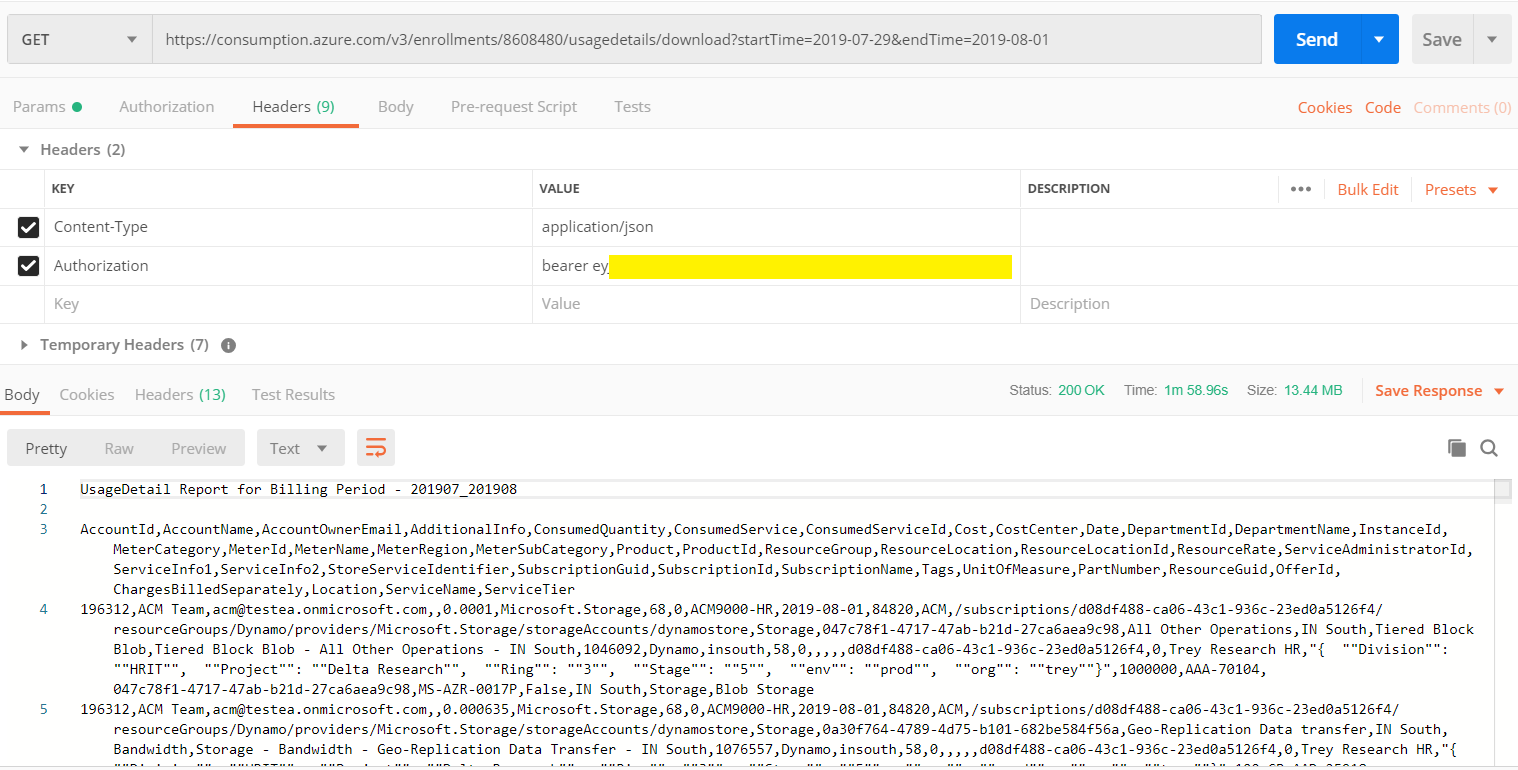
返回结果的字段说明:
| 字段名 | 说明 |
| AccountId | 创建该订阅的ID |
| AccountName | 账户名称 |
| AccountOwnerEmail | 账户所有者邮箱 |
| AdditionalInfo | 附加信息 |
| ConsumedQuantity | 已消耗的数量 |
| ConsumedService | 消耗的服务类型 |
| ConsumedServiceId | 消耗的服务ID |
| Cost | 费用 |
| CostCenter | 资源所属的Cost Center成本中心 ,成本中心只在EA Portal里面定义 |
| Date | 表示该计费资源的计费时间,比如2019-06-01 |
| DepartmentId | 部门ID |
| DepartmentName | 资源所属的部门,部门只在EA Portal里面定义 |
| InstanceId |
资源的唯一ID 对于ARM资源来说,组件展现的形式如下: /subscriptions/{订阅ID}/resourceGroups/{资源组名称}/providers/Microsoft.Compute/virtualMachines/{虚拟机名称} |
| MeterCategory | 服务的一级类别 |
| MeterId | 类别Id |
| MeterName | 类别名称 |
| MeterRegion | 类别区域 |
| MeterSubCategory | 服务的二级类别 |
| Product | 产品 |
| ProductId | 产品Id |
| ResourceGroup | 资源组 |
| ResourceLocation | 资源组所属区域 |
| ResourceLocationId | 资源组所属区域Id |
| ResourceRate | 每计费单位适用的费率 |
| ServiceAdministratorId | 服务管理员Id |
| ServiceInfo1 | 服务信息1 |
| ServiceInfo2 | 服务信息2 |
| StoreServiceIdentifier | 该字段不经常使用 |
| SubscriptionGuid | 订阅Guid |
| SubscriptionId | 订阅ID |
| SubscriptionName | 订阅的显示名称 |
| Tags | 标签 |
| UnitOfMeasure |
列:已消耗的资源数量的单位 比如虚拟机计算资源,是按照小时来收费的,则该列显示为Hour 对于存储来说,是按照GB来收费的。则该列会显示GB |
| PartNumber | 服务的SKU Number |
| ResourceGuid | 不经常使用 |
| OfferId | 不经常使用 |
| ChargesBilledSeparately | 超出货币承诺的收费 |
| Location | 服务所在数据中心区域 |
| ServiceName | 服务名称 |
| ServiceTier | 服务等级 |
Azure EA (3) 使用Postman访问海外Azure Billing API的更多相关文章
- Azure EA (2) 使用Postman访问国内Azure Billing API
<Windows Azure Platform 系列文章目录> 本文介绍的是国内由世纪互联运维的Azure China 请读者先看一下之前的文档内容:Azure EA (1) 查看国内Az ...
- Azure CosmosDB (14) 使用Postman访问CosmosDB REST API
<Windows Azure Platform 系列文章目录> 今天研究了一下如何使用Postman访问Azure CosmosDB. CosmosDB API接口,可以参考:https: ...
- Azure REST API (5) 中国Azure EA Portal Billing API
<Windows Azure Platform 系列文章目录> 本文介绍的是国内由世纪互联运维的Azure China. EA Portal的管理url是:https://ea.azure ...
- 【Azure Developer】使用Postman获取Azure AD中注册应用程序的授权Token,及为Azure REST API设置Authorization
Azure Active Directory (Azure AD) is Microsoft's cloud-based identity and access management service, ...
- 【Azure Developer】Python代码通过AAD认证访问微软Azure密钥保管库(Azure Key Vault)中机密信息(Secret)
关键字说明 什么是 Azure Active Directory?Azure Active Directory(Azure AD, AAD) 是 Microsoft 的基于云的标识和访问管理服务,可帮 ...
- Azure EA (1) 查看国内Azure账单
<Windows Azure Platform 系列文章目录> 本文介绍的是国内由世纪互联运维的Azure China 有关Azure EA Portal的详细内容,可以参考我的GitHu ...
- 【Azure 应用服务】探索在Azure上设置禁止任何人访问App Service的默认域名(Default URL)
问题描述 总所周知,Azure App Service服务会默认提供一个 ***.chinacloudsites.cn为后缀的域名,但是该域名由上海蓝云网络科技有限公司备案,仅用于向其客户提供 Azu ...
- 使用Postman访问OAuth2保护的WebAPI
Instantnoodle现时的WebAPI已经受Azure AD保护,平时直接输入URL的方式已经不能够正常访问到WebAPI 所有API都可以Swagger页面找到 http://getazdev ...
- Azure Storage 系列(六)使用Azure Queue Storage
一,引言 在之前介绍到 Azure Storage 第一篇文章中就有介绍到 Azure Storage 是 Azure 上提供的一项存储服务,Azure 存储包括 对象.文件.磁盘.队列和表存储.这里 ...
随机推荐
- 读懂在单台机器上创建RabbitMQ集群
在优锐课java中了解有关在单台计算机上安装集群以及如何向集群添加更多节点的更多信息,码了很多专业的相关知识, 分享给大家参考学习. 如果你在单台计算机上设置群集时遇到问题,那么以下文章可能会帮助回答 ...
- Eclipse引入自定义XML约束文件(DTD,SCHEMA)问题
Eclipse引入自定义XML约束文件(DTD,SCHEMA)问题 1:说明 使用Eclipse 编写xml文件的约束文件的,包括DTD约束文件,Schema约束文件的时候, 我们也需要接受eclip ...
- 获取系统相关信息 (CPU使用率 内存使用率 系统磁盘大小)
引言 在软件开个过程中,对于软件的稳定性和使用率也是我们需要关注的 . 使用sigar来监控,简单方便! 使用说明:下载sigar jar及配合sigar的dll文件来用,需要将dll文件放到JD ...
- selectpage选择订单的时候,订单数量和金额会动态改变
1. 2. HTML部分: JS: PHP获取数据并return json
- docker-mysql-使用docker运行mysql8
1, 下载镜像, 我用的是8 docker pull mysql: 2, 启动镜像 docker run \ --name mysql8 \ -p : \ -v /Users/wenbronk/Con ...
- Oracle - 如何查找指定字符串所出现的表
需求:举个例子,oracle测试库的scott用户下面的有张emp表,emp表的ename列中有一行数据为'CLARK'.红色标记部分. SQL> select * from scott.emp ...
- pandas 学习 第1篇:pandas基础 - 数据结构和数据类型
pandas是基于NumPy构建的模块,含有使数据分析更快更简单的操作工具和数据结构,是数据分析必不可少的五个包之一.pandas包含序列Series和数据框DataFrame两种最主要数据结构,索引 ...
- ros相机标定
没有经过校准的camera拍摄的图片是有畸变的.如下图: 而我们希望得到的图片是这样的 ros中提供了一个程序camera_calibration帮助我们去做校准. 具体怎么校准参考 https:// ...
- MySQL UNION 查询
UNION 用来合并多个 SELECT 结果. 考察如下两个表: # t1 +----+---------+ | id | pattern | +----+---------+ | 1 | Divot ...
- sql server 列字段拼接 —— STUFF
原始数据: sql语句 SELECT DISTINCT l.family_id, )) ,,'' ) isc_id FROM dbo.Addresses l 结果数据: