
WPF-自定义实现步骤条控件
步骤条实现的效果:
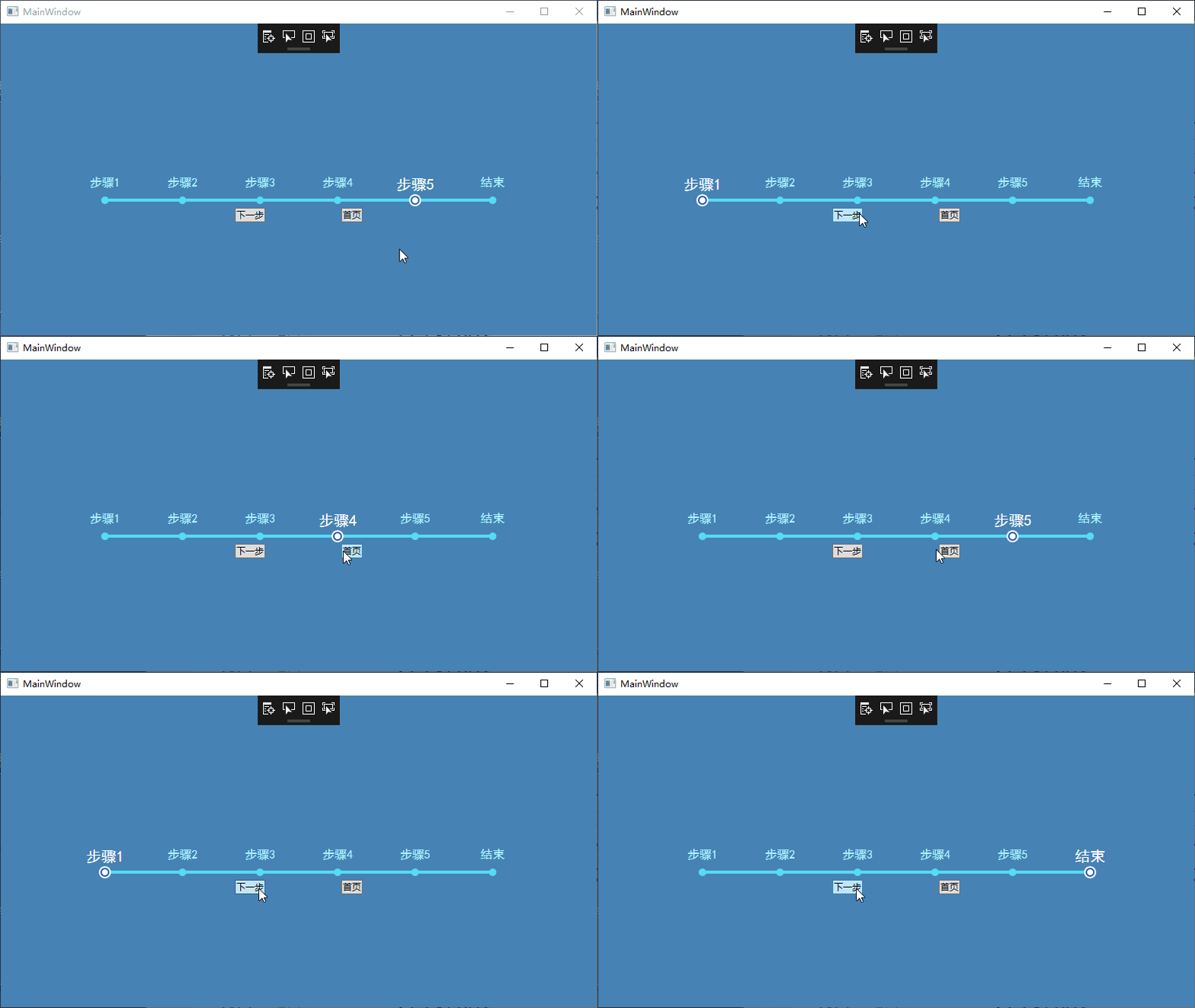
步骤条控件是在listbox的基础上实现的。
一、
xaml代码:
  <Window.Resources>

        <convert1:StepListBarWidthConverter x:Key="StepListStepWidthConverter" />

        <ControlTemplate x:Key="NormalItemTemplate" TargetType="ListBoxItem">

            <Grid>

                <Grid.RowDefinitions>

                    <RowDefinition />

                    <RowDefinition Height="" />

                </Grid.RowDefinitions>

                <ContentPresenter HorizontalAlignment="Center" Content="{TemplateBinding Content}" />

                <Grid Grid.Row="" Margin="">

                    <Ellipse

                        Width=""

                        Height=""

                        HorizontalAlignment="Center"

                        VerticalAlignment="Center"

                        Fill="#55DCF5" />

                </Grid>

            </Grid>

        </ControlTemplate>

        <Style x:Key="StepListBoxStyle" TargetType="ListBox">

            <Setter Property="Template">

                <Setter.Value>

                    <ControlTemplate TargetType="ListBox">

                        <Grid>

                            <Rectangle

                                Width=""

                                Height=""

                                Margin="0,0,0,8"

                                HorizontalAlignment="Center"

                                VerticalAlignment="Bottom"

                                Fill="#55DCF5" />

                            <ItemsPresenter />

                        </Grid>

                    </ControlTemplate>

                </Setter.Value>

            </Setter>

        </Style>

        <ControlTemplate x:Key="SelectedTemplate" TargetType="ListBoxItem">

            <Grid>

                <Grid.RowDefinitions>

                    <RowDefinition />

                    <RowDefinition Height="" />

                </Grid.RowDefinitions>

                <ContentPresenter HorizontalAlignment="Center" Content="{TemplateBinding Content}" />

                <Grid Grid.Row="" Margin="">

                    <Ellipse

                        Width=""

                        Height=""

                        VerticalAlignment="Center"

                        Panel.ZIndex="">

                        <Ellipse.Fill>

                            <SolidColorBrush Color="#FFFFFF" />

                        </Ellipse.Fill>

                    </Ellipse>

                    <Ellipse

                        Width=""

                        Height=""

                        VerticalAlignment="Center"

                        Panel.ZIndex="">

                        <Ellipse.Fill>

                            <SolidColorBrush Color="#225BA7" />

                        </Ellipse.Fill>

                    </Ellipse>

                    <Ellipse

                        Width=""

                        Height=""

                        VerticalAlignment="Center"

                        Panel.ZIndex="">

                        <Ellipse.Fill>

                            <SolidColorBrush Color="#FFFFFF" />

                        </Ellipse.Fill>

                    </Ellipse>

                </Grid>

            </Grid>

        </ControlTemplate>

        <Style x:Key="ListBoxItemStyle" TargetType="ListBoxItem">

            <Setter Property="Width" Value="{Binding RelativeSource={RelativeSource AncestorType=ListBox}, Converter={StaticResource StepListStepWidthConverter}}" />

            <Setter Property="FontSize" Value="" />

            <Setter Property="FontFamily" Value="SimHei" />

            <Setter Property="Foreground" Value="#ACF1FE" />

            <Setter Property="Template" Value="{StaticResource NormalItemTemplate}" />

            <Style.Triggers>

                <Trigger Property="IsSelected" Value="True">

                    <Trigger.Setters>

                        <Setter Property="Template" Value="{StaticResource SelectedTemplate}" />

                        <Setter Property="FontSize" Value="" />

                        <Setter Property="Foreground" Value="White" />

                        <Setter Property="FontFamily" Value="SimHei" />

                    </Trigger.Setters>

                </Trigger>

            </Style.Triggers>

        </Style>

    </Window.Resources>

    <StackPanel Background="SteelBlue">

        <ListBox

            Margin="0 200 0 0"

            x:Name="NavList"

            HorizontalAlignment="Center"

            BorderThickness=""

            Foreground="#225BA7"

            IsEnabled="False"

            ItemContainerStyle="{StaticResource ListBoxItemStyle}"

            SelectedIndex=""

            Style="{StaticResource StepListBoxStyle}">

            <ListBox.ItemsPanel>

                <ItemsPanelTemplate>

                    <StackPanel IsItemsHost="False" Orientation="Horizontal" />

                </ItemsPanelTemplate>

            </ListBox.ItemsPanel>

            <ListBoxItem></ListBoxItem>

            <ListBoxItem></ListBoxItem>

            <ListBoxItem></ListBoxItem>

            <ListBoxItem></ListBoxItem>

            <ListBoxItem></ListBoxItem>

            <ListBoxItem></ListBoxItem>

        </ListBox>

        <StackPanel HorizontalAlignment="Center" Orientation="Horizontal">

            <Button Click="Button_Click">下一步</Button>

            <Button Margin="100,0,0,0" Click="Button_Click_1">首页</Button>

        </StackPanel>

    </StackPanel>
各个样式模板介绍:StepListBoxStyle,整个步骤条控件的样式,矩形长条模板。
NormalItemTemplate,未被选中时单个步骤样式。
SelectedTemplate,被选中时单个步骤样式。
ListBoxItemStyle,通过样式和触发器使用模板。
二、需要固定步骤条总长度,根据项数设置步骤条步长,所以需要写个转换器,设置每项长度。
转换器代码:
    class StepListBarWidthConverter : IValueConverter

    {

        public object Convert(object value, Type targetType, object parameter, CultureInfo culture)

        {

            ListBox listBox = value as ListBox;

            if (listBox==null)

            {

                return Binding.DoNothing;

            }

            if (listBox.Items.Count == )

            {

                return ;

            }

            return  / (listBox.Items.Count - );

        }

        public object ConvertBack(object value, Type targetType, object parameter, CultureInfo culture)

        {

            return Binding.DoNothing;

        }

    }
使用的时候对Listbox的ItemSource和SelectedIndex进行绑定即可。
WPF-自定义实现步骤条控件的更多相关文章
- WPF教程002 - 实现Step步骤条控件
原文:WPF教程002 - 实现Step步骤条控件 在网上看到这么一个效果,刚好在用WPF做控件,就想着用WPF来实现一下 1.实现原理 1.1.该控件分为2个模块,类似ComboBox控件分为Ste ...
- WPF自定义LED风格数字显示控件
原文:WPF自定义LED风格数字显示控件 版权声明:本文为博主原创文章,转载请注明作者和出处 https://blog.csdn.net/ZZZWWWPPP11199988899/article/de ...
- 【C#】wpf自定义calendar日期选择控件的样式
原文:[C#]wpf自定义calendar日期选择控件的样式 首先上图看下样式 原理 总览 ItemsControl内容的生成 实现 界面的实现 后台ViewModel的实现 首先上图,看下样式 原理 ...
- WPF自定义控件第一 - 进度条控件
本文主要针对WPF新手,高手可以直接忽略,更希望高手们能给出一些更好的实现思路. 前期一个小任务需要实现一个类似含步骤进度条的控件.虽然对于XAML的了解还不是足够深入,还是摸索着做了一个.这篇文章介 ...
- C#开发step步骤条控件
现在很多的javascript控件,非常的不错,其中step就是一个,如下图所示: 那么如何用C#来实现一个step控件呢? 先定义一个StepEntity类来存储步骤条节点的信息: public c ...
- WPF 自定义ItemsControl/ListBox/ListView控件样式
一.前言 ItemsControl.ListBox.ListView这三种控件在WPF中都可作为列表信息展示控件.我们可以通过修改这三个控件的样式来展示我们的列表信息. 既然都是展示列表信息的控件,那 ...
- WPF 自定义TextBox带水印控件,可设置圆角
一.简单设置水印TextBox控件,废话不多说看代码: <TextBox TextWrapping="Wrap" Margin="10" Height=& ...
- 4.自定义view-进度条控件
1.效果 2.实现原理 画圆,画圆弧,画文字 外部控制进度,通过invalidate()方法更新 核心代码: @Override protected void onDraw(Canvas canvas ...
- Photoshop和WPF双剑配合,打造炫酷个性的进度条控件
现在如果想打造一款专业的App,UI的设计和操作的简便性相当重要.UI设计可以借助Photoshop或者AI等设计工具,之前了解到WPF设计工具Expression Blend可以直接导入PSD文件或 ...
随机推荐
- Web前端基础(5):CSS(二)
1. 盒模型 在CSS中,"box model"这一术语是用来设计和布局时使用,然后在网页中基本上都会显示一些方方正正的盒子.我们称为这种盒子叫盒模型. 盒模型有两种:标准模型和I ...
- SpringMVC学习笔记一(请求流程和配置,启动项目)
springmvc请求流程: 1.用户发送请求至前端控制器DispatcherServlet 2.DispatcherServlet收到请求调用HandlerMapping处理器映射器. 3.处理器映 ...
- centos7下通过yum方式安装docker环境
1.移除旧版本: yum remove docker \ docker-client \ docker-client-latest \ docker-common \ docker-latest \ ...
- vue学习笔记(二): 添加 element ui 插件
一.加载 ui element vue add element 加载过程及成功结果如下 > vue add element>
- 机器视觉-python基础入门
下载安装python版本 https://www.python.org/ 安装并且勾上为添加系统环境 然后进入cmd命令行里进行 这时候装成功了 然后装opencv依赖库 pip install o ...
- Android监视器概述
还望支持个人博客站:http://www.enjoytoday.cn Android监视器可帮助您分析应用程序的性能,以便您优化,调试和改进它们. 它可以让您从硬件设备或Android模拟器监控应用程 ...
- 用Toad for Oracle创建数据库表空间和用户
打开Toad, 1,菜单栏Session—>new Connection….打开如下窗口: 2,进入之后,菜单DatebaseàSechema Brower...找到Table Space(表 ...
- 6.2 DataFrame
一.DataFrame概述 在Spark SQL中,DataFrame就是它的数据抽象,对DataFrame进行转换操作. DataFrame的推出,让Spark具备了处理大规模结构化数据的能力,不仅 ...
- oracle表连接的优化
多表连接的三种方式: HASH JOIN,MERGE JOIN,NESTED LOOP NESTED LOOP: 嵌套循环连接,适用于内表数据量较小时.外表返回的每一行都要在内表中检索找到与它匹配的行 ...
- Ubuntu环境下打开Firefox报错: Firefox is already running, but is not responding.
在ubuntu下启动firefox可能会报错 Firefox is already running, but is not responding. To open a new window, you ...