
View and Data API 现在支持IE11了
By Daniel Du
After a long time waiting, IE11 finally supports WebGL, which enables us viewing our 3D/2D models on Internet Explorer with view and data API if IE is your favorite browser or your only option for whatever reason.
Here are some tips to make it work. Firstly, it should be IE11, previous version does not work, and you are recommended to install the new versions automatically to get the latest patches if there are any.

But you may get “Load Error : 4”, or HTTP 401 error when loading a model. For whatever reason IE does not send the “ads-token” cookie when the web request is made from a web worker thread. “ads-token” is a session cookie of view and data API, It works fine if the request is made from the main thread. Setting the session cookie toggle works around the problem. Here is how to do it in your IE11 browser setting.
Go to Internet Options, and switch to “Privacy” tab:
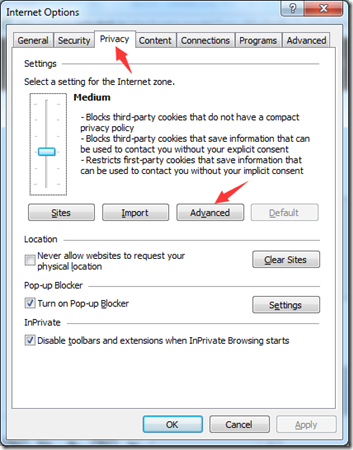
Open the Advanced Privacy Settings by clicking “Advanced” button, and check “Override automatic cookie handling” , make sure the two “Accept” options are selected and “Always allow session cookies” are checked:

Click OK to accept the changes, now you should be able to view 3D models in IE11. Here is a test site: http://checkoutmymodel.autodesk.io/ You can drag and drop your models to upload and view, or try this link directly.
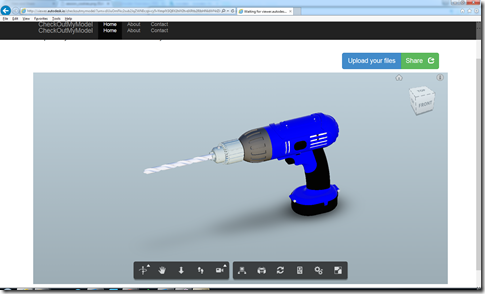
Yes, It is not good to ask users to change their browser setting, more investigation is undergoing for this issue. You may want to add a reminder banner to your site, telling your user to change their settings. Here is what I did with JavaScript and Bootstrap. Please note that $('#alert_placeholder') is the element where you want to show the banner, it could be body or other HTML element, a <div> for example.
var _isIE11 = !!navigator.userAgent.match(/Trident\/7\./);
if (_isIE11) { var message = 'It seems you are using IE11, please refer
to <a href="http://adndevblog.typepad.com/cloud_and_mobile
/2015/04/view-and-data-api-now-support-ie11.html">this
blog post</a> to config your browser to view this sample
correctly.'; $('#alert_placeholder').html('<div id="alertDiv"
class="alert alert-danger">
<button type="button" class="close"
data-dismiss="alert" aria-hidden="true">×
</button>' + message + '</div>');
var alert = $('#alertDiv');
alert.alert(); }
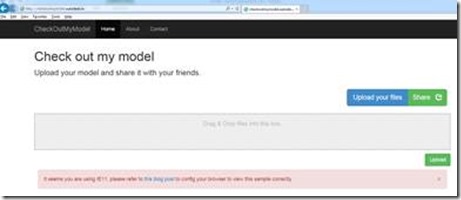
Here is how it looks like when user access the site on IE11, putting a banner refering to this blog post for setting instructions:
View and Data API 现在支持IE11了的更多相关文章
- 特大喜讯,View and Data API 现在支持中文界面了
大家经常会问到,使用View and Data API怎么做界面的本地化,来显示中文,现在好消息来了,从v1.2.19起,View and Data API开始支持多国语言界面了.你需要制定版本号为v ...
- Autodesk View and Data API二次开发学习指南
什么是View and Data API? 使用View and Data API,你可以轻松的在网页上显示大型三维模型或者二维图纸而不需要安装任何插件.通过View and Data API,你可以 ...
- Using View and Data API with Meteor
By Daniel Du I have been studying Meteor these days, and find that Meteor is really a mind-blowing f ...
- View and Data API Tips: Constrain Viewer Within a div Container
By Daniel Du When working with View and Data API, you probably want to contain viewer into a <div ...
- View and Data API Tips: Hide elements in viewer completely
By Daniel Du With View and Data API, you can hide some elements in viewer by calling "viewer.hi ...
- 使用AxisHelper帮助理解View and Data API中的坐标系统
大家使用View and Data API做三维模型开发,必然首先要理解View and Data API的坐标系统,即XYZ三个轴向分别是怎么定义的.Three.js里面提供了一个AxisHelpe ...
- 在View and Data API中更改指定元素的颜色
大家在使用View and Data API开发过程中,经常会用到的就是改变某些元素的颜色已区别显示.比如根据某些属性做不同颜色的专题显示,或者用不同颜色表示施工进度,或者只是简单的以颜色变化来提醒用 ...
- View and Data API tips: 缓存Access Token
对于云API服务,常见的方式就是按照API调用次数收费,某些API调用也就有某些限制,比如在特定时间内只允许调用指定的次数以免造成滥用.虽然Autodesk的view and Data API目前还没 ...
- View and Data API Tips: how to make viewer full screen
By Daniel Du If you have not heard of View and Data API, here is the idea, the View & Data API e ...
随机推荐
- python学习之day1-基础知识
1.变量 变量来源于数学,是计算机语言中能储存计算结果或能表示值抽象概念.变量可以通过变量名访问.在python中,如果要使用一个变量,不需要提前声明,只需要在用的时候,给这个变量赋值即可.pytho ...
- 我被比特币撞了一下腰——记OKCoin试用体验
本博客还有大量的.NET开源技术文章,您可能感兴趣: 1.开源Math.NET基础数学类库使用系列文章:链接 2.开源C#彩票数据资料库系列文章:链接 3.开源的.NET平台ORM组件文章:链接 4. ...
- 手动实现jQuery Tools里面tab功能
平时开发中用的Javascript类库都是jQuery,用到插件或者第三方类库能从jQuery Tools里面找到,基本不用其他的.当然有时同事喜欢使用jQuery UI里面的插件.并且jQuery ...
- 浅谈requireJS
项目中大都使用模块化开发,requireJS作为AMD模块开发的典范,所以有必要学习下.通过一步步利用requireJS编写demo,从而学习requireJS的一个整体开发流程以及自我使用requi ...
- 从零开始编写自己的C#框架(6)——SubSonic3.0插件介绍(附源码)
前面几章主要是概念性的东西为主,向初学者们介绍项目开始前的一些知识与内容,从本章开始将会进入实操阶段,希望跟着本系统学习的朋友认真按说明做好每一步操作(对于代码最好是直接照着文档内容在你的IDE中打一 ...
- 由position属性引申的关于css的进阶讨论(包含块、BFC、margin collapse)
写这篇文章的起因是源于这篇文章:谈谈面试与面试题 中关于position的讨论,文中一开始就说的这句话: 面试的时候问个css的position属性能刷掉一半的人这是啥情况…… 其实这问题我本来打算的 ...
- bootstrap 学习总结
Bootstrap 是最受欢迎的 HTML.CSS 和 JS 框架,用于开发响应式布局.移动设备优先的 WEB 项目.当前最新版本是3.2.0; 使用的第一步,可以直接复制官方的模版,另存为index ...
- struts2学习笔记--使用servletAPI实现ajax的一个小Demo
这个例子是点击网页上的一个button,然后调用action,使用response项前台打印"哎呦 不错哦",当然是以异步形式实现. jsp页面: <head> < ...
- C++入门知识总结(1)
1.有符号数和无符号数. 这个问题其实是一个很细的问题,我们还要把问题追溯到“位”,针对不同的“位”,那么能表示的最大数的范围不同.因为计算机存储数据都是以二进制的方式去存储的,即0和1,比如 110 ...
- AppCan学习笔记--数据存储及listview简单应用
AppCan AppCan开发平台简介 AppCan是Hybrid App开发框架即混合开发框架,有官方提供底层功能使用API HTML5和JavaScript只是作为一种解析语言,真正调用的都是Na ...