
UICollectionView使用以及与UITableView的区别
在开始前我们在这先附一段最简单的代码
- (void)viewDidLoad

{

    [super viewDidLoad];

    UICollectionViewFlowLayout *layout = [[UICollectionViewFlowLayout alloc] init];

    UICollectionView *colView = [[UICollectionView alloc] initWithFrame:self.view.bounds collectionViewLayout:layout];

    colView.backgroundColor = [UIColor grayColor];

    [colView registerClass:[UICollectionViewCell class] forCellWithReuseIdentifier:@"myCell"];

    colView.delegate = self;

    colView.dataSource = self;

    [self.view addSubview:colView];

}

- (NSArray *)loadData

{

    NSArray *arr = [NSArray arrayWithObjects:@"cell", @"cell2", @"cell3", @"cell4", @"cell5", @"cell6", @"cell7",nil];

    return arr;

}

#pragma mark - UICollectionViewDataSource

- (NSInteger)collectionView:(UICollectionView *)collectionView numberOfItemsInSection:(NSInteger)section

{

    return [[self loadData] count];

}

- (NSInteger)numberOfSectionsInCollectionView:(UICollectionView *)collectionView

{

    return ;

}

- (UICollectionViewCell *)collectionView:(UICollectionView *)collectionView cellForItemAtIndexPath:(NSIndexPath *)indexPath

{

    static NSString *cellID = @"myCell";

    UICollectionViewCell *cell = [collectionView dequeueReusableCellWithReuseIdentifier:cellID forIndexPath:indexPath];

    cell.backgroundColor = [UIColor redColor];

    return cell;

}
代码
当你运行时将看到,它与UITableView的布局区别。
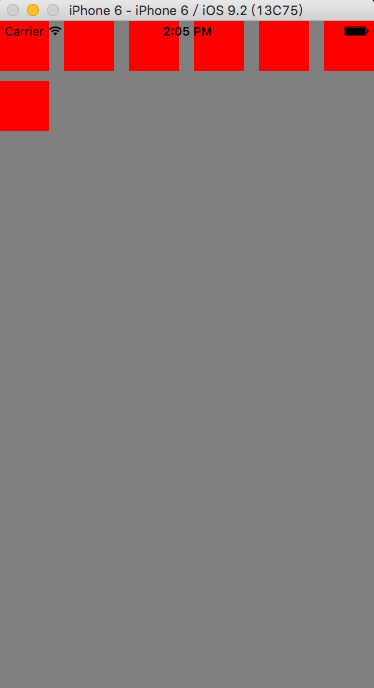
一、介绍
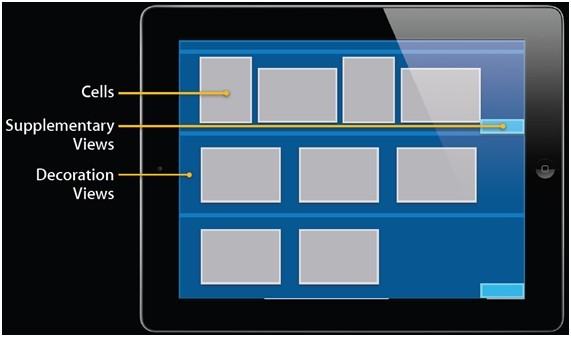
UICollectionView类负责管理数据的有序集合以及以自定义布局的模式来呈现这些数据,它提供了一些常用的表格(table)功能,此外还增加了许多单栏布局。UICollectionView支持可以用于实现多列网格、 平铺的布局、 圆形的布局和更多的自定义布局,甚至你可以动态地改变它的布局。
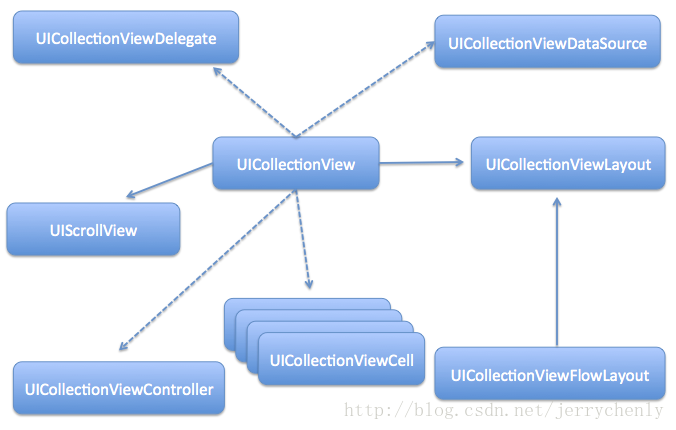
除了将它嵌入在您的用户界面,您可以使用 UICollectionView 对象的方法以确保item的可视化表示匹配您的数据源对象中的顺序。因此,每当您添加、 删除或重新排列您的集合中的数据,您可以使用此类的方法来插入、 删除和重新排列相应cell的状态。您还使用集合视图对象来管理所选的item。
2.初始化,在初始化之前我们需要常见布局实例
UICollectionViewFlowLayout *layout = [[UICollectionViewFlowLayout alloc] init];
UICollectionView *colView = [[UICollectionView alloc] initWithFrame:self.view.bounds collectionViewLayout:layout];
3.注册UICollectionView使用的cell类型。
【必须先注册,否则会报异常
*** Terminating app due to uncaught exception 'NSInternalInconsistencyException', reason: 'could not dequeue a view of kind: UICollectionElementKindCell with identifier myCell - must register a nib or a class for the identifier or connect a prototype cell in a storyboard'
】
[colView registerClass:[UICollectionViewCell class] forCellWithReuseIdentifier:@"myCell"];
4.设置代理
    colView.delegate = self;

    colView.dataSource = self;
5.实现协议
UICollectionViewDataSource
//配置UICollectionView的每个section的item数

- (NSInteger)collectionView:(UICollectionView *)collectionView numberOfItemsInSection:(NSInteger)section

{

    return [[self loadData] count];

}
//配置section数

- (NSInteger)numberOfSectionsInCollectionView:(UICollectionView *)collectionView

{

    return ;

}
//呈现数据

- (UICollectionViewCell *)collectionView:(UICollectionView *)collectionView cellForItemAtIndexPath:(NSIndexPath *)indexPath

{

    static NSString *cellID = @"myCell";

    UICollectionViewCell *cell = [collectionView dequeueReusableCellWithReuseIdentifier:cellID forIndexPath:indexPath];

    cell.backgroundColor = [UIColor redColor];

    return cell;

}
UICollectionViewDelegateFlowLayout
//配置每个item的size

- (CGSize)collectionView:(UICollectionView *)collectionView layout:(UICollectionViewLayout *)collectionViewLayout sizeForItemAtIndexPath:(NSIndexPath *)indexPath

{

    return CGSizeMake(, );

}

//配置item的边距

- (UIEdgeInsets)collectionView:(UICollectionView *)collectionView layout:(UICollectionViewLayout *)collectionViewLayout insetForSectionAtIndex:(NSInteger)section

{

    return UIEdgeInsetsMake(, , , );

}
效果
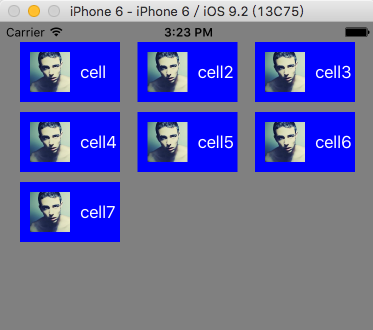
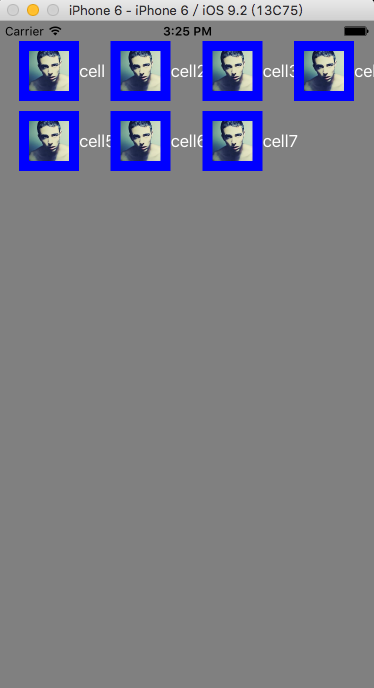
我们明晰地可以看到,它已经进行自动布局,为了更能说明问题,我们现在将
- (CGSize)collectionView:(UICollectionView *)collectionView layout:(UICollectionViewLayout *)collectionViewLayout sizeForItemAtIndexPath:(NSIndexPath *)indexPath

{

    return CGSizeMake(200, 60);

}
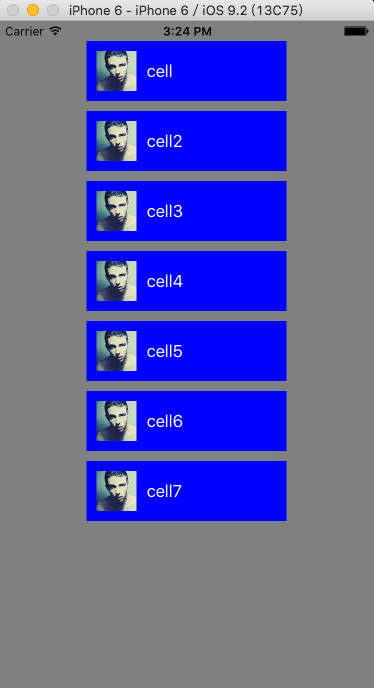
return CGSizeMake(60, 60);
UICollectionViewDelegate
//点击item时触发

- (void)collectionView:(UICollectionView *)collectionView didSelectItemAtIndexPath:(NSIndexPath *)indexPath

{

    NSLog(@"您点击了item:%@", [[self loadData] objectAtIndex:indexPath.row]);

    [collectionView cellForItemAtIndexPath:indexPath].backgroundColor = [UIColor redColor];

}

//当前ite是否可以点击

- (BOOL) collectionView:(UICollectionView *)collectionView shouldSelectItemAtIndexPath:(nonnull NSIndexPath *)indexPath

{

    if (indexPath.row % )

    {

        return YES;

    }

    return NO;

}
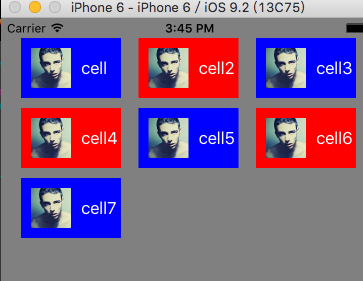
我们也可以通过设置UICollectionViewCell的selectedBackgroundView属性来改变cell选中时的背景视图。
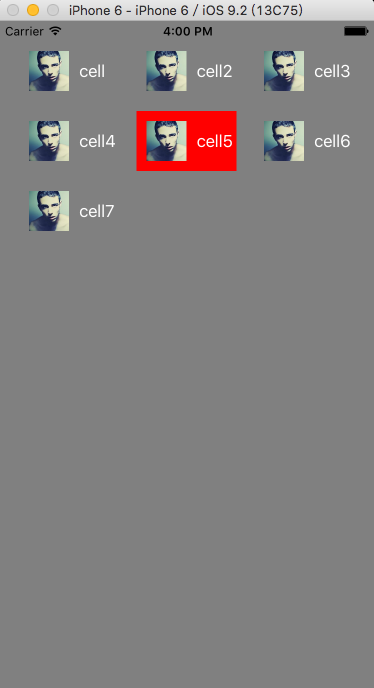
我们还可以设置哪些cell点击时不高亮,点击时cell的样式和点击后cell的样式
- (BOOL)collectionView:(UICollectionView *)collectionView shouldHighlightItemAtIndexPath:(NSIndexPath *)indexPath

{

    return YES;

}

- (void)collectionView:(UICollectionView *)collectionView didHighlightItemAtIndexPath:(NSIndexPath *)indexPath

{

    UICollectionViewCell *cell = [collectionView cellForItemAtIndexPath:indexPath];

    cell.backgroundColor = [UIColor redColor];

}

- (void)collectionView:(UICollectionView *)collectionView didUnhighlightItemAtIndexPath:(NSIndexPath *)indexPath

{

    UICollectionViewCell *cell = [collectionView cellForItemAtIndexPath:indexPath];

    cell.backgroundColor = [UIColor grayColor];

}
UICollectionView使用以及与UITableView的区别的更多相关文章
- iOS全埋点解决方案-UITableView和UICollectionView点击事件
前言 在 $AppClick 事件采集中,还有两个比较特殊的控件: UITableView •UICollectionView 这两个控件的点击事件,一般指的是点击 UITableViewCell 和 ...
- 集合视图 UICollectionView
什么是UICollectionView UICollectionView是一种新的数据展示方式,简单来说可以把他理解成多列的UITableView(请一定注意这是UICollectionView的最最 ...
- UICollectionView 讲解-备
什么是UICollectionView UICollectionView是一种新的数据展示方式,简单来说可以把他理解成多列的UITableView(请一定注意这是UICollectionView的最最 ...
- UICollectionView 浅析
什么是UICollectionView UICollectionView是一种新的数据展示方式,简单来说可以把他理解成多列的UITableView(请一定注意这是UICollectionView的最最 ...
- UICollectionView笔记1
WWDC 2012 Session笔记——205 Introducing Collection Views 这是博主的WWDC2012笔记系列中的一篇,完整的笔记列表可以参看这里.如果您是首次来到本站 ...
- UICollectionView专题
什么是UICollectionView UICollectionView是一种新的数据展示方式,简单来说可以把他理解成多列的UITableView(请一定注意这是UICollectionView的最最 ...
- UICollectionView 讲解
什么是UICollectionView UICollectionView是一种新的数据展示方式,简单来说可以把他理解成多列的UITableView(请一定注意这是 UICollectionView的最 ...
- UICollectionView(一)基本概念
整体预览 高等级的包含和管理(Top-level containment and management) UICollectionView UICollectionViewController UIC ...
- 利用UICollectionView实现列表和宫格视图的切换
很多时候我们需要列表和宫格视图的来回切换,就像苹果的天气应用一样,我之前见过一个用tableview和collectionview来实现这种效果的,我本人不太喜欢这个,那么有没有更好的方法呢?答案是: ...
随机推荐
- 【转】JAVA 接口
1.定义接口 使用interface来定义一个接口.接口定义同类的定义类似,也是分为接口的声明和接口体,其中接口体由常量定义和方法定义两部分组成.定义接口的基本格式如下: [修饰符] inter ...
- JAVA自动化测试数据设计
数据管理是很重要的,数据管理与方法一样,依然是有层次的,我们在测试的过程中,可能会有多个环境,每个环境的URL啊,登录名啊,数据库连接地址啊等等不一样,我们可以把这些环境每个都配置一个数据文件,里面写 ...
- HTTP 错误 500.21 - Internal Server Error 处理程序“ExtensionlessUrlHandler-ISAPI-4.0_64bit”在其模块列表中有一个错误模块“IsapiModule” 解决方法
IIS在发布网站后找不到首页,提示以上错误,原因是在“应用程序池”中,把对应的网站的“托管管道模式”设置为“集成”即可.
- IDE、SATA、SCSI、SAS、FC、SSD硬盘类型介绍[zz]
目前所能见到的硬盘接口类型主要有IDE.SATA.SCSI.SAS.FC等等. IDE是俗称的并口,SATA是俗称的串口,这两种硬盘是个人电脑和低端服务器常见的硬盘.SCSI是"小型计算机系 ...
- quick -- 创建精灵和动作
local imgBg = display.newSprite("666666.jpg") :pos(display.cx, display.cy) :addTo(self) , ...
- 匿名对象和object的转换
有时候经常用到需要把一个匿名对象存入session或List<object>或其他容器中,可是取出来的时候变成object了,不太方便使用. 下面是一种转换方式: class Pr ...
- Asp.net Core 1.0.1升级到Asp.net Core 1.1.0 Preview版本发布到Windows Server2008 R2 IIS中的各种坑
Asp.net Core 1.0.1升级到Asp.net Core 1.1.0后,程序无法运行了 解决方案:在project.json中加入runtime节点 "runtimes" ...
- 获取发布版SHA1获取
- 【黑金原创教程】【FPGA那些事儿-驱动篇I 】【实验一】流水灯模块
实验一:流水灯模块 对于发展商而言,动土仪式无疑是最重要的任务.为此,流水灯实验作为低级建模II的动土仪式再适合不过了.废话少说,我们还是开始实验吧. 图1.1 实验一建模图. 如图1.1 所示,实验 ...
- Kafka 分区备份实战
1.概述 在 Kafka 集群中,我们可以对每个 Topic 进行一个或是多个分区,并为该 Topic 指定备份数.这部分元数据信息都是存放在 Zookeeper 上,我们可以使用 zkCli 客户端 ...