
ROS naviagtion analysis: costmap_2d--StaticLayer
博客转载自:https://blog.csdn.net/u013158492/article/details/50493246
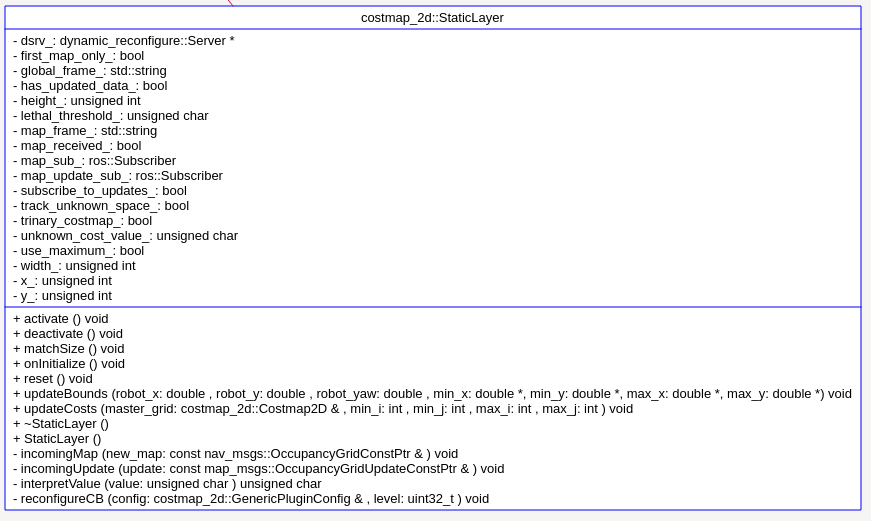
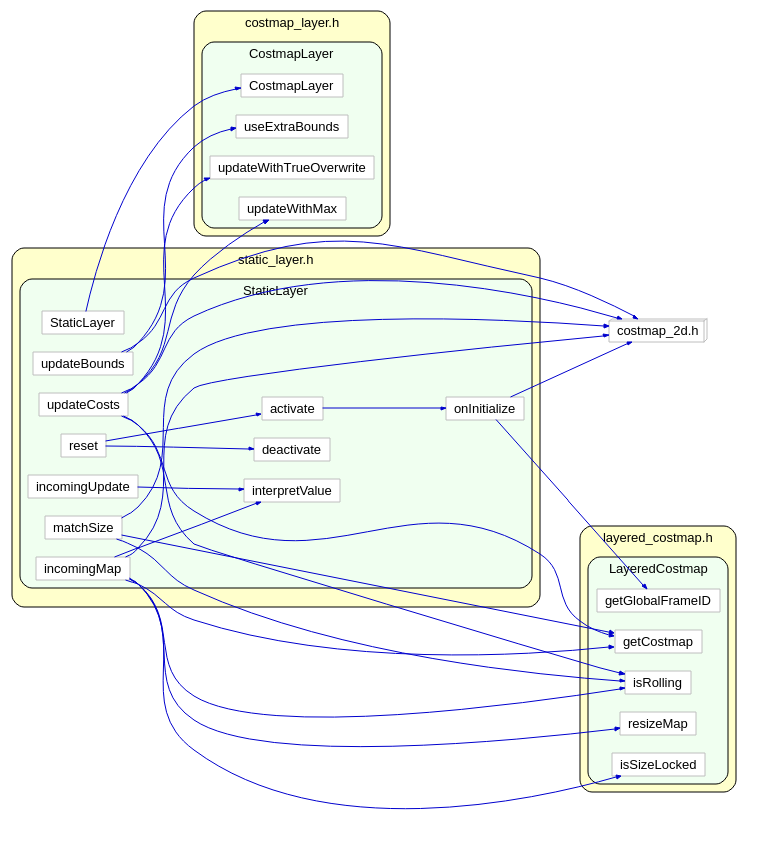
从UML中能够看到,StaticLayer主要是在实现Layer层要求实现的接口。
virtual void onInitialize();

  virtual void activate();

  virtual void deactivate();

  virtual void reset();

  virtual void updateBounds(double robot_x, double robot_y, double robot_yaw, double* min_x, double* min_y,double* max_x, double* max_y);

  virtual void updateCosts(costmap_2d::Costmap2D& master_grid, int min_i, int min_j, int max_i, int max_j);

  virtual void matchSize();
函数virtual void activate()
void StaticLayer::activate()

{

  onInitialize();

}
而函数onInitialize() 中,首先初始化了一堆参数,然后调用
map_sub_ = g_nh.subscribe(map_topic, 1, &StaticLayer::incomingMap, this);//一旦收到topic 是“map”的消息,就调用`incomingMap`
 while (!map_received_ && g_nh.ok())

 {

   ros::spinOnce();

   r.sleep();

 }//如果map_received_一直是false,则阻塞在这里。而更新map_received_的地方在回调函数incomingMap
接下来判断是否接受static map的更新,如果是则开启对topic为map_topic + "_updates" 的更新。最后开启参数动态配置服务。
函数matchSize 中的操作依然是根据master map的尺寸,更新本层的尺寸:
void StaticLayer::matchSize()

{

  // If we are using rolling costmap, the static map size is

  //   unrelated to the size of the layered costmap

  if (!layered_costmap_->isRolling())

  {

    Costmap2D* master = layered_costmap_->getCostmap();

    resizeMap(master->getSizeInCellsX(), master->getSizeInCellsY(), master->getResolution(),

              master->getOriginX(), master->getOriginY());

  }

}
函数interpretValue 则是将参数根据阈值,设定为NO_INFORMATION FREE_SPACE LETHAL_OBSTACLE FREE_SPACE 或者其他值。
unsigned char StaticLayer::interpretValue(unsigned char value)

{

  // check if the static value is above the unknown or lethal thresholds

  if (track_unknown_space_ && value == unknown_cost_value_)

    return NO_INFORMATION;

  else if (!track_unknown_space_ && value == unknown_cost_value_)

    return FREE_SPACE;

  else if (value >= lethal_threshold_)

    return LETHAL_OBSTACLE;

  else if (trinary_costmap_)

    return FREE_SPACE;

  double scale = (double) value / lethal_threshold_;

  return scale * LETHAL_OBSTACLE;

}
以下分析回调函数incomingMap
void StaticLayer::incomingMap(const nav_msgs::OccupancyGridConstPtr& new_map)

{

  unsigned int size_x = new_map->info.width, size_y = new_map->info.height;

  ROS_DEBUG("Received a %d X %d map at %f m/pix", size_x, size_y, new_map->info.resolution);

  // resize costmap if size, resolution or origin do not match

  //这里判断master map的尺寸是否和获取到的static map一致,如果不一致,则应该修改master map

  Costmap2D* master = layered_costmap_->getCostmap();

  if (!layered_costmap_->isRolling() && (master->getSizeInCellsX() != size_x ||

      master->getSizeInCellsY() != size_y ||

      master->getResolution() != new_map->info.resolution ||

      master->getOriginX() != new_map->info.origin.position.x ||

      master->getOriginY() != new_map->info.origin.position.y ||

      !layered_costmap_->isSizeLocked()))

  {

    // Update the size of the layered costmap (and all layers, including this one)

    ROS_INFO("Resizing costmap to %d X %d at %f m/pix", size_x, size_y, new_map->info.resolution);

    layered_costmap_->resizeMap(size_x, size_y, new_map->info.resolution, new_map->info.origin.position.x, new_map->info.origin.position.y, true);//修改了master map

  }

  //如果本层的数据和订阅到的map尺寸不一致,则更新本层的尺寸

  else if (size_x_ != size_x || size_y_ != size_y ||

           resolution_ != new_map->info.resolution ||

           origin_x_ != new_map->info.origin.position.x ||

           origin_y_ != new_map->info.origin.position.y)

  {

    // only update the size of the costmap stored locally in this layer

    ROS_INFO("Resizing static layer to %d X %d at %f m/pix", size_x, size_y, new_map->info.resolution);

    resizeMap(size_x, size_y, new_map->info.resolution,new_map->info.origin.position.x, new_map->info.origin.position.y);

  }

  unsigned int index = 0;

  // initialize the costmap with static data

  //这里将订阅拿到的map数据拷贝到了本层static map的数据成员`costmap_`

  for (unsigned int i = 0; i < size_y; ++i)

  {

    for (unsigned int j = 0; j < size_x; ++j)

    {

      unsigned char value = new_map->data[index];

      costmap_[index] = interpretValue(value);

      ++index;

    }

  }

  map_frame_ = new_map->header.frame_id;

  // we have a new map, update full size of map

  x_ = y_ = 0;

  width_ = size_x_;

  height_ = size_y_;

  map_received_ = true;

  has_updated_data_ = true;

  // shutdown the map subscrber if firt_map_only_ flag is on

  if (first_map_only_)

  {

    map_sub_.shutdown();

  }

}
函数 updateBounds 这里设定为整张static map的大小:
void StaticLayer::updateBounds(double robot_x, double robot_y, double robot_yaw, double* min_x, double* min_y,

                               double* max_x, double* max_y)

{

  if( !layered_costmap_->isRolling() ){

    if (!map_received_ || !(has_updated_data_ || has_extra_bounds_))

      return;

  }

  useExtraBounds(min_x, min_y, max_x, max_y);

  double wx, wy;

  mapToWorld(x_, y_, wx, wy);

  *min_x = std::min(wx, *min_x);

  *min_y = std::min(wy, *min_y);

  mapToWorld(x_ + width_, y_ + height_, wx, wy);

  *max_x = std::max(wx, *max_x);

  *max_y = std::max(wy, *max_y);

  has_updated_data_ = false;

}
函数 updateCosts:
void StaticLayer::updateCosts(costmap_2d::Costmap2D& master_grid, int min_i, int min_j, int max_i, int max_j)

{

  if (!map_received_)

    return;

  if (!layered_costmap_->isRolling())

  {

    // if not rolling, the layered costmap (master_grid) has same coordinates as this layer这里如果不是rolling 选项,则直接将本层数据copy到master map,因为它们尺寸也一样

    if (!use_maximum_)

      updateWithTrueOverwrite(master_grid, min_i, min_j, max_i, max_j);

    else

      updateWithMax(master_grid, min_i, min_j, max_i, max_j);

  }

  else

  {

    // If rolling window, the master_grid is unlikely to have same coordinates as this layer

    unsigned int mx, my;

    double wx, wy;

    // Might even be in a different frame

    //首先获得map坐标系相对于global坐标系的位置,这个时候的map坐标系是随着机器人运动而运动的。

    tf::StampedTransform transform;

    try

    {

      tf_->lookupTransform(map_frame_, global_frame_, ros::Time(0), transform);

    }

    catch (tf::TransformException ex)

    {

      ROS_ERROR("%s", ex.what());

      return;

    }

    // Copy map data given proper transformations

    for (unsigned int i = min_i; i < max_i; ++i)

    {

      for (unsigned int j = min_j; j < max_j; ++j)

      {

        // Convert master_grid coordinates (i,j) into global_frame_(wx,wy) coordinates

        layered_costmap_->getCostmap()->mapToWorld(i, j, wx, wy);

        // Transform from global_frame_ to map_frame_

        tf::Point p(wx, wy, 0);

        p = transform(p);

        // Set master_grid with cell from map

        if (worldToMap(p.x(), p.y(), mx, my))

        {

          if (!use_maximum_)

            master_grid.setCost(i, j, getCost(mx, my));

          else

            master_grid.setCost(i, j, std::max(getCost(mx, my), master_grid.getCost(i, j)));

        }

      }

    }

  }

}
重点是这两句:
if (worldToMap(p.x(), p.y(), mx, my))

{

  if (!use_maximum_)

     master_grid.setCost(i, j, getCost(mx, my));
将static map层的每一点(i,j),都找到对应的master map的(mx,my),这样就可以直接更改master map的对应点了。
OK,静态地图分析到此为止~接下来分析Obstacle 层,这个略微要难点。
ROS naviagtion analysis: costmap_2d--StaticLayer的更多相关文章
- ROS naviagtion analysis: costmap_2d--Costmap2DROS
博客转载自:https://blog.csdn.net/u013158492/article/details/50485418 在上一篇文章中moveBase就有关于costmap_2d的使用: pl ...
- ROS naviagtion analysis: move_base
博客转载自:https://blog.csdn.net/u013158492/article/details/50483123 这是navigation的第一篇文章,主要通过分析ROS代码级实现,了解 ...
- ROS naviagtion analysis: costmap_2d--LayeredCostmap
博客转自:https://blog.csdn.net/u013158492/article/details/50490490 在数据成员中,有两个重要的变量:Costmap2D costmap_和 s ...
- ROS naviagtion analysis: costmap_2d--ObstacleLayer
博客转载自:https://blog.csdn.net/u013158492/article/details/50493676 构造函数 ObstacleLayer() { costmap_ = NU ...
- ROS naviagtion analysis: costmap_2d--CostmapLayer
博客转自:https://blog.csdn.net/u013158492/article/details/50493220 这个类是为ObstacleLayer StaticLayer voxelL ...
- ROS naviagtion analysis: costmap_2d--Layer
博客转载自:https://blog.csdn.net/u013158492/article/details/50493113 这个类中有一个LayeredCostmap* layered_costm ...
- ROS naviagtion analysis: costmap_2d--Costmap2D
博客转载自:https://blog.csdn.net/u013158492/article/details/50492506 Costmap2D是存储地图数据的父类.真正的地图数据就存储在数据成员u ...
- ROS 教程之 navigation :在 catkin 环境下创建costmap layer plugin
在做机器人导航的时候,肯定见到过global_costmap和local_costmap.global_costmap是为了全局路径规划服务的,如从这个房间到那个房间该怎么走.local_costma ...
- ROS探索总结(十三)——导航与定位框架
导航与定位是机器人研究中的重要部分. 一般机器人在陌生的环境下需要使用激光传感器(或者深度传感器转换成激光数据),先进行地图建模,然后在根据建立的地图进行导航.定位.在ROS中也有很多 ...
随机推荐
- HihoCoder 1044 01-string 贪心
1144 : 01串 时间限制:7000ms 单点时限:1000ms 内存限制:256MB 描述 给定两个整数n和m,求是否存在恰好包含n个0和m个1的01串S,使得S中不存在子串"001& ...
- 51nod 1089 最长回文子串 V2(Manacher算法)
回文串是指aba.abba.cccbccc.aaaa这种左右对称的字符串. 输入一个字符串Str,输出Str里最长回文子串的长度. 收起 输入 输入Str(Str的长度 <= 100000) ...
- Dropping tests(二分加01数字)
个人心得:不能说题目太难,而是自己思维太菜,我开始以为这怎么都想不到的,但是学长说不是很简单吗,好吧我信了,我太low. 其实单纯二分只用于搜索,但是这种逆向答案二分确实比较难理解.给大神代码 [一些 ...
- IT售前经验谈
在IT界,成功的完成一个项目需要销售人员.售前人员.项目实施人员(开发人员).售后服务人员等密切协作.本文从售前技术支持人员的角度,对售前技术支持工作的过程进行了描述,根据作者在售前的经验,提出了各环 ...
- java的内存管理 对象的分配与释放
分配 程序员通过new为每个对象申请内存空间(基本类型除外),所有对象都在堆中分配空间:释放:对象的释放是由垃圾回收机制决定和执行的. Java内存分为两种:栈内存和堆内存 (1)在函数中定义的基本类 ...
- ubantu 安装tree命令
前提:必须安装好VMware tools 在linux系统中找不到tree这个命令时,需要安装,如ubuntu用下面的命令就可以安装tree这个命令工具,其他linux系统类似. 1 sudo apt ...
- VS下QT的自定义槽函数修改方法
通过几天的摸索,基本发现了两个VS的槽函数的修改方法 一种是UI是通过UI 设计师拖出来的,类似VB的方法,通过拖的方法,按钮的代码是系统自动生成的,在UI.h的头文件下,这个时候,实现槽函数有个固定 ...
- POJ2142(扩展欧几里得)
The Balance Time Limit: 5000MS Memory Limit: 65536K Total Submissions: 5991 Accepted: 2605 Descr ...
- java代码从键盘输入次数,然后进行运算-----菜鸟如此菜
package com.aaa; import java.util.Scanner; // //求两数相加的和.从键盘输入 public class ftwert { public static vo ...
- PTA 说反话-加强版(20 分)(字符串处理)
说反话-加强版(20 分) 给定一句英语,要求你编写程序,将句中所有单词的顺序颠倒输出. 输入格式: 测试输入包含一个测试用例,在一行内给出总长度不超过500 000的字符串.字符串由若干单词和若干空 ...