
Constructor Overloading in Java with examples 构造方法重载 Default constructor 默认构造器 缺省构造器 创建对象 类实例化
Providing Constructors for Your Classes (The Java™ Tutorials > Learning the Java Language > Classes and Objects) https://docs.oracle.com/javase/tutorial/java/javaOO/constructors.html
A class contains constructors that are invoked to create objects from the class blueprint. Constructor declarations look like method declarations—except that they use the name of the class and have no return type. For example, Bicycle has one constructor:
Constructor Overloading in Java with examples https://beginnersbook.com/2013/05/constructor-overloading/
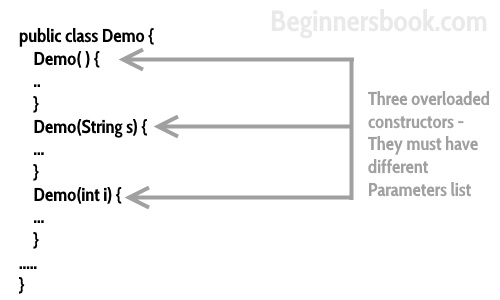
Constructor overloading is a concept of having more than one constructor with different parameters list, in such a way so that each constructor performs a different task. For e.g. Vectorclass has 4 types of constructors. If you do not want to specify the initial capacity and capacity increment then you can simply use default constructor of Vector class like this Vector v = new Vector(); however if you need to specify the capacity and increment then you call the parameterized constructor of Vector class with two int arguments like this: Vector v= new Vector(10, 5);
You must have understood the purpose of constructor overloading. Lets see how to overload a constructor with the help of following java program.
Constructor Overloading Example
Here we are creating two objects of class StudentData. One is with default constructor and another one using parameterized constructor. Both the constructors have different initialization code, similarly you can create any number of constructors with different-2 initialization codes for different-2 purposes.
StudentData.java
class StudentData

{

   private int stuID;

   private String stuName;

   private int stuAge;

   StudentData()

   {

       //Default constructor

       stuID = 100;

       stuName = "New Student";

       stuAge = 18;

   }

   StudentData(int num1, String str, int num2)

   {

       //Parameterized constructor

       stuID = num1;

       stuName = str;

       stuAge = num2;

   }

   //Getter and setter methods

   public int getStuID() {

       return stuID;

   }

   public void setStuID(int stuID) {

       this.stuID = stuID;

   }

   public String getStuName() {

       return stuName;

   }

   public void setStuName(String stuName) {

       this.stuName = stuName;

   }

   public int getStuAge() {

       return stuAge;

   }

   public void setStuAge(int stuAge) {

       this.stuAge = stuAge;

   }

   public static void main(String args[])

   {

       //This object creation would call the default constructor

       StudentData myobj = new StudentData();

       System.out.println("Student Name is: "+myobj.getStuName());

       System.out.println("Student Age is: "+myobj.getStuAge());

       System.out.println("Student ID is: "+myobj.getStuID());

       /*This object creation would call the parameterized

        * constructor StudentData(int, String, int)*/

       StudentData myobj2 = new StudentData(555, "Chaitanya", 25);

       System.out.println("Student Name is: "+myobj2.getStuName());

       System.out.println("Student Age is: "+myobj2.getStuAge());

       System.out.println("Student ID is: "+myobj2.getStuID());

  }

}
Output:
Student Name is: New Student

Student Age is: 18

Student ID is: 100

Student Name is: Chaitanya

Student Age is: 25

Student ID is: 555
Let’s understand the role of this () in constructor overloading
public class OverloadingExample2

{

   private int rollNum;

   OverloadingExample2()

   {

      rollNum =100;

   }

   OverloadingExample2(int rnum)

   {

      this();

      /*this() is used for calling the default

       * constructor from parameterized constructor.

       * It should always be the first statement

       * inside constructor body.

       */

      rollNum = rollNum+ rnum;

   }

   public int getRollNum() {

	  return rollNum;

   }

   public void setRollNum(int rollNum) {

	  this.rollNum = rollNum;

   }

   public static void main(String args[])

   {

	   OverloadingExample2 obj = new OverloadingExample2(12);

       System.out.println(obj.getRollNum());

    }

}
Output:
112
As you can see in the above program that we called the parameterized constructor during object creation. Since we have this() placed in parameterized constructor, the default constructor got invoked from it and initialized the variable rollNum.
Test your skills – Guess the output of the following program
public class OverloadingExample2

{

   private int rollNum;

   OverloadingExample2()

   {

      rollNum =100;

   }

   OverloadingExample2(int rnum)

   {

      rollNum = rollNum+ rnum;

      this();

   }

   public int getRollNum() {

      return rollNum;

   }

   public void setRollNum(int rollNum) {

      this.rollNum = rollNum;

   }

   public static void main(String args[])

   {

       OverloadingExample2 obj = new OverloadingExample2(12);

       System.out.println(obj.getRollNum());

    }

}
Output:
Exception in thread "main" java.lang.Error: Unresolved compilation

problem:Constructor call must be the first statement in a constructor
Program gave a compilation error. Reason: this() should be the first statement inside a constructor.
Another Constructor overloading Example
Another important point to note while overloading a constructor is: When we don’t implement any constructor, the java compiler inserts the default constructor into our code during compilation, however if we implement any constructor then compiler doesn’t do it. See the example below.
public class Demo

{

   private int rollNum;

   //We are not defining a no-arg constructor here

   Demo(int rnum)

   {

      rollNum = rollNum+ rnum;

   }

   //Getter and Setter methods

   public static void main(String args[])

   {

      //This statement would invoke no-arg constructor

      Demo obj = new Demo();

   }

}
Output:
Exception in thread "main" java.lang.Error: Unresolved compilation

problem:The constructor Demo() is undefined
Creating Objects
Creating Objects (The Java™ Tutorials > Learning the Java Language > Classes and Objects) https://docs.oracle.com/javase/tutorial/java/javaOO/objectcreation.html
The Java Tutorials have been written for JDK 8. Examples and practices described in this page don't take advantage of improvements introduced in later releases.
Creating Objects
As you know, a class provides the blueprint for objects; you create an object from a class. Each of the following statements taken from the CreateObjectDemo program creates an object and assigns it to a variable:
Point originOne = new Point(23, 94);

Rectangle rectOne = new Rectangle(originOne, 100, 200);

Rectangle rectTwo = new Rectangle(50, 100);
The first line creates an object of the Point class, and the second and third lines each create an object of the Rectangle class.
Each of these statements has three parts (discussed in detail below):
- Declaration: The code set in bold are all variable declarations that associate a variable name with an object type.
- Instantiation: The new keyword is a Java operator that creates the object.
- Initialization: The new operator is followed by a call to a constructor, which initializes the new object.
Declaring a Variable to Refer to an Object
Previously, you learned that to declare a variable, you write:
type name;
This notifies the compiler that you will use name to refer to data whose type is type. With a primitive variable, this declaration also reserves the proper amount of memory for the variable.
You can also declare a reference variable on its own line. For example:
Point originOne;
If you declare originOne like this, its value will be undetermined until an object is actually created and assigned to it. Simply declaring a reference variable does not create an object. For that, you need to use the new operator, as described in the next section. You must assign an object to originOne before you use it in your code. Otherwise, you will get a compiler error.
A variable in this state, which currently references no object, can be illustrated as follows (the variable name, originOne, plus a reference pointing to nothing):

Instantiating a Class
The new operator instantiates a class by allocating memory for a new object and returning a reference to that memory. The new operator also invokes the object constructor.
Note: The phrase "instantiating a class" means the same thing as "creating an object." When you create an object, you are creating an "instance" of a class, therefore "instantiating" a class.
The new operator requires a single, postfix argument: a call to a constructor. The name of the constructor provides the name of the class to instantiate.
The new operator returns a reference to the object it created. This reference is usually assigned to a variable of the appropriate type, like:
Point originOne = new Point(23, 94);
The reference returned by the new operator does not have to be assigned to a variable. It can also be used directly in an expression. For example:
int height = new Rectangle().height;
This statement will be discussed in the next section.
Initializing an Object
Here's the code for the Point class:
public class Point {

    public int x = 0;

    public int y = 0;

    //constructor

    public Point(int a, int b) {

        x = a;

        y = b;

    }

}
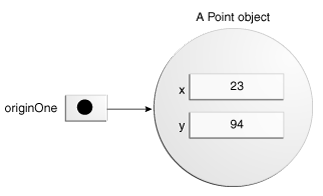
This class contains a single constructor. You can recognize a constructor because its declaration uses the same name as the class and it has no return type. The constructor in the Point class takes two integer arguments, as declared by the code (int a, int b). The following statement provides 23 and 94 as values for those arguments:
Point originOne = new Point(23, 94);
The result of executing this statement can be illustrated in the next figure:
Here's the code for the Rectangle class, which contains four constructors:
public class Rectangle {

    public int width = 0;

    public int height = 0;

    public Point origin;

    // four constructors

    public Rectangle() {

        origin = new Point(0, 0);

    }

    public Rectangle(Point p) {

        origin = p;

    }

    public Rectangle(int w, int h) {

        origin = new Point(0, 0);

        width = w;

        height = h;

    }

    public Rectangle(Point p, int w, int h) {

        origin = p;

        width = w;

        height = h;

    }

    // a method for moving the rectangle

    public void move(int x, int y) {

        origin.x = x;

        origin.y = y;

    }

    // a method for computing the area of the rectangle

    public int getArea() {

        return width * height;

    }

}
Each constructor lets you provide initial values for the rectangle's origin, width, and height, using both primitive and reference types. If a class has multiple constructors, they must have different signatures. The Java compiler differentiates the constructors based on the number and the type of the arguments. When the Java compiler encounters the following code, it knows to call the constructor in the Rectangle class that requires a Point argument followed by two integer arguments:
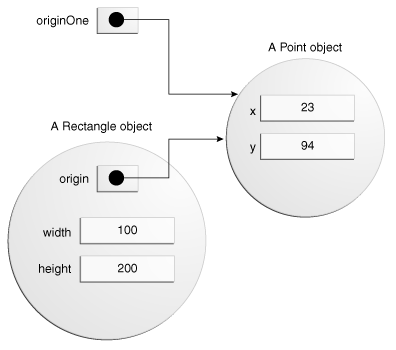
Rectangle rectOne = new Rectangle(originOne, 100, 200);
This calls one of Rectangle's constructors that initializes origin to originOne. Also, the constructor sets width to 100 and height to 200. Now there are two references to the same Point object—an object can have multiple references to it, as shown in the next figure:
The following line of code calls the Rectangle constructor that requires two integer arguments, which provide the initial values for width and height. If you inspect the code within the constructor, you will see that it creates a new Point object whose x and y values are initialized to 0:
Rectangle rectTwo = new Rectangle(50, 100);
The Rectangle constructor used in the following statement doesn't take any arguments, so it's called a no-argument constructor:
Rectangle rect = new Rectangle();
All classes have at least one constructor. If a class does not explicitly declare any, the Java compiler automatically provides a no-argument constructor, called the default constructor. This default constructor calls the class parent's no-argument constructor, or the Object constructor if the class has no other parent. If the parent has no constructor (Object does have one), the compiler will reject the program.
Constructor Overloading in Java with examples 构造方法重载 Default constructor 默认构造器 缺省构造器 创建对象 类实例化的更多相关文章
- 074、Java面向对象之构造方法重载
01.代码如下: package TIANPAN; class Book { // 定义一个新的类 private String title; // 书的名字 private double price ...
- Default Constructor的构造操作
Default Constructor的构造操作 C++ Annotated Reference Manual书中的Section 12.1说过:default constructor 只有在编译器需 ...
- C++对象模型(一):The Semantics of Constructors The Default Constructor (默认构造函数什么时候会被创建出来)
本文是 Inside The C++ Object Model, Chapter 2的部分读书笔记. C++ Annotated Reference Manual中明确告诉我们: default co ...
- C++对象模型——Default Constructor的建构操作(第二章)
第2章 构造函数语意学 (The Semantics of Constructor) 关于C++,最常听到的一个抱怨就是,编译器背着程序猿做了太多事情.Conversion运算符就是最常被引用的 ...
- 构造函数语义学——Default Constructor篇
构造函数语义学--Default Constructor 篇 这一章原书主要分析了:编译器关于对象构造过程的干涉,即在对象构造这个过程中,编译器到底在背后做了什么 这一章的重点在于 default c ...
- The Semantics of Constructors: The Default Constructor (默认构造函数什么时候会被创建出来)
本文是 Inside The C++ Object Model, Chapter 2的部分读书笔记. C++ Annotated Reference Manual中明确告诉我们: default co ...
- Java 重写(Overriding)和重载(Overloading)
方法的重写(Overriding)和重载(Overloading)是java多态性的不同表现. 重写是父类与子类之间多态性的一种表现 重载是一类中多态性的一种表现.
- Java方法、构造方法的重载;创建对象;调用方法
方法的重载 概念:多个同名但是不同参数的方法称为方法的重载 作用:编译器会根据调用时传递的实际参数自动判断具体调用的是哪个重载方法 特点:方法名相同:同一作用域:参数不同:数量不同 类型不同 顺序不同 ...
- Java入门:构造方法
什么是构造方法 类体中有两大形式的成员,其中一个是成员方法(另一个就是成员变量啦~).成员方法又分两种,一种是普通成员方法,另一种是构造方法(有的资料中也称之为构造函数). 所谓构造方法,就是这个类在 ...
随机推荐
- php 输出带变量字符串(echo 函数的应用)
转自: http://www.cnblogs.com/devcjq/articles/2306150.html 学习PHP从最简单的开始:echo, print<?php$temp = arr ...
- Sharepoint 2013 Workflow Error
问题: (1)提示“reload the page and then start the workflow”错误 (2)提示“Unable to properly communicate with t ...
- 数字转人民币大写(SQL SERVER)
--数字转人民币大写NumToRMB ---新建方法create FUNCTION dbo.NumToRMB (@num numeric(14,5)) RETURNS varchar(100) ...
- mysql数据库中,查看当前支持的字符集有哪些?字符集默认的collation的名字?
需求描述: mysql数据库支持很多字符集,那么如何查看当前的mysql版本中支持的或者说可用的字符集有什么呢? 操作过程: 1.使用show character set的方式获取当前版本中支持的字符 ...
- parameter "timeout" in socketchannel does not work
// Accept the connection and make it non-blocking SocketChannel socketChannel = serverSocketChannel. ...
- 百度地图出现UnsatisfiedLinkError: Native method not found: com.baidu...
这是由于导入os文件方式引起 解决办法有两种: 第一种: 弄一个文件夹so/armeabi,把所有的so全部放进去.结构就是so/armeabi/a.so,b.so,c.so 然后压缩这个文件夹成为s ...
- Google Inc.:Google APIs:23' 解决方案
在导入一个项目是,出现 Unable to resolve target 'Google Inc.:Google APIs:6'第一种解决方法: compileSdkVersion 23 改成 com ...
- Ubuntu13.10:[3]如何开启SSH SERVER服务
作为最新版本的UBUNTU系统而言,开源,升级全部都不在话下.传说XP已经停止补丁更新了,使用UBUNTU也是一个很好的选择.ubuntu默认安装完成后只有ssh-agent(客户端模式),宾哥百度经 ...
- 复习前面一个月的学习C#感觉道路好艰难啊
今天是复习前面学习的内容,感觉这一个月来真的学习了很多,但是掌握的不好,好多都是在老师讲完课后做起来练习感觉这知识用起来蛮轻松地,但是经过昨天和今天的复习发现好多还是给忘记啦,甚是失落啊,刚开始就知道 ...
- cocos2dx游戏--欢欢英雄传说--添加游戏背景
经过一段时间的学习cocos2dx,接下来我想要实践开发一个小游戏,我把它命名为“欢欢英雄传说”,项目名将取为HuanHero.环境:cocos2dx环境:cocos2d-x 3.11.1IDE:Co ...