
ConstraintLayout使用
引言
ConstraintLayout是一个ViewGroup,允许您以灵活的方式定位和调整小部件的方法,项目中的布局嵌套问题对项目性能有着不小的威胁,布局能实现扁平化的话会让软件性能得到很大的提升,而ConstraintLayout就是为了解决布局嵌套问题,提示项目的性能。官文有详细对比ConstraintLayout的性能优势。
使用方式:implementation 'com.android.support.constraint:constraint-layout:1.1.3'
Relative positioning(相对定位)
ConstraintLayout 最基本的属性控制有以下几个,即 layout_constraintXXX_toYYYOf 格式的属性,即将“View A”的方向 XXX 置于 “View B”的方向 YYY 。View B 可以是父容器即 ConstraintLayout ,用“parent”来表示。
- layout_constraintLeft_toLeftOf:View A 与 View B 左对齐
- layout_constraintLeft_toRightOf:View A左边置于View B的右边
- layout_constraintTop_toTopOf:View A顶部与View B顶部对齐
- layout_constraintBaseline_toBaselineOf:View A 内部文字与 View B 内部文字对齐
- layout_constraintRight_toLeftOf:以下类似
- layout_constraintRight_toRightOf
- layout_constraintTop_toBottomOf
- layout_constraintBottom_toTopOf
- layout_constraintBottom_toBottomOf
- layout_constraintStart_toEndOf
- layout_constraintStart_toStartOf
- layout_constraintEnd_toStartOf
- layout_constraintEnd_toEndOf
例如:TextView在Button的底部对齐,如果想设置两个View的间距,可以使用android:layout_marginXXX来设置,但其中一个View是Gone的,还需要保存间距可以使用app:layout_goneMarginXXX来设置。
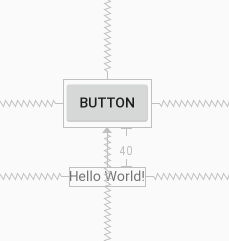
<TextView

        android:layout_width="wrap_content"

        android:layout_height="wrap_content"

        android:text="Hello World!"

        app:layout_constraintLeft_toLeftOf="parent"

        app:layout_constraintRight_toRightOf="parent"

        android:layout_marginTop="40dp"

        app:layout_constraintTop_toBottomOf="@+id/button"/>

<Button

        android:text="Button"

        android:layout_width="wrap_content"

        android:layout_height="wrap_content"

        android:id="@+id/button"

        app:layout_constraintBottom_toBottomOf="parent"

        app:layout_constraintTop_toTopOf="parent"

        app:layout_constraintEnd_toEndOf="parent"

        app:layout_constraintStart_toStartOf="parent"/>
Bias(偏压)
相反的约束时的默认设置是使窗口小部件居中; 但是您可以使用偏差属性调整定位以使一侧偏向另一侧。
* layout_constraintHorizontal_bias:横向偏压
* layout_constraintVertical_bias:竖向偏压例如,想把Button向右横向偏压0.6
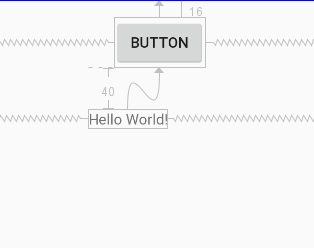
<TextView

        android:layout_width="wrap_content"

        android:layout_height="wrap_content"

        android:text="Hello World!"

        app:layout_constraintLeft_toLeftOf="parent"

        app:layout_constraintRight_toRightOf="parent"

        android:layout_marginTop="40dp"

        app:layout_constraintTop_toBottomOf="@+id/button"/>

<Button

        android:text="@string/button"

        android:layout_width="wrap_content"

        android:layout_height="wrap_content"

        android:id="@+id/button"

        android:layout_marginTop="16dp"

        app:layout_constraintTop_toTopOf="parent"

        app:layout_constraintEnd_toEndOf="parent"

        app:layout_constraintStart_toStartOf="parent"

        app:layout_constraintHorizontal_bias="0.6"/>
Circular positioning(循环定位)
以角度和距离约束窗口小部件中心相对于另一个窗口小部件中心,这允许您将小部件放在圆上,可以使用以下属性。
* layout_constraintCircle :引用另一个小部件ID
* layout_constraintCircleRadius :到其他小部件中心的距离
* layout_constraintCircleAngle :小部件应该处于哪个角度(以度为单位,从0到360)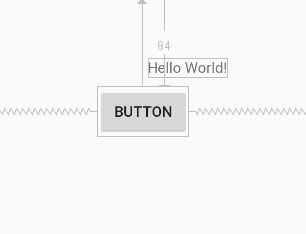
<Button

        android:text="@string/button"

        android:layout_width="wrap_content"

        android:layout_height="wrap_content"

        android:id="@+id/button"

        app:layout_constraintTop_toTopOf="parent"

        app:layout_constraintEnd_toEndOf="parent"

        app:layout_constraintStart_toStartOf="parent" android:layout_marginTop="84dp"

        app:layout_constraintHorizontal_bias="0.547"/>

<TextView

        android:layout_width="wrap_content"

        android:layout_height="wrap_content"

        android:text="Hello World!"

        app:layout_constraintCircle="@+id/button"

        app:layout_constraintCircleRadius="60dp"

        app:layout_constraintCircleAngle="45"/>
Constraints(约束)
将维度设置为WRAP_CONTENT,在1.1之前的版本中,它们将被视为文字维度 - 这意味着约束不会限制生成的维度。虽然通常这足够,但在某些情况下,您可能希望使用WRAP_CONTENT,但仍然强制执行约束以限制生成的维度。在这种情况下,您可以添加一个相应的属性。
* app:layout_constrainedWidth=”true|false”
* app:layout_constrainedHeight=”true|false”当维度设置为时MATCH_CONSTRAINT,默认行为是使结果大小占用所有可用空间,可以使用以下属性。
* layout_constraintWidth_min和layout_constraintHeight_min:将设置此维度的最小大小
* layout_constraintWidth_max和layout_constraintHeight_max:将设置此维度的最大大小
* layout_constraintWidth_percent和layout_constraintHeight_percent:将此维度的大小设置为父级的百分比要使用百分比,您需要设置以下内容:
* 尺寸应设置为MATCH_CONSTRAINT(0dp)
* 默认值应设置为百分比app:layout_constraintWidth_default="percent" 或app:layout_constraintHeight_default="percent"
* 然后将layout_constraintWidth_percent 或layout_constraintHeight_percent属性设置为0到1之间的值Ratio(比)
可以将view的一个维度定义为另一个维度的比率。为此,您需要将至少一个约束维度设置为0dp(即MATCH_CONSTRAINT),并将该属性layout_constraintDimensionRatio设置为给定比率。例如
<Button android:layout_width="wrap_content"

        android:layout_height="0dp"

        app:layout_constraintDimensionRatio="1:1" />
两个尺寸都设置为MATCH_CONSTRAINT(0dp),您也可以使用比率,系统设置满足所有约束的最大尺寸并保持指定的纵横比。要根据另一个特定边的尺寸限制一个特定边,可以预先附加W,“或” H,分别约束宽度或高度。例如
<Button android:layout_width="0dp"

        android:layout_height="0dp"

        app:layout_constraintDimensionRatio="H,16:9"

        app:layout_constraintBottom_toBottomOf="parent"

        app:layout_constraintTop_toTopOf="parent"/>
Chains(链)
设置属性layout_constraintHorizontal_chainStyle或layout_constraintVertical_chainStyle链的第一个元素时,链的行为将根据指定的样式更改(默认值CHAIN_SPREAD)。
- CHAIN_SPREAD - 元素将展开(默认样式)
- 加权链接CHAIN_SPREAD模式,如果设置了一些小部件MATCH_CONSTRAINT,它们将分割可用空间
- CHAIN_SPREAD_INSIDE - 类似,但链的端点不会分散
- CHAIN_PACKED - 链条的元素将被包装在一起。然后,子项的水平或垂直偏差属性将影响打包元素的定位
Optimizer(优化器)
通过标记app:layout_optimizationLevel添加到ConstraintLayout元素来决定应用哪些优化。
* none : 未应用任何优化
* standard : 默认。仅优化直接和障碍约束
* direct : 优化直接约束
* barrier : 优化障碍限制
* chain : 优化链约束
* dimensions : 优化维度度量,减少匹配约束元素的度量数量
ConstraintLayout使用的更多相关文章
- [转 载] android 谷歌 新控件(约束控件 )ConstraintLayout 扁平化布局
序 在Google IO大会中不仅仅带来了Android Studio 2.2预览版,同时带给我们一个依赖约束的库. 简单来说,她是相对布局的升级版本,但是区别与相对布局更加强调约束.何为约束,即控件 ...
- 依赖ConstraintLayout报错,Could not find *****,Failed to resolve:*****
ConstraintLayout 约束布局,AndroidStudio2.2中新增功能之一,可以先去看看这篇文章 Android新特性介绍,ConstraintLayout完全解析,2.3版本的And ...
- ConstraintLayout+radioGroup做一个tab.简单好用。
主页tab是必须会有的,各种实现也很多.各有千秋.但目标都是简单.可控.今天用ConstraintLayout+radioGroup做一个tab.简单性可控性都还可以.本文目的把ConstraintL ...
- ConstraintLayout
ConstraintLayout使用笔记 具体使用参考:http://blog.csdn.net/guolin_blog/article/details/53122387 ConstraintLayo ...
- Say Hello to ConstraintLayout
ConstraintLayout介绍 ConstraintLayout让你可以在很平的view结构(没有多层布局嵌套)中构建一个复杂的布局结构. 有点像RelativeLayout, 所有的view都 ...
- ConstraintLayout知识记录
一.准备工作 1. 确保SDK Tools已经下载了ContraintLayout的支持库. 2. gradle中增加对ConstraintLayout的依赖. compile 'com.andr ...
- ConstraintLayout布局介绍.md
一.介绍 ConstraintLayout是一个ViewGroup允许您以灵活的方式定位和调整窗口小部件的窗口.从api9开始支持.继承自viewGroup; 二.具体使用 这个控件的具体分类主要有如 ...
- Android Material Design控件使用(一)——ConstraintLayout 约束布局
参考文章: 约束布局ConstraintLayout看这一篇就够了 ConstraintLayout - 属性篇 介绍 Android ConstraintLayout是谷歌推出替代PrecentLa ...
- Gradle 同步时报错,Could not find com.android.support.constraint:constraint-layout:1.0.0-alpha8的解决方法
Error:Could not find com.android.support.constraint:constraint-layout:1.0.0-alpha8. 原因: SDK 中可能是没有安装 ...
- Android 开发 ConstraintLayout详解
implementation 'androidx.constraintlayout:constraintlayout:2.0.0-alpha3' app:layout_constraintHorizo ...
随机推荐
- 【腾讯Bugly干货分享】iOS App 签名的原理
本文来自 WeRead 团队博客: http://wereadteam.github.io/ iOS 签名机制挺复杂,各种证书,Provisioning Profile,entitlements,Ce ...
- PHP安装BCMath扩展
我们都知道,大多数编程语言对于浮点型数据格式遵循 IEEE 754 标准,PHP也不例外,这就会导致在使用浮点数运算的过程中会有精度丢失的问题.PHP提供了BCMath库来支持更加精确的计算.但是我的 ...
- SpringMVC框架一:搭建测试
这里做一个Demo:展示商品列表 新建Dynamic Web Project: 导入jar包,放在lib下: 放入Lib文件夹之后,会自动build path 接下来配置web.xml: <?x ...
- C#8个常用的字符串的操作
1.根据单个分隔字符用split截取 string st="GT123_1"; string[] sArray=st.split('_'); 输出:sArray[0]=" ...
- Linux基本命令大全
linux的基本命令 增 mKdir test # 创建一个名为test的文件夹 mkdir -p test1/test2/test3 # 递归创建directory mkdir -p {aaa,bb ...
- SpringBoot集成Thymeleaf模板引擎
简单介绍 目前在JavaEE领域有几中比较常用的模板引擎,分别是Jsp.Velocity.Freemarker.Thymeleaf,对Freemark语法不是特别熟悉,不过对于前端页面渲染效率来说,j ...
- Zookeeper 集群安装配置,超详细,速度收藏!
今天,栈长分享下 Zookeeper 的集群安装及配置. 下载 下载地址:http://zookeeper.apache.org/ 下载过程就不说了,我们下载了最新的zookeeper-3.4.11. ...
- java mongodb连接配置实践——生产环境最优
之前百度,google了很多,发现并没有介绍mongodb生产环境如何配置的文章, 当时想参考下都不行, 所以写篇文章,大家可以一块讨论下. 1. MongoClientOptions中的连接池配置: ...
- mysql 开发进阶篇系列 21 磁盘I/O问题(RAID)
一.概述 作为应用系统的持久化层,不管数据库采取了什么样的Cache机制,数据库最终总是要将数据储存到可以长久保存的I/O设备磁盘上.但磁盘的存取速度显然要比cpu,ram的速度慢很多.因此,对于比较 ...
- Android Metro风格的Launcher开发系列第三篇
前言: 各位小伙伴,又到了每周更新文章了时候了,本来是周日能发出来呢,这不是赶上清明节吗,女王大人发话了,清明节前两天半陪她玩,只留给我周一下午半天时间写博客,哪里有女王哪里就有压迫呀有木有!好了闲话 ...