
SPring整合Mybatis方式一
Spring整合Mybatis
需要maven包:
mysql-connector-java 5.1.47,
mybatis 3.5.2,
spring-webmvc 5.2.2.RELEASE,
spring-jdbc 5.2.2.RELEASE,
aspectjweaver 1.8.13
mybatis-spring 2.0.2,
目录:
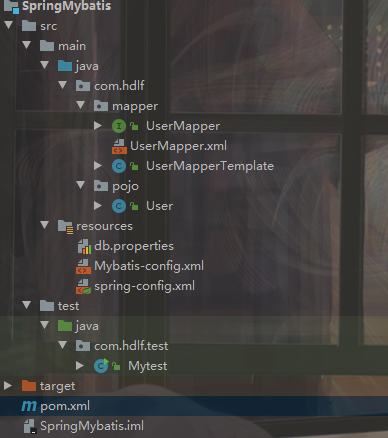
pom.xml配置:
<?xml version="1.0" encoding="UTF-8"?>

<project xmlns="http://maven.apache.org/POM/4.0.0"

         xmlns:xsi="http://www.w3.org/2001/XMLSchema-instance"

         xsi:schemaLocation="http://maven.apache.org/POM/4.0.0 http://maven.apache.org/xsd/maven-4.0.0.xsd">

    <modelVersion>4.0.0</modelVersion>

    <groupId>org.example</groupId>

    <artifactId>SpringMybatis</artifactId>

    <version>1.0-SNAPSHOT</version>

    <dependencies>

        <!-- https://mvnrepository.com/artifact/mysql/mysql-connector-java -->

        <dependency>

            <groupId>mysql</groupId>

            <artifactId>mysql-connector-java</artifactId>

            <version>5.1.47</version>

        </dependency>

        <!-- https://mvnrepository.com/artifact/org.mybatis/mybatis -->

        <dependency>

            <groupId>org.mybatis</groupId>

            <artifactId>mybatis</artifactId>

            <version>3.5.2</version>

        </dependency>

        <!-- https://mvnrepository.com/artifact/org.springframework/spring-webmvc -->

        <dependency>

            <groupId>org.springframework</groupId>

            <artifactId>spring-webmvc</artifactId>

            <version>5.2.2.RELEASE</version>

        </dependency>

        <!-- https://mvnrepository.com/artifact/org.springframework/spring-jdbc -->

        <dependency>

            <groupId>org.springframework</groupId>

            <artifactId>spring-jdbc</artifactId>

            <version>5.2.2.RELEASE</version>

        </dependency>

        <!-- https://mvnrepository.com/artifact/org.aspectj/aspectjweaver -->

        <dependency>

            <groupId>org.aspectj</groupId>

            <artifactId>aspectjweaver</artifactId>

            <version>1.8.13</version>

        </dependency>

        <!-- https://mvnrepository.com/artifact/org.mybatis/mybatis-spring -->

        <dependency>

            <groupId>org.mybatis</groupId>

            <artifactId>mybatis-spring</artifactId>

            <version>2.0.2</version>

        </dependency>

    </dependencies>

    <!--maven由于他的约定大于配置,我们之后可以能遇到我们写的配置文件,无法被处理或生效问题,解决方案-->

    <build>

        <resources>

            <resource>

                <directory>src/main/java</directory>

                <includes>

                    <include>**/*.properties</include>

                    <include>**/*.xml</include>

                </includes>

                <filtering>false</filtering>

            </resource>

            <resource>

                <directory>src/main/resources</directory>

                <includes>

                    <include>**/*.properties</include>

                    <include>**/*.xml</include>

                </includes>

                <filtering>false</filtering>

            </resource>

        </resources>

    </build>

</project>
Mybatis-config.xml配置文件:
因为是spring可以完全掌管Mybatis但把mybatis的一些配置留给Mybatis-config比较好
<?xml version="1.0" encoding="UTF-8" ?>

<!DOCTYPE configuration

        PUBLIC "-//mybatis.org//DTD Config 3.0//EN"

        "http://mybatis.org/dtd/mybatis-3-config.dtd">

<configuration>

    <typeAliases>

        <package name="com.hdlf.pojo"/>

    </typeAliases>

    <mappers>

        <mapper resource="com/hdlf/mapper/UserMapper.xml"/>

    </mappers>

</configuration>
UserMapper接口:
package com.hdlf.mapper;

import com.hdlf.pojo.User;

import java.util.List;

public interface UserMapper {

    public List<User> getalluser();

}
UserMapper.xml配置:
<?xml version="1.0" encoding="UTF-8" ?>

<!DOCTYPE mapper

        PUBLIC "-//mybatis.org//DTD Config 3.0//EN"

        "http://mybatis.org/dtd/mybatis-3-mapper.dtd">

<mapper namespace="com.hdlf.mapper.UserMapper">

    <select id="getalluser" resultType="User">

        select * from mybatis.user

    </select>

</mapper>
User实体类:
package com.hdlf.pojo;

public class User {

    private int id;

    private String name;

    private String pwd;

    public User() {

    }

    public User(int id, String name, String pwd) {

        this.id = id;

        this.name = name;

        this.pwd = pwd;

    }

    public int getId() {

        return id;

    }

    public void setId(int id) {

        this.id = id;

    }

    public String getName() {

        return name;

    }

    public void setName(String name) {

        this.name = name;

    }

    public String getPwd() {

        return pwd;

    }

    public void setPwd(String pwd) {

        this.pwd = pwd;

    }

    @Override

    public String toString() {

        return "User{" +

                "id=" + id +

                ", name='" + name + '\'' +

                ", pwd='" + pwd + '\'' +

                '}';

    }

}
重点,spring-config.xml配置:
根据官网上可以找到:
DataSource使用spring的数据源可以替换mybatis的配置,需要使用DriverManagerDataSource
sqlSessionFactory绑定mybatis配置文件,重点可以配合mybatis配置文件,而mybatis配置文件可以关联mappers
SqlSessionTemplate就是常用的sqlsession只是封装了,但需要构造器注入,把sqlSessionFactory绑定的配置注入到里面即可
<?xml version="1.0" encoding="UTF-8"?>
<beans xmlns="http://www.springframework.org/schema/beans"
xmlns:xsi="http://www.w3.org/2001/XMLSchema-instance"
xsi:schemaLocation="http://www.springframework.org/schema/beans
http://www.springframework.org/schema/beans/spring-beans.xsd"> <!--DataSource:使用spring的数据源替换mybatis的配置
使用spring提供的jdbc:org.springframework.jdbc.datasource
-->
<bean id="dataSource" class="org.springframework.jdbc.datasource.DriverManagerDataSource">
<property name="driverClassName" value="com.mysql.jdbc.Driver"/>
<property name="url" value="jdbc:mysql://localhost:3306/mybatis?useSSL=true&UseUnicode=true&characterEncoding=UTF-8&serverTimezone=UTC"/>
<property name="username" value="root"/>
<property name="password" value="root"/>
</bean>
<!--sqlSessionFactory-->
<bean id="sqlSessionFactory" class="org.mybatis.spring.SqlSessionFactoryBean">
<property name="dataSource" ref="dataSource" />
<!--绑定mybatis配置文件-->
<property name="configLocation" value="classpath:Mybatis-config.xml"/>
</bean> <!--SqlSessionTemplate:就是mybatis经常使用的SqlSession-->
<bean id="SqlSession" class="org.mybatis.spring.SqlSessionTemplate">
<!--只能使用构造器注入sqlSessionFactory,因为没有set方法-->
<constructor-arg index="0" ref="sqlSessionFactory"></constructor-arg>
</bean> <bean id="usermapper" class="com.hdlf.mapper.UserMapperTemplate">
<property name="SqlSession" ref="SqlSession"></property> </bean>
</beans>
UserMapperTemplate实现类:
实现Usermapper的方法,封装SqlSessionTemplate,然后用getalluesr返回mapper.getalluser();所有数据
package com.hdlf.mapper;

import com.hdlf.pojo.User;

import org.mybatis.spring.SqlSessionTemplate;

import java.util.List;

public class UserMapperTemplate implements UserMapper {

    private SqlSessionTemplate SqlSession;

    public void setSqlSession(SqlSessionTemplate sqlSession) {

        this.SqlSession = sqlSession;

    }

    public List<User> getalluser() {

        UserMapper mapper = SqlSession.getMapper(UserMapper.class);

        return mapper.getalluser();

    }

}
测试类:
不用配置mybatis之类的麻烦的配置
package com.hdlf.test;

import com.hdlf.mapper.UserMapper;

import com.hdlf.pojo.User;

import org.springframework.context.ApplicationContext;

import org.springframework.context.support.ClassPathXmlApplicationContext;

import java.io.IOException;

public class Mytest {

    public static void main(String[] args) throws IOException {

        ApplicationContext context = new ClassPathXmlApplicationContext("spring-config.xml");

        UserMapper userMapper = context.getBean("usermapper", UserMapper.class);

        for (User user : userMapper.getalluser()) {

            System.out.println(user);

        }

    }

}
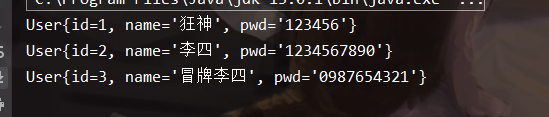
结果:
SPring整合Mybatis方式一的更多相关文章
- spring 整合 mybatis 中数据源的几种配置方式
因为spring 整合mybatis的过程中, 有好几种整合方式,尤其是数据源那块,经常看到不一样的配置方式,总感觉有点乱,所以今天有空总结下. 一.采用org.mybatis.spring.mapp ...
- Spring学习总结(五)——Spring整合MyBatis(Maven+MySQL)二
接着上一篇博客<Spring整合MyBatis(Maven+MySQL)一>继续. Spring的开放性和扩张性在J2EE应用领域得到了充分的证明,与其他优秀框架无缝的集成是Spring最 ...
- spring整合mybatis(hibernate)配置
一.Spring整合配置Mybatis spring整合mybatis可以不需要mybatis-config.xml配置文件,直接通过spring配置文件一步到位.一般需要具备如下几个基本配置. 1. ...
- Mybatis学习(六)————— Spring整合mybatis
一.Spring整合mybatis思路 非常简单,这里先回顾一下mybatis最基础的根基, mybatis,有两个配置文件 全局配置文件SqlMapConfig.xml(配置数据源,全局变量,加载映 ...
- Spring整合MyBatis 你get了吗?
Spring整合MyBatis 1.整体架构dao,entity,service,servlet,xml 2..引入依赖 <dependencies> <dependency> ...
- Mybatis(六) Spring整合mybatis
心莫浮躁~踏踏实实走,一步一个脚印,就算不学习,玩,能干嘛呢?人生就是那样,要找点有意思,打发时间的事情来做,而钻研技术,动脑动手的过程,还是比其他工作更有意思些~ so,努力啥的都是强迫自己做自以为 ...
- 简单探讨spring整合mybatis时sqlSession不需要释放关闭的问题
https://blog.csdn.net/RicardoDing/article/details/79899686 近期,在使用spring和mybatis框架编写代码时,sqlSession不需要 ...
- Spring整合MyBatis(三)sqlSessionFactory创建
摘要: 本文结合<Spring源码深度解析>来分析Spring 5.0.6版本的源代码.若有描述错误之处,欢迎指正. 目录 一.SqlSessionFactoryBean的初始化 二.获取 ...
- Spring整合MyBatis(二)Spring整合MyBatis
摘要: 本文结合<Spring源码深度解析>来分析Spring 5.0.6版本的源代码.若有描述错误之处,欢迎指正. 了解了MyBatis的独立使用过程后,我们再看看它与Spring整合的 ...
随机推荐
- Perl 笔记
目录 Perl 学习 常用记录 基础 1. 运行perl 2. 字符串 3. 变量 4. 条件 5. 循环 6. 运算符 7. 时间日期 8. 子程序(函数) 9. 引用 10. 格式化输出 11. ...
- IDEA 创建 Spring Boot 多模块项目(Multi Modules)
本准备写点代码实例放到网站,太多的模板,反而每次新建工程的时候很麻烦.于是准备把这个章节的内容提前先讲讲.正好把这个代码也管理起来.话说这个多模块功能还挺爽. 写过 C# 项目用过 Visual St ...
- socket中文奇数个出现乱码的解决办法
用MyEclipse试了一下JAVA获取系统正在运行进程代码,结果Console输出的时候中文部分输出为乱码,在网上找了很多办法,都没有解决问题.后来发现一个方法,解决了问题,特此分享. 下面成功解决 ...
- Mac 下 vim 常用命令
vim 三种模式:命令模式.插入模式.底线命令模式. 切换模式: 命令模式: 启动 vim 进入命令模式: i 切换到插入模式,以输入字符. x 删除当前光标所在处的字符. : 切换到底线命令 ...
- Oracle常用SQL时间函数
1.查询当前日期和时间 select sysdate from dual; 2.查询本月最后一天 select last_day(sysdate) from dual; 3.查询前后多少月 ) fro ...
- [运维] 如何解决 nginx: [emerg] bind() to 0.0.0.0:80 failed (13: Permission denied)
环境: 虚拟机 linux centos 7 64 当时正在配置 nginx , 由于解压后的 nginx 默认安装位置是在 /usr/local/ 目录下, 而这个目录是 root 用户才有权限操作 ...
- 如何用 pycharm 调试 airflow
airflow 和 pycharm 相关基础知识请看其他博客 我们在使用 airflow的 dag时. 每次写完不知道对不对的,总不能到页面环境中跑一下,等到报错再调试吧.这是很让人恼火的事情 这里我 ...
- 将网站转换为Web应用程序
1.新建web应用程序,清除应用程序中默认生成的文件 2.将网站中的文件复制到web应用程序中 3.将网站的App_Code文件重命名 4.右键web应用程序,点击将转换为应用程序项目 5.添加引用 ...
- 五年C语言程序员,是深耕技术还是走管理?
从进入程序员行列开始(2013年6月),到现在为止(2019年2月),已经有五年半了. 一路波折,已经从无知菜鸟走到了意识觉醒的老鸟了. 薪资变化情况如下: 2013年:2000元/月 ( ...
- unique() 函数详解
简介 顾名思义,unique,独一无二的.这个函数可以对容器中的元素进行"去重". 但是需要注意,这里的"去重",并没有把重复的元素删除,只是不重复的元素放到了 ...