
tensorflow-gpu安装遇到的坑
tensorflow-gpu安装好导入,一直出现以下错误
折腾了好久。
错误之前也按照中国官网安装及配置各环境变量:https://tensorflow.google.cn/install/gpu
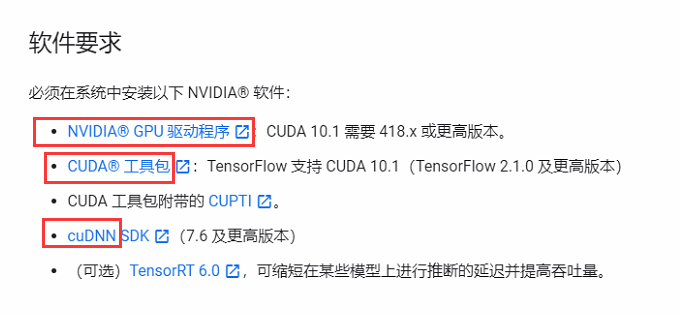
其次基于anaconda+Python3.7安装tensorflow_gpu-2.2.0-cp37也安装成功。
但import tensorflow as tf总出现以下错误。

ImportError                               Traceback (most recent call last)

D:\soft\anaconda3\lib\site-packages\tensorflow\python\pywrap_tensorflow.py in <module>

     57

---> 58   from tensorflow.python.pywrap_tensorflow_internal import *

     59

D:\soft\anaconda3\lib\site-packages\tensorflow\python\pywrap_tensorflow_internal.py in <module>

     27             return _mod

---> 28     _pywrap_tensorflow_internal = swig_import_helper()

     29     del swig_import_helper

D:\soft\anaconda3\lib\site-packages\tensorflow\python\pywrap_tensorflow_internal.py in swig_import_helper()

     23             try:

---> 24                 _mod = imp.load_module('_pywrap_tensorflow_internal', fp, pathname, description)

     25             finally:

D:\soft\anaconda3\lib\imp.py in load_module(name, file, filename, details)

    241         else:

--> 242             return load_dynamic(name, filename, file)

    243     elif type_ == PKG_DIRECTORY:

D:\soft\anaconda3\lib\imp.py in load_dynamic(name, path, file)

    341             name=name, loader=loader, origin=path)

--> 342         return _load(spec)

    343

ImportError: DLL load failed: 找不到指定的模块。

During handling of the above exception, another exception occurred:

ImportError                               Traceback (most recent call last)

<ipython-input-1-64156d691fe5> in <module>

----> 1 import tensorflow as tf

D:\soft\anaconda3\lib\site-packages\tensorflow\__init__.py in <module>

     39 import sys as _sys

     40

---> 41 from tensorflow.python.tools import module_util as _module_util

     42 from tensorflow.python.util.lazy_loader import LazyLoader as _LazyLoader

     43

D:\soft\anaconda3\lib\site-packages\tensorflow\python\__init__.py in <module>

     48 import numpy as np

     49

---> 50 from tensorflow.python import pywrap_tensorflow

     51

     52 # Protocol buffers

D:\soft\anaconda3\lib\site-packages\tensorflow\python\pywrap_tensorflow.py in <module>

     67 for some common reasons and solutions.  Include the entire stack trace

     68 above this error message when asking for help.""" % traceback.format_exc()

---> 69   raise ImportError(msg)

     70

     71 # pylint: enable=wildcard-import,g-import-not-at-top,unused-import,line-too-long

ImportError: Traceback (most recent call last):

  File "D:\soft\anaconda3\lib\site-packages\tensorflow\python\pywrap_tensorflow.py", line 58, in <module>

    from tensorflow.python.pywrap_tensorflow_internal import *

  File "D:\soft\anaconda3\lib\site-packages\tensorflow\python\pywrap_tensorflow_internal.py", line 28, in <module>

    _pywrap_tensorflow_internal = swig_import_helper()

  File "D:\soft\anaconda3\lib\site-packages\tensorflow\python\pywrap_tensorflow_internal.py", line 24, in swig_import_helper

    _mod = imp.load_module('_pywrap_tensorflow_internal', fp, pathname, description)

  File "D:\soft\anaconda3\lib\imp.py", line 242, in load_module

    return load_dynamic(name, filename, file)

  File "D:\soft\anaconda3\lib\imp.py", line 342, in load_dynamic

    return _load(spec)

ImportError: DLL load failed: 找不到指定的模块。

Failed to load the native TensorFlow runtime.

See https://www.tensorflow.org/install/errors

for some common reasons and solutions.  Include the entire stack trace

above this error message when asking for help.
解决方法:
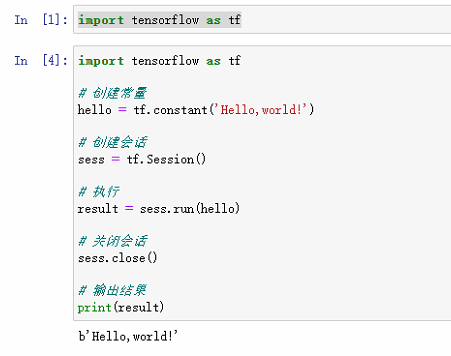
卸载。换版本,pip install tensorflow-gpu==1.15.0
成功:

tensorflow-gpu安装遇到的坑的更多相关文章
- TensorFlow DeepLab教程初稿-tensorflow gpu安装教程
TensorFlow DeepLab教程初稿-tensorflow gpu安装教程 商务合作,科技咨询,版权转让:向日葵,135-4855__4328,xiexiaokui#qq.com Summar ...
- tensorflow -gpu安装,史上最新最简单的途径(不用自己装cuda,cdnn)
tensorflow -gpu安装首先,安装Anoconda1. 官网下载点我: 2.安装 点击 python 3.6 version自动下载x64版,下载好之后,然后安装. 如图,打上勾之后,一路n ...
- 【转】Ubuntu 16.04安装配置TensorFlow GPU版本
之前摸爬滚打总是各种坑,今天参考这篇文章终于解决了,甚是鸡冻\(≧▽≦)/,电脑不知道怎么的,安装不了16.04,就安装15.10再升级到16.04 requirements: Ubuntu 16.0 ...
- Ubuntu 16.04 + CUDA 8.0 + cuDNN v5.1 + TensorFlow(GPU support)安装配置详解
随着图像识别和深度学习领域的迅猛发展,GPU时代即将来临.由于GPU处理深度学习算法的高效性,使得配置一台搭载有GPU的服务器变得尤为必要. 本文主要介绍在Ubuntu 16.04环境下如何配置Ten ...
- Win10上安装Keras 和 TensorFlow(GPU版本)
一. 安装环境 Windows 10 64bit 家庭版 GPU: GeForce GTX1070 Python: 3.5 CUDA: CUDA Toolkit 8.0 GA1 (Sept 2016 ...
- ubuntu16.04下安装TensorFlow(GPU加速)----详细图文教程【转】
本文转载自:https://blog.csdn.net/zhaoyu106/article/details/52793183 le/details/52793183 写在前面 一些废话 接触深度学习已 ...
- Google TensorFlow for GPU安装、配置大坑
Google TensorFlow for GPU安装.配置大坑 从本周一开始(12.05),共4天半的时间,终于折腾好Google TensorFlow for GPU版本,其间跳坑无数,摔得遍体鳞 ...
- 备注: ubt 16.04 安装 gtx 1060 --- 成功运行 tensorflow - gpu
---------------------------------------------------------------------------------------------------- ...
- win10系统下安装TensorFlow GPU版本
首先要说,官网上的指南是最好的指南. https://www.tensorflow.org/install/install_windows 需要FQ看. 想要安装gpu版本的TensorFlow.我们 ...
- 通过Anaconda在Ubuntu16.04上安装 TensorFlow(GPU版本)
一. 安装环境 Ubuntu16.04.3 LST GPU: GeForce GTX1070 Python: 3.5 CUDA Toolkit 8.0 GA1 (Sept 2016) cuDNN v6 ...
随机推荐
- aspnetcore读取配置【源码分析】
总的逻辑 继承 IConfigurationSource 这个接口的子类是配置源 ,其中的build方法,创建并返回对应的ConfigurationProvider. 继承 IConfiguratio ...
- 组织炎症水平高的RA患者接受TNF拮抗剂治疗的效果更好
组织炎症水平高的RA患者接受TNF拮抗剂治疗的效果更好van der Pouw Kraan TC, et al. Ann Rheum Dis. 2008;67(4):563-6.目的:不同患者对TNF ...
- 达标式减量策略又一例证(STRASS研究)
标签: 类风湿关节炎; T2T策略; TNF抑制剂; 药物减停; STRASS研究 达标式减量策略又一例证(STRASS研究): RA维持期个体化减停TNF拮抗剂是可能的 电邮发布日期: 2016年1 ...
- 与TNF拮抗剂治疗AS临床和MRI疗效相关的血清生物标记物
与TNF拮抗剂治疗AS临床和MRI疗效相关的血清生物标记物 PresentID: THU0223 SERUM BIOMARKERS ASSOCIATED WITH CHANGES IN ASDAS A ...
- Java流程控制:用户交互Scanner、选择结构
Java流程控制:用户交互Scanner.选择结构 用户交互Scanner Scanner类用于获取用户的输入 基本语法: Scanner s = new Scanner(System.in);s.c ...
- 《爆肝整理》保姆级系列教程-玩转Charles抓包神器教程(8)-Charles如何进行断点调试
1.简介 Charles和Fiddler一样也有个强大的功能,可以修改发送到服务器的数据包,但是修改前需要拦截,即设置断点.设置断点后,开始拦截接下来所有网页,直到取消断点.这个功能可以在数据包发送之 ...
- PHP实现QQ第三方登录代码
前言: PHP实现QQ快速登录,罗列了三种方法 方法一:面向过程,回调地址和首次触发登录写到了一个方法页面[因为有了if做判断], 方法二,三:面向对象 1.先调用登录方法,向腾讯发送请求,2.腾讯携 ...
- EF Core自动将实体映射到数据库
protected override void OnModelCreating(ModelBuilder modelBuilder) { try { var compilationLibrary = ...
- C语言实现链表的创建与遍历
1 #include <stdio.h> 2 #include <stdlib.h> 3 4 5 typedef struct Node{ 6 int data; 7 stru ...
- Linux route命令修改默认路由优先级
(自测可用)摘自:https://www.cnblogs.com/luoyang712/p/11953256.html 在多个网络连接的情况下,比如以太网和WIFI同时存在的时候,路由表中就会存在多个 ...