
python 飞机大战 实例
飞机大战
#coding=utf-8

import pygame

from pygame.locals import *

import time

import random

class Base(object):

    def __init__(self,x,y,screen,image_name):

        self.x=x

        self.y=y

        self.screen=screen

        self.image=pygame.image.load(image_name).convert()

class BaseBullet(Base):

    def __init__(self,x,y,screen,image_name):

        Base.__init__(self,x,y,screen,image_name)

    def display(self):

        self.screen.blit(self.image,(self.x,self.y))

class Bullet(BaseBullet):

    def __init__(self,x,y,screen):

          BaseBullet.__init__(self,x+40, y-20, screen,"C:/Users/lenovo/Desktop/feiji/bullet-3.gif")

    def move(self):

            self.y-=10

    def judge(self):

        if self.y<0:

            return True

        else:

            return False

 #谁发射 谁创建

class EnemyBullet(BaseBullet):

    def __init__(self,x,y,screen):

         BaseBullet.__init__(self,x+25, y+40, screen,"C:/Users/lenovo/Desktop/feiji/bullet1.png")

    def move(self):

            self.y+=5

    def judge(self):

        if self.y>600:

            return True

        else:

            return False

class BasePlane(Base):

    def __init__(self,x,y,screen,image_name):

        Base.__init__(self,x,y,screen,image_name)

        self.bullet_list=[]#存储子弹

    def display(self):

         #更新飞机的位置

        self.screen.blit(self.image,(self.x,self.y))

        #存放需要删除的对象信息

        needDelItemList=[]

        for i in self.bullet_list:

            if i.judge():

                needDelItemList.append(i)

        for i in needDelItemList:

            self.bullet_list.remove(i)

        #更新及这架飞机发射出的所有子弹的位置

        #子弹移动了 判断每一颗子弹和子弹的位置

        for bullet in self.bullet_list:

            bullet.display()

            bullet.move()

class HeroPlane(BasePlane):

    def __init__(self,screen):#默认有照片 默认有位置

        BasePlane.__init__(self,200,500,screen,"C:/Users/lenovo/Desktop/feiji/hero.gif")

        self.hit=False #表示是否要爆炸

        self.bomb_list=[]#用来存储爆炸时需要的图片

        self.__create_images()

        self.image_num = 0

     #   用来记录while True的次数,当次数达到一定值时才显示一张爆炸的图,然后清空,,当这个次数再次达到时,再显示下一个爆炸效果的图片

        self.image_index = 0#用来记录当前要显示的爆炸效果的图片的序号

    def __create_images(self):

        self.bomb_list.append(pygame.image.load("C:/Users/lenovo/Desktop/feiji/hero_blowup_n1.png"))

        self.bomb_list.append(pygame.image.load("C:/Users/lenovo/Desktop/feiji/hero_blowup_n2.png"))

        self.bomb_list.append(pygame.image.load("C:/Users/lenovo/Desktop/feiji/hero_blowup_n3.png"))

        self.bomb_list.append(pygame.image.load("C:/Users/lenovo/Desktop/feiji/hero_blowup_n4.png"))

    def display(self):

        if self.hit==True:

            self.screen.blit(self.bomb_list[self.image_index],(self.x,self.y))

            self.image_num+=1

            if self.image_num == 5:

                self.image_num=0

                self.image_index+=1

            if self.image_index>3:

                time.sleep(0.1)

                print("failure")

                exit()

        else:

                self.screen.blit(self.image,(self.x, self.y))

            #存放需要删除的对象信息

        needDelItemList=[]

        for i in self.bullet_list:

            if i.judge():

                needDelItemList.append(i)

        for i in needDelItemList:

            self.bullet_list.remove(i)

        #更新及这架飞机发射出的所有子弹的位置

        #子弹移动了 判断每一颗子弹和子弹的位置

        for bullet in self.bullet_list:

            bullet.display()

            bullet.move()

    def bomb(self):

        self.hit = True

    def moveLeft(self):

        self.x-=20

    def moveRight(self):

        self.x+=20

    def moveUp(self):

        self.y-=20

    def moveDown(self):

        self.y+=20

    def fire(self):

        newBullet=Bullet(self.x,self.y,self.screen)

        self.bullet_list.append(newBullet)

class EnemyPlane(BasePlane):

    def __init__(self,screen):

        BasePlane.__init__(self,0,0,screen,"C:/Users/lenovo/Desktop/feiji/enemy0.png")

        self.direction="right"#用来存储飞机默认的显示方向

    def move(self):

        if self.direction=="right":

            self.x+=2

        elif self.direction=="left":

            self.x-=2

        if(self.x>480-50):

            self.direction="left"

        elif(self.x<0):

           self.direction="right"

    def fire(self):

        random_num=random.randint(1,200)

        if random_num==7 or random_num==20:

            self.bullet_list.append(EnemyBullet(self.x, self.y,self.screen))

def key_control(heroPlane):

     for event in pygame.event.get():

            if event.type == QUIT:

                print("exit")

                exit()

            elif event.type == KEYDOWN:

                if event.key == K_a or event.key==K_LEFT:

                    print('left')

                    heroPlane.moveLeft()

                elif event.key == K_d or event.key==K_RIGHT:

                    print('right')

                    heroPlane.moveRight()

                elif event.key == K_w or event.key==K_UP:

                     print('up')

                     heroPlane.moveUp()

                elif event.key ==K_s or event.key==K_DOWN:

                     print('down')

                     heroPlane.moveDown()

                elif event.key == K_SPACE:

                     heroPlane.fire()

                elif event.key == K_b:

                     print('b')

                     heroPlane.bomb()

if __name__=="__main__":

    screen=pygame.display.set_mode((480,600),0, 32)

    background=pygame.image.load("C:/Users/lenovo/Desktop/feiji/background.png").convert()

    heroPlane=HeroPlane(screen)

    enemy=EnemyPlane(screen)

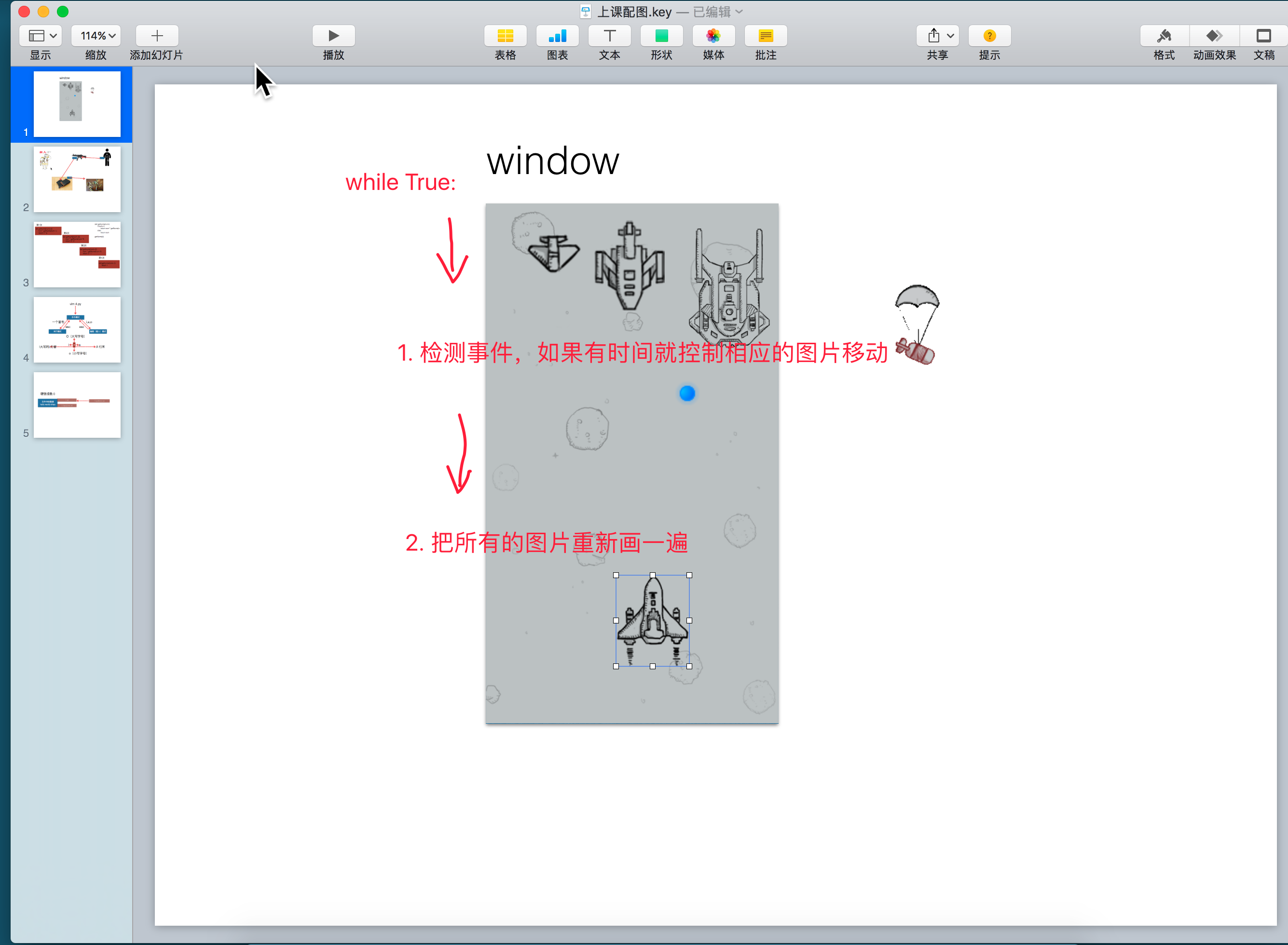
    while True:

        screen.blit(background,(0,0))

        heroPlane.display()

        enemy.display()#让敌机显示

        enemy.move()#调用敌机的move方法

        enemy.fire()#让敌机开火

        pygame.display.update()

        key_control(heroPlane)

        time.sleep(0.01)
for循环的坑
(防止列表循环的时候删自己列表元素出现bug)
不能边遍历边删
是指不能删自己循环的列表,可以删其他人
for 循环遍历一个列表的时候删除一个元素是有坑的

刚好指向下一个元素
11 22 33 删除了 33 ,44刚好进一位(补上),所以44没有删掉
把谁要删的记下来
a=[11,22,33,44,55]

b=[]

for i in a:

	if i=33 or i=44:

		b.append(i)

for i in b:

		a.remove(i)

print(a)
python 飞机大战 实例的更多相关文章
- Python飞机大战实例有感——pygame如何实现“切歌”以及多曲重奏?
目录 pygame如何实现"切歌"以及多曲重奏? 一.pygame实现切歌 初始化路径 尝试一 尝试二 尝试三 成功 总结 二.如何在python多线程顺序执行的情况下实现音乐和音 ...
- python飞机大战
'''新手刚学python,仿着老师敲的代码.1.敌方飞机只能左右徘徊(不会往下跑)并且不会发射子弹.2.正在研究怎么写计分.3.也参考了不少大佬的代码,但也仅仅只是参考了.加油!''' import ...
- python飞机大战简单实现
小游戏飞机大战的简单代码实现: # 定义敌机类 class Enemy: def restart(self): # 重置敌机的位置和速度 self.x = random.randint(50, 400 ...
- python飞机大战代码
import pygame from pygame.locals import * from pygame.sprite import Sprite import random import time ...
- 小甲鱼python基础教程飞机大战源码及素材
百度了半天小甲鱼python飞机大战的源码和素材,搜出一堆不知道是什么玩意儿的玩意儿. 最终还是自己对着视频一行行代码敲出来. 需要的同学点下面的链接自取. 下载
- Python版飞机大战
前面学了java用java写了飞机大战这次学完python基础后写了个python版的飞机大战,有兴趣的可以看下. 父类是飞行物类是所有对象的父类,setting里面是需要加载的图片,你可以换称自己的 ...
- js实例--飞机大战
<!DOCTYPE html> <html> <head> <meta charset="utf-8"/> <title> ...
- Python小游戏之 - 飞机大战美女 !
用Python写的"飞机大战美女"小游戏 源代码如下: # coding=utf-8 import os import random import pygame # 用一个常量来存 ...
- 一、利用Python编写飞机大战游戏-面向对象设计思想
相信大家看到过网上很多关于飞机大战的项目,但是对其中的模块方法,以及使用和游戏工作原理都不了解,看的也是一脸懵逼,根本看不下去.下面我做个详细讲解,在做此游戏需要用到pygame模块,所以这一章先进行 ...
随机推荐
- 使用Visio—UML画类图
在一个VS工程中,由于类的个数较多,而参数描述不是特别清晰.若此工程的生命周期较长,则有必要对工程进行完整分析,给出完整的文档.需要画出类图,并对每个成员进行详细描述. 一.画出类图 在VIsio中, ...
- 【sicily】 1934. 移动小球
Description 你有一些小球,从左到右依次编号为1,2,3,...,n. 你可以执行两种指令(1或者2).其中, 1 X Y表示把小球X移动到小球Y的左边, 2 X Y表示把小球X移动到小球Y ...
- CDR服装设计-旗袍款式图
在服装行业中的服装款式设计.图案设计和面料设计等方面,CorelDRAW是一款常用绘图设计软件,用CorelDRAW绘制款式图比手绘更容易表达服装结构.比例.图案.色彩等要素,服装款图主要目的是为了更 ...
- BZOJ : [Usaco2013 Nov]Crowded 单调队列
正反两遍个来一次单调队列 DP 即可. Code: #include<cstdio> #include<deque> #include<algorithm> usi ...
- S-HR二开基础
检测是否某个类部署上去了:http://10.3.0.115:6888/easportal/tools/getclassurl.jsp?className=com.kingdee.eas.hr.ser ...
- 15.3 Task 语法和语义
15.3.1 声明异步方法和返回类型 async static void GetStringAsync() { using (var client = new HttpClient()) { Task ...
- 区分escape、encodeURI和encodeURIComponent
一.escape和它们不是同一类 简单来说,escape是对字符串(string)进行编码(而另外两种是对URL),作用是让它们在所有电脑上可读.编码之后的效果是%XX或者%uXXXX这种形式.其中 ...
- 数据结构与算法(2)- vector概念介绍
声明:虽然本系列博客与具体的编程语言无关.但是本文作者对c++相对比较熟悉,其次是java,所以难免会有视角上的偏差.举例也大多是和这两门语言相关. Vector的出现主要是为了解决数组的静态空间的问 ...
- CvsHelper 使用指南
用于读取和写入CSV文件的.NET库. 非常快速,灵活和易于使用. 支持读写自定义类对象. 入门 要安装CsvHelper,请从包管理器控制台运行以下操作. Install-Package CsvHe ...
- 0808关于RDS如何恢复到本地教程
转自http://www.cnblogs.com/ilanni/archive/2016/02/25/5218129.html 公司目前使用的数据库是阿里云的RDS,目前RDS的版本为mysql5.6 ...