
python飞机大战
'''
新手刚学python,仿着老师敲的代码。
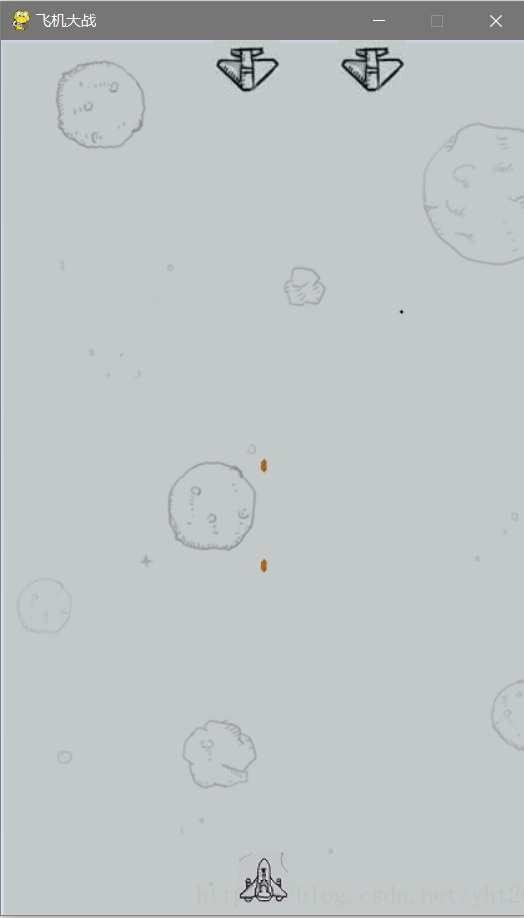
1、敌方飞机只能左右徘徊(不会往下跑)并且不会发射子弹。
2、正在研究怎么写计分。
3、也参考了不少大佬的代码,但也仅仅只是参考了。
加油!
'''
import pygame
from pygame.locals import *
import time

# 子弹类
class Bullet(object):
    # 初始化子弹属性:xy坐标、窗口、子弹图片
    def __init__(self, screen_temp, x, y):
        self.x = x--18
        self.y = y-15
        self.screen = screen_temp
        self.image = pygame.image.load("zd.png")
    # 子弹显示
    def display(self):
        self.screen.blit(self.image, (self.x, self.y))
    # 子弹移动,y -= 10
    def move(self):
        self.y -= 10
    # 判断子弹是否越界
    def judge(self):
        if self.y < 0:
            return True
        else:
            return False

# 玩家飞机类
class Aircraft_obj(object):
    # 初始化玩家飞机属性:坐标、窗口、子弹列表对象
    def __init__(self, screen_temp):
        self.x = 190
        self.y = 650
        self.screen = screen_temp
        self.image = pygame.image.load("FeiJi.jpeg")
        self.bullet_list = []
    # 显示玩家飞机图片,for循环显示发射子弹,如越界则删除子弹
    def display(self):
        self.screen.blit(self.image, (self.x, self.y))
        for bullet in self.bullet_list:
            bullet.display()
            bullet.move()
            if bullet.judge():
                self.bullet_list.remove(bullet)
    # 玩家飞机移动
    def move_left(self):
        if self.x < 10:
            pass
        else:
            self.x -= 10
    def move_right(self):
        if self.x > 480-100-10:
            pass
        else:
            self.x += 10
    def move_up(self):
        if self.y < 10:
            pass
        else:
            self.y -= 10
    def move_down(self):
        if self.y > 650:
            pass
        else:
            self.y += 10
    # 将子弹储存在发射列表中
    def fire(self):
        self.bullet_list.append(Bullet(self.screen, self.x, self.y))
# 敌机类
class EnemyPlane(object):
    # 初始化敌机属性:坐标、窗口、图片、移动反向、是否爆炸、爆炸图片列表
    def __init__(self, screen_temp, x, y):
        self.x = x
        self.y = y
        self.screen = screen_temp
        self.image = pygame.image.load("DiJi.jpg")
        self.direction = 'right'
        self.hit = False
        self.bomb_lists = []
        self.__crate_images()
        self.image_num = 0
        self.image_index = 0
    # 敌机左右移动
    def move(self):
        if self.hit == True:
            pass
        else:
            if self.direction == 'right':
                self.x += 5
            elif self.direction == 'left':
                self.x -= 5
            if self.x > 420-50:
                self.direction = 'left'
            elif self.x < 0:
                self.direction = 'right'
    # 添加爆炸图片列表
    def __crate_images(self):
        self.bomb_lists.append(pygame.image.load("baozha.png"))
        self.bomb_lists.append(pygame.image.load("baozha.png"))
        self.bomb_lists.append(pygame.image.load("baozha.png"))
        self.bomb_lists.append(pygame.image.load("baozha.png"))
    # 判断是否爆炸
    def blast(self, x1, x2, y):
        if((x1>=self.x and x2<=self.x+51) or x2==self.x or x1==self.x+51) and y<39:
            self.hit = True
    # 显示爆炸效果或正常图片,利用循环和sleep()暂停让用户看清
    def display(self):
        if self.hit == True:
            self.screen.blit(self.bomb_lists[self.image_index], (self.x, self.y))
            self.image_num += 1
            if self.image_num == 7:
                self.image_num = 0
                self.image_index += 1
            if self.image_index > 3:
                # 暂停1秒
                time.sleep(1)
                exit()
        else:
            self.screen.blit(self.image, (self.x, self.y))
# 检查键盘输入函数
def key_control(aircraft_temp):
    for event in pygame.event.get():
        # 退出
        if event.type == QUIT:
            print("exit")
            exit()
        # 键盘按下事件
        elif event.type == KEYDOWN:
            # 按下a或←,调用玩家飞机向左移动方法
            if event.key == K_a or event.key == K_LEFT:
                print("left")
                aircraft_temp.move_left()
            # 按下d或→,,调用玩家飞机发射子弹方法
            elif event.key == K_d or event.key == K_RIGHT:
                print("right")
                aircraft_temp.move_right()

            elif event.key == K_w or event.key == K_UP:
                print("up")
                aircraft_temp.move_up()
            # 按下d或→,,调用玩家飞机发射子弹方法
            elif event.key == K_s or event.key == K_DOWN:
                print("down")
                aircraft_temp.move_down()

            # 按下空格,调用玩家飞机发射子弹方法
            elif event.key == K_SPACE:
                print("space")
                aircraft_temp.fire()
    # 得分系统
    def score():
        pass

# 主函数
def main():
    pygame.init()
    pygame.display.set_caption("飞机大战")
    screen = pygame.display.set_mode((420,700), 0, 32)
    background = pygame.image.load('bj.png')

    # 创建玩家飞机对象
    aircraft = Aircraft_obj(screen)
    enemy = EnemyPlane(screen,0,0)
    enemy2 = EnemyPlane(screen,100,0)

    # 游戏音效
    sound = pygame.mixer.Sound("时光洪流.mp3")
    sound.play()
    pygame.mixer.music.load("时光洪流.mp3")
    pygame.mixer.music.play(-1, 0.0)

    while True:
        screen.blit(background, (0, 0))
        aircraft.display()
        # 遍历子弹,找到坐标,判断是否与敌机相逢
        for bullet in aircraft.bullet_list:
            x1 = bullet.x
            x2 = bullet.x+22
            y1 = bullet.y
            enemy.blast(x1, x2, y1)
        enemy.display()
        enemy2.display()
        enemy.move()
        enemy2.move()
        pygame.display.update()
        key_control(aircraft)
        # 暂停0.01秒
        time.sleep(0.01)
main()
python飞机大战的更多相关文章
- Python飞机大战实例有感——pygame如何实现“切歌”以及多曲重奏?
目录 pygame如何实现"切歌"以及多曲重奏? 一.pygame实现切歌 初始化路径 尝试一 尝试二 尝试三 成功 总结 二.如何在python多线程顺序执行的情况下实现音乐和音 ...
- python 飞机大战 实例
飞机大战 #coding=utf-8 import pygame from pygame.locals import * import time import random class Base(ob ...
- python飞机大战简单实现
小游戏飞机大战的简单代码实现: # 定义敌机类 class Enemy: def restart(self): # 重置敌机的位置和速度 self.x = random.randint(50, 400 ...
- python飞机大战代码
import pygame from pygame.locals import * from pygame.sprite import Sprite import random import time ...
- 小甲鱼python基础教程飞机大战源码及素材
百度了半天小甲鱼python飞机大战的源码和素材,搜出一堆不知道是什么玩意儿的玩意儿. 最终还是自己对着视频一行行代码敲出来. 需要的同学点下面的链接自取. 下载
- Python小游戏之 - 飞机大战美女 !
用Python写的"飞机大战美女"小游戏 源代码如下: # coding=utf-8 import os import random import pygame # 用一个常量来存 ...
- 一、利用Python编写飞机大战游戏-面向对象设计思想
相信大家看到过网上很多关于飞机大战的项目,但是对其中的模块方法,以及使用和游戏工作原理都不了解,看的也是一脸懵逼,根本看不下去.下面我做个详细讲解,在做此游戏需要用到pygame模块,所以这一章先进行 ...
- Python版飞机大战
前面学了java用java写了飞机大战这次学完python基础后写了个python版的飞机大战,有兴趣的可以看下. 父类是飞行物类是所有对象的父类,setting里面是需要加载的图片,你可以换称自己的 ...
- Python之游戏开发-飞机大战
Python之游戏开发-飞机大战 想要代码文件,可以加我微信:nickchen121 #!/usr/bin/env python # coding: utf-8 import pygame impor ...
随机推荐
- 助你上手Vue3全家桶之Vue3教程
目录 前言 1,setup 1.1,返回值 1.2,注意点 1.3,语法 1.4,setup的参数 2,ref 创建响应式数据 3,reactive 创建响应式数据 4,computed 计算属性 5 ...
- DP秒思维
DP算法对于大部分题有着良好的能力,但有些题目我们要转换思维,不能直接的设具体的转态.... 最近做了两道秒题,在这里分享一下: https://ac.nowcoder.com/acm/contest ...
- hdu 1159 Common Subsequence(最长公共子序列,DP)
题意: 两个字符串,判断最长公共子序列的长度. 思路: 直接看代码,,注意边界处理 代码: char s1[505], s2[505]; int dp[505][505]; int main(){ w ...
- CANN5.0黑科技解密 | 别眨眼!缩小隧道,让你的AI模型“身轻如燕”!
摘要:CANN作为释放昇腾硬件算力的关键平台,通过深耕先进的模型压缩技术,聚力打造AMCT模型压缩工具,在保证模型精度前提下,不遗余力地降低模型的存储空间和计算量. 随着深度学习的发展,推理模型巨大的 ...
- 挂载iscsi存储
参考连接:https://segmentfault.com/a/1190000005853387?utm_source=tag-newest 安装客户端工具,iscsi-initiator yum i ...
- Git撤销、回滚操作
git的工作流 工作区:即自己当前分支所修改的代码,git add xx 之前的!不包括 git add xx 和 git commit xxx 之后的. 暂存区:已经 git add xxx 进去, ...
- 三. 为什么要用Promise
# 三. 为什么要用Promise /* 1.指定回调函数的方式更加灵活: 旧的:必须在启动异步任务前指定 promise:启动异步任务 => 返回promie对象 => 给promise ...
- Linux NameSpace (目录)
1. User Namespace 详解 2. Pid Namespace 详解 3. Mnt Namespace 详解 4. UTS Namespace 详解 5. IPC Namespace 详解 ...
- Django笔记&教程 7-1 基于类的视图(Class-based views)介绍
Django 自学笔记兼学习教程第7章第1节--基于类的视图(Class-based views)介绍 点击查看教程总目录 1 介绍 Class-based views (CBVs) are view ...
- python3 在webelement对象里面获取元素路径的方法
一. 在webelement对象里面使用查找Xpath 查找时,必须使用.指明当前节点 food = driver.find_element_by_id('food') eles = food.fin ...