
用Python写一个贪吃蛇
最近在学Python,想做点什么来练练手,命令行的贪吃蛇一般是C的练手项目,但是一时之间找不到别的,就先做个贪吃蛇来练练简单的语法。
由于Python监听键盘很麻烦,没有C语言的kbhit(),所以这条贪吃蛇不会自己动,运行效果如下:

要求:用#表示边框,用*表示食物,o表示蛇的身体,O表示蛇头,使用wsad来移动
Python版本:3.6.1
系统环境:Win10
类:
board:棋盘,也就是游戏区域
snake:贪吃蛇,通过记录身体每个点来记录蛇的状态
game:游戏类
本来还想要个food类的,但是food只需要一个坐标,和一个新建,所以干脆使用list来保存坐标,新建food放在game里面,从逻辑上也没有太大问题
源码
# Write By Guobao

# 2017/4//7

#

# 贪吃蛇

# 用#做边界,*做食物,o做身体和头部

# python 3.6.1

import copy

import random

import os

import msvcrt

# the board class, used to put everything

class board:

    __points =[]

    def __init__(self):

        self.__points.clear()

        for i in range(22):

            line = []

            if i == 0 or i == 21:

                for j in range(22):

                    line.append('#')

            else:

                line.append('#')

                for j in range(20):

                    line.append(' ')

                line.append('#')

            self.__points.append(line)

    def getPoint(self, location):

        return self.__points[location[0]][location[1]]

    def clear(self):

        self.__points.clear()

        for i in range(22):

            line = []

            if i == 0 or i == 21:

                for j in range(22):

                    line.append('#')

            else:

                line.append('#')

                for j in range(20):

                    line.append(' ')

                line.append('#')

            self.__points.append(line)

    def put_snake(self, snake_locations):

        # clear the board

        self.clear()

        # put the snake points

        for x in snake_locations:

            self.__points[x[0]][x[1]] = 'o'

        # the head

        x = snake_locations[len(snake_locations) - 1]

        self.__points[x[0]][x[1]] = 'O'

    def put_food(self, food_location):

        self.__points[food_location[0]][food_location[1]] = '*'

    def show(self):

        os.system("cls")

        for i in range(22):

            for j in range(22):

                print(self.__points[i][j], end='')

            print()

# the snake class

class snake:

    __points = []

    def __init__(self):

        for i in range(1, 6):

            self.__points.append([1, i])

    def getPoints(self):

        return self.__points

    # move to the next position

    # give the next head

    def move(self, next_head):

        self.__points.pop(0)

        self.__points.append(next_head)

    # eat the food

    # give the next head

    def eat(self, next_head):

        self.__points.append(next_head)

    # calc the next state

    # and return the direction

    def next_head(self, direction='default'):

        # need to change the value, so copy it

        head = copy.deepcopy(self.__points[len(self.__points) - 1])

        # calc the "default" direction

        if direction == 'default':

            neck = self.__points[len(self.__points) - 2]

            if neck[0] > head[0]:

                direction = 'up'

            elif neck[0] < head[0]:

                direction = 'down'

            elif neck[1] > head[1]:

                direction = 'left'

            elif neck[1] < head[1]:

                direction = 'right'

        if direction == 'up':

            head[0] = head[0] - 1

        elif direction == 'down':

            head[0] = head[0] + 1

        elif direction == 'left':

            head[1] = head[1] - 1

        elif direction == 'right':

            head[1] = head[1] + 1

        return head

# the game

class game:

    board = board()

    snake = snake()

    food = []

    count = 0

    def __init__(self):

        self.new_food()

        self.board.clear()

        self.board.put_snake(self.snake.getPoints())

        self.board.put_food(self.food)

    def new_food(self):

        while 1:

            line = random.randint(1, 20)

            column = random.randint(1, 20)

            if self.board.getPoint([column, line]) == ' ':

                self.food = [column, line]

                return

    def show(self):

        self.board.clear()

        self.board.put_snake(self.snake.getPoints())

        self.board.put_food(self.food)

        self.board.show()

    def run(self):

        self.board.show()

        # the 'w a s d' are the directions

        operation_dict = {b'w': 'up', b'W': 'up', b's': 'down', b'S': 'down', b'a': 'left', b'A': 'left', b'd': 'right', b'D': 'right'}

        op = msvcrt.getch()

        while op != b'q':

            if op not in operation_dict:

                op = msvcrt.getch()

            else:

                new_head = self.snake.next_head(operation_dict[op])

                # get the food

                if self.board.getPoint(new_head) == '*':

                    self.snake.eat(new_head)

                    self.count = self.count + 1

                    if self.count >= 15:

                        self.show()

                        print("Good Job")

                        break

                    else:

                        self.new_food()

                        self.show()

                # 反向一Q日神仙

                elif new_head == self.snake.getPoints()[len(self.snake.getPoints()) - 2]:

                    pass

                # rush the wall

                elif self.board.getPoint(new_head) == '#' or self.board.getPoint(new_head) == 'o':

                    print('GG')

                    break

                # normal move

                else:

                    self.snake.move(new_head)

                    self.show()

            op = msvcrt.getch()

game().run()
笔记:
1.Python 没有Switch case语句,可以利用dirt来实现
2.Python的=号是复制,复制引用,深复制需要使用copy的deepcopy()函数来实现
3.即使在成员函数内,也需要使用self来访问成员变量,这和C++、JAVA很不一样
2017.4.11 更新
完成了贪吃蛇之后,我开始打一个简单的学生信息管理系统,内容简单,数据量小,但是可以用上MVC架构,又可以更好的训练。过程中发现自己在贪吃蛇中有一个致命的问题,虽然在贪吃蛇中,这个问题并不会影响结果。
先看board类中的部分代码:
 class board:

     __points =[]
 4 # 后面不重要
咋一看没有问题,但是看初始化__point的位置,并不是在__init__()中第一次初始化,这种情况下,__point是一个类变量,而不是一个成员变量,如果__point是一个不可变的类型(如整形),那可能不会看出什么影响,但是当它是一个可变的类型,如list,就会有很大的问题,看我在命令行上的试验:
①整形例子
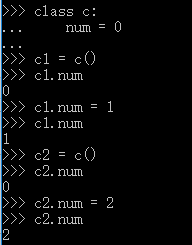
到此为止,和我一开始的想法没有冲突,请看下面:

惊讶的发现可以直接通过类名来访问到num变量,而且还一直保持着最初的值,还能变
②list例子

试验的时候心理活动:嗯→很正常→就该这样→卧槽???
这时候可以再来一句:

分析:整形例子中,当我修改num的值,其实是让num指向了新的内存,所以会有c1,c2有着各自的num值;
而在list例子中,当我修改cc的值,修改的是cc指向的内存的值,cc一直指向同一个内存
个人理解:不论哪一个例子,都是在复制类变量,所以会有这种现象
贪吃蛇中,因为Snake和board我都只有一个实例,所以没有明显的问题。
与此相关可以看这篇博客:http://www.cnblogs.com/duanv/p/5947525.html
函数的默认参数中也有相似的问题,可以看:http://blog.jobbole.com/42706/#article-comment
用Python写一个贪吃蛇的更多相关文章
- 如何用Python写一个贪吃蛇AI
前言 这两天在网上看到一张让人涨姿势的图片,图片中展示的是贪吃蛇游戏, 估计大部分人都玩过.但如果仅仅是贪吃蛇游戏,那么它就没有什么让人涨姿势的地方了. 问题的关键在于,图片中的贪吃蛇真的很贪吃XD, ...
- 使用Python写一个贪吃蛇
参考代码http://blog.csdn.net/leepwang/article/details/7640880 我在程序中加入了分数显示,三种特殊食物,将贪吃蛇的游戏逻辑写到了SnakeGame的 ...
- python 写一个贪吃蛇游戏
#!usr/bin/python #-*- coding:utf-8 -*- import random import curses s = curses.initscr() curses.curs_ ...
- 用 Python 写个贪吃蛇,保姆级教程!
本文基于 Windows 环境开发,适合 Python 新手 本文作者:HelloGitHub-Anthony HelloGitHub 推出的<讲解开源项目>系列,本期介绍 Python ...
- 【C/C++】10分钟教你用C++写一个贪吃蛇附带AI功能(附源代码详解和下载)
C++编写贪吃蛇小游戏快速入门 刚学完C++.一时兴起,就花几天时间手动做了个贪吃蛇,后来觉得不过瘾,于是又加入了AI功能.希望大家Enjoy It. 效果图示 AI模式演示 imageimage 整 ...
- pygame试水,写一个贪吃蛇
最近学完python基础知识,就想着做一个游戏玩玩,于是就在https://www.pygame.org/docs/学着做了个贪吃蛇游戏. 首先要导入模块. import pygame import ...
- 一步一步用Canvas写一个贪吃蛇
之前在慕课网看了几集Canvas的视频,一直想着写点东西练练手.感觉贪吃蛇算是比较简单的了,当年大学的时候还写过C语言字符版的,没想到还是遇到了很多问题. 最终效果如下(图太大的话 时间太长 录制gi ...
- Python写的贪吃蛇游戏例子
第一次用Python写这种比较实用且好玩的东西,权当练手吧 游戏说明: * P键控制“暂停/开始”* 方向键控制贪吃蛇的方向 源代码如下: 复制代码代码如下: from Tkinter import ...
- 用js写一个贪吃蛇小游戏
<!DOCTYPE html> <html lang="en"> <head> <meta charset="UTF-8&quo ...
随机推荐
- HTTPS和TCP协议三次握手设计
1. 我们的TCP 三次握手大概是长这样 2.那么为什么 TCP 要采取三次握手,而不是两次或其他 首先我们要知道握手的目的: 为了保证通讯双方建立的连接是可靠的. 同时,为了保证性能,握手的次数要求 ...
- 我的秋招经验分享(已拿BAT头条网易滴滴)
微信公众号[程序员江湖] 作者黄小斜,斜杠青年,某985硕士,阿里 Java 研发工程师,于 2018 年秋招拿到 BAT 头条.网易.滴滴等 8 个大厂 offer,目前致力于分享这几年的学习经验. ...
- 两个月的Java实习结束,继续努力
前言 只有光头才能变强 2018年8月30日,今天我辞职了.在6月25号入职,到现在也有两个月时间了. 感受: 第一天是期待的:第一次将项目拉到本地上看的时候,代码很多,有非常多的模块,模块下又有da ...
- 5G 时代,可能是什么样呢?
(摄于上海陆家嘴) 众所周知,5g时代即将到来,其相关的区块链技术也将在更多的领域以及方面发挥越来越多的作用. 与新模式与新领域这种软性变化不同,新技术的产生,有着足够的想象空间.仅从内容创作 ...
- Button控件的点击事件
Java的代码 主要重点: findViewById(); OnClickListener() package com.example.admin.myapplication; import andr ...
- andorid 应用第二次登录实现自动登录
前置条件是所有用户相关接口都走 https,非用户相关列表类数据走 http. 步骤 第一次登陆 getUserInfo 里带有一个长效 token,该长效 token 用来判断用户是否登陆和换取短 ...
- 理解Device Tree Usage
英语原文地址: htttp://devicetree.org/Device_Tree_Usage 本文介绍如何为新的机器或板卡编写设备树(Device Tree), 它旨在概要性的介绍设备树概念,以及 ...
- JavaScript 中的四舍五入
在 JavaScript 中,对数值进行四舍五入操作的场景有以下几种: 向上取整:ceil 向下取整:floor 四舍五入:round 固定精度:toFixed 固定长度:toPrecision 取整 ...
- 在.NET MVC 中使用Highcharts+Ajax+Json生成动态曲线图,柱状图,饼图
开发背景: 今天在做一个关于商城后台金额报表统计的功能,为了让数据直观明了并且这个报表还需要在手机端自适应所以我决定采用HIghCharts插件下的的报表,大家也可以去了解一下免费开源主要是好看. 首 ...
- 分析 js构造函数:对象方法 、类方法 、原型方法
构造函数方法有对象方法.类方法.原型方法,这些方法在什么时候可以调用,什么时候不能调用,为什么? function Func(name){ this.name=name; this.ff=functi ...