
使用JavaScript实现单向链表
一、实现功能
1、链表元素头部插入 this.unShift = function(data) {}
2、链表元素尾部插入 this.append= function(data) {} //返回boolean
3、链表元素按位置插入 this.insert= function(position, data) {} //返回boolean
4、链表元素头部删除 this.shift= function() {} //返回boolean
5、链表元素尾部删除 this.pop = function() {} //返回boolean
6、链表按元素删除 this.removeData = function(data) {} //返回boolean
7、链表按下标删除 this.removePos = function(position) {} //返回boolean
8、链表是否为空 this.isEmpty= function() {} //返回boolean
9、链表元素组成的字符串 this.toString= function() {} //返回 string
10、链表的长度 this.length= function() {} //返回number
11、链表查找元素 this.searchData= function(data) {} //返回obj={index:,data:}
二、节点声明
function Node(data) {

	this.data = data  //数据

	this.next = null  //指向

}
三、完整功能代码
function List() {

	let length = 0

	let head = null

	this.append = (data) => { // 向链表末尾添加元素

		let node = new Node(data)

		let current

		if(head === null) {

			head = node

		}

		else {

			current = head

			while(current.next) {

				current = current.next

			}

			current.next = node

		}

		length ++

		return true

	}

	this.insert = (position, data) => { // 向链表指定位置添加元素

	    if (position >= 0 && position <= length) { //检查是否越界

	        let node = new Node(data),

	            current = head,

	            previous,

	            index = 0

	        if (position === 0) { //在第一个位置添加

	            node.next = current

	            head = node

	        }else {

	            while (index ++ < position) {

	                previous = current

	                current = current.next

	            }

	            //通过改变指针,将node链接在previous和current之间

	            node.next = current

	            previous.next = node

	        }

	        length ++

	        return true

	    }else {

	        return false

	    }

	}

	this.removeData = (data) => { // 通过数据删除链表元素

		let previous,

			current,

			index = 0

		if (head === null) {

			return false

		}

		current = head

		while(index ++ < length && current.data !== data) {

			previous = current

			current = current.next

		}

		if(index > length) {

			return false

		}else {

			current.next = current.next

			length --

			return true

		}

	}

	this.removePos = (position) => { // 通过位置删除链表元素

		if( position >= -1 && position < length) {

			let previous,

				current = head,

				index = 0

			if (position === 0) {

				head = current.next

			}else {

				while(index ++ < position) {

					previous = current

					current = current.next

				}

				previous.next = current.next

			}

			length --

			return true

		}else {

			return false

		}

	}

	this.unShift = (data) => {  //向链表首插入元素

		let node = new Node(data),

			current = head

		node.next = current

		head = node

		length ++

		return true

	}

	this.shift = () => {  //删除链表首元素

		let current = head

		if(head === null) {

			return false

		}

		else {

			head = current.next

			length --

			return true

		}

	}

	this.pop = () => { // 删除链表尾元素

		let current,

			previous

		if (head === null){

			return false

		}

		current = head

		while(current) {

			previous = current

			current = current.next

		}

		previous = null

		length --

		return true

	}

	this.isEmpty = () => {

		return length === 0

	}

	this.length = () => {

		return length

	}

	this.searchData = (data) => { //查找元素

		let current,

			index = 0,

			obj = {}

		if( head === null ) {

			return false

		}

		current = head

		while(index ++ < length && current.data !== data) {

			current = current.next

		}

		obj = {

			index: index,

			data: current.data

		}

		return obj

	}

	this.toString = () => { //输出数据组成的字符串

		let resultStr = "",

			current,

			index = length

		if (head === null) {

			return ""

		}

		current = head

		while(index -- > 0) {

			resultStr += "," + current.data

			current = current.next

		}

		return resultStr.slice(1)

	}

}
四、测试代码及结果
1、测试代码
<!DOCTYPE html>

<html>

<head>

	<title>test</title>

	<script type="text/javascript" src="./singleList.js"></script>

</head>

<body>

	<script type="text/javascript">

		let singleList = new List()

		console.log(singleList.append("1"))

		console.log(singleList.toString())

		console.log(singleList.append("2"))

		console.log(singleList.toString())

		console.log(singleList.append("3"))

		console.log(singleList.toString())

		console.log(singleList.unShift(0))

		console.log(singleList.toString())

		console.log(singleList.insert(2,"4"))

		console.log(singleList.toString())

		console.log(singleList.shift())

		console.log(singleList.toString())

		console.log(singleList.pop())

		console.log(singleList.toString())

		console.log(singleList.searchData("1"))

		console.log(singleList.removePos(1))

		console.log(singleList.toString())

		console.log(singleList.removeData("1"))

		console.log(singleList.toString())

		console.log(singleList.isEmpty())

	</script>

</body>

</html>
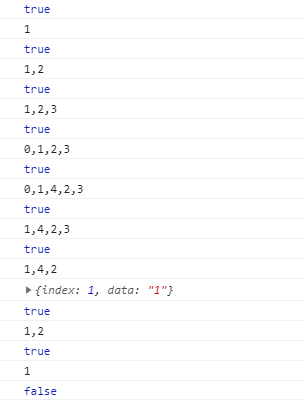
2、测试结果
使用JavaScript实现单向链表的更多相关文章
- JavaScript实现单向链表
JavaScript 本身提供了十分好用的数据类型,以满足大家的日常使用.单靠 Array 和 Object 也的确足够应付日常的绝大部分需求,这也导致了很多前端er对数据结构这一块不是十分的了解. ...
- JavaScript实现单向链表结构
参考资料 一.什么是链表结构? 1.1.简介 链表和数组一样, 可以用于存储一系列的元素, 但是链表和数组的实现机制完全不同,链表中的元素在内存不是连续的空间,链表的每个元素由一个存储元素本身(数据) ...
- 学习javascript数据结构(二)——链表
前言 人生总是直向前行走,从不留下什么. 原文地址:学习javascript数据结构(二)--链表 博主博客地址:Damonare的个人博客 正文 链表简介 上一篇博客-学习javascript数据结 ...
- Reverse Linked List II 单向链表逆序(部分逆序)
0 问题描述 原题点击这里. 将单向链表第m个位置到第n个位置倒序连接.例如, 原链表:1->2->3->4->5, m=2, n =4 新链表:1->4->3-& ...
- 【编程题目】输入一个单向链表,输出该链表中倒数第 k 个结点
第 13 题(链表):题目:输入一个单向链表,输出该链表中倒数第 k 个结点.链表的倒数第 0 个结点为链表的尾指针.链表结点定义如下: struct ListNode {int m_nKey;Lis ...
- 输出单向链表中倒数第k个结点
描述 输入一个单向链表,输出该链表中倒数第k个结点,链表的倒数第0个结点为链表的尾指针. 链表结点定义如下: struct ListNode { int m_nKey; ListNode* ...
- Linus:利用二级指针删除单向链表
Linus大神在slashdot上回答一些编程爱好者的提问,其中一个人问他什么样的代码是他所喜好的,大婶表述了自己一些观点之后,举了一个指针的例子,解释了什么才是core low-level codi ...
- 【转】Linus:利用二级指针删除单向链表
原文作者:陈皓 原文链接:http://coolshell.cn/articles/8990.html 感谢网友full_of_bull投递此文(注:此文最初发表在这个这里,我对原文后半段修改了许多, ...
- C语言实现单向链表及其各种排序(含快排,选择,插入,冒泡)
#include<stdio.h> #include<malloc.h> #define LEN sizeof(struct Student) struct Student / ...
随机推荐
- 横向滑动的listview和其中用到的触摸监听事件详解
一.首先把横向的listview的代码放上来 HorizontalListView: package com.common.cklibrary.utils.myview; import java.ut ...
- 第七篇 Flask 中路由系统以及参数
Flask中的路由系统其实我们并不陌生了,从一开始到现在都一直在应用 @app.route("/",methods=["GET","POST" ...
- NEL程序员专用轻钱包 进入0.01状态了
这个轻钱包能干什么,现在就能在测试网看个余额,转个帐,调用个合约. 而且功能非常程序员化 你会说是不是没啥用 但是他有非常有用,因为他可以很容易的拼出NEOGUI拼不出来的交易 比如参与ICO交易 ...
- 安装tensorflowGPU版本
ubuntu 16.0# 安装cuda ## 安装sudo dpkg -i cuda-repo-ubuntu1604-9-0-local_9.0.176-1_amd64.deb.debsudo apt ...
- vue cli搭建项目
1.首先电脑要在安装node环境下才能运行 2.全局安装webpack:npm install webpack -g 3.安装vue脚手架: npm install vue-cli -g 4.新建文件 ...
- __x__(19)0907第四天__ HTML5 文本标签 及 样式
strong 表语义上的强调, em 表示语气上的强调: <strong>警告:离僵尸远点!</strong> 世界末日了,因为僵尸是<em>有毒的</em& ...
- __x__(20)0907第四天__列表ul,ol,dl
列表分为: 有序列表 ul: <ul type="disc"> <li>张三</li> <li>李四</li> < ...
- file_get_contents 在本地测试可以, 但在服务器上报错403
解决方法: Most likely if you don't get any content while accessing an webpage, probably it doesn't want ...
- Gparted Live分区调整
由于年少无知,在安装ubuntu系统的时候,以为/temp是软件包安装时解压的缓冲,所以给/temp留了10G,而以为/var只是记录一些log而已,因此把仅存的1G分配给了它.随后在安装软件时出现“ ...
- 7、vue-awesome-swiper页面跳转
<template> <swiper :options='swiperOption' ref="mySwiper" class='swiper-container ...