
WPF 3D 常用类(1)
几何数据相关类
Geometry3D
抽象类, 用于定义物体的几何数据, 可用于计算HitTest和BoundingBox
MeshGeometry3D
Geometry3D的子类, 定义网格的顶点, 三角形顶点, 法线, Texture(纹理)的座标
常用属性: Positions, TriangleIndices, Noramls, TextureCoordinates
模型相关类 (模型=几何数据+变形(位置,旋转,尺寸)+材质)
Model3D
抽象类, 表示一个3D模型, 子类有: Light, GeometryModel3D, Model3DGroup
GeometryModel3D
Model3D的子类, 不仅包含了物体的几何数据Geometry, 还包含了物体的材质Matrial, 变形Transform
<GeometryModel3D Geometry="{StaticResource myTeapot}">
<GeometryModel3D.Material>
<DiffuseMaterial>
<DiffuseMaterial.Brush>
<SolidColorBrush Color="Blue" Opacity="1.0" /></DiffuseMaterial.Brush>
</DiffuseMaterial>
</GeometryModel3D.Material>
<GeometryModel3D.Transform>
<RotateTransform3D>
<RotateTransform3D.Rotation>
<AxisAngleRotation3D x:Name="myAngleRotation" Axis="0,3,0" Angle="1" />
</RotateTransform3D.Rotation>
</RotateTransform3D>
</GeometryModel3D.Transform>
</GeometryModel3D>
----------------------------------------------------------------------
<GeometryModel3D>

  <GeometryModel3D.Geometry>

          <MeshGeometry3D

              Positions="-1 -1 0  1 -1 0  -1 1 0  1 1 0"

              Normals="0 0 1  0 0 1  0 0 1  0 0 1"

              TextureCoordinates="0 1  1 1  0 0  1 0   "

              TriangleIndices="0 1 2  1 3 2" />

      </GeometryModel3D.Geometry>

      <GeometryModel3D.Material>

          <DiffuseMaterial>

              <DiffuseMaterial.Brush>

                  <SolidColorBrush Color="Cyan" Opacity="0.3"/>

              </DiffuseMaterial.Brush>

          </DiffuseMaterial>

      </GeometryModel3D.Material>

      <GeometryModel3D.Transform>

          <TranslateTransform3D

            OffsetX="2" OffsetY="0" OffsetZ="-1"   >

          </TranslateTransform3D>

      </GeometryModel3D.Transform>

  </GeometryModel3D>
.csharpcode, .csharpcode pre
{
font-size: small;
color: black;
font-family: consolas, "Courier New", courier, monospace;
background-color: #ffffff;
/*white-space: pre;*/
}
.csharpcode pre { margin: 0em; }
.csharpcode .rem { color: #008000; }
.csharpcode .kwrd { color: #0000ff; }
.csharpcode .str { color: #006080; }
.csharpcode .op { color: #0000c0; }
.csharpcode .preproc { color: #cc6633; }
.csharpcode .asp { background-color: #ffff00; }
.csharpcode .html { color: #800000; }
.csharpcode .attr { color: #ff0000; }
.csharpcode .alt
{
background-color: #f4f4f4;
width: 100%;
margin: 0em;
}
.csharpcode .lnum { color: #606060; }
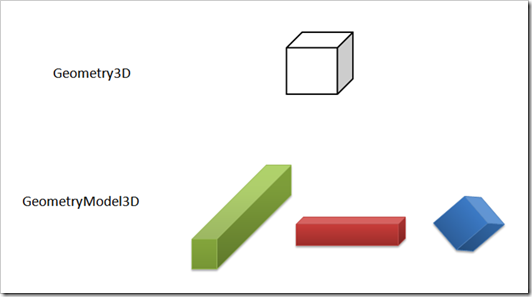
多个GeometryModel3D的实例可以共享一个Geometry3D的实例, 只需设置不通的Material, Transform就可以呈现出不同的物体.
视觉相关类 (包含一个Model3D对象)
Visual3D
Visual的职责是:
- Output display
- Transformations
- Hittesting
- Clipping
- Bounding box calculations
没有的功能包括:
- Event handling
- Layout
- Styles
- Data binding
- Globalization
抽象类, Viewport3D.Children就是Visual3D对象的集合
Visual3D类有一个属性Visual3DModel, 该属性的类型是Model3D
class Visual3D
{
Model3D Visual3DModel { get;set; }
}
ModelVisual3D
Visual3D的子类, 增加了Content, Children等属性
容易混淆的名字 : Visual3D, ModelVisual3D, Model3D, Visual3DModel(属性名)
Viewport3D
负责渲染3D对象, HitTest, 大致由Camera + 一组ModelVisual3D对象(Lights + 多个GeometryModel3D对象)
       <Viewport3D ClipToBounds="True" Width="150" Height="150" Canvas.Left="0" Canvas.Top="10">

          <!-- Defines the camera used to view the 3D object. -->

          <Viewport3D.Camera>

            <PerspectiveCamera Position="0,0,2" LookDirection="0,0,-1" FieldOfView="60" />

          </Viewport3D.Camera>

          <!-- The ModelVisual3D children contain the 3D models -->

          <Viewport3D.Children>

            <!-- Light -->

            <ModelVisual3D>

              <ModelVisual3D.Content>

                <DirectionalLight Color="#FFFFFF" Direction="-0.612372,-0.5,-0.612372" />

              </ModelVisual3D.Content>

            </ModelVisual3D>
            <!-- Objects -->

            <ModelVisual3D>

              <ModelVisual3D.Content>

                <GeometryModel3D>

                  <!-- The geometry specifes the shape of the 3D plane. In this sample, a flat sheet is created. -->

                  <GeometryModel3D.Geometry>

                    <MeshGeometry3D

                     TriangleIndices="0,1,2 3,4,5 "

                     Normals="0,0,1 0,0,1 0,0,1 0,0,1 0,0,1 0,0,1 "

                     TextureCoordinates="0,0 1,0 1,1 1,1 0,1 0,0 "

                     Positions="-0.5,-0.5,0.5 0.5,-0.5,0.5 0.5,0.5,0.5 0.5,0.5,0.5 -0.5,0.5,0.5 -0.5,-0.5,0.5 " />

                  </GeometryModel3D.Geometry>

                  <!-- The material specifies the material applied to the 3D object. In this sample a linear gradient

                       covers the surface of the 3D object.-->

                  <GeometryModel3D.Material>

                    <MaterialGroup>

                      <DiffuseMaterial>

                        <DiffuseMaterial.Brush>

                          <LinearGradientBrush StartPoint="0,0.5" EndPoint="1,0.5">

                            <LinearGradientBrush.GradientStops>

                              <GradientStop Color="Yellow" Offset="0" />

                              <GradientStop Color="Red" Offset="0.25" />

                              <GradientStop Color="Blue" Offset="0.75" />

                              <GradientStop Color="LimeGreen" Offset="1" />

                            </LinearGradientBrush.GradientStops>

                          </LinearGradientBrush>

                        </DiffuseMaterial.Brush>

                      </DiffuseMaterial>

                    </MaterialGroup>

                  </GeometryModel3D.Material>

                  <!-- Apply a transform to the object. In this sample, a rotation transform is applied, rendering the

                       3D object rotated. -->

                  <GeometryModel3D.Transform>

                    <RotateTransform3D>

                      <RotateTransform3D.Rotation>

                        <AxisAngleRotation3D Axis="0,3,0" Angle="40" />

                      </RotateTransform3D.Rotation>

                    </RotateTransform3D>

                  </GeometryModel3D.Transform>

                </GeometryModel3D>
              </ModelVisual3D.Content>

            </ModelVisual3D>
          </Viewport3D.Children>

        </Viewport3D>
Viewport2DVisual3D
用于把一个2D对象,比如Button, TextBlock放在一个3D物体上
<Viewport2DVisual3D Geometry="{StaticResource plane}">


        <Viewport2DVisual3D.Material>

          <DiffuseMaterial  Viewport2DVisual3D.IsVisualHostMaterial="true" />

        </Viewport2DVisual3D.Material>

        <Button>3.5!</Button>

 </Viewport2DVisual3D>
.csharpcode, .csharpcode pre
{
font-size: small;
color: black;
font-family: consolas, "Courier New", courier, monospace;
background-color: #ffffff;
/*white-space: pre;*/
}
.csharpcode pre { margin: 0em; }
.csharpcode .rem { color: #008000; }
.csharpcode .kwrd { color: #0000ff; }
.csharpcode .str { color: #006080; }
.csharpcode .op { color: #0000c0; }
.csharpcode .preproc { color: #cc6633; }
.csharpcode .asp { background-color: #ffff00; }
.csharpcode .html { color: #800000; }
.csharpcode .attr { color: #ff0000; }
.csharpcode .alt
{
background-color: #f4f4f4;
width: 100%;
margin: 0em;
}
.csharpcode .lnum { color: #606060; }
Viewport3DVisual
把一组3D对象绘制在2D对象上
UIElement3D(支持事件)
UIElement3D
ModelUIElement3D : 和ModelVisual3D类似, 但支持事件
ContainerUIElement3D : 一组ModelUIElement3D的集合, 但不表现自己
WPF 3D 常用类(1)的更多相关文章
- WPF 3D 知识点大全以及实例
引言 现在物联网概念这么火,如果监控的信息能够实时在手机的客服端中以3D形式展示给我们,那种体验大家可以发挥自己的想象. 那生活中我们还有很多地方用到这些,如上图所示的Kinect 在医疗上的应用,当 ...
- WPF 3D 模型旋转
原文:WPF 3D 模型旋转 WPF 是 Microsoft 在 Framework3.0 中支持的一种技术,它能作出很绚丽的界面,同时它也支持3D的操作.在3D操作主要包括平移(Translate) ...
- WPF DataGrid常用属性记录
WPF DataGrid常用属性记录 组件常用方法: BeginEdit:使DataGrid进入编辑状态. CancelEdit:取消DataGrid的编辑状态. CollapseRowGroup:闭 ...
- WPF 3D 小小小小引擎 - ·WPF 3D变换应用
原文:WPF 3D 小小小小引擎 - ·WPF 3D变换应用 WPF可以提供的3D模型使我们可以轻松地创建3D实体,虽然目前来看还很有一些性能上的问题,不过对于一些简单的3D应用应该是可取的,毕竟其开 ...
- android 系统层 常用类介绍
类名 功能介绍 示意图 surfacemanager为应用程序显示2d和3d程序无缝结合 mediaFramework 基于packetvideocore 该库支持常见视频图片格式的回放和录放譬如mp ...
- WPF 3D变换应用
WPF可以提供的3D模型使我们可以轻松地创建3D实体,虽然目前来看还很有一些性能上的问题,不过对于一些简单的3D应用应该是可取的,毕竟其开发效率高,而且也容易上手. 下面给大家演示的是使用在WPF 3 ...
- WPF 3D model - Sphere, Cone, and Cylinder
原文:WPF 3D model - Sphere, Cone, and Cylinder Extending Visual3D - Sphere, Cone, and Cylinder http: ...
- WPF 3D 获取鼠标在场景的3d坐标
原文:WPF 3D 获取鼠标在场景的3d坐标 上一篇中我们谈到了WPF 3d做图的一些简单原理,这里我们简单介绍一下怎样获得鼠标在场景中的3d坐标,知道了3d坐标就可以进行很多操作了: 首先介绍一下3 ...
- WPF 3D动态加载模型文件
原文:WPF 3D动态加载模型文件 这篇文章需要读者对WPF 3D有一个基本了解,至少看过官方的MSDN例子. 一般来说关于WPF使用3D的例子,都是下面的流程: 1.美工用3DMAX做好模型,生成一 ...
随机推荐
- Codeforces Round #235 (Div. 2) D. Roman and Numbers (数位dp、状态压缩)
D. Roman and Numbers time limit per test 4 seconds memory limit per test 512 megabytes input standar ...
- 纠正一个概念:类就有VMT,各实例不过是共享这个VMT而已
不是只有实例才有VMT,举个例子,各实例的VMT地址是相同的: Use System.Contnrs; procedure TForm1.BitBtn2Click(Sender: TObject); ...
- struts2+jquery +json实现异步加载数据,亲测(原创)
//初始加载页面时 $(document).ready(function(){ //为获取单个值的按钮注册鼠标单击事件 $("#getMessage").click(functio ...
- HDU 2444 The Accomodation of Students(推断是否是二分图)
题目链接 题意:n个学生,m对关系,每一对互相认识的能住一个房间.问否把这些学生分成两组,要求每组的学生都互不认识.求最多须要多少个房间. 能否分成两组?也就是说推断是不是二分图,推断二分图的办法,用 ...
- YUV格式具体解释
YUV是指亮度參量和色度參量分开表示的像素格式,而这样分开的优点就是不但能够避免相互干扰,还能够减少色度的採样率而不会对图像质量影响太大.YUV是一个比較笼统地说法,针对它的详细排列方式,能够分为非常 ...
- Java时间比較
Date类有两个方法 一个是after()比方date1.after(date2)推断date1是否在date2之后也就是说date1小于date2吧, 一个是before()比方date1.befo ...
- cocos2d-x项目101次相遇: Scenes , Director, Layers, Sprites
cocos2d-x 101次相遇 / 文件夹 1 安装和环境搭建 -xcode 2 Scenes , Director, Layers, Sprites 3 建立图片菜单 4 在 ...
- UIImagePickerController本地化控件文字
在使用UIImagePickerController时候,你会发如今选择照片或者拍照的时候,界面的很多控件都是英文的,比方"Cancel","Choose"等. ...
- ASA虚墙配置
asa配置ASA Version 8.0(2) <system>!hostname ASA5520enable password 2KFQnbNIdI.2KYOU encryptedno ...
- JSON支持什么对象/类型?
原文:JSON支持什么对象/类型? 当一个面试官问你: JSON都支持什么对象/类型?你怎么回答? 也许他的本意是下面这个答案: JSON格式支持的数据类型有以下: 类型 描述 Number 在Jav ...