
C# 学习之旅(2)--- 意外的收获
今天在完成老师布置的C#作业(计算一元二次方程的根)的时候,收获到意外的知识,所以写此博文予以记录。
意外收获为: 对文本框的输入值进行检测,使之按照要求格式输入。
下面是整个的源代码:
 using System;

 using System.Collections.Generic;

 using System.ComponentModel;

 using System.Data;

 using System.Drawing;

 using System.Linq;

 using System.Text;

 using System.Windows.Forms;

 namespace Demo

 {

     public partial class Form1 : Form

     {

         public Form1()

         {

             InitializeComponent();

         }

         private void textBox1_TextChanged(object sender, EventArgs e)

         {

             string str1 = textBox1.Text.Trim();

             for (int i = ; i < str1.Length; i++)

             {

                 if (i ==  && str1[] == '-')

                 {

                     continue;

                 }

                 if (!Char.IsNumber(str1[i]) || (i ==  && str1[] == ''))

                 {

                     textBox1.Text = string.Empty;

                     textBox1.BackColor = Color.Red;

                 }

                 else

                 {

                     textBox1.BackColor = Color.Empty;

                 }

             }

         //    if (textBox1.Text == "")

         //        textBox1.ForeColor = Color.Red;

         }

         private void textBox2_TextChanged(object sender, EventArgs e)

         {

             string str2 = textBox2.Text.Trim();

             for (int i = ; i < str2.Length; i++)

             {

                 if (i ==  && str2[] == '-')

                 {

                     continue;

                 }

                 if (!Char.IsNumber(str2[i]))

                 {

                     textBox2.Text = string.Empty;

                     textBox2.BackColor = Color.Red;

                 }

                 else

                 {

                     textBox2.BackColor = Color.Empty;

                 }

             }

         }

         private void textBox3_TextChanged(object sender, EventArgs e)

         {

             string str3 = textBox3.Text.Trim();

             for (int i = ; i < str3.Length; i++)

             {

                 if (i ==  && str3[] == '-')

                 {

                     continue;

                 }

                 if (!Char.IsNumber(str3[i]))

                 {

                     textBox3.Text = string.Empty;

                     textBox3.BackColor = Color.Red;

                 }

                 else

                 {

                     textBox3.BackColor = Color.Empty;

                 }

             }

         }

         private void Confirm_Click(object sender, EventArgs e)

         {

   //          float a = float.Parse(textBox1.Text);

   //          float b = float.Parse(textBox2.Text);

   //          float c = float.Parse(textBox3.Text);

             object box1 = textBox1;

             object box2 = textBox2;

             object box3 = textBox3;

             object box4 = textBox4;

             Demo ch = new Demo();

             ch.set(box1,box2,box3);

             ch.jiSuan();

             ch.show(box4);

        }

     }

     public class Demo

     {

         private float a = ;

         private float b = ;

         private float c = ;

         public double x = ;

         public double y = ;

         public double r = ;

         public double i = ;

         public int flag;

         public void set(object box1,object box2,object box3)

         {

             TextBox tempa = (TextBox)box1;

             TextBox tempb = (TextBox)box2;

             TextBox tempc = (TextBox)box3;

             if (tempa.Text == string.Empty )

                 tempa.Text = string.Format("请输入数字");

             else

             {

                 this.a = float.Parse(tempa.Text);

             }

             if (tempb.Text == string.Empty)

                 tempb.Text = string.Format("");

             else

             {

                 this.b = float.Parse(tempb.Text);

             }

             if (tempc.Text == string.Empty)

                 tempc.Text = string.Format("");

             else

             {

                 this.c = float.Parse(tempc.Text);

             }

         }

         public void jiSuan()

         {

             double demo = ;

             demo = Math.Pow(b, ) -  * a * c;

             if (demo == )

             {

                 flag = ;

                 x = y = -b / ( * a);

             }

             else if (demo > )

             {

                 flag = ;

                 x = (-b + Math.Sqrt(demo)) / ( * a);

                 y = (-b - Math.Sqrt(demo)) / ( * a);

             }

             else if (demo < )

             {

                 flag = ;

                 r = -b / ( * a);

                 i = Math.Sqrt( * a * c - b * b) / ( * a);

             }

         }

         public void show(object box4)

         {

             TextBox temp = (TextBox)box4;

             if (this.a == )

             {

                 temp.Text = string.Format("参数输入有误");

             }

             else

             {

                 if (flag == )

                     temp.Text = String.Format("x = y = {0:N2}", x);

                 else if (flag == )

                     temp.Text = String.Format("x = {0:N2}, y = {1:N2}", x, y);

                 else if (flag == )

                     temp.Text = String.Format("x = {0:N2}i + {1:N2}, y = -{2:N2}i + {3:N2}", i, r, i, r);

             }

         }

     }

 }
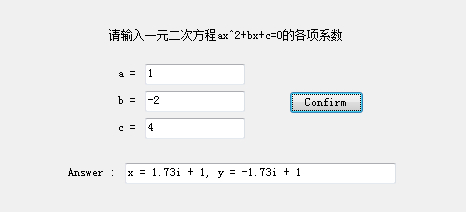
正常测试下, 效果如下:
在学长的试用下,任意输入了几个字母,然后程序崩溃了,~~~~(>_<)~~~~ !
所以上网一阵乱搜后,就有了下面的效果 : )
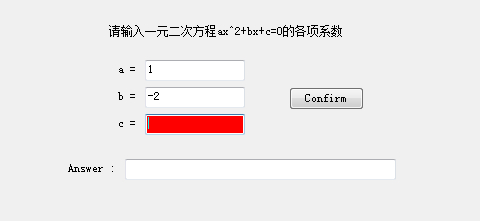
如下:若输入的字符为非数字( 当然首尾负号是可以检测到的 : ) )则会自动将文本框清空,
同时文本框背景置为红色,再输入正确格式后变回原来的颜色。
该效果核心代码如下:
 private void textBox1_TextChanged(object sender, EventArgs e)

 {

     string str1 = textBox1.Text.Trim();

     for (int i = ; i < str1.Length; i++)

     {

         if (i ==  && str1[] == '-')

             continue;

         if (!Char.IsNumber(str1[i]))

         {

             textBox1.Text = string.Empty;

             textBox1.BackColor = Color.Red;

         }

         else

         {

             textBox1.BackColor = Color.Empty;

         }

     }

 }
读到这里,您辛苦了! ^_^
————————————————————————————————————————————————————————————————————————————
声明:
本文为 大Yi巴狼 对自己所学的知识整理和实现。
本文档欢迎自由转载,但请务必保持本文档完整或注明来之本文档。本文档未经 大Yi巴狼 同意,不得用于商业用途。最后,如果您能从这个简单文档里获得些许帮助,大Yi巴狼 将对自己的一点努力感到非常高兴;由于作者本人水平有限,如果本文档中包含的错误给您造成了不便,在此提前说声抱歉。
祝身体健康,工作顺利。
C# 学习之旅(2)--- 意外的收获的更多相关文章
- WCF学习之旅—第三个示例之二(二十八)
上接WCF学习之旅—第三个示例之一(二十七) 五.在项目BookMgr.Model创建实体类数据 第一步,安装Entity Framework 1) 使用NuGet下载最新版的Entity Fram ...
- WCF学习之旅—第三个示例之四(三十)
上接WCF学习之旅—第三个示例之一(二十七) WCF学习之旅—第三个示例之二(二十八) WCF学习之旅—第三个示例之三(二十九) ...
- Hadoop学习之旅二:HDFS
本文基于Hadoop1.X 概述 分布式文件系统主要用来解决如下几个问题: 读写大文件 加速运算 对于某些体积巨大的文件,比如其大小超过了计算机文件系统所能存放的最大限制或者是其大小甚至超过了计算机整 ...
- WCF学习之旅—第三个示例之三(二十九)
上接WCF学习之旅—第三个示例之一(二十七) WCF学习之旅—第三个示例之二(二十八) 在上一篇文章中我们创建了实体对象与接口协定,在这一篇文章中我们来学习如何创建WCF的服务端代码.具体步骤见下面. ...
- WCF学习之旅—WCF服务部署到IIS7.5(九)
上接 WCF学习之旅—WCF寄宿前的准备(八) 四.WCF服务部署到IIS7.5 我们把WCF寄宿在IIS之上,在IIS中宿主一个服务的主要优点是在发生客户端请求时宿主进程会被自动启动,并且你可以 ...
- WCF学习之旅—WCF服务部署到应用程序(十)
上接 WCF学习之旅—WCF寄宿前的准备(八) WCF学习之旅—WCF服务部署到IIS7.5(九) 五.控制台应用程序宿主 (1) 在解决方案下新建控制台输出项目 ConsoleHosting.如下 ...
- WCF学习之旅—WCF服务的Windows 服务程序寄宿(十一)
上接 WCF学习之旅—WCF服务部署到IIS7.5(九) WCF学习之旅—WCF服务部署到应用程序(十) 七 WCF服务的Windows 服务程序寄宿 这种方式的服务寄宿,和IIS一样有一个一样 ...
- WCF学习之旅—WCF服务的WAS寄宿(十二)
上接 WCF学习之旅—WCF服务部署到IIS7.5(九) WCF学习之旅—WCF服务部署到应用程序(十) WCF学习之旅—WCF服务的Windows 服务程序寄宿(十一) 八.WAS宿主 IIS ...
- WCF学习之旅—WCF服务的批量寄宿(十三)
上接 WCF学习之旅—WCF服务部署到IIS7.5(九) WCF学习之旅—WCF服务部署到应用程序(十) WCF学习之旅—WCF服务的Windows 服务程序寄宿(十一) WCF学习之旅—WCF ...
- WCF学习之旅—第三个示例之五(三十一)
上接WCF学习之旅—第三个示例之一(二十七) WCF学习之旅—第三个示例之二(二十八) WCF学习之旅—第三个示例之三(二十九) WCF学习 ...
随机推荐
- VIM标记 mark 详解
转载:http://blog.163.com/lgh_2002/blog/static/44017526201081154512135/ 我的vim配置:http://pan.baidu.com/s/ ...
- Java基础知识强化之集合框架笔记75:哈希表
1. 哈希表数据结构(数组): 2. 哈希表确定元素是否相同: (1)判断的是两个元素的哈希值是否相同 如果相同,再判断两个对象内容是否相同 (2)判断哈希值相 ...
- Http Statis 500 -错误笔记
HTTP Status 500 - type Exception report message description The server encountered an internal error ...
- Content-Type一览
文件扩展名 Content-Type(Mime-Type) 文件扩展名 Content-Type(Mime-Type) .*( 二进制流,不知道下载文件类型) application/octet-st ...
- linq检索带命名空间的xml
XElement el = XElement.Load(fil); XNamespace ns = "http://schemas.microsoft.com/ado/2009/11/edm ...
- (原创)monitor H3C switch with cacti
H3C交换机需要做的操作 [H3C]snmp-agent #H3C默认SNMP是关闭的,需要先开启 [H3C]snmp-agent community read public #设置团体名[publi ...
- NVelocity 实现简单的留言板
留言版简单实现 -------------------------------------------------------------------------------------------- ...
- Servlet & JSP - Form-based Authentication
基本认证和摘要认证都只能使用浏览器自带的登录框而不能使用自定义的登录页面.如果必须使用自定义的登录页面,则可以选择基于表框的认证方式. 基于表框的认证的配置与基本认证和摘要认证的差别在于部署描述符中 ...
- Jersey(1.19.1) - Hello World, Get started with Jersey using the embedded Grizzly server
Maven Dependencies The following Maven dependencies need to be added to the pom: <dependency> ...
- 使用spring+mybatis+atomikos+tomcat构建分布式事务
本文通过一个demo,介绍如何使用spring+mybatis+atomikos+tomcat构建在一个事务中涉及两个数据源的web应用. demo功能:实现一个能成功提交和回滚的涉及两个数据库数据源 ...