
10. Android框架和工具之 AppMsg(消息提示)
1. AppMsg
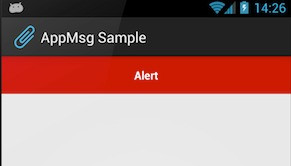
优雅的弹出类似Toast的消息提示,支持3种状态Alert(警告),Confirm(确认)以及Info(消息)。
2. AppMsg使用:
(1)AppMsg下载地址:
https://github.com/johnkil/Android-AppMsg
(2)下载成功之后,解压如下:
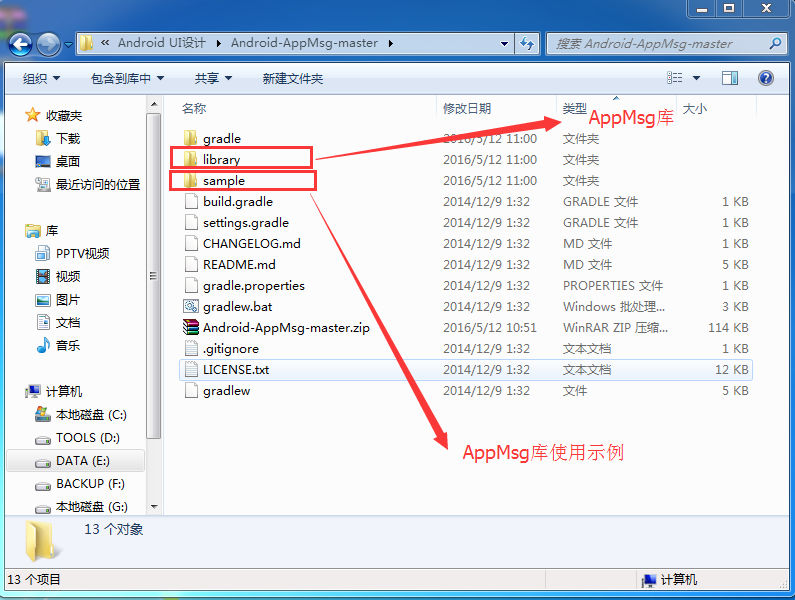
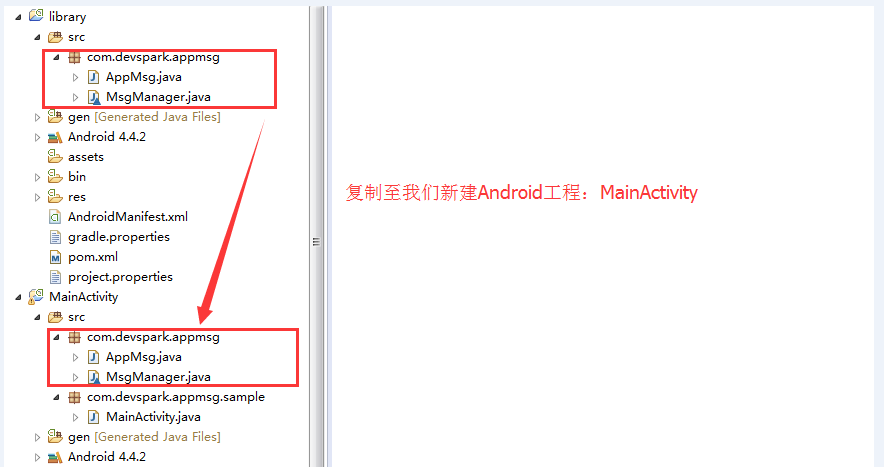
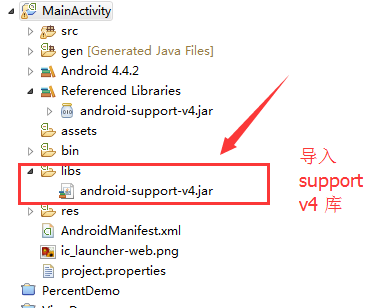
(3)导入library 和 sample 分别导入Eclipse如下:
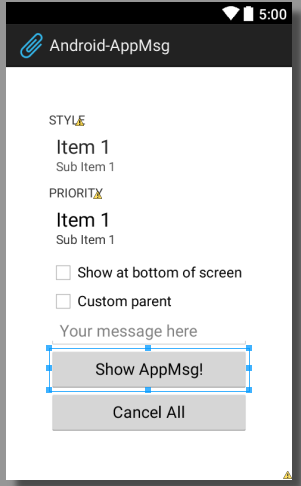
(4)首先我们来到主布局文件activity_main.xml,如下:
 <ScrollView xmlns:android="http://schemas.android.com/apk/res/android"

     xmlns:tools="http://schemas.android.com/tools"

     android:layout_width="match_parent"

     android:layout_height="match_parent"

     android:fillViewport="true">

     <LinearLayout

         android:id="@+id/animated_root"

         android:layout_width="match_parent"

         android:layout_height="match_parent"

         android:gravity="center"

         android:orientation="vertical"

         android:animateLayoutChanges="true"

         android:padding="48dp">

         <TextView

             android:layout_width="wrap_content"

             android:layout_height="wrap_content"

             android:layout_gravity="left"

             android:textAllCaps="true"

             android:text="@string/style"

             />

         <Spinner

             android:id="@+id/style_spnr"

             android:layout_width="match_parent"

             android:layout_height="wrap_content"

             android:minHeight="48dp"

             android:spinnerMode="dropdown"

             android:entries="@array/styles"

             android:prompt="@string/style"

             />

         <TextView

             android:layout_width="wrap_content"

             android:layout_height="wrap_content"

             android:layout_gravity="left"

             android:textAllCaps="true"

             android:text="@string/priority"

             />

         <Spinner

             android:id="@+id/priority_spnr"

             android:layout_width="match_parent"

             android:layout_height="wrap_content"

             android:minHeight="48dp"

             android:spinnerMode="dropdown"

             android:entries="@array/priorities"

             android:prompt="@string/priority"

             />

         <CheckBox

             android:id="@+id/bottom"

             android:layout_width="match_parent"

             android:layout_height="wrap_content"

             android:text="@string/bottom" />

         <LinearLayout

             android:id="@+id/alt_parent"

             android:visibility="gone"

             android:layout_width="match_parent"

             android:layout_height="wrap_content"

             android:minHeight="48dp"

             android:orientation="vertical" />

         <CheckBox

             android:id="@+id/parent_chk"

             android:layout_width="match_parent"

             android:layout_height="wrap_content"

             android:text="@string/custom_parent" />

         <EditText

             android:id="@+id/provided_txt"

             android:layout_width="match_parent"

             android:layout_height="wrap_content"

             android:hint="@string/your_message_here"

             />

         <Button

             android:id="@+id/show"

             android:layout_width="match_parent"

             android:layout_height="wrap_content"

             android:onClick="buttonClick"

             android:text="@string/show_appmsg" />

         <Button

             android:id="@+id/cancel_all"

             android:layout_width="match_parent"

             android:layout_height="wrap_content"

             android:onClick="buttonClick"

             android:text="@string/cancel_all" />

     </LinearLayout>

 </ScrollView>
布局效果如下:
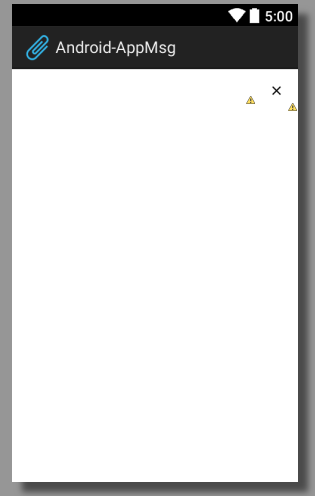
前面提到可以显示Alert、Confirm、Info三种消息样式,其实还可以显示自定义的消息样式,这里我们自定义一个消息样式为sticky.xml,如下:
 <?xml version="1.0" encoding="utf-8"?>

 <RelativeLayout xmlns:android="http://schemas.android.com/apk/res/android"

                 android:layout_width="match_parent"

                 android:layout_height="wrap_content"

                 android:minHeight="48dp">

     <ImageButton

             android:id="@+id/remove_btn"

             android:layout_width="wrap_content"

             android:layout_height="wrap_content"

             android:layout_alignParentRight="true"

             android:layout_centerVertical="true"

             android:minWidth="48dp"

             android:minHeight="48dp"

             android:src="@drawable/ic_action_cancel_inset"

             style="@style/SelectableItem"/>

     <TextView

             android:id="@android:id/message"

             android:layout_width="match_parent"

             android:layout_height="wrap_content"

             android:layout_toLeftOf="@id/remove_btn"

             android:layout_centerVertical="true"

             android:gravity="center"

             android:padding="8dp"

             android:textColor="#ff222222"

             android:textIsSelectable="false"

             android:textSize="14sp"

             android:textStyle="bold"/>

 </RelativeLayout>
布局效果图,如下:
(5)在MainActivity工程之中找到主Activity,修改为extends Activity,如下:
 /*

  * Copyright 2012 Evgeny Shishkin

  *

  * Licensed under the Apache License, Version 2.0 (the "License");

  * you may not use this file except in compliance with the License.

  * You may obtain a copy of the License at

  *

  *      http://www.apache.org/licenses/LICENSE-2.0

  *

  * Unless required by applicable law or agreed to in writing, software

  * distributed under the License is distributed on an "AS IS" BASIS,

  * WITHOUT WARRANTIES OR CONDITIONS OF ANY KIND, either express or implied.

  * See the License for the specific language governing permissions and

  * limitations under the License.

  */

 package com.devspark.appmsg.sample;

 import android.app.Activity;

 import android.animation.LayoutTransition;

 import android.annotation.TargetApi;

 import android.os.Bundle;

 import android.view.View;

 import android.view.ViewGroup;

 import android.widget.CheckBox;

 import android.widget.CompoundButton;

 import android.widget.EditText;

 import android.widget.Spinner;

 import static android.os.Build.VERSION.SDK_INT;

 import static android.os.Build.VERSION_CODES.ICE_CREAM_SANDWICH;

 import static android.os.Build.VERSION_CODES.JELLY_BEAN;

 import static android.text.TextUtils.isEmpty;

 import static android.view.Gravity.BOTTOM;

 import static android.view.View.GONE;

 import static android.view.View.VISIBLE;

 import com.devspark.appmsg.AppMsg;

 /**

  * Sample of AppMsg library.

  *

  * @author hebao

  */

 public class  MainActivity  extends Activity {

     private static final int NORMAL_POSITION = 1;

     private static final int INFO_POSITION = 2;

     private int mMsgCount;

     private Spinner mStyle;

     private Spinner mPriority;

     private EditText mProvidedMsg;

     private CheckBox mBottom;

     private CheckBox mParent;

     private ViewGroup mAltParent;

     public void onCreate(Bundle savedInstanceState) {

         super.onCreate(savedInstanceState);

         setContentView(R.layout.activity_main);

         mProvidedMsg = (EditText) findViewById(R.id.provided_txt);

         mStyle = (Spinner) findViewById(R.id.style_spnr);

         mStyle.setSelection(INFO_POSITION);

         mPriority = (Spinner) findViewById(R.id.priority_spnr);

         mPriority.setSelection(NORMAL_POSITION);

         mBottom = (CheckBox) findViewById(R.id.bottom);

         mParent = (CheckBox) findViewById(R.id.parent_chk);

         mAltParent = (ViewGroup) findViewById(R.id.alt_parent);

         mParent.setOnCheckedChangeListener(new CompoundButton.OnCheckedChangeListener() {

             @Override

             public void onCheckedChanged(CompoundButton buttonView, boolean isChecked) {

                 mAltParent.setVisibility(isChecked ? VISIBLE : GONE);

                 mBottom.setVisibility(isChecked ? GONE : VISIBLE);

             }

         });

         if (SDK_INT >= JELLY_BEAN) {

             enableChangingTransition();

         }

     }

     /**

      * 指使用该注解的方法适用于系统版本Android 4.1

      * 注:Android 4.1的版本代号是Jelly Bean

      */

     @TargetApi(JELLY_BEAN)

     private void enableChangingTransition() {

         ViewGroup animatedRoot = (ViewGroup) findViewById(R.id.animated_root);

         animatedRoot.getLayoutTransition().enableTransitionType(LayoutTransition.CHANGING);

     }

     /**

      * Button onClick listener.

      *

      * @param v

      */

     public void buttonClick(View v) {

         switch (v.getId()) {

             case R.id.show:

                 showAppMsg();

                 break;

             case R.id.cancel_all:

                 AppMsg.cancelAll(this);

                 break;

             default:

                 return;

         }

     }

     /**

      * 显示App Message

      */

     private void showAppMsg() {

         mMsgCount++;

         final int styleSelected = mStyle.getSelectedItemPosition();

         final int priority = positionToPriority(mPriority.getSelectedItemPosition());

         final CharSequence providedMsg = mProvidedMsg.getText();

         final CharSequence msg = isEmpty(providedMsg)

                 ? new StringBuilder().append(mStyle.getSelectedItem())

                 .append(" ").append(mPriority.getSelectedItem())

                 .append(" msg#").append(mMsgCount).toString()

                 : providedMsg;

         final AppMsg.Style style;

         boolean customAnimations = false;

         AppMsg provided = null;

         switch (styleSelected) {

             case 0:

                 style = AppMsg.STYLE_ALERT;

                 break;

             case 1:

                 style = AppMsg.STYLE_CONFIRM;

                 break;

             case 3:

                 style = new AppMsg.Style(AppMsg.LENGTH_SHORT, R.color.custom);

                 customAnimations = true;

                 break;

             case 4:

                 style = new AppMsg.Style(AppMsg.LENGTH_STICKY, R.color.sticky);

                 provided = AppMsg.makeText(this, msg, style, R.layout.sticky);

                 provided.getView()

                         .findViewById(R.id.remove_btn)

                         .setOnClickListener(new CancelAppMsg(provided));

                 break;

             default:

                 style = AppMsg.STYLE_INFO;

                 break;

         }

         // create {@link AppMsg} with specify type

         AppMsg appMsg = provided != null ? provided : AppMsg.makeText(this, msg, style);

         appMsg.setPriority(priority);

         if (mParent.isChecked()) {

             appMsg.setParent(mAltParent);

         } else {

             if (mBottom.isChecked()) {

                 appMsg.setLayoutGravity(BOTTOM);

             }

         }

         if (customAnimations) {

             appMsg.setAnimation(android.R.anim.slide_in_left, android.R.anim.slide_out_right);

         }

         appMsg.show();

     }

     private static int positionToPriority(int selectedItemPosition) {

         switch (selectedItemPosition) {

             case 0:

                 return AppMsg.PRIORITY_HIGH;

             case 2:

                 return AppMsg.PRIORITY_LOW;

             default:

                 return AppMsg.PRIORITY_NORMAL;

         }

     }

     @Override

     protected void onPause() {

         super.onPause();

         // This is optional for 14+,

         // also you may want to call it at your later convenience, e.g. onDestroy

         if (SDK_INT < ICE_CREAM_SANDWICH) {

             AppMsg.cancelAll(this);

         }

     }

     static class CancelAppMsg implements View.OnClickListener {

         private final AppMsg mAppMsg;

         CancelAppMsg(AppMsg appMsg) {

             mAppMsg = appMsg;

         }

         @Override

         public void onClick(View v) {

             mAppMsg.cancel();

         }

     }

 }
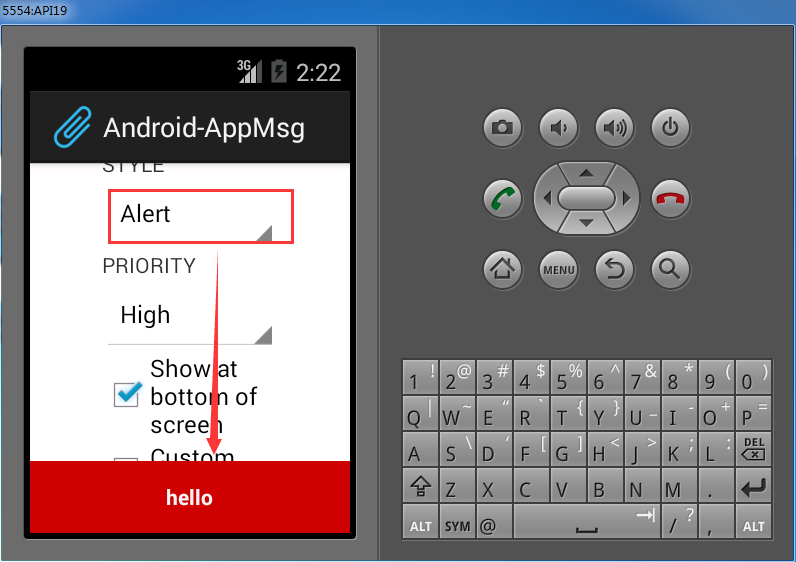
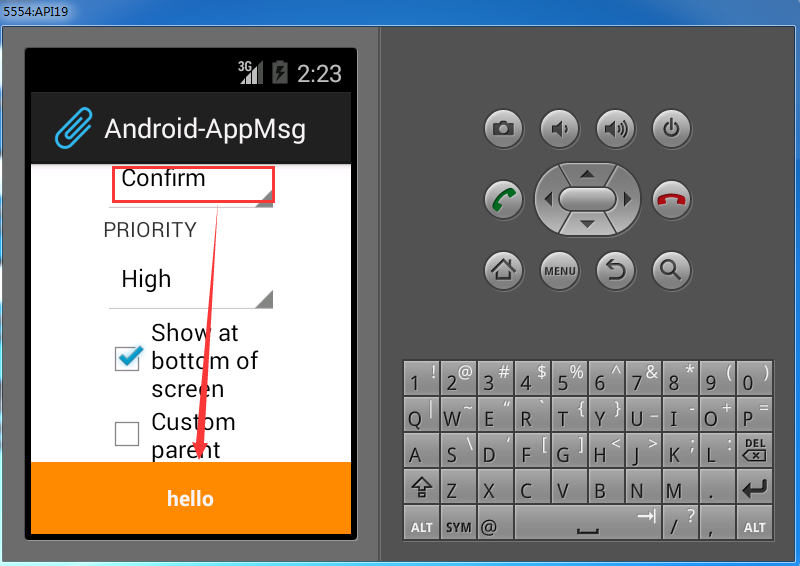
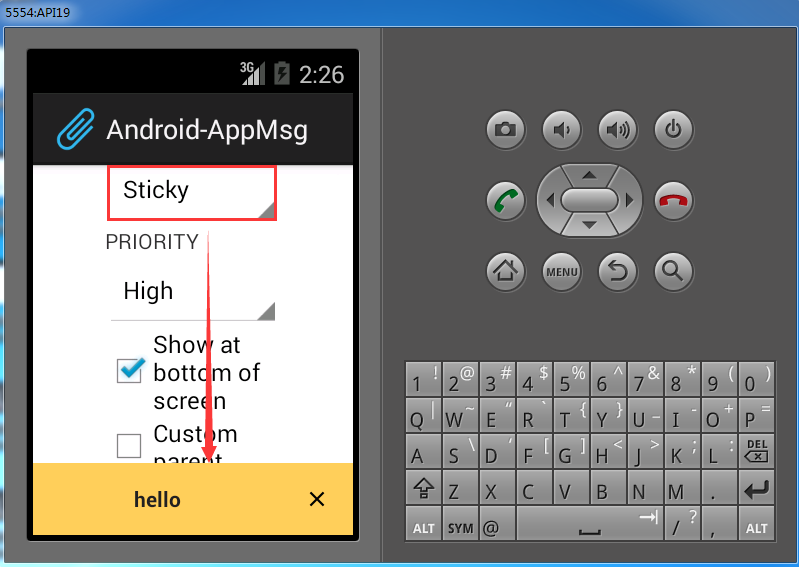
部署到模拟器上,如下:

10. Android框架和工具之 AppMsg(消息提示)的更多相关文章
- 7. Android框架和工具之 android-percent-support-lib-sample(百分比支持)
1. android-percent-support-lib-sample介绍: 谷歌最新的百分比布局库的示例项目.其实LinearLayout的layout_weight也能实现百分比效果,不过这个 ...
- Android应用开发学习之Toast消息提示框
作者:刘昊昱 博客:http://blog.csdn.net/liuhaoyutz 本文我们来看Toast消息提示框的用法.使用Toast消息提示框一般有三个步骤: 1. 创建一个Toast对象.可 ...
- Android学习笔记通过Toast显示消息提示框
显示消息提示框的步骤 这个很简单我就直接上代码了: Button show = (Button)findViewById(R.id.show); show.setOnClickListener(new ...
- 4. Android框架和工具之 android-async-http
1. android-async-http 简介 主要有以下功能: (1)发送异步http请求,在匿名callback对象中处理response信息: (2)http请求发生在UI(主)线程之外的 ...
- 3. Android框架和工具之 xUtils(DbUtils )
1. xUtils简介 xUtils 包含了很多实用的android工具.xUtils 最初源于Afinal框架,进行了大量重构,使得xUtils支持大文件上传,更全面的http请求协议支持(10种谓 ...
- 3. Android框架和工具之 xUtils(HttpUtils)
1. HttpUtils 作用: 支持同步,异步方式的请求: 支持大文件上传,上传大文件不会oom: 支持GET,POST,PUT,MOVE,COPY,DELETE,HEAD请求: 下载支持301/3 ...
- 13. Android框架和工具之 Android Drawable Factory
1. AndroidDrawableFactory 一个生成Android应用所需尺寸图片的工具. 托管在Github之中: https://github.com/tizionario/Android ...
- 6. Android框架和工具之 JSON解析
Android进阶笔记17:3种JSON解析工具(org.json.fastjson.gson)
- 3. Android框架和工具之 xUtils(BitmapUtils)
1. BitmapUtils 作用: 加载bitmap的时候无需考虑bitmap加载过程中出现的oom和android容器快速滑动时候出现的图片错位等现象: 支持加载网络图片和本地图片: 内存管理使用 ...
随机推荐
- Java的位运算符—— 与(&)、非(~)、或(|)、异或(^)
位运算符主要针对二进制,它包括了:“与”.“非”.“或”.“异或”.从表面上看似乎有点像逻辑运算符,但逻辑运算符是针对两个关系运算符来进行逻辑运算,而位运算符主要针对两个二进制数的位进行逻辑运算.下面 ...
- C# Control 控件DrapDrop不触发的问题
今天在做一个鼠标拖拽功能时,需要用到PictureBox的拖拽,即拖拽一个图标到PictureBox上实现加载绘制,可是怎么整也触发不了DrapDrop事件,最后终于找到了解决方法:原来需要在Drog ...
- C#之数组
什么是数组?数组是一种数据结构,包含同一个类型的多个元素.数组的声明:int[] myIntArray; 注:声明数组时,方括号 ([]) 必须跟在类型后面,而不是变量名后面.在 C# 中,将方括号放 ...
- linux TCP数据包重传过程----小结
于TCP/IP协议栈的TCP协议的重传功能是由在linux内核源码(net/ipv4/tcp_output.c)中的函数tcp_retransmit_skb()实现的 代码如下: /* This re ...
- IE下判断IE版本的语句...[if lte IE 6]……[endif]
<!--[if lte IE 6]> <![endif]--> IE6及其以下版本可见 <!--[if lte IE 7]> <![endif]--> ...
- MFC打开文件对话框
{ CString FilePathName; CFileDialog dlg(TRUE);///TRUE为OPEN对话框,FALSE为SAVE AS对话框 if(dlg.DoModal()==IDO ...
- Find n‘th number in a number system with only 3 and 4
这是在看geeksforgeeks时看到的一道题,挺不错的,题目是 Given a number system with only 3 and 4. Find the nth number in th ...
- VPW Communication Protocol
http://www.fastfieros.com/tech/vpw_communication_protocol.htm Breakdown of the j1850 3 byte Header f ...
- 使用sqlite的命令操作
一: 首先进入到D:\java\android\android-sdk\platform-tools文件夹里面 二:使用adb shell进入shell命令方式行(注意要想进入shell里面的操作 ...
- Android APK反编译得到Java源代码和资源文件
在此郑重声明,贴出来的目的不是为了去破解人家的软件,完全是一种学习的态度,不过好像通过这种方式也可以去汉化一些外国软件. 一.反编译Apk得到Java源代码 首先要下载两个工具:dex2jar和JD- ...