
WPF 实现繁花曲线
原文:WPF 实现繁花曲线
版权声明:本文为博主原创文章,未经博主允许不得转载。 https://blog.csdn.net/nihang1234/article/details/83346919
XAML:
<Window x:Class="FlowerCurve.MainWindow"

        xmlns="http://schemas.microsoft.com/winfx/2006/xaml/presentation"

        xmlns:x="http://schemas.microsoft.com/winfx/2006/xaml"

        xmlns:d="http://schemas.microsoft.com/expression/blend/2008"

        xmlns:mc="http://schemas.openxmlformats.org/markup-compatibility/2006"

        xmlns:local="clr-namespace:FlowerCurve"

        mc:Ignorable="d"

        Title="MainWindow" Height="800" Width="800" Loaded="Window_Loaded" WindowStartupLocation="CenterScreen">

    <Canvas>

        <Path Name="path" Stroke="Red" StrokeThickness="1"/>

    </Canvas>

</Window>
后台代码:
using System;

using System.Collections.Generic;

using System.Diagnostics;

using System.Linq;

using System.Text;

using System.Threading;

using System.Threading.Tasks;

using System.Windows;

using System.Windows.Controls;

using System.Windows.Data;

using System.Windows.Documents;

using System.Windows.Input;

using System.Windows.Media;

using System.Windows.Media.Imaging;

using System.Windows.Navigation;

using System.Windows.Shapes;

using System.Windows.Threading;

namespace FlowerCurve

{

    /// <summary>

    /// Interaction logic for MainWindow.xaml

    /// </summary>

    public partial class MainWindow : Window

    {

        private Point _bigCircleCenter = new Point(400, 400);

        private double _bigRadius = 400;

        private double _smallRadius = 260;

        private double _d = 110;

        DispatcherTimer timer = new DispatcherTimer();

        private double _angle = 0;

        private PathFigure _figure;

        private double _step = 0.05D;

        List<Point> _points = new List<Point>();

        public MainWindow()

        {

            InitializeComponent();

        }

        private void Draw(PathFigure figure, Point point, bool isStartPoint)

        {

            if (isStartPoint)

            {

                figure.StartPoint = point;

            }

            else

            {

                figure.Segments.Add(new LineSegment(point, true));

            }

        }

        private void Window_Loaded(object sender, RoutedEventArgs e)

        {

            timer.Interval = TimeSpan.FromMilliseconds(5);

            timer.Tick += Timer_Tick;

            timer.Start();

            PathGeometry curve = new PathGeometry();

            path.Data = curve;

            //curve.StartPoint = new Point(_bigRadius - _smallRadius - _d, 0);

            //curve.mo

            _figure = new PathFigure();

            curve.Figures.Add(_figure);

        }

        private void Timer_Tick(object sender, EventArgs e)

        {

            Point p = Calculate(_angle);

            Draw(_figure, p, _angle == 0);

            _points.Add(p);

            if (_points.Count > 10)

            {

                bool finished =Math.Abs(p.X-_points[0].X)<2 && Math.Abs(p.Y - _points[0].Y) < 2;

                Debug.WriteLine($"{_points[0].X - p.X} || {_points[0].Y - p.Y}");

                if (finished)

                {

                    MessageBox.Show("绘制完成");

                    timer.Stop();

                }

            }

            _angle += _step;

        }

        private Point Calculate(double angle)

        {

            double xr = _bigCircleCenter.X + (_bigRadius - _smallRadius) * Math.Cos(angle);

            double yr = _bigCircleCenter.Y - (_bigRadius - _smallRadius) * Math.Sin(angle);

            double a = _bigRadius * angle / _smallRadius;

            double x = xr + _d * Math.Cos(a);

            double y = yr + _d * Math.Sin(a);

            Point p = new Point(x, y);

            return p;

        }

    }

}
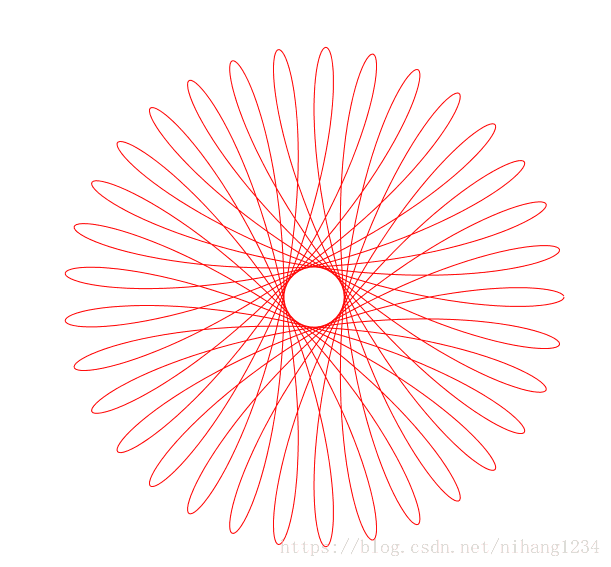
运行效果:
源代码
WPF 实现繁花曲线的更多相关文章
- 使用python和pygame绘制繁花曲线
前段时间看了一期<最强大脑>,里面展示了各种繁花曲线组合成的非常美丽的图形,一时心血来潮,想尝试自己用代码绘制繁花曲线,想怎么组合就怎么组合. 真实的繁花曲线使用一种称为繁花曲线规的小玩意 ...
- WPF贝塞尔曲线示例
WPF贝塞尔曲线示例 贝塞尔曲线在之前使用SVG的时候其实就已经有接触到了,但应用未深,了解的不是很多,最近在进行图形操作的时候需要用到贝塞尔曲线,所以又重新来了解WPF中贝塞尔曲线的绘制. 一阶贝塞 ...
- 缓动公式整理(附:C#实现及WPF原版对比)
前言 缓动在动画效果中应用非常广泛,在合适的时候使用一些缓动效果会使得效果更加符合人的直观感受,简单来说,会显得更加自然. WPF提供了11种缓动效果,涵盖了大部分的使用场景.不过如果需要在非WPF下 ...
- WPF绘制光滑连续贝塞尔曲线
1.需求 WPF本身没有直接把点集合绘制成曲线的函数.可以通过贝塞尔曲线函数来绘制. 贝塞尔曲线类是:BezierSegment,三次贝塞尔曲线,通过两个控制点来控制开始和结束方向. Quadrati ...
- 贝塞尔曲线 WPF MVVM N阶实现 公式详解+源代码下载
源代码下载 效果图: 本程序主要实现: N阶贝塞尔曲线(通用公式) 本程序主要使用技术 MVVM InterAction 事件绑定 动态添加Canvas的Item 第一部分公式: n=有效坐标点数量 ...
- WPF 曲线图表控件(自制)(二)
原文:WPF 曲线图表控件(自制)(二) 版权声明:本文为博主原创文章,未经博主允许不得转载. https://blog.csdn.net/koloumi/article/details/775218 ...
- WPF 曲线图表控件(自制)(一)
原文:WPF 曲线图表控件(自制)(一) 版权声明:本文为博主原创文章,未经博主允许不得转载. https://blog.csdn.net/koloumi/article/details/775092 ...
- C#WPF 如何绘制几何图形 图示教程 绘制sin曲线 正弦 绘制2D坐标系 有图有代码
原文:C#WPF 如何绘制几何图形 图示教程 绘制sin曲线 正弦 绘制2D坐标系 有图有代码 C#WPF 如何绘制几何图形? 怎么绘制坐标系?绘制sin曲线(正弦曲线)? 这离不开Path(Syst ...
- WPF使用DynamicDataDisplay.dll显示CPU及内存使用曲线
原文:WPF使用DynamicDataDisplay.dll显示CPU及内存使用曲线 版权声明:本文为博主原创文章,未经博主允许不得转载. https://blog.csdn.net/wangshub ...
随机推荐
- vue 用 :style动态修改带中划线的样式属性
今天在项目中遇到要用:style动态设置margin-top值,直接写发现报错.后来改成驼峰就成功了,记录一下 错误示范: <div class="testLeft ulData&qu ...
- ios本地相册 照像 本地视频
-(IBAction)btnClick{ UIActionSheet* actionSheet = [[UIActionSheet alloc] initWithTitle:nil delegate: ...
- IE9下不显示select
由于IE8和IE9下不兼容,需要在头部加入: <meta http-equiv="X-UA-Compatible" content="IE=EmulateIE7&q ...
- mysql8 mongodb4 增删改查 性能对比,2019 最专业对比,nosql 真的比 sql 性能强很多?
原文:mysql8 mongodb4 增删改查 性能对比,2019 最专业对比,nosql 真的比 sql 性能强很多? 版权所有:http://www.fengyunxiao.cn 近几年看了很多关 ...
- 魔兽争霸war3心得体会(一):UD的冰甲蜘蛛流
玩war3好几年了,之前都是打打电脑,随便玩玩的.刚刚在浩方等平台上和人玩的时候,各种被虐,很难赢一局.从去年开始,才认真玩.思考下各种战术. 最初,使用的是兽族orc,后来觉得兽族不够厉害,玩到对战 ...
- Deep Learning for Nature Language Processing --- 第四讲(下)
A note on matrix implementations 将J对softmax的权重W和每一个word vector进行求导: 尽量使用矩阵运算(向量化).不要使用for loop. 模型训练 ...
- swift学习第十三天:类的构造函数
类的构造函数 构造函数的介绍 构造函数类似于OC中的初始化方法:init方法 默认情况下载创建一个类时,必然会调用一个构造函数 即便是没有编写任何构造函数,编译器也会提供一个默认的构造函数. 如果是继 ...
- markdown + vim
https://www.jianshu.com/p/24aefcd4ca93https://github.com/isnowfy/python-vim-instant-markdownhttps:// ...
- 黑马程序猿-assign、retain、release、nonatomic、atomic、strong、weak
都是用于修饰@property声明的变量 assign:用于非oc对象类型,表示直接赋值(默认值) retain:用于mrc中,用于类属性中有oc对象的情况,表示先推断赋值的对象是否和实例对象变量的值 ...
- redisson
http://www.tuicool.com/articles/BjyeaeQ http://blog.csdn.net/csujiangyu/article/details/51005342