
Winform Chart
Chart图表解释说明:
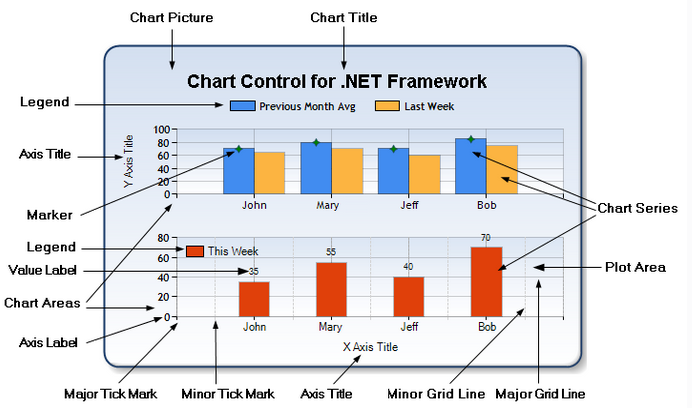
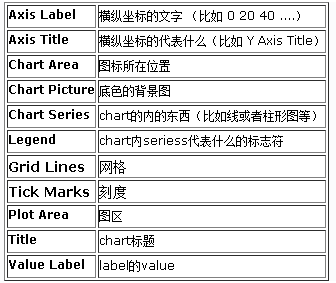
第一步:使用VS创建Winform项目;
第二步:工具箱中拖入Chart控件;
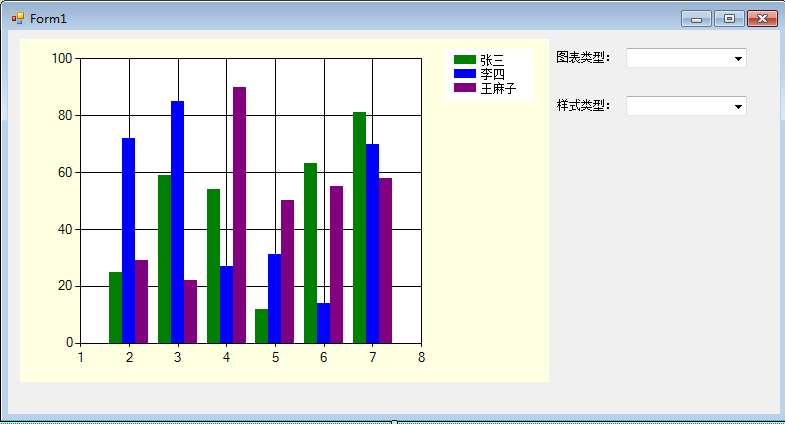
第三步:所有控件拖入其他控件如下图所示:
using System;

using System.Collections.Generic;

using System.Drawing;

using System.Windows.Forms;

using System.Windows.Forms.DataVisualization.Charting;

namespace ZB.PISS.StatisticsSys

{

    public partial class Form1 : Form

    {

        public Form1()

        {

            InitializeComponent();

        }

        private void Form1_Load(object sender, EventArgs e)

        {

            List<int> x = new List<int> { , , , ,  };

            List<int> a = new List<int> { , , , ,  };

            List<int> b = new List<int> { , , , ,  };

            List<int> c = new List<int> { , , , ,  };

            var dd = chartDemo.Series;

            this.chartDemo.Series["name1"].Points.DataBindXY(x, a);

            this.chartDemo.Series["name2"].Points.DataBindXY(x, b);

            this.chartDemo.Series["name3"].Points.DataBindXY(x, c);
Winfrom chart DataBindXY X内容显示不全解决方法如下:
chartImage.ChartAreas["ChartArea1"].AxisX.LabelAutoFitStyle = LabelAutoFitStyles.None;
chartImage.ChartAreas["ChartArea1"].AxisX.LabelStyle.Interval = 1;
chartImage.ChartAreas["ChartArea1"].AxisX.LabelStyle.IsStaggered = false;
//Chart Title

            this.chartDemo.Titles.Add("人员信息统计").Alignment = ContentAlignment.MiddleCenter;

            Color[] arr = chartDemo.PaletteCustomColors;

            this.cmbPattern.DataSource = PatternList();

            this.cmbType.DataSource = SeriesTypeList();

            //Axis Title

            this.chartDemo.ChartAreas[].AxisX.Title = "月份信息";

            this.chartDemo.ChartAreas[].AxisY.Title = "数量信息";

            //Lable

            //          #VALX 显示当前图例的X轴的对应文本(或数据)

            //#VAL, #VALY, 显示当前图例的Y轴的对应文本(或数据)

            //#VALY2, #VALY3, 显示当前图例的辅助Y轴的对应文本(或数据)

            //#SER: 显示当前图例的名称

            //#LABEL 显示当前图例的标签文本

            //#INDEX 显示当前图例的索引

            //#PERCENT 显示当前图例的所占的百分比

            //#TOTAL 总数量

            //#LEGENDTEXT 图例文本

            this.chartDemo.Series[].Label = "#VAL";

            this.chartDemo.Series[].Label = "#VAL";

            this.chartDemo.Series[].Label = "#VAL";

            //Marker

            this.chartDemo.Series[].MarkerSize = ;

            this.chartDemo.Series[].MarkerSize = ;

            this.chartDemo.Series[].MarkerSize = ;

            this.chartDemo.Series[].MarkerStyle = MarkerStyle.Circle;

            this.chartDemo.Series[].MarkerStyle = MarkerStyle.Square;

            this.chartDemo.Series[].MarkerStyle = MarkerStyle.Diamond;

        }

        #region ChartType

        public List<string> SeriesTypeList()

        {

            List<string> list = new List<string>();

            foreach (string item in Enum.GetNames(typeof(SeriesChartType)))

            {

                list.Add(item);

            }

            return list;

        }

        private void cmbType_SelectedValueChanged(object sender, EventArgs e)

        {

            try

            {

                SeriesChartType type = (SeriesChartType)Enum.Parse(typeof(SeriesChartType),

              this.cmbType.Text);

                this.chartDemo.Series["name1"].ChartType = type;

                this.chartDemo.Series["name2"].ChartType = type;

                this.chartDemo.Series["name3"].ChartType = type;

            }

            catch

            {

                return;

            }

        }

        #endregion

        #region Pattern

        public List<string> PatternList()

        {

            List<string> list = new List<string>();

            foreach (string item in Enum.GetNames(typeof(ChartColorPalette)))

            {

                list.Add(item);

            }

            return list;

        }

        private void cmbPattern_SelectedValueChanged(object sender, EventArgs e)

        {

            ChartColorPalette palette = (ChartColorPalette)Enum.Parse(typeof(ChartColorPalette),

                this.cmbPattern.Text);

            this.chartDemo.Palette = palette;

        }

        #endregion

    }

}
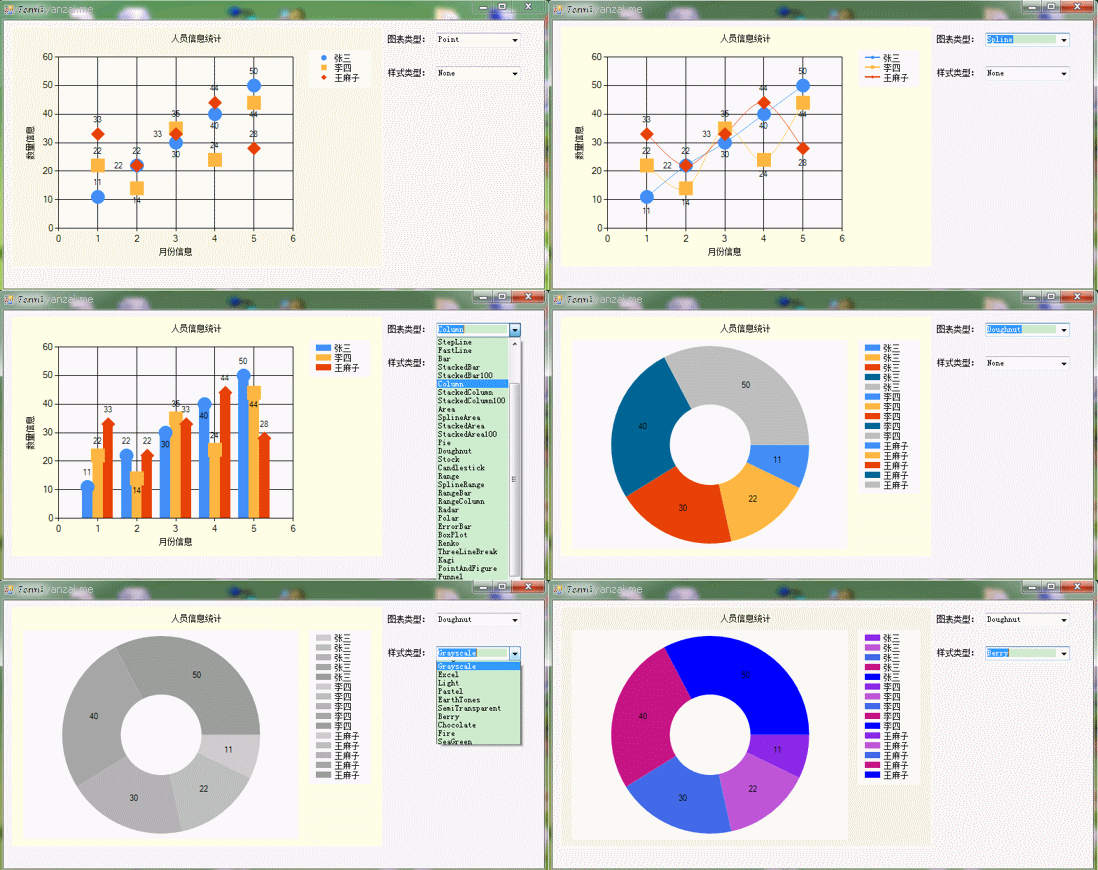
运行效果如下:
资源源码下载地址:http://download.csdn.net/my Winfrom Chart
补充:
一:实现3D效果
 private void comboBox1_SelectedValueChanged(object sender, EventArgs e)

        {

            if (this.comboBox1.Text.Equals("3D"))

            {

                 //this.chartDemo.ChartAreas[0].Area3DStyle.Enable3D = true;

                 //开启三维模式的原因是为了避免标签重叠

                 this.chartDemo.ChartAreas["ChartArea1"].Area3DStyle.Enable3D = true;//开启三维模式;PointDepth:厚度BorderWidth:边框宽

                 this.chartDemo.ChartAreas["ChartArea1"].Area3DStyle.Rotation = ;//起始角度

                 this.chartDemo.ChartAreas["ChartArea1"].Area3DStyle.Inclination = ;//倾斜度(0~90)

                 this.chartDemo.ChartAreas["ChartArea1"].Area3DStyle.LightStyle = LightStyle.Realistic;//表面光泽度

                 this.chartDemo.ChartAreas["ChartArea1"].AxisX.Interval = ; //决定x轴显示文本的间隔,1为强制每个柱状体都显示,3则间隔3个显示

                 this.chartDemo.ChartAreas["ChartArea1"].AxisX.LabelStyle.Font = new Font("宋体", , FontStyle.Regular);

                 this.chartDemo.ChartAreas["ChartArea1"].AxisX.MajorGrid.Enabled = false;

            }

            else

            {

                this.chartDemo.ChartAreas["ChartArea1"].Area3DStyle.Enable3D = false;

            }

        }
Winform Chart的更多相关文章
- c# winform Chart Pie 中若X轴数据为字符串时,#VALX取值为0
https://q.cnblogs.com/q/83848/ 在winform程序中用自带的Chart进行画图表时,若画饼图,其中X轴数据为字符串,这时候如果想设置Label值的格式为#VALX:#V ...
- c# Winform Chart入门
额外参考链接:http://www.cnblogs.com/greenerycn/archive/2008/10/27/microsoft-chart.html winform 仪表盘相关下载链接:/ ...
- winform Chart控件 获取鼠标处坐标值方法
Chart控件本身功能强大,应用广泛,因此其属性.方法也很多.此处介绍在很多应用中需要查看鼠标位置处坐标值的一些方法 1,调用Chart事件 GetToolTip 利用ToolTipEventArg ...
- WPF 使用WinForm Chart控件
第一步: 页面 首先引用命名空间 xmlns:wfi="clr-namespace:System.Windows.Forms.Integration;assembly=WindowsFor ...
- 使用WinForm Chart控件 制作饼装,柱状,折线图
http://blog.csdn.net/dream2050csdn/article/details/53510340 chart控件的属性很多,主要用到Chart控件图表区域的属性有五个属性 1.A ...
- 【207】WinForm Chart类
目录: 在工具箱中找到 Chart 控件并使用 设置 Chart 属性 代码中设置属性 属性中设置属性 Chart 类说明 ChartAreas ChartAreaCollection 类 Chart ...
- Winform Chart 控件读取datatable后显示图表
private void Button2_Click(object sender, EventArgs e) { DataTable table = new DataTable(); this.cha ...
- C# chart,有关如何在鼠标移动到Series上时显示节点及数据 (有待继续更新)
一.效果与思路 效果: 解决方案1 用chart的mousemove时间,实时跟踪鼠标最近的X轴的位置,然后把cursorX设置到那个位置上,让用户知道我是选的那一个X的值,同时用tooltip显示该 ...
- Winform & Devexpress Chart使用入门
一.Chart(Winform) 使用图表控件(chart)首先要理解图表区域(ChartArea).XY轴(AxisX.AxisY).数据点(Series).标题(Title).图例(Legend) ...
随机推荐
- Django中Ajax处理
1.大部分和Flask中相同. 2.Django处理JSON,主要是对于查询结果集处理. 使用Django提供的序列化的类来完成QuerySet到JSON字符串的转换 from django.core ...
- [LeetCode&Python] Problem 748. Shortest Completing Word
Find the minimum length word from a given dictionary words, which has all the letters from the strin ...
- [LeetCode&Python] Problem 226. Invert Binary Tree
Invert a binary tree. Example: Input: 4 / \ 2 7 / \ / \ 1 3 6 9 Output: 4 / \ 7 2 / \ / \ 9 6 3 1 Tr ...
- Xlua使用教程、攻略
Xlua 使用指南 本文提供全流程,中文翻译. Chinar 坚持将简单的生活方式,带给世人!(拥有更好的阅读体验 -- 高分辨率用户请根据需求调整网页缩放比例) Chinar -- 心分享.心创新! ...
- textarea(多行文本域)
多行文本域<textarea>: <textarea name="..." rows="..." cols="..." . ...
- PDO数据库引擎
PDO概述1.PDO是一种数据库访问抽象层,你不必使用以前的 mysqli_xx 之类只能访问 mysql数据库.使用PDO可以连接mysql.msssql.oracle等等,而不必重写代码.2.PD ...
- Linux Distribution 分支
https://distrowatch.com/ DistroWatch是一个包含了各种Linux发行版及其他自由/开放源代码的类Unix操作系统的新闻.人气排名.以及其他一般信息等的网站.它包含了数 ...
- C++学习(二十一)(C语言部分)之 函数2
复习 函数名 函数名称 调用时需要函数名加上相应的参数函数类型 void 返回值(根据函数的需要)参数函数体 用来写函数的一个定义 函数怎样实现都现在其中函数声明 函数定义 定义如果放在调用的后面, ...
- #366 A-C
A. Hulk 题意是给你一个n 输出一个英文字符串,找下规律就发现 当(i!=n&&i%2==1) 输出的是 I hate that (注意大写) 当(i!=n&&i ...
- 《DSP using MATLAB》Problem 6.16
从别的地方找来的: 截图有些乱. 结构流程图如下