
简单的springboot + vue
安装vue 脚手架
npm install -g @vue/cli
查看vue 版本
vue -V
创建vue项目
vue create vue_project
Vue CLI v4.5.13
? Please pick a preset: (Use arrow keys)
  Default ([Vue 2] babel, eslint)
  Default (Vue 3) ([Vue 3] babel, eslint)
> Manually select features
Vue CLI v4.5.13
? Please pick a preset: Manually select features
? Check the features needed for your project: (Press <space> to select, <a> to toggle all, <i> to invert selection)
>( ) Choose Vue version
 (*) Babel
 ( ) TypeScript
 ( ) Progressive Web App (PWA) Support
 (*) Router
 ( ) Vuex
 ( ) CSS Pre-processors
 ( ) Linter / Formatter
 ( ) Unit Testing
 ( ) E2E Testing
Vue CLI v4.5.13
? Please pick a preset: Manually select features
? Check the features needed for your project: Babel, Router
? Use history mode for router? (Requires proper server setup for index fallback in production) (Y/n) n
Vue CLI v4.5.13
? Please pick a preset: Manually select features
? Check the features needed for your project: Babel, Router
? Use history mode for router? (Requires proper server setup for index fallback in production) No
? Where do you prefer placing config for Babel, ESLint, etc.? (Use arrow keys)
In dedicated config files
> In package.json
Vue CLI v4.5.13
? Please pick a preset: Manually select features
? Check the features needed for your project: Babel, Router
? Use history mode for router? (Requires proper server setup for index fallback in production) No
? Where do you prefer placing config for Babel, ESLint, etc.? In package.json
? Save this as a preset for future projects? (y/N) n
Vue CLI v4.5.13
  Creating project in D:\vue\vue20211002\vue\vue_project.
�  Initializing git repository...
⚙️  Installing CLI plugins. This might take a while...

> core-js@3.18.1 postinstall D:\vue\vue20211002\vue\vue_project\node_modules\core-js
> node -e "try{require('./postinstall')}catch(e){}"

> ejs@2.7.4 postinstall D:\vue\vue20211002\vue\vue_project\node_modules\ejs
> node ./postinstall.js

added 1220 packages from 635 contributors in 36.733s

81 packages are looking for funding
  run `npm fund` for details

�  Invoking generators...
�  Installing additional dependencies...

added 4 packages from 1 contributor in 3.849s

81 packages are looking for funding
  run `npm fund` for details

  Running completion hooks...

�  Generating README.md...

�  Successfully created project vue_project.
�  Get started with the following commands:

 $ cd vue_project
 $ npm run serve

PS D:\vue\vue20211002\vue>
启动vue项目
PS D:\vue\vue20211002\vue> cd vue_project
PS D:\vue\vue20211002\vue\vue_project> npm run serve

> vue_project@0.1.0 serve D:\vue\vue20211002\vue\vue_project
> vue-cli-service serve

 INFO  Starting development server...
98% after emitting CopyPlugin

 DONE  Compiled successfully in 1793ms                                                                        7:55:17 PM

  App running at:
  - Local:   http://localhost:8080/
  - Network: http://192.168.5.14:8080/

  Note that the development build is not optimized.
  To create a production build, run npm run build.
mysql数据库
# Host: 127.0.0.1  (Version: 5.5.53)
# Date: 2020-09-01 16:46:58
# Generator: MySQL-Front 5.3  (Build 4.13)

/*!40101 SET NAMES utf8 */;

#
# Source for table "book"
#

DROP TABLE IF EXISTS `book`;
CREATE TABLE `book` (
  `id` int(10) NOT NULL AUTO_INCREMENT,
  `name` varchar(20) DEFAULT NULL,
  `author` varchar(20) DEFAULT NULL,
  `publish` varchar(20) DEFAULT NULL,
  `pages` int(10) DEFAULT NULL,
  `price` float(10,2) DEFAULT NULL,
  `bookcaseid` int(10) DEFAULT NULL,
  `abled` int(10) DEFAULT NULL,
  PRIMARY KEY (`id`),
  KEY `FK_ieh6qsxp6q7oydadktc9oc8t2` (`bookcaseid`)
) ENGINE=MyISAM AUTO_INCREMENT=15 DEFAULT CHARSET=utf8;

#
# Data for table "book"
#

/*!40000 ALTER TABLE `book` DISABLE KEYS */;
INSERT INTO `book` VALUES (1,'解忧杂货店','东野圭吾','电子工业出版社',102,27.30,9,1),(2,'追风筝的人','卡勒德·胡赛尼','中信出版社',330,26.00,1,1),(3,'人间失格','太宰治','作家出版社',150,17.30,1,1),(4,'这就是二十四节气','高春香','电子工业出版社',220,59.00,3,1),(5,'白夜行','东野圭吾','南海出版公司',300,27.30,4,1),(6,'摆渡人','克莱儿·麦克福尔','百花洲文艺出版社',225,22.80,1,1),(7,'暖暖心绘本','米拦弗特毕','湖南少儿出版社',168,131.60,5,1),(8,'天才在左疯子在右','高铭','北京联合出版公司',330,27.50,6,1),(9,'我们仨','杨绛','生活.读书.新知三联书店',89,17.20,7,1),(10,'活着','余华','作家出版社',100,100.00,6,1),(11,'水浒传','施耐庵','三联出版社',300,50.00,1,1),(12,'三国演义','罗贯中','三联出版社',300,50.00,2,1),(13,'红楼梦','曹雪芹','三联出版社',300,50.00,5,1),(14,'西游记','吴承恩','三联出版社',300,60.00,3,1);
/*!40000 ALTER TABLE `book` ENABLE KEYS */;
vue配置
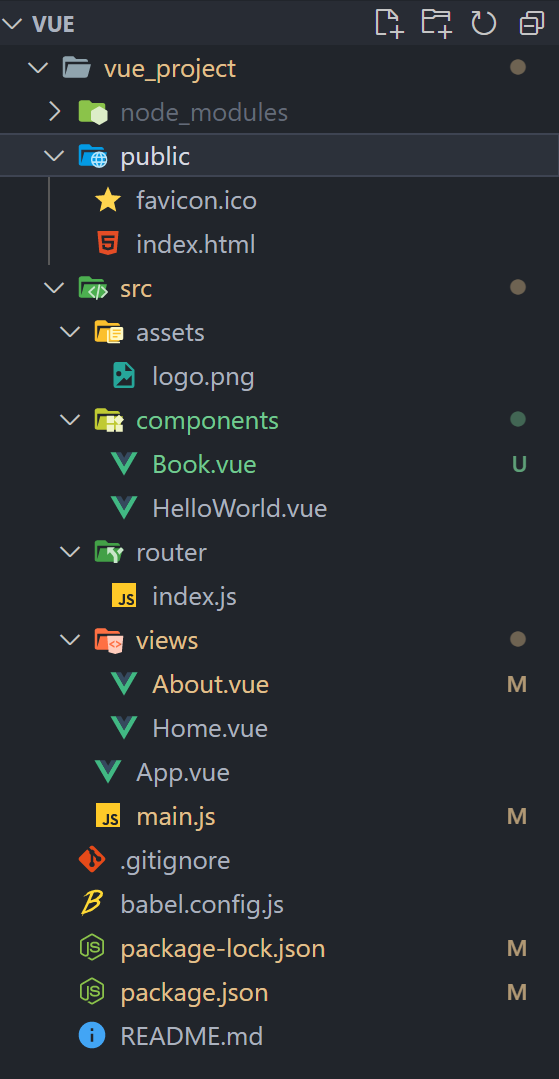
/components/Book.vue
<template>
  <div>
      <table>
        <tr>
            <td>index</td>
            <td>编号</td>
            <td>图书名称</td>
            <td>作者</td>
        </tr>
        <tr v-for="(item,index) in books" :key="index">
            <td>{{index}}</td>
            <td>{{item.id}}</td>
            <td>{{item.name}}</td>
            <td>{{item.author}}</td>
        </tr>
    </table>
    {{msg}}
  </div>
</template>

<script>
    export default {
        name: "book",
        data(){
          return{
            msg:'Hello Vue',
            books:[
              {
                  id: 1,
                  name:'Java零基础实战',
                  author:'宁楠'
              },
              {
                  id: 2,
                  name:'Vue零基础实战',
                  author:'张三'
              },
              {
                  id: 3,
                  name:'Spring Boot零基础实战',
                  author:'小明'
              }
            ]
          }
        },
        created(){
          const _this = this;
          this.$axios.get('http://localhost:8888/book').then(
            function(resp){
                _this.books = resp.data;
            }
          )
        }
    }
</script>

<style scoped>

</style>
views/About.vue
<template>
  <div class="about">
     <Book msg="Welcome to Your Vue.js App"/>
  </div>
</template>
<script>
// @ is an alias to /src
import Book from '@/components/Book.vue'

export default {
  name: 'About',
  components: {
    Book
  }
}
</script>
router/index.js
import Vue from 'vue'
import VueRouter from 'vue-router'
import Home from '../views/Home.vue'

Vue.use(VueRouter)

const routes = [
  {
    path: '/',
    name: 'Home',
    component: Home
  },
  {
    path: '/about',
    name: 'About',
    // route level code-splitting
    // this generates a separate chunk (about.[hash].js) for this route
    // which is lazy-loaded when the route is visited.
    component: () => import(/* webpackChunkName: "about" */ '../views/About.vue')
  }
]

const router = new VueRouter({
  routes
})

export default router
跨域配置
CrosConfig
package com.springbootvue.config;

import org.springframework.context.annotation.Configuration;
import org.springframework.web.servlet.config.annotation.CorsRegistry;
import org.springframework.web.servlet.config.annotation.WebMvcConfigurer;

/**
 * @author
 * @create-date 2020/9/1 0001 16:27
 */
@Configuration//自动配置
public class CrosConfig implements WebMvcConfigurer { //实现这个接口

    //重新addCorsMappings方法
    @Override
    public void addCorsMappings(CorsRegistry registry) {
        registry.addMapping("/**")      //添加映射路径,“/**”表示对所有的路径实行全局跨域访问权限的设置
                .allowedOriginPatterns("*")            //开放哪些ip、端口、域名的访问权限
                .allowedMethods( "GET", "POST", "PUT", "OPTIONS", "DELETE")        //开放哪些Http方法,允许跨域访问
                .allowCredentials(true)         //是否允许发送Cookie信息
                .maxAge(3600)
                .allowedHeaders("*");            //允许HTTP请求中的携带哪些Header信息
    }
}
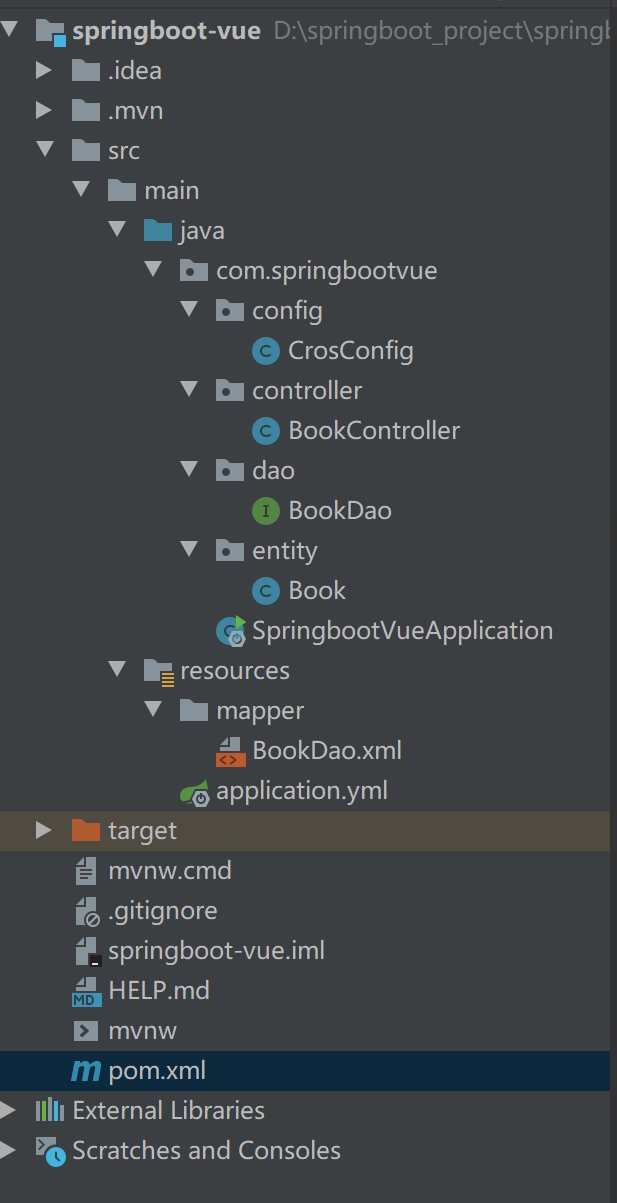
BookController
package com.springbootvue.controller;

import com.springbootvue.dao.BookDao;
import com.springbootvue.entity.Book;
import org.springframework.web.bind.annotation.GetMapping;
import org.springframework.web.bind.annotation.RequestMapping;
import org.springframework.web.bind.annotation.RestController;

import javax.annotation.Resource;
import java.util.List;

/**
 * @author admin
 * @PROJECT_NAME: springboot-vue
 **/
@RestController("/")
@RequestMapping
public class BookController {
    @Resource
    private BookDao bookDao;
    @GetMapping("/book")
//    @CrossOrigin
    public List<Book> findAll(){
        return bookDao.selectAll();
    }
    @GetMapping("/b")
    public Book find(){
        Integer a=1;
        return bookDao.selectByPrimaryKey(a);
    }
}
BookDao
package com.springbootvue.dao;

import com.springbootvue.entity.Book;
import org.apache.ibatis.annotations.Select;

import java.util.List;
public interface BookDao {

    @Select("select * from book")
    List<Book> selectAll();
}
Book
package com.springbootvue.entity;

import java.io.Serializable;
import lombok.Data;

/**
 * book
 * @author
 */
@Data
public class Book implements Serializable {
    private Integer id;

    private String name;

    private String author;

    private String publish;

    private Integer pages;

    private Double price;

    private Integer bookcaseid;

    private Integer abled;

    private static final long serialVersionUID = 1L;

}
SpringbootVueApplication
package com.springbootvue;

import org.mybatis.spring.annotation.MapperScan;
import org.springframework.boot.SpringApplication;
import org.springframework.boot.autoconfigure.SpringBootApplication;

/**
 * @author admin
 */
@SpringBootApplication
@MapperScan("com.springbootvue.dao")
public class SpringbootVueApplication {

    public static void main(String[] args) {
        SpringApplication.run(SpringbootVueApplication.class, args);
    }

}
BookDao.xml
<?xml version="1.0" encoding="UTF-8"?>
<!DOCTYPE mapper PUBLIC "-//mybatis.org//DTD Mapper 3.0//EN" "http://mybatis.org/dtd/mybatis-3-mapper.dtd">
<mapper namespace="com.springbootvue.dao.BookDao">
  <resultMap id="BaseResultMap" type="com.springbootvue.entity.Book">
    <id column="id" jdbcType="INTEGER" property="id" />
    <result column="name" jdbcType="VARCHAR" property="name" />
    <result column="author" jdbcType="VARCHAR" property="author" />
    <result column="publish" jdbcType="VARCHAR" property="publish" />
    <result column="pages" jdbcType="INTEGER" property="pages" />
    <result column="price" jdbcType="FLOAT" property="price" />
    <result column="bookcaseid" jdbcType="INTEGER" property="bookcaseid" />
    <result column="abled" jdbcType="INTEGER" property="abled" />
  </resultMap>
  <sql id="Base_Column_List">
    id, `name`, author, publish, pages, price, bookcaseid, abled
  </sql>
  <select id="selectAll" resultMap="BaseResultMap">
    select
    <include refid="Base_Column_List" />
    from book
  </select>

</mapper>
application.yml
spring:
  datasource:
    url: jdbc:mysql://localhost:3306/vuetest?useUnicode=true&characterEncoding=UTF-8&serverTimezone=Asia/Shanghai
    username: root
    password: root
    driver-class-name:  com.mysql.cj.jdbc.Driver
  jpa:
    show-sql: true
    properties:
      hibernate:
        format_sql: true
server:
  port: 8888
# mybatis配置
mybatis:
  mapper-locations: classpath:mapper/*.xml    # mapper映射文件位置
  type-aliases-package: com.springbootvue.entity    # 实体类所在的位置
  configuration:
    log-impl: org.apache.ibatis.logging.stdout.StdOutImpl   #用于控制台打印sql语句
pom.xml
<?xml version="1.0" encoding="UTF-8"?>
<project xmlns="http://maven.apache.org/POM/4.0.0" xmlns:xsi="http://www.w3.org/2001/XMLSchema-instance"
         xsi:schemaLocation="http://maven.apache.org/POM/4.0.0 https://maven.apache.org/xsd/maven-4.0.0.xsd">
    <modelVersion>4.0.0</modelVersion>
    <parent>
        <groupId>org.springframework.boot</groupId>
        <artifactId>spring-boot-starter-parent</artifactId>
        <version>2.5.5</version>
        <relativePath/> <!-- lookup parent from repository -->
    </parent>
    <groupId>com</groupId>
    <artifactId>springboot-vue</artifactId>
    <version>0.0.1-SNAPSHOT</version>
    <name>springboot-vue</name>
    <description>Demo project for Spring Boot</description>
    <properties>
        <project.build.sourceEncoding>UTF-8</project.build.sourceEncoding>
        <project.reporting.outputEncoding>UTF-8</project.reporting.outputEncoding>
        <java.version>1.8</java.version>
    </properties>
    <dependencies>
        <dependency>
            <groupId>org.springframework.boot</groupId>
            <artifactId>spring-boot-starter-web</artifactId>
        </dependency>

        <dependency>
            <groupId>org.projectlombok</groupId>
            <artifactId>lombok</artifactId>
        </dependency>

        <!-- mysql-->
        <dependency>
            <groupId>mysql</groupId>
            <artifactId>mysql-connector-java</artifactId>
            <version>8.0.20</version>
        </dependency>
        <dependency>
            <groupId>org.mybatis.spring.boot</groupId>
            <artifactId>mybatis-spring-boot-starter</artifactId>
            <version>2.2.0</version>
        </dependency>
        <dependency>
            <groupId>javax</groupId>
            <artifactId>javaee-api</artifactId>
            <version>7.0</version>
        </dependency>
        <dependency>
            <groupId>org.springframework.boot</groupId>
            <artifactId>spring-boot-starter-test</artifactId>
            <scope>test</scope>
        </dependency>

    </dependencies>

    <build>
        <plugins>
            <plugin>
                <groupId>org.apache.maven.plugins</groupId>
                <artifactId>maven-resources-plugin</artifactId>
                <version>3.1.0</version>
            </plugin>
            <plugin>
                <groupId>org.springframework.boot</groupId>
                <artifactId>spring-boot-maven-plugin</artifactId>
                <configuration>
                    <excludes>
                        <exclude>
                            <groupId>org.projectlombok</groupId>
                            <artifactId>lombok</artifactId>
                        </exclude>
                    </excludes>
                </configuration>
            </plugin>
        </plugins>
    </build>

</project>
简单的springboot + vue的更多相关文章
- SpringBoot+Vue+WebSocket 实现在线聊天
一.前言 本文将基于 SpringBoot + Vue + WebSocket 实现一个简单的在线聊天功能 页面如下: 在线体验地址:http://www.zhengqingya.com:8101 二 ...
- SpringBoot + Vue + nginx项目部署(零基础带你部署)
一.环境.工具 jdk1.8 maven spring-boot idea VSVode vue 百度网盘(vue+springboot+nginx源码): 链接:https://pan.baidu. ...
- 使用Docker部署Spring-Boot+Vue博客系统
在今年年初的时候,完成了自己的个Fame博客系统的实现,当时也做了一篇博文Spring-boot+Vue = Fame 写blog的一次小结作为记录和介绍.从完成实现到现在,也断断续续的根据实际的使用 ...
- SpringBoot + Vue + ElementUI 实现后台管理系统模板 -- 后端篇(五): 数据表设计、使用 jwt、redis、sms 工具类完善注册登录逻辑
(1) 相关博文地址: SpringBoot + Vue + ElementUI 实现后台管理系统模板 -- 前端篇(一):搭建基本环境:https://www.cnblogs.com/l-y-h/p ...
- SpringBoot + Vue + ElementUI 实现后台管理系统模板 -- 后端篇(一): 搭建基本环境、整合 Swagger、MyBatisPlus、JSR303 以及国际化操作
相关 (1) 相关博文地址: SpringBoot + Vue + ElementUI 实现后台管理系统模板 -- 前端篇(一):搭建基本环境:https://www.cnblogs.com/l-y- ...
- Springboot+Vue实现仿百度搜索自动提示框匹配查询功能
案例功能效果图 前端初始页面 输入搜索信息页面 点击查询结果页面 环境介绍 前端:vue 后端:springboot jdk:1.8及以上 数据库:mysql 核心代码介绍 TypeCtrler .j ...
- springboot+vue前后端分离,nginx代理配置 tomcat 部署war包详细配置
1.做一个小系统,使用了springboot+vue 基础框架参考这哥们的,直接拿过来用,链接https://github.com/smallsnail-wh/interest 前期的开发环境搭建就不 ...
- 一个简单的适用于Vue的下拉刷新,触底加载组件
一个简单的适用于Vue的上拉刷新,触底加载组件,没有发布npm需要时直接粘贴定制修改即可 <template> <div class="list-warp-template ...
- 一个最简单的springboot
现在项目里使用springboot,平时开发并不太关注springboot的一些基本配置,现在想整理一下springboot相关内容. 实际开发中都会因为各种业务需求在springboot上添加很多东 ...
随机推荐
- JuiceFS 即将发布 1.0 并调整开源许可
开源一周年 JuiceFS 开始于 2017 年,是一款云原生分布式文件系统,旨在帮助企业解决多云.跨云.混合云环境下所面临的诸多挑战:数据安全和保护.大数据架构升级.海量小文件访问.Kubernet ...
- 使用.NET 6开发TodoList应用(27)——实现API的Swagger文档化
系列导航及源代码 使用.NET 6开发TodoList应用文章索引 需求 在日常开发中,我们需要给前端提供文档化的API接口定义,甚至需要模拟架设一个fake服务用来调试接口字段.或者对于后端开发人员 ...
- 【Java】静态与非静态
文章目录 静态与非静态 static关键字 使用static修饰属性:静态变量(或类变量) 类变量与实例变量的内存解析 使用static修饰方法:静态方法 使用static的注意点 开发中,如何确定一 ...
- 《剑指offer》面试题64. 求1+2+…+n
问题描述 求 1+2+...+n ,要求不能使用乘除法.for.while.if.else.switch.case等关键字及条件判断语句(A?B:C). 示例 1: 输入: n = 3 输出: 6 示 ...
- springmvc复习导图
spingmvcweb请求
- mysql加强(4)~多表查询
mysql加强(4)~多表查询:笛卡尔积.消除笛卡尔积操作(等值.非等值连接),内连接(隐式连接.显示连接).外连接.自连接 一.笛卡尔积 1.什么是笛卡尔积: 数学上,有两个集合A={a,b},B= ...
- Python 序列类型小结
序列是python中最基本的数据结构. 序列中每一个元素都有其对应的索引,索引是从0开始,0,1,2......依次类推 python中的序列类型有:字符串str.列表list.元组tuple.Uni ...
- Airtest 的连接安卓模拟器
1. 开启安卓模拟器 2. 查看进程,MEmuHeadless.exe的进行程号, 然后在cmd中输入 netstat -ano|findstr "16116" 3. 到 airt ...
- vue常用组件
滚动组件:better-scroll 官网地址:https://ustbhuangyi.github.io/better-scroll/doc/zh-hans/installation.html ...
- django之百度Ueditor富文本编辑器后台集成
Python3 + Django2.0 百度Ueditor 富文本编辑器的集成 百度富文本编辑器官网地址:http://fex.baidu.com/ueditor/ 疑问:为什么要二次集成? 答案:因 ...