
爬虫框架之Scrapy——爬取某招聘信息网站
案例1:爬取内容存储为一个文件
1.建立项目
C:\pythonStudy\ScrapyProject>scrapy startproject tenCent

New Scrapy project 'tenCent', using template directory 'c:\\program files\\pytho

n36\\lib\\site-packages\\scrapy\\templates\\project', created in:

    C:\pythonStudy\ScrapyProject\tenCent

You can start your first spider with:

    cd tenCent

    scrapy genspider example example.com
2.编写item文件
import scrapy

class TencentItem(scrapy.Item):

    # define the fields for your item here like:

    # name = scrapy.Field()

    # 职位名称

    position_name = scrapy.Field()

    # 详情链接

    position_link = scrapy.Field()

    # 职位类别

    position_type = scrapy.Field()

    # 职位人数

    position_number = scrapy.Field()

    # 职位地点

    work_location = scrapy.Field()

    # 发布时间

    publish_times = scrapy.Field()

    # 工作职责

    position_duty = scrapy.Field()

    # 工作要求

    position_require = scrapy.Field()
3.建立spider文件
C:\pythonStudy\ScrapyProject\tenCent\tenCent\spiders>scrapy genspider tencent "hr.tencent.com"

Created spider 'tencent' using template 'basic' in module:

  tenCent.spiders.tencent
编写spider类逻辑
from tenCent.items import TencentItem

class TencentSpider(scrapy.Spider):

    name = 'tencent'

    allowed_domains = ['hr.tencent.com']

    base_url = 'https://hr.tencent.com/'

    start_urls = ['https://hr.tencent.com/position.php']

    def parse(self, response):

        node_list = response.xpath('//tr[@class="even"] | //tr[@class="odd"]')

        # 选取所有标签tr 且class属性等于even或odd的元素

        next_page = response.xpath('//a[@id="next"]/@href').extract_first()

        # 选取所有标签a且id=next,href属性值

        for node in node_list:

            '''

            实例化对象要放在循环里面,否则会造成item被多次赋值,

            因为每次循环完毕后,请求只给了调度器,入队,并没有去执行请求,

            循环完毕后,下载器会异步执行队列中的请求,此时item已经为最后一条记录,

            而详细内容根据url不同去请求的,所以每条详细页是完整的,

            最终结果是数据内容为每页最后一条,详细内容与数据内容不一致,

            在yield item后,会把内容写到pipeline中

            '''

            item = TencentItem()

            item['position_name'] = node.xpath('./td[1]/a/text()').extract_first()  # 获取第一个td标签下a标签的文本

            item['position_link'] = node.xpath('./td[1]/a/@href').extract_first()  # 获取第一个td标签下a标签href属性

            item['position_type'] = node.xpath('./td[2]/text()').extract_first()  # 获取第二个td标签下文本

            item['position_number'] = node.xpath('./td[3]/text()').extract_first()  # 获取第3个td标签下文本

            item['work_location'] = node.xpath('./td[4]/text()').extract_first()  # 获取第4个td标签下文本

            item['publish_times'] = node.xpath('./td[5]/text()').extract_first()  # 获取第5个td标签下文本

            # yield item  注释yield item ,因为detail方法中yield item会覆盖这个

            yield scrapy.Request(url=self.base_url + item['position_link'] ,callback=self.detail,meta={'item':item})  # 请求详细页,把item传到detail

            # 请求给调度器,入队,循环结束完成后,交给下载器去异步执行,返回response

        yield scrapy.Request(url=self.base_url + next_page,callback=self.parse) # 请求下一页

    def detail(self, response):

        """

        爬取详细内容

        :param response:

        :return:

        """

        print("-->detail")

        item = response.meta['item'] # 得到parse中的yield item

        item['position_duty'] =  ''.join(response.xpath('//ul[@class="squareli"]')[0].xpath('./li/text()').extract())  # 转化为字符串

        item['position_require'] = ''.join(response.xpath('//ul[@class="squareli"]')[1].xpath('./li/text()').extract()) # 转化为字符串

        yield item
4.建立pipeline文件
存储数据
# -*- coding: utf-8 -*-

# Define your item pipelines here

#

# Don't forget to add your pipeline to the ITEM_PIPELINES setting

# See: https://doc.scrapy.org/en/latest/topics/item-pipeline.html

import json

class TencentPipeline(object):

    def open_spider(self, spider):

        """

         # spider (Spider 对象) – 被开启的spider

         # 可选实现,当spider被开启时,这个方法被调用。

        :param spider:

        :return:

        """

        self.file = open('tencent.json', 'w', encoding='utf-8')

        json_header = '{ "tencent_info":['

        self.count = 0

        self.file.write(json_header)  # 保存到文件

    def close_spider(self, spider):

        """

        # spider (Spider 对象) – 被关闭的spider

        # 可选实现,当spider被关闭时,这个方法被调用

        :param spider:

        :return:

        """

        json_tail = '] }'

        self.file.seek(self.file.tell() - 1)  # 定位到最后一个逗号

        self.file.truncate()  # 截断后面的字符

        self.file.write(json_tail)  # 添加终止符保存到文件

        self.file.close()

    def process_item(self, item, spider):

        """

        # item (Item 对象) – 被爬取的item

        # spider (Spider 对象) – 爬取该item的spider

        # 这个方法必须实现,每个item pipeline组件都需要调用该方法,

        # 这个方法必须返回一个 Item 对象,被丢弃的item将不会被之后的pipeline组件所处理。

        :param item:

        :param spider:

        :return:

        """

        content = json.dumps(dict(item), ensure_ascii=False, indent=2) + ","  # 字典转换json字符串

        self.count += 1

        print('content', self.count)

        self.file.write(content)  # 保存到文件
5.设置settiing
# Crawl responsibly by identifying yourself (and your website) on the user-agent

USER_AGENT = '"User-Agent":"Mozilla/5.0 (Windows NT 6.1; Win64; x64) AppleWebKit/537.36 (KHTML, like Gecko) Chrome/63.0.3239.132 Safari/537.36"'  # 头部信息,反爬

ITEM_PIPELINES = {

   'tenCent.pipelines.TencentPipeline': 300,

}
6.执行程序
C:\pythonStudy\ScrapyProject\tenCent\tenCent\spiders>scrapy crawl tencent
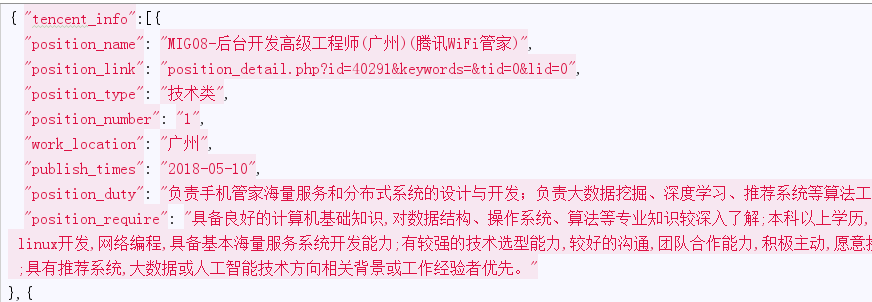
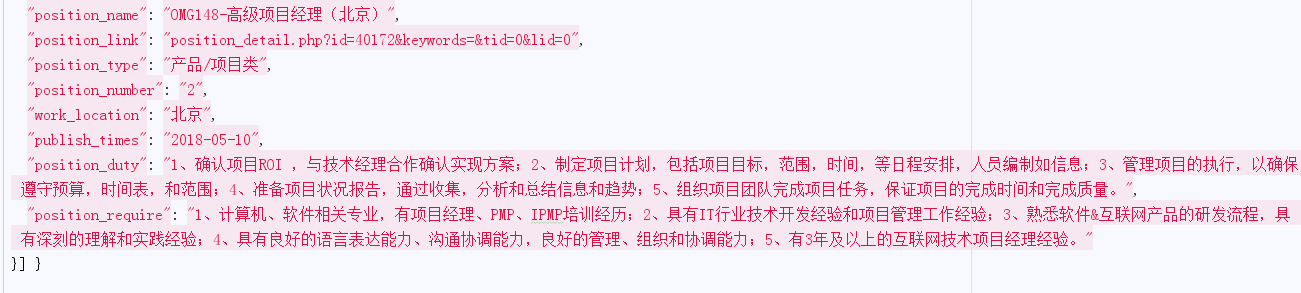
json文件
案例2:爬取内容存储为两个文件
案例2与只是把案例1中的概率页和详细内容页分成两个文件去存储,
只有某些py文件内容有变化,以下只列举出有变化的py文件
1.编写item文件
用两个类表示不同的存储内容
import scrapy

"""

职位概览页字段

"""

class TencentItem(scrapy.Item):

    # define the fields for your item here like:

    # name = scrapy.Field()

    # 职位名称

    position_name = scrapy.Field()

    # 详情链接

    position_link = scrapy.Field()

    # 职位类别

    position_type = scrapy.Field()

    # 职位人数

    position_number = scrapy.Field()

    # 职位地点

    work_location = scrapy.Field()

    # 发布时间

    publish_times = scrapy.Field()

"""

职位详细页字段

"""

class TenDetailItem(scrapy.Item):

    # 工作职责

    position_duty = scrapy.Field()

    # 工作要求

    position_require = scrapy.Field()
2.编写spider文件逻辑
# -*- coding: utf-8 -*-

import scrapy

from tenCent.items import TencentItem

from tenCent.items import TenDetailItem

print(__name__)

class TencentSpider(scrapy.Spider):

    name = 'tencent'

    allowed_domains = ['hr.tencent.com']

    base_url = 'https://hr.tencent.com/'

    start_urls = ['https://hr.tencent.com/position.php']

    def parse(self, response):

        node_list = response.xpath('//tr[@class="even"] | //tr[@class="odd"]')

        # 选取所有标签tr 且class属性等于even或odd的元素

        next_page = response.xpath('//a[@id="next"]/@href').extract_first()

        # 选取所有标签a且id=next,href属性值

        for node in node_list:

            '''

            实例化对象要放在循环里面,否则会造成item被多次赋值,

            因为每次循环完毕后,请求只给了调度器,入队,并没有去执行请求,

            循环完毕后,下载器会异步执行队列中的请求,此时item已经为最后一条记录,

            而详细内容根据url不同去请求的,所以每条详细页是完整的,

            最终结果是数据内容为每页最后一条,详细内容与数据内容不一致,

            在yield item后,会把内容写到pipeline中

            '''

            item = TencentItem()

            item['position_name'] = node.xpath('./td[1]/a/text()').extract_first()  # 获取第一个td标签下a标签的文本

            item['position_link'] = node.xpath('./td[1]/a/@href').extract_first()  # 获取第一个td标签下a标签href属性

            item['position_type'] = node.xpath('./td[2]/text()').extract_first()  # 获取第二个td标签下文本

            item['position_number'] = node.xpath('./td[3]/text()').extract_first()  # 获取第3个td标签下文本

            item['work_location'] = node.xpath('./td[4]/text()').extract_first()  # 获取第4个td标签下文本

            item['publish_times'] = node.xpath('./td[5]/text()').extract_first()  # 获取第5个td标签下文本

            yield item

            yield scrapy.Request(url=self.base_url + item['position_link'] ,callback=self.detail)  # 请求详细页

            # 请求给调度器,入队,循环结束完成后,交给下载器去异步执行,返回response

        # yield scrapy.Request(url=self.base_url + next_page,callback=self.parse) # 请求下一页

    def detail(self, response):

        """

        爬取详细内容

        :param response:

        :return:

        """

        print("-->detail")

        item = TenDetailItem() # 实例化TenDetailItem

        item['position_duty'] = ''.join(response.xpath('//ul[@class="squareli"]')[0].xpath('./li/text()').extract())  # 转化为字符串

        item['position_require'] = ''.join(response.xpath('//ul[@class="squareli"]')[1].xpath('./li/text()').extract()) # 转化为字符串

        yield item
3.建立pipeline文件
存储数据
# -*- coding: utf-8 -*-

# Define your item pipelines here

#

# Don't forget to add your pipeline to the ITEM_PIPELINES setting

# See: https://doc.scrapy.org/en/latest/topics/item-pipeline.html

import json

from .items import TencentItem

from .items import TenDetailItem

"""

存储职位概览

"""

class TencentPipeline(object):

    def open_spider(self, spider):

        """

         # spider (Spider 对象) – 被开启的spider

         # 可选实现,当spider被开启时,这个方法被调用。

        :param spider:

        :return:

        """

        self.file = open('tencent.json', 'w', encoding='utf-8')

        json_header = '{ "tencent_info":['

        self.count = 0

        self.file.write(json_header)  # 保存到文件

    def close_spider(self, spider):

        """

        # spider (Spider 对象) – 被关闭的spider

        # 可选实现,当spider被关闭时,这个方法被调用

        :param spider:

        :return:

        """

        json_tail = '] }'

        self.file.seek(self.file.tell() - 1)  # 定位到最后一个逗号

        self.file.truncate()  # 截断后面的字符

        self.file.write(json_tail)  # 添加终止符保存到文件

        self.file.close()

    def process_item(self, item, spider):

        """

        # item (Item 对象) – 被爬取的item

        # spider (Spider 对象) – 爬取该item的spider

        # 这个方法必须实现,每个item pipeline组件都需要调用该方法,

        # 这个方法必须返回一个 Item 对象,被丢弃的item将不会被之后的pipeline组件所处理。

        :param item:

        :param spider:

        :return:

        """

        if isinstance(item,TencentItem):

            content = json.dumps(dict(item), ensure_ascii=False, indent=2) + ","  # 字典转换json字符串

            self.count += 1

            print('content', self.count)

            self.file.write(content)  # 保存到文件

        '''

        return item后,item会根据优先级

        传递到下一个管道TenDetailPipeline处理

        此段代码说明当实例不属于TencentItem时,放弃存储json,

        直接传递到下一个管道处理

        return放在if外面,如果写在if里面item在不属于TencentItem实例后,

        item会终止传递,造成detail数据丢失

        '''

        return item

"""

存储职位详细情况

"""

class TenDetailPipeline(object):

    def open_spider(self, spider):

        """

         # spider (Spider 对象) – 被开启的spider

         # 可选实现,当spider被开启时,这个方法被调用。

        :param spider:

        :return:

        """

        self.file = open('tendetail.json', 'w', encoding='utf-8')

        json_header = '{ "tendetail_info":['

        self.count = 0

        self.file.write(json_header)  # 保存到文件

    def close_spider(self, spider):

        """

        # spider (Spider 对象) – 被关闭的spider

        # 可选实现,当spider被关闭时,这个方法被调用

        :param spider:

        :return:

        """

        json_tail = '] }'

        self.file.seek(self.file.tell() - 1)  # 定位到最后一个逗号

        self.file.truncate()  # 截断后面的字符

        self.file.write(json_tail)  # 添加终止符保存到文件

        self.file.close()

    def process_item(self, item, spider):

        """

        # item (Item 对象) – 被爬取的item

        # spider (Spider 对象) – 爬取该item的spider

        # 这个方法必须实现,每个item pipeline组件都需要调用该方法,

        # 这个方法必须返回一个 Item 对象,被丢弃的item将不会被之后的pipeline组件所处理。

        :param item:

        :param spider:

        :return:

        """

        if isinstance(item, TenDetailItem):

            '''

            得到item,判断item实例属于TenDetailItem,存储json文件

            如果不属于,直接return item到下一个管道

          '''

            print('**'*30)

            content = json.dumps(dict(item), ensure_ascii=False, indent=2) + ","  # 字典转换json字符串

            self.count += 1

            print('content', self.count)

            self.file.write(content)  # 保存到文件

        return item
4.设置settiing
# See https://doc.scrapy.org/en/latest/topics/item-pipeline.html

ITEM_PIPELINES = { # 注册2个管道

   'tenCent.pipelines.TencentPipeline': 300,

   'tenCent.pipelines.TenDetailPipeline':400  # 数字越大,优先级越小,最后被执行

}
5.执行
#>scrapy crawl tencent >1.txt 2>&1

#把内容输出到文件中
爬虫框架之Scrapy——爬取某招聘信息网站的更多相关文章
- pyspider爬虫框架webui简介-爬取阿里招聘信息
命令行输入pyspider开启pyspider 浏览器打开http://localhost:5000/ group表示组名,几个项目可以同一个组名,方便管理,当组名修改为delete时,项目会在一天后 ...
- Scrapy框架——CrawlSpider爬取某招聘信息网站
CrawlSpider Scrapy框架中分两类爬虫,Spider类和CrawlSpider类. 它是Spider的派生类,Spider类的设计原则是只爬取start_url列表中的网页, 而Craw ...
- python之scrapy爬取jingdong招聘信息到mysql数据库
1.创建工程 scrapy startproject jd 2.创建项目 scrapy genspider jingdong 3.安装pymysql pip install pymysql 4.set ...
- python scrapy爬取前程无忧招聘信息
使用scrapy框架之前,使用以下命令下载库: pip install scrapy -i https://pypi.tuna.tsinghua.edu.cn/simple 1.创建项目文件夹 scr ...
- 【图文详解】scrapy爬虫与动态页面——爬取拉勾网职位信息(2)
上次挖了一个坑,今天终于填上了,还记得之前我们做的拉勾爬虫吗?那时我们实现了一页的爬取,今天让我们再接再厉,实现多页爬取,顺便实现职位和公司的关键词搜索功能. 之前的内容就不再介绍了,不熟悉的请一定要 ...
- 爬取拉勾网招聘信息并使用xlwt存入Excel
xlwt 1.3.0 xlwt 文档 xlrd 1.1.0 python操作excel之xlrd 1.Python模块介绍 - xlwt ,什么是xlwt? Python语言中,写入Excel文件的扩 ...
- 网络爬虫之scrapy爬取某招聘网手机APP发布信息
1 引言 过段时间要开始找新工作了,爬取一些岗位信息来分析一下吧.目前主流的招聘网站包括前程无忧.智联.BOSS直聘.拉勾等等.有段时间时间没爬取手机APP了,这次写一个爬虫爬取前程无忧手机APP岗位 ...
- 用scrapy爬取亚马逊网站项目
这次爬取亚马逊网站,用到了scrapy,代理池,和中间件: spiders里面: # -*- coding: utf-8 -*- import scrapy from scrapy.http.requ ...
- Python爬取拉勾网招聘信息并写入Excel
这个是我想爬取的链接:http://www.lagou.com/zhaopin/Python/?labelWords=label 页面显示如下: 在Chrome浏览器中审查元素,找到对应的链接: 然后 ...
随机推荐
- \n,\r,\t
etF首先说说\n,\r,\t \n 软回车: 在Windows 中表示换行且回到下一行的最开始位置 在Linux.unix 中只表示换行,但不会回到下一行的开始位置. \r 软空格: 在Linux. ...
- happypack 进一步 优化 build速率
1.webpack.base.conf.js 使用happypack的正确姿势: 'use strict' const path = require('path') const utils = req ...
- robot framework学习笔记之六—自动变量
自动变量被RF框架创建和修改,在测试执行过程中值可能会变化;另外,某些自动变量在执行过程中并非总是可用.修改自动变量,并不能对变量的初始值产生影响.但可以用某些内建关键字来修改某些自动变量的值. 变量 ...
- Kaggle新手入门之路(完结)
学完了Coursera上Andrew Ng的Machine Learning后,迫不及待地想去参加一场Kaggle的比赛,却发现从理论到实践的转变实在是太困难了,在此记录学习过程. 一:安装Anaco ...
- 应用“PUSH推送”的5个真相和5个误区
真相一:用户厌烦的并不是推送功能本身 针对如何看待推送功能这一问题,对1万名用户进行了问卷调查,结果表明80%的用户表示不会拒绝推送功能.各个年龄段方面没有太大的差别,但女性用户更容易受个人兴趣和 ...
- stm32 定时器TIM时钟步骤
1)TIM3 时钟使能 . RCC_APB1PeriphClockCmd(RCC_APB1Periph_TIMx, ENABLE); //时钟使能 2) 初始化定时器参数,设置自动重装值, 分频系数, ...
- HDU 2647:Reward(拓扑排序+队列)
Reward Time Limit: 2000/1000 MS (Java/Others) Memory Limit: 32768/32768 K (Java/Others) Total Sub ...
- HDU1070:Milk
Milk Time Limit: 2000/1000 MS (Java/Others) Memory Limit: 65536/32768 K (Java/Others)Total Submis ...
- 网络流--最大流dinic模板
标准的大白书式模板,除了变量名并不一样……在主函数中只需要用到 init 函数.add 函数以及 mf 函数 #include<stdio.h> //差不多要加这么些头文件 #includ ...
- Sencha Touch+PhoneGap打造超级奶爸之喂养记(一) 源码免费提供(转)
起源 非常高兴我的宝宝健康平安的出生了.对于初次做奶爸的我,喜悦过后,面临着各中担心,担心宝宝各项指标是否正常.最初几天都是在医院待着,从出生那一天开始,护士妹妹隔一段时间就会来问宝宝的喂奶,大小便, ...