
alpine编译安装tengine,并使用supervisor启动
Alpine是一个小型的linux系统,官方docker镜像只有不到5MB,非常适合作为容器镜像。
Alpine Linux is a security-oriented, lightweight Linux distribution based on musl libc and Busybox.

A minimal Docker image based on Alpine Linux with a complete package index and only 5 MB in size!
为了更好地了解alpine,我在虚拟机上安装了一个本地alpine。
上官网下载一个标准STANDARD镜像。创建一个虚拟机,我用的 VMWare Fusion,挂载好下载的iso镜像。

然后启动就可以了,不过这时信息没有存盘,需要使用安装脚本安装系统到磁盘。安装过程其实很简单,初次使用,最重要的是要知道有这个安装脚本。
安装脚本叫做 setup-alpine,其实仔细看的话,系统每次启动和登陆的时候都会有提示。
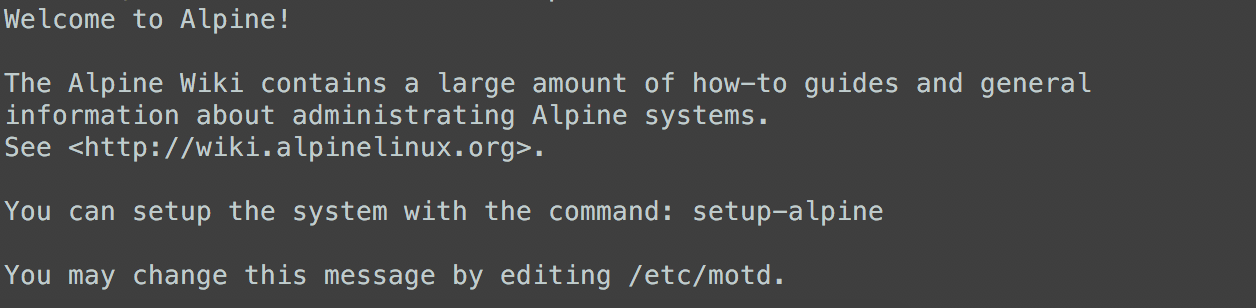
安装系统细节就不说了,如果有疑问可查官方文档。安装完成后,需要重启系统。重启之后,就是从磁盘启动的了。
下面具体说说如何使用:
1、配置安装源。
# vim /etc/apk/repositories

https://mirrors.ustc.edu.cn/alpine/edge/main

https://mirrors.ustc.edu.cn/alpine/edge/community

https://mirrors.ustc.edu.cn/alpine/edge/testing
2、安装ssh服务。Alpine使用的包管理工具叫 apk。服务管理系统叫 OpenRC。
# apk update

# apk add openssh

# rc-service sshd start

# rc-update add sshd
3、修改sshd配置文件,允许root登录。
# vim /etc/ssh/sshd_config

PermitRootLogin yes

# service sshd restart
这时就可以使用终端远程登陆了。
4、安装用户管理工具,修改root用户的shell为bash,默认使用的是ash。
# apk add shadow

# usermod -s /bin/bash root
5、安装常用工具。
# apk add vim bash bash-completion
6、设置常用别名。
# vim /etc/profile

export LS_OPTIONS='--color=auto'

alias ls='ls $LS_OPTIONS'

alias ll='ls $LS_OPTIONS -l'

alias l='ls $LS_OPTIONS -lA'
7、其实在testing源里面,已经有现成的tengine安装包了。不过这里我会测试手动编译,不会直接使用安装包。
# apk policy tengine

tengine policy:

  2.1.0-r4:

    https://mirrors.ustc.edu.cn/alpine/edge/testing
8、如何查看安装包包含哪些文件。有两种方法,不过都只能查看已经安装的包。
# apk manifest tengine | awk '{print $2}'

etc/tengine/scgi_params

etc/tengine/fastcgi_params

etc/tengine/tengine.conf

etc/tengine/uwsgi_params

etc/tengine/fastcgi.conf

etc/tengine/mime.types

etc/tengine/koi-win

etc/tengine/mime.types.default

etc/tengine/koi-utf

etc/tengine/browsers

etc/tengine/uwsgi_params.default

etc/tengine/scgi_params.default

etc/tengine/module_stubs

etc/tengine/nginx.conf.default

etc/tengine/fastcgi_params.default

etc/tengine/win-utf

etc/tengine/fastcgi.conf.default

etc/logrotate.d/tengine

etc/init.d/tengine

usr/sbin/nginx

usr/sbin/dso_tool

usr/html/index.html

usr/html/50x.html

usr/share/licenses/tengine/LICENSE
# apk info -a tengine | grep -v \.h

tengine-2.1.0-r4 description:

tengine-2.1.0-r4 webpage:

http://tengine.taobao.org/

tengine-2.1.0-r4 installed size:

1519616

tengine-2.1.0-r4 depends on:

so:libc.musl-x86_64.so.1

so:libcrypto.so.42

so:libpcre.so.1

so:libssl.so.44

so:libz.so.1

tengine-2.1.0-r4 provides:

cmd:dso_tool

cmd:nginx

tengine-2.1.0-r4 is required by:

tengine-2.1.0-r4 contains:

etc/tengine/scgi_params

etc/tengine/fastcgi_params

etc/tengine/tengine.conf

etc/tengine/uwsgi_params

etc/tengine/fastcgi.conf

etc/tengine/mime.types

etc/tengine/koi-win

etc/tengine/mime.types.default

etc/tengine/koi-utf

etc/tengine/browsers

etc/tengine/uwsgi_params.default

etc/tengine/scgi_params.default

etc/tengine/module_stubs

etc/tengine/nginx.conf.default

etc/tengine/fastcgi_params.default

etc/tengine/win-utf

etc/tengine/fastcgi.conf.default

etc/logrotate.d/tengine

etc/init.d/tengine

usr/sbin/nginx

usr/sbin/dso_tool

tengine-2.1.0-r4 triggers:

tengine-2.1.0-r4 affects auto-installation of:

tengine-2.1.0-r4 replaces:

tengine-2.1.0-r4 license:

Custom
9、安装开发组件。
# apk add alpine-sdk

(1/26) Installing fakeroot (1.22-r0)

(2/26) Installing sudo (1.8.22-r2)

(3/26) Installing pax-utils (1.2.2-r1)

(4/26) Installing libressl2.6-libtls (2.6.4-r0)

(5/26) Installing libressl (2.6.4-r0)

(6/26) Installing libattr (2.4.47-r6)

(7/26) Installing attr (2.4.47-r6)

(8/26) Installing tar (1.30-r0)

(9/26) Installing patch (2.7.6-r1)

(10/26) Installing lzip (1.19-r2)

(11/26) Installing abuild (3.1.0-r4)

Executing abuild-3.1.0-r4.pre-install

(12/26) Installing libmagic (5.32-r0)

(13/26) Installing file (5.32-r0)

(14/26) Installing g++ (6.4.0-r6)

(15/26) Installing fortify-headers (0.9-r0)

(16/26) Installing build-base (0.5-r1)

(17/26) Installing lz4-libs (1.8.1.2-r0)

(18/26) Installing lzo (2.10-r2)

(19/26) Installing squashfs-tools (4.3-r4)

(20/26) Installing libburn (1.4.8-r0)

(21/26) Installing libedit (20170329.3.1-r3)

(22/26) Installing libacl (2.2.52-r4)

(23/26) Installing libisofs (1.4.8-r0)

(24/26) Installing libisoburn (1.4.8-r0)

(25/26) Installing xorriso (1.4.8-r0)

(26/26) Installing alpine-sdk (0.5-r0)
其中,build-base包含gcc,libc,make,g++。
# apk info -a build-base

build-base-0.5-r1 webpage:

http://dev.alpinelinux.org/cgit

build-base-0.5-r1 installed size:

4096

build-base-0.5-r1 depends on:

binutils

file

gcc

g++

make

libc-dev

fortify-headers
10、编译安装tengine。这里我加了ldap模块。
# apk add libressl-dev openldap-dev zlib-dev pcre-dev

# mkdir /usr/local/src

# cd /usr/local/src

# git clone https://github.com/kvspb/nginx-auth-ldap.git

# wget http://tengine.taobao.org/download/tengine-2.2.0.tar.gz

# tar xvf tengine-2.2.0.tar.gz

# cd tengine-2.2.0/

# ./configure --prefix=/usr/local/nginx --with-http_reqstat_module=shared --add-module=../nginx-auth-ldap

# make -j 2

# make install

# make dso_install
11、安装supervisor。
# apk add supervisor
修改supervisor的配置文件。
# vim /etc/supervisord.conf

[unix_http_server]

file=/run/supervisord.sock   ; (the path to the socket file)

[supervisord]

logfile=/var/log/supervisord.log ; (main log file;default $CWD/supervisord.log)

loglevel=info                ; (log level;default info; others: debug,warn,trace)

pidfile=/run/supervisord.pid ; (supervisord pidfile;default supervisord.pid)

childlogdir=/var/log/supervisor ; ('AUTO' child log dir, default $TEMP)

environment=LC_ALL=en_US.UTF-8,LANG=en_US.UTF-8,LANGUAGE=en_US.UTF-8

[rpcinterface:supervisor]

supervisor.rpcinterface_factory = supervisor.rpcinterface:make_main_rpcinterface

[supervisorctl]

serverurl=unix:///run/supervisord.sock ; use a unix:// URL  for a unix socket

[program:nginx-app]

command = /usr/local/nginx/sbin/nginx
这里需要手动创建日志目录,不然supervisord无法启动。算是一个坑。
# mkdir /var/log/supervisor

# service start supervisord
# supervisorctl

nginx-app                        RUNNING   pid 33479, uptime 0:00:02
补充
# apk --help

apk-tools 2.9.1, compiled for x86_64.

usage: apk COMMAND [options] [ARGS]

The following commands are available:

  add       Add PACKAGEs to 'world' and install (or upgrade) them, while ensuring that all dependencies are met

  del       Remove PACKAGEs from 'world' and uninstall them

  fix       Repair package or upgrade it without modifying main dependencies

  update    Update repository indexes from all remote repositories

  info      Give detailed information about PACKAGEs or repositories

  search    Search package by PATTERNs or by indexed dependencies

  upgrade   Upgrade currently installed packages to match repositories

  cache     Download missing PACKAGEs to cache and/or delete unneeded files from cache

  version   Compare package versions (in installed database vs. available) or do tests on literal version strings

  index     Create repository index file from FILEs

  fetch     Download PACKAGEs from global repositories to a local directory

  audit     Audit the directories for changes

  verify    Verify package integrity and signature

  dot       Generate graphviz graphs

  policy    Show repository policy for packages

  stats     Show statistics about repositories and installations

  manifest  Show checksums of package contents

Global options:

  -h, --help              Show generic help or applet specific help

  -p, --root DIR          Install packages to DIR

  -X, --repository REPO   Use packages from REPO

  -q, --quiet             Print less information

  -v, --verbose           Print more information (can be doubled)

  -i, --interactive       Ask confirmation for certain operations

  -V, --version           Print program version and exit

  -f, --force             Enable selected --force-* (deprecated)

  --force-binary-stdout   Continue even if binary data is to be output

  --force-broken-world    Continue even if 'world' cannot be satisfied

  --force-non-repository  Continue even if packages may be lost on reboot

  --force-old-apk         Continue even if packages use unsupported features

  --force-overwrite       Overwrite files in other packages

  --force-refresh         Do not use cached files (local or from proxy)

  -U, --update-cache      Alias for --cache-max-age 60

  --progress              Show a progress bar

  --progress-fd FD        Write progress to fd

  --no-progress           Disable progress bar even for TTYs

  --purge                 Delete also modified configuration files (pkg removal) and uninstalled packages from cache (cache clean)

  --allow-untrusted       Install packages with untrusted signature or no signature

  --wait TIME             Wait for TIME seconds to get an exclusive repository lock before failing

  --keys-dir KEYSDIR      Override directory of trusted keys

  --repositories-file REPOFILE Override repositories file

  --no-network            Do not use network (cache is still used)

  --no-cache              Do not use any local cache path

  --cache-dir CACHEDIR    Override cache directory

  --cache-max-age AGE     Maximum AGE (in minutes) for index in cache before refresh

  --arch ARCH             Use architecture with --root

  --print-arch            Print default arch and exit

This apk has coffee making abilities.
最后这句造咖啡的能力好奇特意查了一下,真的有这个feature...不过没什么用。
# apk fetch coffee

Go and fetch your own coffee.
alpine编译安装tengine,并使用supervisor启动的更多相关文章
- debian7编译安装tengine添加lua和ldap模块
1.安装开发环境 # aptitute update # aptitude install -y build-essential # aptitude install -y libldap2-dev ...
- CentOS 7编译安装Tengine+PHP+MariaDB全程笔记
安装环境:CentOS7 3.10.0-693.5.2.el7.x86_64 准备源码包: pcre-8.41.tar.gz openssl-1.0.1h.tar.gz zlib-1.2.11.tar ...
- centos7 yum安装nginx和 编译安装tengine
说明 我这里给大家演示一下如何安装nginx,nginx我就不多介绍了,然后我再说一点就是,安装的两种方法都可以,编译安装和yum安装,我不能每个都演示两遍呀,所以看到我这博客的你,学会举一反三好吧? ...
- CentOS7 源码编译安装Tengine
简介 Tengine是由淘宝网发起的Web服务器项目.它在Nginx的基础上,针对大访问量网站的需求,添加了很多高级功能和特性.它的目的是打造一个高效.安全的Web平台. 发展 Tengine的性能和 ...
- CentOS 7.2编译安装Tengine
Tengine官网上有个非常简单的教程,中间并未涉及到一些常用的设置,所以仅供参考.一下午为本人的安装步骤及过程. 配置firewalld,iptables,关闭SELINUX 1.安装必要的编译环境 ...
- Mysql 编译安装并使用自定义用户启动
本文基于 Redhat Linux 6.7 的环境,Mysql 版本为 5.5.37 安装前的检查 必备的组件,如果没有使用 yum 进行安装,可以使用网上的源,也可以使用本地光盘作为 Yum 源. ...
- 源码编译安装nginx及设置开机启动项
1.上传nginx文档:解压到/data目录下,并安装依赖包tar xf nginx-1.20.1.tar.gz -C /data/cd /data/nginx-1.20.1/ && ...
- apache编译安装完成后的服务启动设置
Apache安装后可通过其安装路径的bin目录下的apachectl脚本控制服务的启动和停止.本例中apache安装在/usr/local/apache-2.2.6,服务控制脚本为: /usr/loc ...
- CentOS 6.4编译安装淘宝web服务器Tengine
Tengine 是由淘宝核心系统部基于Nginx开发的Web服务器,它在Nginx的基础上,针对大访问量网站的需求,添加了很多功能和特性.Tengine的性能和稳定性已经在大型的网站如淘宝网,淘宝商城 ...
随机推荐
- 20155207 EXP7 网络欺诈技术防范
20155207 EXP7 网络欺诈技术防范 实验内容 本实践的目标理解常用网络欺诈背后的原理,以提高防范意识,并提出具体防范方法. 具体有 (1)简单应用SET工具建立冒名网站 (2)etterca ...
- 20155339 Exp8 Web基础
Exp8 Web基础 基础问题回答 (1)什么是表单 表单在网页中主要负责数据采集功能. 一个表单有三个基本组成部分: 表单标签,这里面包含了处理表单数据所用CGI程序的URL以及数据提交到服务器的方 ...
- 3、class文件加载过程
1.加载2.链接(检验/准备/解析) 1/检验过程:检验class的数据格式.2/准备过程:创建静态域,并将这些域设为默认值.3/解析过程:在一个Java类中会包含对其它.类或接口的形式引用,包括它的 ...
- java 调用 linux 命令行 +使用管道、awk等命令进行数据处理的方法
这里用 sh -c "命令" 的方式是因为java里只能这么用,管道这边java处理不了,所以只能一次执行一条命令,但是在linux里用 sh -c 的方式返回的awk处理过的结果 ...
- 微信小程序之缓存——不同页面传递数据
1. 添加缓存 单个密钥允许存储的最大数据长度为1MB,所有数据存储上限为10MB. // 存储信息到storage // 异步存储 set() { wx.setStorage({ key: 'use ...
- golang高性能端口扫描
前言 最近有个小项目的需要,使用golang写了个端口扫描工具,不得不说golang的效率确实比python快的太多了.在使用一段时间golang之后,感觉有三个方面是优于python的: 一个方面是 ...
- [摘抄]从 GitHub 身上学到的 3 个创业经验
1.找一个大问题去解决 让 Git 更容易使用是 GitHub 的目标,但它从来不是 GitHub 的最终目标.GitHub 的真正目标是让协作和编写软件变得更容易.世界上每一个软件开发者都在努力解决 ...
- Python_Xlrd&Xlwt
import xlrd # \U 开始的字符被编译器认为是八进制 解决方法 r objWB = xlrd.open_workbook(r'C:\Users\IBM\Desktop\S1\7月下旬入库表 ...
- 华为测试大牛Python+Django接口自动化怎么写的?
有人喜欢创造世界,他们做了开发者:有的人喜欢开发者,他们做了测试员.什么是软件测试?软件测试就是一场本该在用户面前发生的灾难提前在自己面前发生了,这会让他们生出一种救世主的感觉,拯救了用户,也就拯救者 ...
- Unity3d Transform.forward和Vector3.forward的区别!
在Unity中有两个forward,一个是Transform.forward一个是Vector3.forward. 对于Vector3来说,它只是缩写.没有其它任何含义. Vector3.forwar ...