
Salesforce LWC学习(四十六) record-picker组件浅谈
本篇参考:
https://developer.salesforce.com/docs/platform/lwc/guide/reference-graphql.html
https://developer.salesforce.com/docs/platform/lwc/guide/reference-refreshgraphql.html
https://developer.salesforce.com/docs/platform/graphql/guide/graphql-wire-lwc.html
https://developer.salesforce.com/docs/component-library/bundle/lightning-record-picker/documentation
背景:想象一下我们以前做项目如果需要一个搜索功能的时候,比如搜索Account列表数据,查询条件可以基于Owner或者某个自定义的lookup字段进行查询时,我们通常要如何设计?
- 创建custom lookup component来支持;
- 通过 lightning-record-edit-form搭配 lightning-input-field,input-field字段绑定着lookup字段来实现。
先不评论方案的好坏,这两种都需要花费不少的时间以及考虑不同的点,可扩展性达不到保证。 除此以外,有时还需要考虑其他的问题,比如通过哪个字段进行搜索,显示哪个字段,UI效果稳定性等等。现在我们就不用有这样的顾虑了,因为 lightning-record-picker来了。
一. lightning-record-picker
lightning-record-picker组件允许你基于输入的内容返回所对应的数据列表并且直接进行渲染,使用 GraphQL wire adapter来进行数据搜索,数据显示以及数据选择一条以后的信息获取。 至于GraphQL是什么,我们后续再说。
我们先看一下 lightning-record-picker的最简单的一个例子,只需要html的代码,js不需要任何内容。
<template>

    <lightning-record-picker

        label="Accounts"

        placeholder="Search Accounts..."

        object-api-name="Account">

    </lightning-record-picker>

</template>
效果显示:这个UI效果,如果做过 custom lookup组件的小伙伴应该很熟悉,除的位置不同以外,其他的效果基本一致。

lightning-record-picker除这个最基础的以外,还支持哪些扩展呢?
1. Filter: 就像lookup字段支持 Lookup Filter一样,我们在使用搜索功能时,有时希望加一些前置的过滤条件,从而初始时就过滤掉我们不需要的数据。lightning-record-picker也支持filter功能而且用法很简单。我们对上面的代码进行一下改造
recordPickerSample.html:增加了filter属性
<template>

    <lightning-record-picker

        label="Accounts"

        placeholder="Search Accounts..."

        filter={filter}

        object-api-name="Account">

    </lightning-record-picker>

</template>
recordPickerSample.js: 增加了filter变量,我们可以看到结构体主要两部分:
- criteria: 用于指定我们的过滤的条件,包含三部分,并且这三部分都是必填内容:
- fieldPath: object api name
- operator: 操作符
- value: 过滤字段的值
- filterLogic:可选项,如果不包含这个值,默认所有的条件是AND,如果需要自定义,则添加这个值。
注:官方文档中这里的代码写的是错误的,如果直接复制粘贴无法运行,因为filterLogic位置不正确。
import { LightningElement, track, wire } from 'lwc';

export default class recordPickerSample extends LightningElement {

    filter = {

        criteria: [

            {

                fieldPath: 'AccountSource',

                operator: 'ne',

                value: 'Other'

            },

            {

                fieldPath: 'Type',

                operator: 'eq',

                value: 'Prospect'

            }

        ],

        filterLogic: '1 OR 2',

    }

}
上面的代码主要实现的是搜索记录时,要求记录还需要满足 AccountSource不等于Other或者Type等于Prospect。除此以外,我们看到operator的值有点怪,ne和eq,这些代表什么呢?
| Function | Description |
| eq | Equals。 |
| ne | Not Equals. |
| lt | less than。 |
| gt | great than。 |
| lte | Less than or equal |
| gte | Greater than or equal |
| like | 和soql中的用法相同 |
| in | 和soql中的IN用法相同 |
| nin | 和soql中的Not IN用法相同 |
| inq | 元素在一个query集中,和soql的 in子查询相同 |
| ninq | 元素不在一个query集中,和soql的not in 子查询相同 |
| includes | multi picklist包含某个值 |
| excludes | multi picklist不包含某个值 |
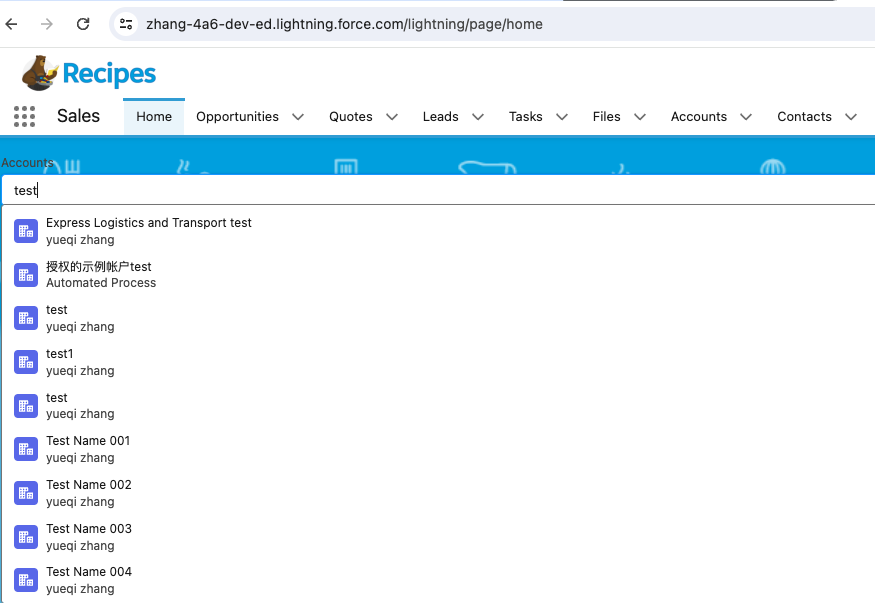
2. Display: 默认我们会显示搜索的Name字段的值,如果我们需要显示其他的值,我们可以通过display-info属性来实现。目前additional fields 只支持1个,即列表最多只允许显示两个字段。我们将上面的代码进行增强。
recordPickerSample.html:增加 display-info属性
<template>

    <lightning-record-picker

        label="Accounts"

        placeholder="Search Accounts..."

        filter={filter}

        display-info={displayInfo}

        object-api-name="Account">

    </lightning-record-picker>

</template>
recordPickerSample.js:声明变量,变量使用 additionalFields。
import { LightningElement, track, wire } from 'lwc';

export default class recordPickerSample extends LightningElement {

    filter = {

        criteria: [

            {

                fieldPath: 'AccountSource',

                operator: 'ne',

                value: 'Other'

            },

            {

                fieldPath: 'Type',

                operator: 'eq',

                value: 'Prospect'

            }

        ],

        filterLogic: '1 OR 2',

    }

    displayInfo = {

        additionalFields: ['Owner.Name']

    }

}
效果显示:
<template>

    <lightning-record-picker

        label="Accounts"

        placeholder="Search Accounts..."

        filter={filter}

        display-info={displayInfo}

        matching-info={matchingInfo}

        object-api-name="Account">

    </lightning-record-picker>

</template>
recordPickerSample.js: matchingInfo属性可以设置两个信息: primaryField以及additionalFields参数。尽管additionalFields参数传递是数组,但是目前仍然最多也只允许1个值。
import { LightningElement, track, wire } from 'lwc';

export default class recordPickerSample extends LightningElement {

    filter = {

        criteria: [

            {

                fieldPath: 'AccountSource',

                operator: 'ne',

                value: 'Other'

            },

            {

                fieldPath: 'Type',

                operator: 'eq',

                value: 'Prospect'

            }

        ],

        filterLogic: '1 OR 2',

    }

    displayInfo = {

        additionalFields: ['Phone']

    }

    matchingInfo = {

        primaryField: { fieldPath: 'Name' },

        additionalFields: [ { fieldPath: 'Phone' } ]

    }

}
效果显示:demo中通过Phone的信息也可以搜索出想要的信息

4. 事件: 组件封装了几个标准行为的事件,其他的小伙伴自行查看,这里只介绍 change事件,handler用于返回所选中的recordId信息。demo会和下面的一起介绍。
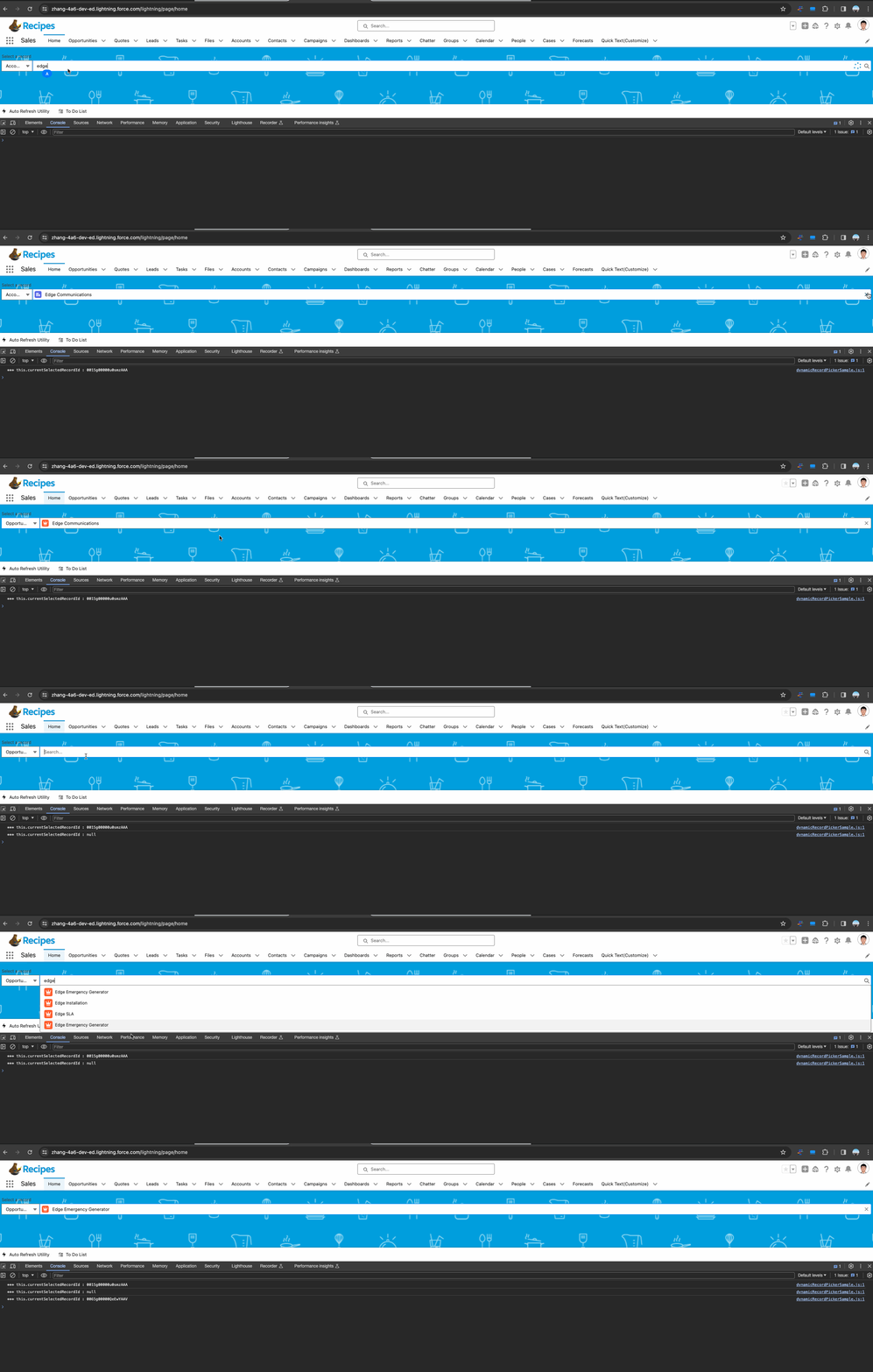
二. lightning-record-picker实现WhatId等多选择的效果
<template>

    <div class="slds-form-element">

        <label class="slds-form-element__label">Select a record</label>

        <div class="slds-form-element__control slds-combobox-group">

            <lightning-combobox

                label="Select Object"

                variant="label-hidden"

                options={objNametList}

                value={selectedObject}

                onchange={handleTargetSelection}

            >

            </lightning-combobox>

            <lightning-record-picker

                object-api-name={selectedObject}

                placeholder="Search..."

                label="Select a record"

                variant="label-hidden"

                onchange={handleRecordSelect}

                class="slds-size_full slds-combobox-addon_end"

            >

            </lightning-record-picker>

        </div>

    </div>

</template>
dynamicRecordPickerSample.js
import { LightningElement } from 'lwc';

export default class dynamicRecordPickerSample extends LightningElement {

    objNametList = [

      {label: 'Account',value: 'Account'},

      {label: 'Contact',value: 'Contact'},

      {label: 'Opportunity',value: 'Opportunity'},

      {label: 'Case',value: 'Case'}

    ];

    selectedObject = 'Account';

    currentSelectedRecordId;

    handleObjectChange(event) {

        this.selectedObject = event.target.value;

    }

    handleRecordSelect(event) {

        this.currentSelectedRecordId = event.detail.recordId;

        console.log('*** this.currentSelectedRecordId : ' + this.currentSelectedRecordId);

    }

}
效果显示:
总结: 篇中主要介绍了lightning-record-picker的使用,record-picker基于GraphQL的wire adapter来实现,后续的篇章中有机会也会讲一下GraphQL Wire Adapter等相关知识。官方文档中有一些错误,导致复制粘贴无法运行,不要怀疑自己,修改以后重新尝试。篇中有错误地方欢迎指出,有不懂欢迎留言。
Salesforce LWC学习(四十六) record-picker组件浅谈的更多相关文章
- Salesforce LWC学习(四十) dynamic interaction 浅入浅出
本篇参考: Configure a Component for Dynamic Interactions in the Lightning App Builder - Salesforce Light ...
- Salesforce LWC学习(四十二) getRecordNotifyChange已弃用
本篇参考: https://developer.salesforce.com/docs/component-library/documentation/en/lwc/lwc.reference_get ...
- Salesforce LWC学习(三十六) Quick Action 支持选择 LWC了
本篇参考: https://developer.salesforce.com/docs/component-library/documentation/en/lwc/lwc.use_quick_act ...
- Salesforce LWC学习(二十六) 简单知识总结篇三
首先本篇感谢长源edward老哥的大力帮助. 背景:我们在前端开发的时候,经常会用到输入框,并且对这个输入框设置 required或者其他的验证,当不满足条件时使用自定义的UI或者使用标准的 inpu ...
- Salesforce LWC学习(四十) datatable的dynamic action的小坑浅谈
本篇参考:https://developer.salesforce.com/docs/component-library/bundle/lightning-datatable/documentatio ...
- Salesforce LWC学习(三十九) lwc下quick action的recordId的问题和解决方案
本篇参考: https://developer.salesforce.com/docs/component-library/bundle/force:hasRecordId/documentation ...
- Salesforce LWC学习(三十) lwc superbadge项目实现
本篇参考:https://trailhead.salesforce.com/content/learn/superbadges/superbadge_lwc_specialist 我们做lwc的学习时 ...
- Salesforce LWC学习(四) 父子component交互 / component声明周期管理 / 事件处理
我们在上篇介绍了 @track / @api的区别.在父子 component中,针对api类型的变量,如果声明以后就只允许在parent修改,son component修改便会导致报错. sonIt ...
- Java开发学习(四十六)----MyBatisPlus新增语句之id生成策略控制及其简化配置
在前面有一篇博客:Java开发学习(四十一)----MyBatisPlus标准数据层(增删查改分页)开发,我们在新增的时候留了一个问题,就是新增成功后,主键ID是一个很长串的内容. 我们更想要的是按照 ...
- Salesforce LWC学习(二十四) Array.sort 浅谈
本篇参考:https://developer.mozilla.org/zh-CN/docs/Web/JavaScript/Reference/Global_Objects/Array/sort sal ...
随机推荐
- Go语言常用标准库——context
文章目录 为什么需要Context 基本示例 全局变量方式 通道方式 官方版的方案 Context初识 Context接口 Background()和TODO() With系列函数 WithCance ...
- 第一个 Go 程序"hello,world" 与 main 函数和Go常用基本命令
第一个 Go 程序"hello,world" 与 main 函数和Go常用基本命令 目录 第一个 Go 程序"hello,world" 与 main 函数和Go ...
- 高效数据传输:Java通过绑定快速将数据导出至Excel
摘要:本文由葡萄城技术团队于博客园原创并首发.转载请注明出处:葡萄城官网,葡萄城为开发者提供专业的开发工具.解决方案和服务,赋能开发者. 前言 把数据导出至 Excel 是很常见的需求,而数据的持久化 ...
- 文心一言 VS 讯飞星火 VS chatgpt (109)-- 算法导论10.1 7题
七.用go语言,说明如何用两个队列实现一个栈,并分析相关栈操作的运行时间. 文心一言: 在Go语言中,我们可以用两个队列(queue1和queue2)实现一个栈.以下是实现代码: package ma ...
- 英方软件和dell emc对比理解
英方软件和dell emc对比理解: 英方软件 功能 对比dell emc理解 i2Availability 1.英方实现业务高可用的时候,要求在异地运行与生产机环境一致的备机,备机数据实时与生产机同 ...
- CF1343C
题目简化和分析: 给您一个序列,您要在其中选择若干个数使得: 相邻两数异号 长度最大,总和最大 我们可以牢牢抓住长度且总和最大,这一特性. 说明我们必须在每一个连续的同号的子串中被迫选择最大的,以满足 ...
- Kubernetes 中使用consul-template渲染配置
Kubernetes 中使用consul-template渲染配置 当前公司使用consul来实现服务发现,如Prometheue配置中的target和alertmanager注册都采用了consul ...
- html-0
选择器 (一):first-child和:first-of-type :first-child第一个元素 <!DOCTYPE html> <html> <head> ...
- 我整理了一份Flink流计算入门教程清单(转)
好久不见! 作为技术出身的我,不太会写软文广告,今天就直接来个硬广.之前与人民邮电出版社合作的<Flink原理与实践>经过一年多时间的打磨和润色,这两天终于与大家见面了,恳请各位朋友多多支 ...
- Spring系列:Spring6简介和基本使用
一.概述 1.1 特点 Spring 是一款主流的 Java EE 轻量级开源框架 ,Spring 由"Spring 之父"Rod Johnson 提出并创立,其目的是用于简化 J ...