
tigervnc使用总结
vncserver和x0vncserver用法总计
通常vncserver :port 会调用到xvnc,这时系统会新建一个虚拟桌面通过vncserver分享出去。
vncserver的用法很简单:
 vncserver -h

usage: vncserver [:<number>] [-name <desktop-name>] [-depth <depth>]

                 [-geometry <width>x<height>]

                 [-pixelformat rgbNNN|bgrNNN]

                 [-fp <font-path>]

                 [-fg]

                 [-autokill]

                 [-noxstartup]

                 [-xstartup <file>]

                 <Xvnc-options>...

       vncserver -kill <X-display>

       vncserver -list
若需要通过脚本使用vncserver,可使用如下方法:
su - $vncuser <<EOF

vncserver -kill $vncport

vncserver $vncport

EOF
而和vncserver不同,x0vncserver则是分享当前物理屏幕(类似于克隆),若通过vncserver方式出现问题,则可采用此方法。
x0vncserver常见用法:
x0vncserver -h

TigerVNC Server version 1.10., built Nov   ::

Usage: x0vncserver [<parameters>]

       x0vncserver --version

Parameters can be turned on with -<param> or off with -<param>=

Parameters which take a value can be specified as -<param> <value>

Other valid forms are <param>=<value> -<param>=<value> --<param>=<value>

Parameter names are case-insensitive.  The parameters are:

Global Parameters:

  UseIPv6        - Use IPv6 for incoming and outgoing connections. (default=)

  UseIPv4        - Use IPv4 for incoming and outgoing connections. (default=)

  ZlibLevel      - Zlib compression level (default=-)

  ImprovedHextile - Use improved compression algorithm for Hextile encoding

                   which achieves better compression ratios by the cost of

                   using more CPU time (default=)

  pam_service    - Alias for PAMService

  PAMService     - Service name for PAM password validation (default=vnc)

  PlainUsers     - Users permitted to access via Plain security type (including

                   TLSPlain, X509Plain etc.) (default=)

  GnuTLSPriority - GnuTLS priority string that controls the TLS session’s

                   handshake algorithms (default=NORMAL)

  QueryConnect   - Prompt the local user to accept or reject incoming

                   connections. (default=)

  AcceptSetDesktopSize - Accept set desktop size events from clients.

                   (default=)

  SendCutText    - Send clipboard changes to clients. (default=)

  AcceptCutText  - Accept clipboard updates from clients. (default=)

  AcceptPointerEvents - Accept pointer press and release events from clients.

                   (default=)

  AcceptKeyEvents - Accept key press and release events from clients.

                   (default=)

  DisconnectClients - Disconnect existing clients if an incoming connection is

                   non-shared. If combined with NeverShared then new

                   connections will be refused while there is a client active

                   (default=)

  NeverShared    - Never treat incoming connections as shared, regardless of

                   the client-specified setting (default=)

  AlwaysShared   - Always treat incoming connections as shared, regardless of

                   the client-specified setting (default=)

  Protocol3.    - Always use protocol version 3.3 for backwards compatibility

                   with badly-behaved clients (default=)

  FrameRate      - The maximum number of updates per second sent to each client

                   (default=)

  CompareFB      - Perform pixel comparison on framebuffer to reduce

                   unnecessary updates (: never, : always, : auto)

                   (default=)

  ClientWaitTimeMillis - The number of milliseconds to wait for a client which

                   is no longer responding (default=)

  MaxIdleTime    - Terminate after s seconds of user inactivity (default=)

  MaxConnectionTime - Terminate when a client has been connected for s seconds

                   (default=)

  MaxDisconnectionTime - Terminate when no client has been connected for s

                   seconds (default=)

  IdleTimeout    - The number of seconds after which an idle VNC connection

                   will be dropped (zero means no timeout) (default=)

  MaxCutText     - Maximum permitted length of an incoming clipboard update

                   (default=)

  RemapKeys      - Comma-separated list of incoming keysyms to remap.  Mappings

                   are expressed as two hex values, prefixed by 0x, and

                   separated by -> (default=)

  Blackl
1、首先通过vncpasswd新建一个vnc密码。
2、将物理桌面转发出去。
x0vncserver -rfbport -display : -PasswordFile ~/.vnc/passwd
其中:
-rfbport 指定转发到哪个端口,默认为5900。
-display 指定转发哪个物理显示器(若存在多个显示器的情况下)。
-PasswordFile 指定密码文件
A VNC server is already running as :xx
当提示这个错误时我们会习惯性想到端口被占用,我们执行vncserver -kill :xx即可,但有时候这种方法就不灵了。

明明提示已经没有这个进程了,当执行vncserver :xx时还是说端口已在使用。
并且执行lsof :59xx时并没有其他进程占用此端口。
真这么神奇?脑壳大。。。
但理智告诉我肯定是有原因的,于是我看看了vncserver这个命令其实是一个perl脚本(PS:我们可以在这里修改vnc的默认端口,比如从59xx改到39xx。)
看看了vncserver这个脚本顿时茅塞顿开。
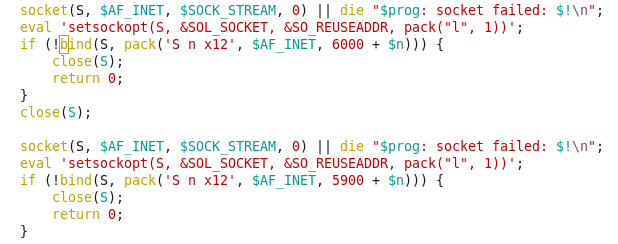
除了默认的59xx端口,Xvnc进程还会用到60xx端口。
于是我马上看了看60xx端口的使用情况。

What?其他进程占用了这个端口。kill掉这个进程,重新执行vncserver :xx后成功启动vnc。
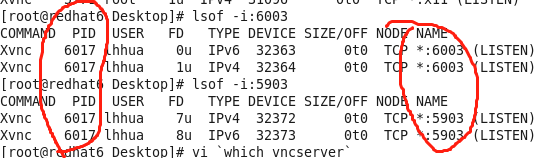
正常启动后我们可以看到Xvnc会同时用到两个端口,但对外连接的应该是那个非60xx端口。
至此问题得到解决。
tigervnc使用总结的更多相关文章
- CentOS 6.8 安装TigerVNC 实现 Linux 远程桌面
CentOS 6.8 有默认的安装的 vnc 位于端口 5900 : 系统->首选项->远程桌面 勾选[共享]的选项, 取消勾选[安全]的选项, 然后防火墙添加 5900 端口 基本就可 ...
- ubuntu 安装tigervnc
root@iZ25q0jd99eZ:~# apt-get install tigervnc Reading package lists... Done Building dependency tree ...
- 用windows远程连接linux桌面(使用tightvnc或者tigervnc)
一.安装tightvnc: tightvnc的安装在安装包中有详细的说明(README文件) 首先你要确保linux已经安装jpeg和zlib库, 2.编译 执行如下两个命令: [root@local ...
- windows远程连接linux桌面---使用tightvnc或者tigervnc
一.安装tightvnc: tightvnc的安装在安装包中有详细的说明(README文件) 首先你要确保linux已经安装jpeg和zlib库, 2.编译 执行如下两个命令: [root@local ...
- RHEL7安装配置TigerVNC
TigerVNC使用非加密的链接,默认会被firewalld blocked 掉,想要 vnc正常工作就需要让firewalld开放相应的端口才行. vnc默认的端口号为5900,而每个vnc win ...
- tigerVNC远程桌面,跨内网
tigerVNC的简单使用教程(CentOS的远程桌面连接) 1.环境和软件准备 (1) CentOS 6.5下 [root@localhost ~]$ yum install tigervnc (2 ...
- PCanywhere/teamviewer/RDP/ultraVNC/tigerVNC/realVNC/Xmanager
PCanywhere/teamviewer/RDP/ultraVNC/tigerVNC/realVNC/Xmanager 1, 通常应用场景一般CentOS/RHEL等linux系统不配置安装Desk ...
- tigervnc*
yum install -y tigervnc* tigervnc-server vncserver www.webmin.cn http://blog.sina.com.cn/s/blog_4ba5 ...
- CentOS 6.8 安装TigerVNC 实现 Linux 远程桌面并安装火狐浏览器
CentOS 6.8 安装TigerVNC 实现 Linux 远程桌面并安装火狐浏览器 vnc客户端地址:https://files.cnblogs.com/files/MYSQLZOUQI/vnc- ...
- 放弃 Tightvnc, 选择 Tigervnc
构建headless vnc server ,我终于放弃了Tightvnc 基于以下原因: 1) 已知的Qt5的键盘映射问题,导致virtualbox 的使用出现困难 https://unix.sta ...
随机推荐
- ADO.NET中DataTable类的使用
DataTable类将关系数据表示为表格形式.在创建DataTable之前,必须包含System.Data名称空间.ADO.NET提供了一个DataTable类来独立创建和使用数据表.它也可以和Dat ...
- #2020.1.26笔记——springdatajpa
2020.1.26笔记--springdatajpa 使用jpa的步骤: 1. 导入maven坐标 <?xml version="1.0" encoding="UT ...
- 强大的java工作流引擎,可视化开发工作流
我们先来看看什么是工作流? 所谓工作流引擎是指workflow作为应用系统的一部分,并为之提供对各应用系统有决定作用的根据角色.分工和条件的不同决定信息传递路由.内容等级等核心解决方案.工作流引擎包括 ...
- 一文看懂js中元素的滚动大小(scrollWidth,scrollHeight,scrollTop,scrollLeft)
滚动大小(scroll dimension) 滚动大小指的是包含滚动内容元素的大小. 以下是与元素滚动内容大小相关的属性: 1. scrollWidth:在没有滚动条的情况下,元素内容的总宽度. 2. ...
- 前端实现html转pdf方法总结
最近要搞前端html转pdf的功能.折腾了两天,略有所收,踩了一些坑,所以做些记录,为后来的兄弟做些提示,也算是回馈社区.经过一番调(sou)研(suo)发现html导出pdf一般有这几种方式,各有各 ...
- 2020 新个税算的头疼?会 python,这都不是事儿...
背景 今年疫情复工后,财务小姐姐给我们普及了2020年新个税的算法.. 听完之后的感觉就是:恩,原来是这么回事! 虽然是个小工薪阶级,但是对于扣多少税还是很关心的.于是拿起笔算了算2月份的个税,产生了 ...
- R中character和factor的as.integer的不同
记录一个容易犯错的地方. 用chr标记的0~1变量可以变为整数0和1, 而用因子factor标记的变量转换为整数时总是从1开始. 如果不注意区分就会发生令自己困惑的错误.
- css 固比固模型
<!DOCTYPE html PUBLIC "-//W3C//DTD XHTML 1.0 Transitional//EN" "http://www.w3.org/ ...
- windows下安装spark-python
首先需要安装Java 下载安装并配置Spark 从官方网站Download Apache Spark™下载相应版本的spark,因为spark是基于hadoop的,需要下载对应版本的hadoop才行, ...
- react / config\webpack.config.js 编译后去掉map 减小体积 shouldUseSourceMap = false
react / config\webpack.config.js 编译后去掉map 减小体积 shouldUseSourceMap = false