
Jenkins+Gitlab+Ansible自动化部署(五)
Freestyle Job实现静态网站部署交付(接Jenkins+Gitlab+Ansible自动化部署(四)https://www.cnblogs.com/zd520pyx1314/p/10244504.html)
- 环境构建
- 编写ansible playbook脚本实现静态网页远程部署
- 将playbook部署脚本提交到GitLab仓库
- 构建Freestyle Job任务框架
- Jenkins集成Ansible与Gitlab实现静态网页的自动化部署
首先确定自己的环境已经准备完毕。
登录gitlab查看

登录Jenkins首页
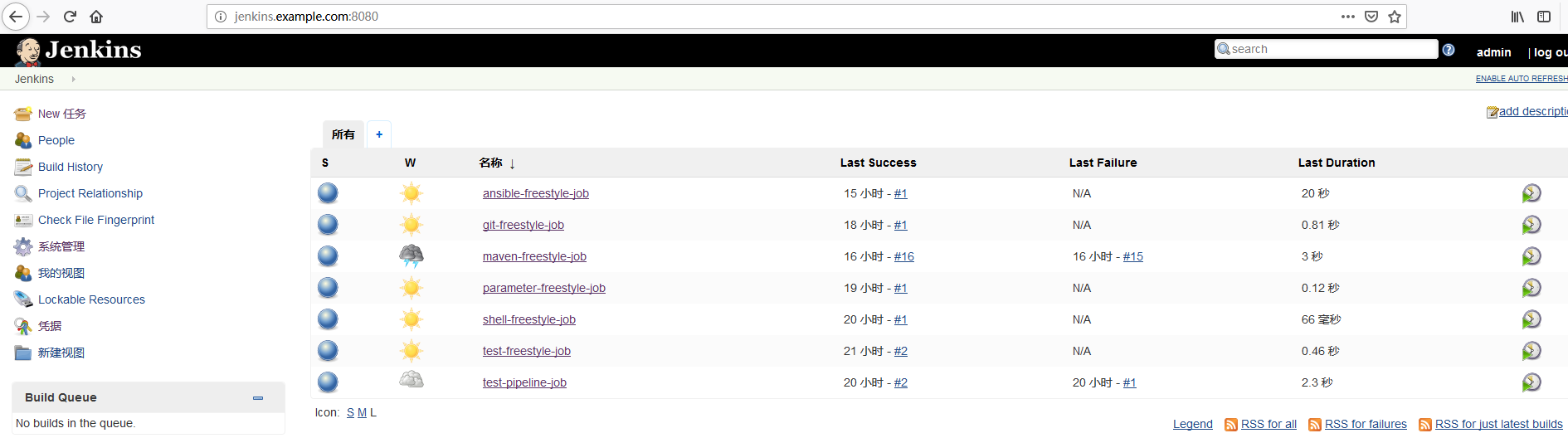
登录Jenkins主机查看Ansible2.5+python 3.6虚拟环境
$ ssh root@192.168.244.131

Last login: Wed Jan   ::  from 192.168.244.1

[root@jenkins ~]# su - deploy

Last login: Wed Jan   :: CST  on pts/

[deploy@jenkins ~]$ source /home/deploy/.py3-a2.-env/bin/activate           (.py3-a2.-env) [deploy@jenkins ~]$ source /home/deploy/.py3-a2.-env/ansible/hacking/env-setup -q

(.py3-a2.-env) [deploy@jenkins ~]$ ansible --version

ansible 2.5. (stable-2.5 c748512c4c) last updated // :: (GMT +)

  config file = None

  configured module search path = ['/home/deploy/.ansible/plugins/modules', '/usr/share/ansible/plugins/modules']

  ansible python module location = /home/deploy/.py3-a2.-env/ansible/lib/ansible

  executable location = /home/deploy/.py3-a2.-env/ansible/bin/ansible

  python version = 3.6. (default, Jan   , ::) [GCC 4.8.  (Red Hat 4.8.-)]

(.py3-a2.-env) [deploy@jenkins ~]$
准备就绪,开始编写ansible playbook脚本实现静态网页远程部署,打开Git bash命令行,将之前创建好的ansible-playbook-repo仓库clone到本地:
xueji@xueji MINGW64 ~

$ git config --global http.sslVerify false

xueji@xueji MINGW64 ~

$ cd Desktop/repo/

$  git clone https://gitlab.example.com/root/ansible-playbook-repo.git

Cloning into 'ansible-playbook-repo'...

remote: Enumerating objects: , done.

remote: Counting objects: % (/), done.

remote: Total  (delta ), reused  (delta )

Unpacking objects: % (/), done.

xueji@xueji MINGW64 ~/Desktop/repo/ansible-playbook-repo (master)

$ ll

total

-rw-r--r--  xueji     1月   : ansible-playbook.txt

drwxr-xr-x  xueji     1月   : nginx_playbooks/

-rw-r--r--  xueji   7月   : nginx-freestyle-job.sh

drwxr-xr-x  xueji     1月   : test_playbooks/
开始配置
xueji@xueji MINGW64 ~/Desktop/repo/ansible-playbook-repo/nginx_playbooks (master)

$ ll

total

-rw-r--r--  xueji   7月   : deploy.retry

-rw-r--r--  xueji   7月   : deploy.yml

drwxr-xr-x  xueji    1月   : inventory/

drwxr-xr-x  xueji    1月   : roles/

xueji@xueji MINGW64 ~/Desktop/repo/ansible-playbook-repo/nginx_playbooks (master)

$ vim deploy.yml

- hosts: "nginx"

  gather_facts: true

  remote_user: root

  roles:

    - nginx

xueji@xueji MINGW64 ~/Desktop/repo/ansible-playbook-repo/nginx_playbooks (master)

$ vim inventory/prod

[nginx]

test.example.com

[nginx:vars]

server_name=test.example.com

port=

user=deploy

worker_processes=

max_open_file=

root=/www

xueji@xueji MINGW64 ~/Desktop/repo/ansible-playbook-repo/nginx_playbooks (master)

$ vim inventory/dev

[nginx]

test.example.com

[nginx:vars]

server_name=test.example.com

port=

user=deploy

worker_processes=

max_open_file=

root=/www

xueji@xueji MINGW64 ~/Desktop/repo/ansible-playbook-repo/nginx_playbooks (master)

$ vim roles/nginx/files/health_check.sh

#!/bin/sh

URL=$

curl -Is http://$URL > /dev/null && echo "The remote side is healthy" || echo "The remote side is failed, please check"

xueji@xueji MINGW64 ~/Desktop/repo/ansible-playbook-repo/nginx_playbooks (master)

$ cat roles/nginx/files/index.html

This is my first website

xueji@xueji MINGW64 ~/Desktop/repo/ansible-playbook-repo/nginx_playbooks (master)

$ vim roles/nginx/templates/nginx.conf.j2

# For more information on configuration, see:

user              {{ user }};

worker_processes  {{ worker_processes }};

error_log  /var/log/nginx/error.log;

pid        /var/run/nginx.pid;

events {

    worker_connections  {{ max_open_file }};

}

http {

    include       /etc/nginx/mime.types;

    default_type  application/octet-stream;

    log_format  main  '$remote_addr - $remote_user [$time_local] "$request" '

                      '$status $body_bytes_sent "$http_referer" '

                      '"$http_user_agent" "$http_x_forwarded_for"';

    access_log  /var/log/nginx/access.log  main;

    sendfile        on;

    #tcp_nopush     on;

    #keepalive_timeout  ;

    keepalive_timeout  ;

    #gzip  on;

    # Load config files from the /etc/nginx/conf.d directory

    # The default server is in conf.d/default.conf

    #include /etc/nginx/conf.d/*.conf;

    server {

        listen       {{ port }} default_server;

        server_name  {{ server_name }};

        #charset koi8-r;

        #access_log  logs/host.access.log  main;

        location / {

            root   {{ root }};

            index  index.html index.htm;

        }

        error_page  404              /404.html;

        location = /404.html {

            root   /usr/share/nginx/html;

        }

        # redirect server error pages to the static page /50x.html

        #

        error_page   500 502 503 504  /50x.html;

        location = /50x.html {

            root   /usr/share/nginx/html;

        }

    }

}

xueji@xueji MINGW64 ~/Desktop/repo/ansible-playbook-repo/nginx_playbooks (master)

$ vim roles/nginx/tasks/main.yml

- name: Disable system firewall

  service: name=firewalld state=stopped

- name: Disable SELINUX

  selinux: state=disabled

- name: setup nginx yum source

  yum: pkg=epel-release state=latest

- name: write then nginx config file

  template: src=roles/nginx/templates/nginx.conf.j2 dest=/etc/nginx/nginx.conf

- name: create nginx root folder

  file: 'path={{ root }} state=directory owner={{ user }} group={{ user }} mode=0755'

- name: copy index.html to remote

  copy: 'remote_src=no src=roles/nginx/files/index.html dest=/www/index.html mode=0755'

- name: restart nginx service

  service: name=nginx state=restarted

- name: run the health check locally

  shell: "sh roles/nginx/files/health_check.sh {{ server_name }}"

  delegate_to: localhost

  register: health_status

- debug: msg="{{ health_status.stdout }}"
将配置好的文件,提交到远程gitlab
xueji@xueji MINGW64 ~/Desktop/repo/ansible-playbook-repo/nginx_playbooks (master)

$ cd ~/Desktop/repo/ansible-playbook-repo/

xueji@xueji MINGW64 ~/Desktop/repo/ansible-playbook-repo (master)

$ git add .

xueji@xueji MINGW64 ~/Desktop/repo/ansible-playbook-repo (master)

$ git commit -m"First commit"

[master 06431dc] First commit

  files changed,  deletions(-)

 delete mode  test_playbooks/deploy.retry

 delete mode  test_playbooks/deploy.yml

 delete mode  test_playbooks/inventory/dev

 delete mode  test_playbooks/inventory/prod

 delete mode  test_playbooks/roles/nginx/files/health_check.sh

 delete mode  test_playbooks/roles/nginx/files/index.html

 delete mode  test_playbooks/roles/nginx/tasks/main.yml

 delete mode  test_playbooks/roles/nginx/templates/nginx.conf.j2

xueji@xueji MINGW64 ~/Desktop/repo/ansible-playbook-repo (master)

$ git push origin master

Enumerating objects: , done.

Counting objects: % (/), done.

Delta compression using up to  threads

Compressing objects: % (/), done.

Writing objects: % (/),  bytes | 212.00 KiB/s, done.

Total  (delta ), reused  (delta )

To https://gitlab.example.com/root/ansible-playbook-repo.git

   169dec7..06431dc  master -> master
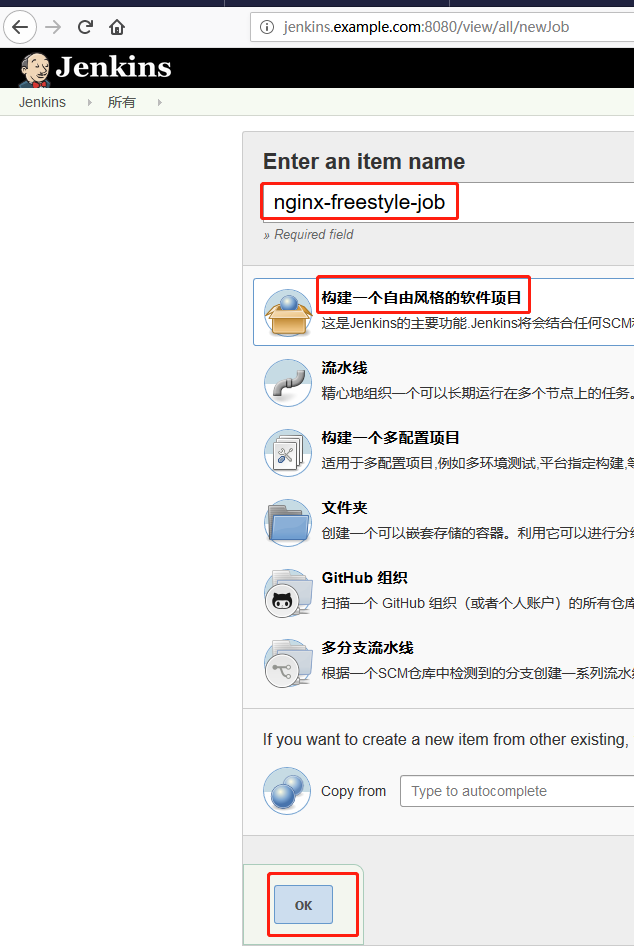
返回到Jenkins web管理页,点击“New 任务”
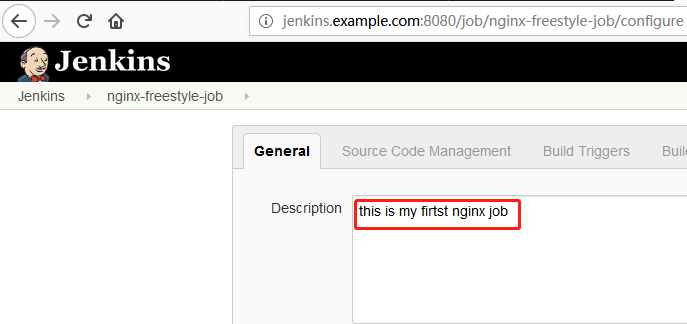
添加描述
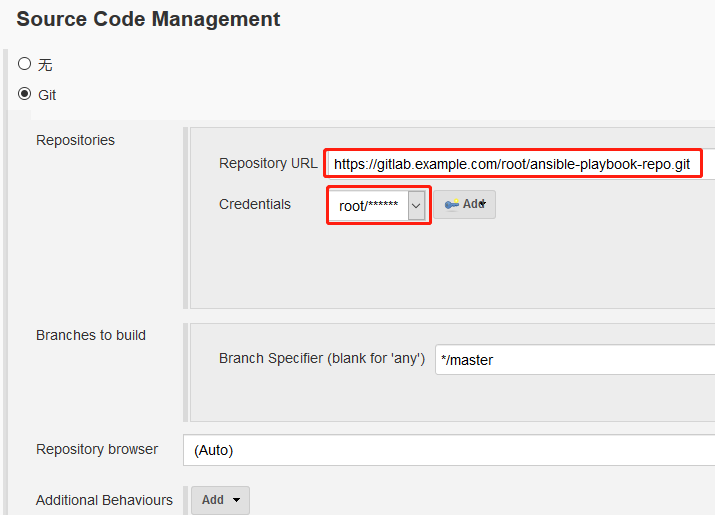
添加Git仓库(该仓库地址即为上述配置的ansible-playbook-repo的仓库地址)
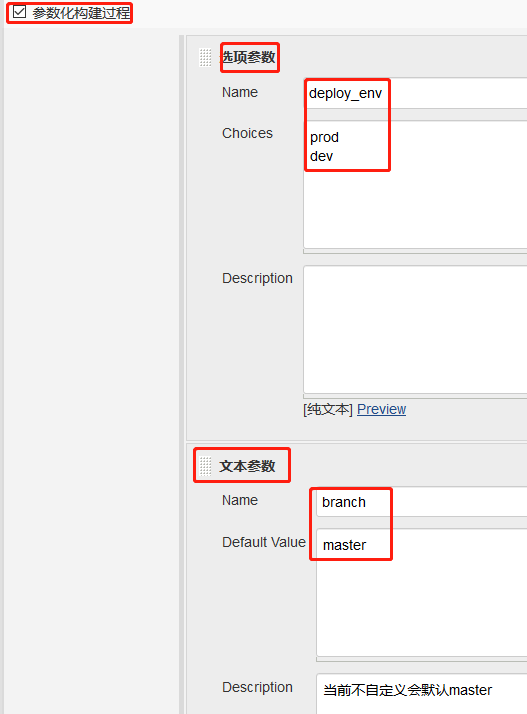
参数化构建过程
添加构建步骤

在执行shell弹出的输入框内输入以下内容
#/bin/sh

set +x

source /home/deploy/.py3-a2.-env/bin/activate

source /home/deploy/.py3-a2.-env/ansible/hacking/env-setup -q

cd $WORKSPACE/nginx_playbooks

ansible --version

ansible-playbook --version

ansible-playbook -i inventory/$deploy_env ./deploy.yml -e project=nginx -e branch=$branch -e env=$deploy_env
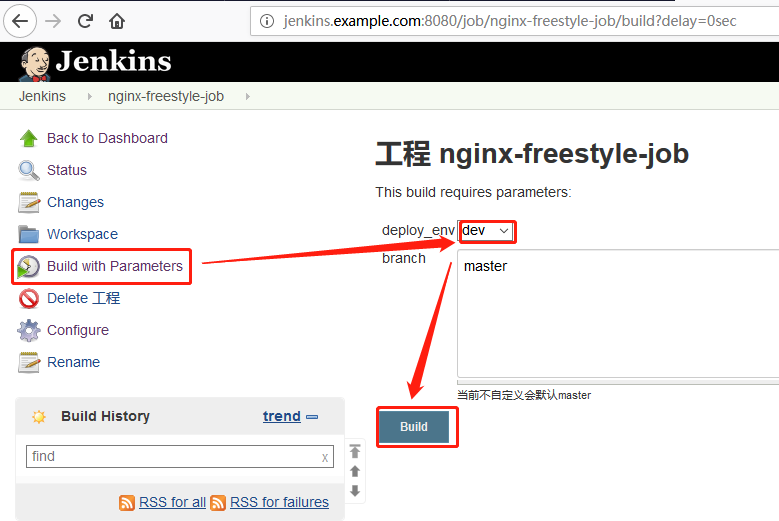
点击“Save”,然后点击“Build with Parameters”,在右侧下拉列表中选择dev,点击“Build”
查看输出信息


验证目标主机是否部署成功,在浏览器输入test.exmaple.com查看
前提是保证本地windows主机下的C:\Windows\System32\drivers\etc\hosts文件中末尾有如下对应关系
192.168.244.130 gitlab.example.com

192.168.244.131 jenkins.example.com

192.168.244.132 ansible.example.com

192.168.244.133 test.example.com

可以看到已经成功部署~
Jenkins+Gitlab+Ansible自动化部署(五)的更多相关文章
- Jenkins+Gitlab+Ansible自动化部署(六)
Pipeline Job实现Nginix+MySQL+PHP+Wordpress实现自动化部署交付(Jenkins+Gitlab+Ansible自动化部署(五)https://www.cnblogs. ...
- Jenkins+Gitlab+Ansible自动化部署(三)
接Jenkins+Gitlab+Ansible自动化部署(一)https://www.cnblogs.com/zd520pyx1314/p/10210727.html 和(二)https://www. ...
- Jenkins+Gitlab+Ansible自动化部署(一)
首先准备实验环境 虚拟机 主机名 IP地址 服务 系统版本 内核版本 Vmware Workstation 14 gitlab.example.com 192.168.244.130 gitlab ...
- Jenkins+Gitlab+Ansible自动化部署(四)
接Jenkins+Gitlab+Ansible自动化部署(三)https://www.cnblogs.com/zd520pyx1314/p/10235394.html Jenkins应用 Jenkin ...
- Jenkins+Gitlab+Ansible自动化部署(二)
接Jenkins+Gitlab+Ansbile自动化部署(一):https://www.cnblogs.com/zd520pyx1314/p/10210727.html Ansible的配置与部署 工 ...
- 【开发工具】Jenkins+Gitlab实现自动化部署
我在尝试在容器中安装Jenkins时,初衷是希望使用docker in docker 的模式来实现Jenkins slave容器按需创建.在实现的时候需要在Jenkins 中安装Kubernetes插 ...
- 基于Jenkins+Gitlab的自动化部署实战
故事背景 一个中小型企业,是典型的互联网公司,当初期的时候可能运维只能标配到2~3人,此时随着公司的发展,项目会逐渐增多.前期部署项目可能都是手动的, 俗称“人肉部署”,这简直是无比的痛苦,不能忍受的 ...
- jenkins +gitlab +docker 自动化部署tomcat 项目
实验环境 实验设备 三台服务器 centos 7.X 以上 内存 2-3G左右 192.168.1.195 (jenkins最新+ git 2.8+maven 3.5 +tomcat 8+java1. ...
- 从Docker 到Jenkins 到Ansible的部署经验
从Docker 到Jenkins 到Ansible的部署经验 工作中,除了开发功能,还负责系统的部署工作.我从频繁的部署工作中,逐渐找到了一些偷懒的方法.从传统的Java -jar命令启动服务,到通过 ...
随机推荐
- skynet实践(9)-随机数重复问题
最近在使用skynet的过程中,遇到需要为玩家的每次请求产生一个随机序列的场景.简化如下: main.lua中每隔1S便发出一次随机数请求: local skynet = require " ...
- DLL进一步讲解:extern "C" __declspec(dllexport)
一.__declspec(dllexport): 将一个函数声名为导出函数,就是说这个函数要被其他程序调用,即作为DLL的一个对外函数接口. 通常它和extern "C" ...
- Git Shell Warning
Warning: Permanently added 'github.com,192.30.252.120' <RSA> to the list of known hosts. The a ...
- k8s-集群状态及部署一个实例
[root@k8s-master ~]# kubectl get csNAME STATUS MESSAGE ERRORcontroller-manager Healthy ok scheduler ...
- MySQL_活动期间单笔订单最高的且满600元 判别是重激活客户还是10月注册客户_20161031
将29号和30号两个需求放到一个表当中 首先都满足在10.29到31号之间单笔订单最高的且满600元 数据结构为一个用户一个订单ID 一行一行的 上面是第一个表 我们当做主表 a 第二个表 我们找注册 ...
- navicat 关于orcale新建表空间,用户和权限分配
图文教程,直观, 上面连接数据库 下面创建表空间 建表空间的设置 表空间名的设置 新建用户 填写用户名,选择默认表空间 成员属性德设置,这里因为是自己用,所以选择最大权限,其他的权限这是需要专业的了 ...
- SimpliciTI简介
SimpliciTI简介 SimpliciTI是TI开发的一份专门针对其CCxxxx系列无线通信芯片的网络协议.按照其官方说法SimpliciTI是一个基于连接的点对点通讯协议.它支持两种网络拓扑结构 ...
- BOM——浏览器对象模型(Browser Object Model)
什么是BOM? BOM是Browser Object Model的缩写,简称浏览器对象模型 BOM提供了独立于内容而与浏览器窗口进行交互的对象 由于BOM主要用于管理窗口与窗口之间的通讯,因此其核心对 ...
- saltstack syndic安装配置使用
salt-syndic是做神马的呢?如果大家知道zabbix proxy的话那就可以很容易理解了,syndic的意思为理事,其实如果叫salt-proxy的话那就更好理解了,它就是一层代理,如同zab ...
- Spring:JdbcTemplate使用指南
Spring:JdbcTemplate使用指南 Spring:JdbcTemplate使用指南 前言: 本文指在介绍Spring框架中的JdbcTemplate类的使用方法,涉及基本的Spring反转 ...