
testNG helloWorld
1. 新建maven工程。File -> New -> Project -> Maven,不选Create from archetype,直接点击“Next”。GroupId和ArtifactId填TestHelloWorld。点击确认,完成新建。
2. src -> main -> java下新建java文件,内容如下:
public class RandomEmailGenerator {

    public String emailGenerator(){

        return "Have generate an email";

    }

}
3. src -> test -> java下新建java文件,内容如下:
import org.testng.Assert;

import org.testng.annotations.Test;

public class TestHelloWorld {

    @Test

    public void testEmailGenerator(){

        RandomEmailGenerator randomEmailGenerator = new RandomEmailGenerator();

        String email = randomEmailGenerator.emailGenerator();

        Assert.assertEquals(email, "Have generate an email");

    }

}
4. pom.xml文件
<?xml version="1.0" encoding="UTF-8"?>

<project xmlns="http://maven.apache.org/POM/4.0.0"

         xmlns:xsi="http://www.w3.org/2001/XMLSchema-instance"

         xsi:schemaLocation="http://maven.apache.org/POM/4.0.0 http://maven.apache.org/xsd/maven-4.0.0.xsd">

    <modelVersion>4.0.0</modelVersion>

    <groupId>TestHelloWorld</groupId>

    <artifactId>TestHelloWorld</artifactId>

    <version>1.0-SNAPSHOT</version>

    <properties>

        <project.build.sourceEncoding>UTF-8</project.build.sourceEncoding>

    </properties>

    <dependencies>

        <dependency>

            <groupId>org.testng</groupId>

            <artifactId>testng</artifactId>

            <version>6.8.7</version>

            <scope>test</scope>

        </dependency>

        <dependency>

            <groupId>junit</groupId>

            <artifactId>junit</artifactId>

            <version>3.8.1</version>

            <scope>test</scope>

        </dependency>

    </dependencies>

</project>
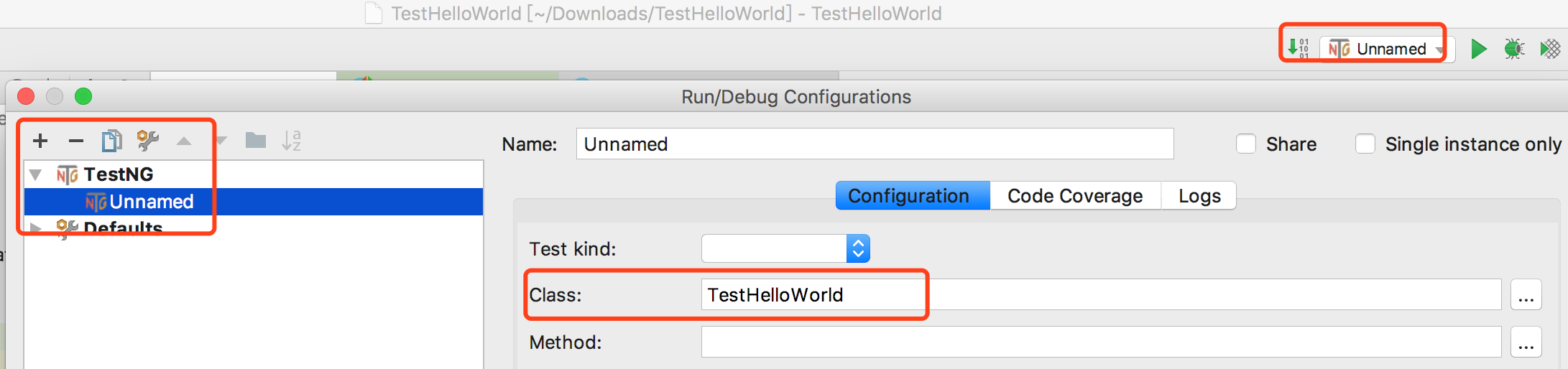
5. 配置工程。
选择TestNG,class里选择TestHellWorld.java文件。
6. 运行
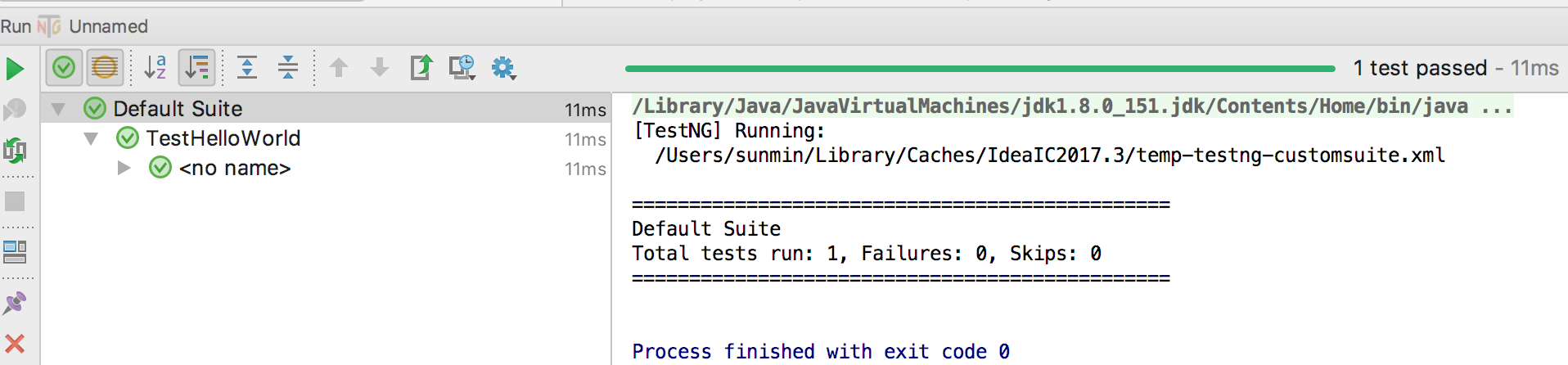
点击unname旁边的三角符号,将运行testNG测试用例。运行结果如下。
testNG helloWorld的更多相关文章
- Self20171218_Eclipse+TestNg HelloWorld
作为一个经典的入门例子,这里展示如何开始使用TestNG单元测试框架. 使用的工具 : TestNG 6.8.7 Maven 3 Eclipse IDE TestNG下载并安装 从这里 http:// ...
- ant+jenkins+testng+selenium集成环境搭建
一.前序工作 下载ant:http://ant.apache.org/bindownload.cgi 下载jenkins:http://jenkins-ci.org/ 下载testng:http:// ...
- Selenium2(webdriver)入门之TestNG的使用
一.在Eclipse中安装TestNG 1.打开eclipse-->help-->Install New Software-->Add,输入Name和Location后,点击OK. ...
- Selenium WebDriver TestNg Maven Eclipse java 简单实例
环境准备 前提条件Eclipse 已经安装过 TestNg ,Maven 插件 新建一个普通的java项目 点击右键 configure->convert to Maven Project 之后 ...
- Spring学习笔记2:Spring HelloWorld
1:IntelliJ新建Maven工程 2:pom文件加入Spring依赖 <project xmlns="http://maven.apache.org/POM/4.0.0" ...
- JAVA+SELENIUM+MAVEN+TESTNG框架(二)新建项目
1.新建maven项目 2.下载selenium的jar包,放入maven依赖库中 3.新增testng依赖库,build path->add libirary->testng 4.查看自 ...
- Selenium2(webdriver)入门之TestNG的安装与简单使用
上一篇已经搭建好了Eclipse+selenium2的环境,这一篇主要记录下TestNG的使用. 一.在Eclipse中安装TestNG 1.打开eclipse-->help-->Inst ...
- testNG断言
https://junit.org/junit4/javadoc/latest/org/junit/Assert.html#assertThat 断言:Hamcrest - Matchers 对象: ...
- TestNG入门到...
目录 一.概述 二.@Test注解常用参数 三.测试中常用的断言(assert) 四.TestNG常用注解及使用 五.配置文件xml常用标签 六.参数传递 七.测试报告 一.概述 1.TestNG是一 ...
随机推荐
- GitLab的权限管理及Merge Request
GitLab的权限管理及Merge Request 原创尘世间一名迷途小码农 发布于2019-06-09 12:40:30 阅读数 2909 收藏 展开 目录 1.前言 2.角色权限 3.强制代码审 ...
- lightgbm GPU版本安装
python机器学习-乳腺癌细胞挖掘(博主亲自录制视频)https://study.163.com/course/introduction.htm?courseId=1005269003&u ...
- SpringBoot过滤器过滤get及post请求中的XSS和SQL注入
1.创建XssAndSqlHttpServletRequestWrapper包装器,这是实现XSS过滤的关键,在其内重写了getParameter,getParameterValues,getHead ...
- mysql判断表字段或索引是否存在,然后修改
判断字段是否存在: DROP PROCEDURE IF EXISTS schema_change; DELIMITER // CREATE PROCEDURE schema_change() BEGI ...
- sails 相关软件下载地址及命令
vscode1.40 https://vscode.cdn.azure.cn/stable/f359dd69833dd8800b54d458f6d37ab7c78df520/VSCodeUserS ...
- C++ unordered_set运用实例
C++ unordered_set运用实例 #include <unordered_set> #include <numeric> #include "print.h ...
- 【jmeter】使用jmeter进行测试-示例
介绍 jmeter主要用于负载测试,详细信息可以参见Google. 这里使用一个简单的示例,来介绍jmeter的使用. 涉及的功能点包括: HTTP HEADER配置 HTTP Request配置 J ...
- mysql 日期计算集合
#日期计算集合 #select curdate() #本前日期 #,DATE_ADD(`date`,interval day) /*本月前一天(昨天)*/ #,DATE_ADD(`date`,inte ...
- [转]System Verilog的概念以及与verilog的对比
原文地址: http://blog.csdn.net/gtatcs/article/details/8970489 SystemVerilog语言简介 SystemVerilog是一种硬件描述和验证语 ...
- mongodb4.2.2 centos 单机安装
下载 rpm包 wget https://repo.mongodb.org/yum/redhat/7/mongodb-org/4.2/x86_64/RPMS/mongodb-org-server-4. ...