
springboot swagger 整合
Swagger 是一个规范和完整的框架,用于生成、描述、调用和可视化 RESTful 风格的 Web 服务。 文件的方法,参数和模型紧密集成到服务器端的代码,允许API来始终保持同步。
作用:
1. 接口的文档在线自动生成。
2. 功能测试。
1.添加pom.xml
<dependency>

            <groupId>io.springfox</groupId>

            <artifactId>springfox-swagger-ui</artifactId>

            <version>2.7.0</version>

        </dependency>

        <dependency>

            <groupId>io.springfox</groupId>

            <artifactId>springfox-swagger2</artifactId>

            <version>2.7.0</version>

        </dependency>
2.在启动类同级增加类
package com;

import org.springframework.context.annotation.Bean;

import org.springframework.context.annotation.Configuration;

import springfox.documentation.builders.ApiInfoBuilder;

import springfox.documentation.builders.PathSelectors;

import springfox.documentation.builders.RequestHandlerSelectors;

import springfox.documentation.service.ApiInfo;

import springfox.documentation.service.Contact;

import springfox.documentation.spi.DocumentationType;

import springfox.documentation.spring.web.plugins.Docket;

import springfox.documentation.swagger2.annotations.EnableSwagger2;

@Configuration

@EnableSwagger2

public class Swagger2 {

//swagger2的配置文件,这里可以配置swagger2的一些基本的内容,比如扫描的包等等

    @Bean

    public Docket createRestApi() {

        return new Docket(DocumentationType.SWAGGER_2)

                .apiInfo(apiInfo())

                .select()

                //为当前包路径

                .apis(RequestHandlerSelectors.basePackage("com.taiji.demo.controller"))

                .paths(PathSelectors.any())

                .build();

    }

    //构建 api文档的详细信息函数,注意这里的注解引用的是哪个

    private ApiInfo apiInfo() {

        return new ApiInfoBuilder()

                //页面标题

                .title("系统API接口")

                //创建人

                .contact(new Contact("zhangyg", "www.redxun.com", "zhangyg@redxun.cn"))

                //版本号

                .version("1.0")

                //描述

                .description("系统API接口")

                .build();

    }

}
3.编辑java 文件
package com.taiji.demo.controller;

import org.springframework.beans.factory.annotation.Autowired;

import org.springframework.web.bind.annotation.PathVariable;

import org.springframework.web.bind.annotation.RequestBody;

import org.springframework.web.bind.annotation.RequestMapping;

import org.springframework.web.bind.annotation.RequestMethod;

import org.springframework.web.bind.annotation.RestController;

import com.alibaba.fastjson.JSONObject;

import com.taiji.core.util.IdUtil;

import com.taiji.demo.model.SaleOrder;

import com.taiji.demo.service.SaleOrderService;

import io.swagger.annotations.Api;

import io.swagger.annotations.ApiImplicitParam;

import io.swagger.annotations.ApiImplicitParams;

import io.swagger.annotations.ApiOperation;

import io.swagger.annotations.ApiParam;

import io.swagger.annotations.ApiResponse;

import io.swagger.annotations.ApiResponses;

@RestController

@Api(value="销售订单API接口")

public class SaleOrderController {

        @Autowired

        private SaleOrderService saleOrderService;

        @ApiOperation(value="添加订单",notes="添加订单描述")

        @RequestMapping(value="/add",method={RequestMethod.POST,RequestMethod.GET})

        public void add(@ApiParam(value = "用户数据",

                        required = true,

                        type="JSONObject",

                        example="{\"name\":\"A\",\"userId\":\"B\",\"total\":\"100\"}") @RequestBody JSONObject json){

            SaleOrder order=new SaleOrder();

            order.setId(IdUtil.getId());

            order.setName(json.getString("name"));

            order.setCreator(json.getString("userId"));

            order.setTotal(json.getDouble("total"));

            saleOrderService.create(order);

        }

        @ApiOperation(value="根据ID查看明细",notes="根据ID查看明细")

        @ApiImplicitParams(value={

            @ApiImplicitParam(name="id",value="订单ID",required=true,dataType="String")

        })

        @RequestMapping(value="/get/{id}",method=RequestMethod.GET)

        public SaleOrder get(@PathVariable(value="id") String id){

            SaleOrder order= saleOrderService.get(id);

            return order;

        }

        @RequestMapping(value="/page/{page}",method=RequestMethod.GET)

        @ApiResponses({

            @ApiResponse(response=JSONObject.class, code = 200, message = "订单列表")

        })

        public JSONObject page(@PathVariable(value="page") int page){

            JSONObject order= saleOrderService.getAll(page,10);

            return order;

        }

}
4.访问平台列表
http://localhost:8000/demo/swagger-ui.html#/sale45order45controller

5.在线调试接口
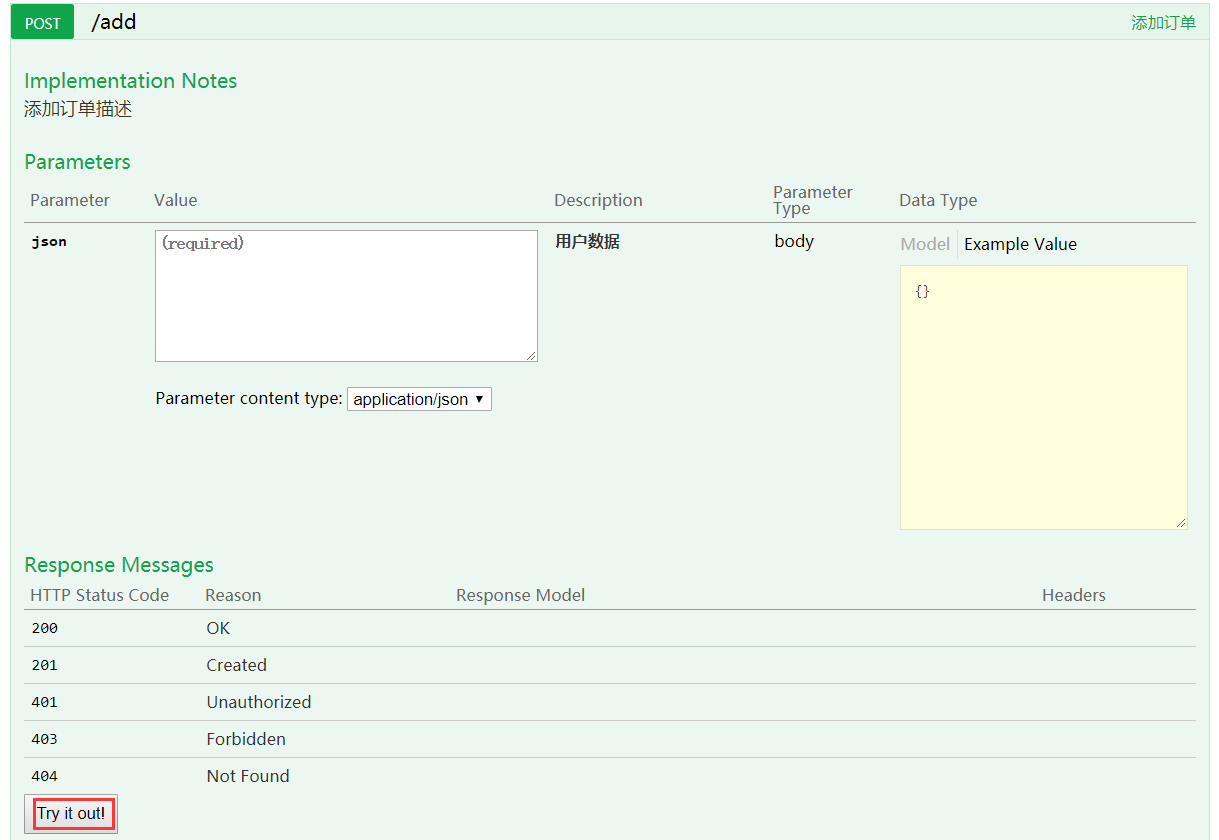
输入好参数后,点击try it out 按钮,可以对代码进行调试。
springboot swagger 整合的更多相关文章
- SpringBoot+Swagger整合API
SpringBoot+Swagger整合API Swagger:整合规范的api,有界面的操作,测试 1.在pom.xml加入swagger依赖 <!--整合Swagger2配置类--> ...
- SpringBoot+Swagger整合
0.引言及注意事项 Swagger是一个接口文档工具,依照Swagger可以0配置开发接口.不过要注意,Swagger是基于SpringBoot1.47版本开发的,而SpringBoot现在基本都是是 ...
- SpringBoot+Swagger2 整合
SpringBoot+Swagger2四步整合 第一步:添加相关依赖 <parent> <groupId>org.springframework.boot</groupI ...
- springboot+jpa+mysql+swagger整合
Springboot+jpa+MySQL+swagger整合 创建一个springboot web项目 <dependencies> <dependency> < ...
- SpringBoot与Swagger整合
1 SpringBoot与Swagger整合https://blog.csdn.net/jamieblue1/article/details/99847744 2 Swagger详解(SpringBo ...
- springboot+swagger接口文档企业实践(上)
目录 1.引言 2.swagger简介 2.1 swagger 介绍 2.2 springfox.swagger与springboot 3. 使用springboot+swagger构建接口文档 3. ...
- SpringBoot 同时整合thymeleaf html、vue html和jsp
问题描述 SpringBoot如何同时访问html和jsp SpringBoot访问html页面可以,访问jsp页面报错 SpringBoot如何同时整合thymeleaf html.vue html ...
- SpringBoot+AOP整合
SpringBoot+AOP整合 https://blog.csdn.net/lmb55/article/details/82470388 https://www.cnblogs.com/onlyma ...
- SpringBoot+Redis整合
SpringBoot+Redis整合 1.在pom.xml添加Redis依赖 <!--整合Redis--> <dependency> <groupId>org.sp ...
随机推荐
- Web App Checklist
Mobile Web App checklist 目标: 高性能Mobile Web App 一.UX和UI 操作节目与边框之间留空隙: 防止操作过程中,触发系统缺省行为,有些是无法disable的. ...
- 根据日志分析异常:There is already 'XXX' bean method
问题代码: @Slf4j @Api(value = "paymentOrderController", description = "PaymentOrderContro ...
- debug protractor
HTAir:protractor-cucumber-typescript kbladewht$ node --inspect-brk=0.0.0.0:1229 node_modules/protrac ...
- android 开发 View _4_ 我的简单自定义ViewDemo
效果图: 代码: package com.example.lenovo.mydemo.myViewDemo; import android.content.Context; import androi ...
- 201772020113 李清华《面向对象程序设计(java)》第三周学习总结
一.测试题反思: 这次的测试题暴露出我在学习上的很多问题:首先,编程能力非常薄弱,编程题目只写出了第一个程序,还因为小问题通不过测试,以后一定要多上手练习,多阅读示例程序.其次,对理论知识的掌握不全面 ...
- leetcode55
bool canJump(vector<int>& nums) { ]; ; i < nums.size() && reach >= i; i++) { ...
- leetcode79
class Solution { public boolean exist(char[][] board, String word) { for(int i=0; i<board.length; ...
- leetcode141
/** * Definition for singly-linked list. * public class ListNode { * public int val; * public ListNo ...
- ---mingw Linux交叉编译给Window的工具
https://arrayfire.com/cross-compile-to-windows-from-linux/
- 使用 C++ REST SDK 进行网络编程
安装 C++ REST SDK $ brew install cpprestsdk $ brew install boost $ brew install libressl 创建工程 打开 Xcode ...