
SpringBoot+Swagger整合
0.引言及注意事项
Swagger是一个接口文档工具,依照Swagger可以0配置开发接口。不过要注意,Swagger是基于SpringBoot1.47版本开发的,而SpringBoot现在基本都是是2+。
如果要选用restful支持,只能将SpringBoot退出到1+版本。
1.maven引入
<dependency>

    <groupId>io.springfox</groupId>

    <artifactId>springfox-swagger2</artifactId>

    <version>2.9.2</version>

</dependency>

<dependency>

    <groupId>io.springfox</groupId>

    <artifactId>springfox-swagger-ui</artifactId>

    <version>2.9.2</version>

</dependency>
2.Swagger配置文档
import org.springframework.context.annotation.Bean;

import org.springframework.context.annotation.Configuration;

import springfox.documentation.builders.ApiInfoBuilder;

import springfox.documentation.builders.PathSelectors;

import springfox.documentation.builders.RequestHandlerSelectors;

import springfox.documentation.spi.DocumentationType;

import springfox.documentation.spring.web.plugins.Docket;

import springfox.documentation.swagger2.annotations.EnableSwagger2;

@Configuration

@EnableSwagger2

public class swaggerConfig {

    @Bean

    Docket docket(){

        return new Docket(DocumentationType.SWAGGER_2)

                .select()

                .apis(RequestHandlerSelectors.any())

                .paths(PathSelectors.any())

                .build()

                .apiInfo(new ApiInfoBuilder().description("项目").build());

    }

}
3.接口配置
import io.swagger.annotations.Api;

import io.swagger.annotations.ApiOperation;

import org.just.computer.mathproject.Entity.Advertisement;

import org.just.computer.mathproject.Service.AdvertisementService;

import org.springframework.beans.factory.annotation.Autowired;

import org.springframework.web.bind.annotation.GetMapping;

import org.springframework.web.bind.annotation.RequestMapping;

import org.springframework.web.bind.annotation.RequestParam;

import org.springframework.web.bind.annotation.RestController;

import java.util.List;

@RestController

@Api(tags ="广告")

@RequestMapping("/Advertisement/")

public class AdvertisementController {

    @Autowired

    AdvertisementService advertisementService;

    @ApiOperation(value ="获得所有广告")

    @GetMapping("/getAllAdvertisement")

    public List<Advertisement> getAllAdvertisement(){

        return advertisementService.getAllAdvertisement();

    }

    @ApiOperation(value = "添加广告")

    @GetMapping("/addAdvertisement")

    public Boolean getAllAdvertisement(@RequestParam String img, @RequestParam String href){

        try {

            advertisementService.addAdvertisement(img,href);

            return true;

        }catch (Exception e){

            return false;

        }

    }

    @ApiOperation(value = "删除广告")

    @GetMapping("/deleteAdvertisement")

    public Boolean deleteAdvertisementById(Integer id){

       try{

           advertisementService.deleteAdvertisementById(id);

           return true;

       }catch (Exception e){

           return false;

       }

    }

}
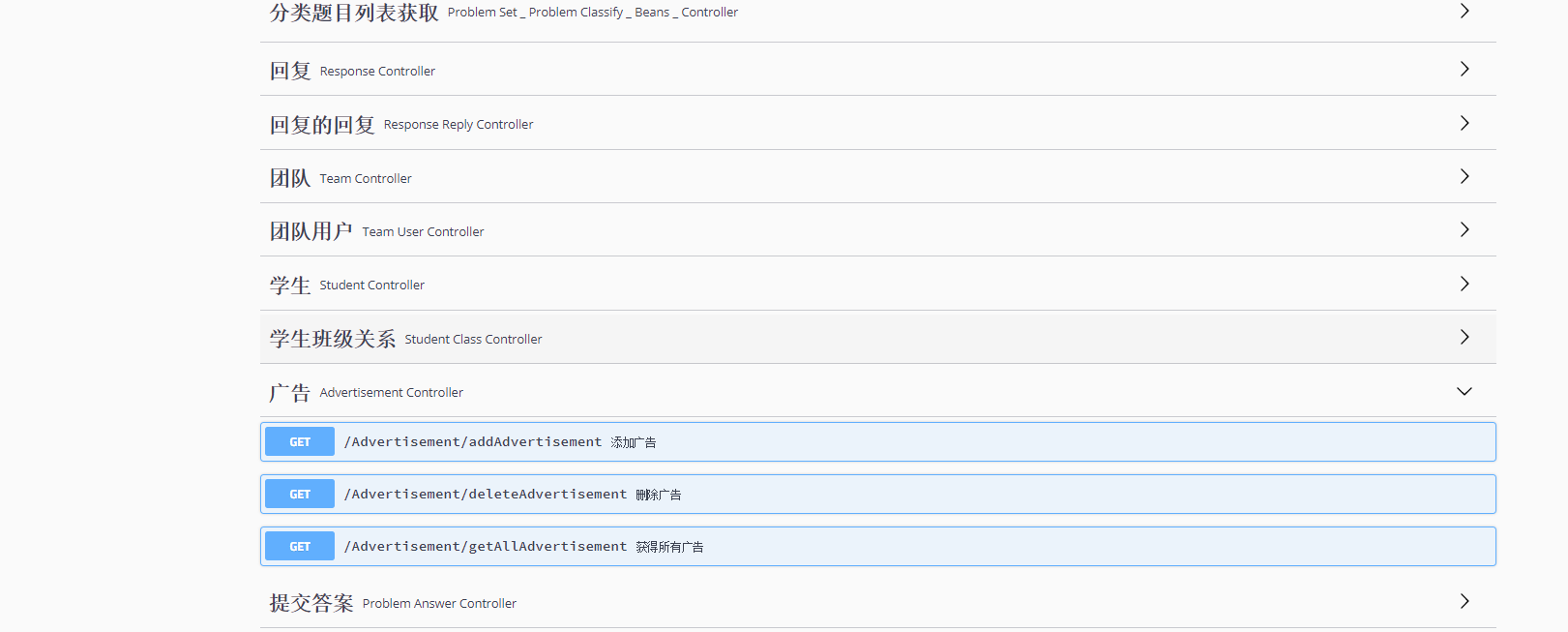
本地运行后访问这里即可访问
或者到ip:端口/swagger-ui.html
运行结果如下
SpringBoot+Swagger整合的更多相关文章
- SpringBoot+Swagger整合API
SpringBoot+Swagger整合API Swagger:整合规范的api,有界面的操作,测试 1.在pom.xml加入swagger依赖 <!--整合Swagger2配置类--> ...
- springboot swagger 整合
Swagger 是一个规范和完整的框架,用于生成.描述.调用和可视化 RESTful 风格的 Web 服务. 文件的方法,参数和模型紧密集成到服务器端的代码,允许API来始终保持同步. 作用: 1. ...
- SpringBoot+Swagger2 整合
SpringBoot+Swagger2四步整合 第一步:添加相关依赖 <parent> <groupId>org.springframework.boot</groupI ...
- springboot+jpa+mysql+swagger整合
Springboot+jpa+MySQL+swagger整合 创建一个springboot web项目 <dependencies> <dependency> < ...
- SpringBoot与Swagger整合
1 SpringBoot与Swagger整合https://blog.csdn.net/jamieblue1/article/details/99847744 2 Swagger详解(SpringBo ...
- springboot+swagger接口文档企业实践(上)
目录 1.引言 2.swagger简介 2.1 swagger 介绍 2.2 springfox.swagger与springboot 3. 使用springboot+swagger构建接口文档 3. ...
- SpringBoot 同时整合thymeleaf html、vue html和jsp
问题描述 SpringBoot如何同时访问html和jsp SpringBoot访问html页面可以,访问jsp页面报错 SpringBoot如何同时整合thymeleaf html.vue html ...
- SpringBoot+AOP整合
SpringBoot+AOP整合 https://blog.csdn.net/lmb55/article/details/82470388 https://www.cnblogs.com/onlyma ...
- SpringBoot+Redis整合
SpringBoot+Redis整合 1.在pom.xml添加Redis依赖 <!--整合Redis--> <dependency> <groupId>org.sp ...
随机推荐
- 双十一DIY装机记
一.装机背景 最近发现古董笔记本太卡了,用了近6年,尽管自己不打游戏,但是业余时间写写代码,同时开两个编辑器,打开个大一点的软件都卡的不行,据说更换固态硬盘可以提高速度,于是乎,京东买了一个500 ...
- 交互式shell脚本web console
官网:http://web-console.org/ 这个脚本可以实现web下交互,也就是有了这玩意后可以不用反弹shell了. <?php // Web Console v0.9.7 (201 ...
- Xcode里面如何添加和配置pch文件??
开发工具/原料: 1.Mac 2.Xcode(我这里目前用的Xcode的最新版本Xcode 7.3) PCH文件的部分发展史: 定义:pch全称为“precompiled header”,也就是预编译 ...
- 微信小程序json与xml互相转换
1.首先在目录结构中引入必要的js文件 https://files.cnblogs.com/files/qianyou304/x2j.rar 2.js中代码如下:(部分)json 2 xml var ...
- [Go] gocron源码阅读-通过第三方cli包实现命令行参数获取和管理
gocron源码中使用的是下面这个第三方包来实现的,下面就单独的拿出来测试以下效果,和官方flag包差不多 go get github.com/urfave/cli package main impo ...
- CodeForces 1260D(二分+贪心+差分)
题意 https://vjudge.net/problem/CodeForces-1260D 有m个士兵,t秒,你要带尽可能多的士兵从0去n+1,且他们不能被杀死.路上有一些陷阱,陷阱d[i]会杀死能 ...
- CodeForces-1257D (贪心+双指针)
题意 https://vjudge.net/problem/CodeForces-1257D 你需要操作m个英雄去打败n只怪物,每个英雄的力量值为pi,可以打败si只怪物:每只怪物的力量值为ai. 当 ...
- Xshell使用教程
Xshell 是一个强大的安全终端模拟软件,它支持SSH1, SSH2, 以及Microsoft Windows 平台的TELNET 协议.Xshell 通过互联网到远程主机的安全连接以及它创新性的设 ...
- DRF视图功能介绍(2)
本帖最后由 杰哥,我就服你 于 2018-12-20 13:22 编辑 Django rest framework(DRF) D:是一个用于构建Web API强大又灵活的框架,基于Django框架二次 ...
- day4_7.2
流程语句 1.if判断语句 在python中if语句可以依据判断的条件,决定执行哪个语句.其格式如下: if 条件: 代码1 else: 代码2 当满足条件1时,执行代码1,否则执行代码2.所以条件语 ...