
python开发_getpass_获取登录名
我们有时候需要获取到计算机的登录名,这时候,就可以使用python中的getpass模块了
下面是我做的demo
运行效果:
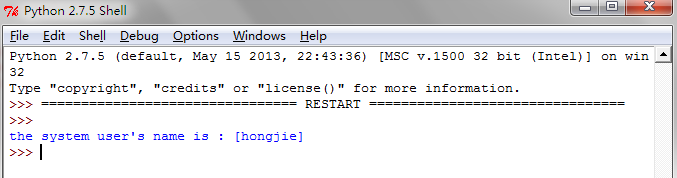
==================================================
代码部分:
==================================================
 #python getpass

 #Author   :   Hongten

 #Mailto   :   hongtenzone@foxmail.com

 #Blog     :   http://www.cnblogs.com/hongten

 #QQ       :   648719819

 #Version  :   1.0

 import getpass

 '''

     The getpass module provides two functions:

     getpass.getpass(prompt = 'Password:', stream = None)

         Prompt the user form a password without echoing.

         The user is prompted using the string prompt,which

         defaults to 'Password:' .On Unix, the prompt is written

         to the file-like object stream.stream defaults to the

         controlling terminal(/dev/tty) or if that is unavailable

         to sys.stderr(this argument is ignoed on Windows)

         if echo free input is unavailable getpass() falls back to

         printing a warning message to stream and reading from

         sys.stdin and issuing a GetPassWarning.

         Availablity:Macintosh,Unix,Windows.

         Note:

         if you call getpass from within IDLE,the input may be done in

         the terminal you launched IDLE from rather than the idle window

         itself.

         exception getpass.GetPassWarning

             A UserWarning subclass isssued when password input may be echoed.

         getpass.getuser()

             Return the 'login name' of the user.Availavility:Unix,Windows.

             This function checks the environment variables LOGNAME, USER,LNAME and

             USERNAME,in order, and returns the values of the first one which is set

             to a non-empty string.If none are set,the login name from the password

             database is returned on systems which support the pwd module,otherwise,

             an exception is raised.

 '''

 def get_system_user_name():

     '''return the 'login name' of the user.'''

     return getpass.getuser()

 def main():

     user_name = get_system_user_name()

     print('the system user\'s name is : [{}]'.format(user_name))

 if __name__ == '__main__':

     main()
python开发_getpass_获取登录名的更多相关文章
- python开发_tkinter_获取文本框内容_给文本框添加键盘输入事件
在之前的blog中有提到python的tkinter中的菜单操作 python开发_tkinter_窗口控件_自己制作的Python IDEL_博主推荐 python开发_tkinter_窗口控件_自 ...
- python开发_tkinter_获取单选菜单值
在之前的blog中有提到python的tkinter中的菜单操作 python开发_tkinter_窗口控件_自己制作的Python IDEL_博主推荐 python开发_tkinter_窗口控件_自 ...
- python开发 getpass获取操作系统登陆名
需用使用python getpass模块 import getpass def get_system_user_name(): return getpass.getuser() def main(): ...
- python开发_platform_获取操作系统详细信息工具
''' python中,platform模块给我们提供了很多方法去获取操作系统的信息 如: import platform platform.platform() #获取操作系统名称及版本号,'Win ...
- 用户管理的设计--4.jquery的ajax实现登录名的校验
页面效果 鼠标失去焦点时,不需要刷新页面进行校验,判断登录名是否重复. 实现步骤 1.引入struts2-json-plugin-2.5.10.1插件包 2.页面使用jquery的ajax实现后台校验 ...
- Python开发实战教程(8)-向网页提交获取数据
来这里找志同道合的小伙伴!↑↑↑ Python应用现在如火如荼,应用范围很广.因其效率高开发迅速的优势,快速进入编程语言排行榜前几名.本系列文章致力于可以全面系统的介绍Python语言开发知识和相关知 ...
- 测试开发Python培训:模拟登录新浪微博-技术篇
测试开发Python培训:模拟登录新浪微博-技术篇 一般一个初学者项目的起点就是登陆功能的自动化,而面临的项目不同实现的技术难度是不一样的,poptest在做测试开发培训中更加关注技术难点,掌握技 ...
- python获取函数名
Date: 20140223Auth: Jin 参考: http://hi.baidu.com/greysign/item/d11919d325c4c2e6b2f777bf 获取函数名python中获 ...
- //可以不保存在session中, 并且前面我保存在request,这里session也可以获取 chain.doFilter(request, response); //只有登录名不为空时放行,防止直接登录 成功的页面
public void doFilter(ServletRequest request, ServletResponse response, FilterChain chain) throws IOE ...
随机推荐
- 阿里面试回来,想和Java程序员谈一谈
引言 其实本来真的没打算写这篇文章,主要是LZ得记忆力不是很好,不像一些记忆力强的人,面试完以后,几乎能把自己和面试官的对话都给记下来.LZ自己当初面试完以后,除了记住一些聊过的知识点以外,具体的内容 ...
- 使用 script 命令记录用户操作行为
Script 命令可以帮助管理员记录用户的操作行为,包括用户查看文件中的哪些具体内容,写入了哪些文件,写了些什么都能看到,比较详细的记录了用户的操作行为. 本文对此进行简要说明. 1.添加日志记录 e ...
- 83.Linux之ubuntu-14.04.4-desktop-amd64安装
QQ(1044233591) 一.软件下载 二.安装 1.上一节已经安装好了VMware10.0.4软件,双击桌面VMware Workstation软件图标,出现VMware软件界面,点击" ...
- MinGw 和 cygwin 的区别和联系
原创 by zoe.zhang .......................................................... 1. windows与Linux操作系统的不同 ...
- Python字符串(Str)详解
字符串是 Python 中最常用的数据类型.我们可以使用引号('或")来创建字符串. 创建字符串很简单,只要为变量分配一个值即可 字符串的格式 b = "hello itcast. ...
- 两行代码搞定js对象深浅拷贝
有一段时间没有更新博客了,忙于工作.2018年刚过去,今天来开启2018第一篇博文.好了,咱们步入正题. 先上代码 /** * 遍历对象 * 1.判断是不是原始值 * 2.判断是数组还是对象 * 3. ...
- git —— bug分支
储藏工作现场 $ git stash 切换到需要修改bug的分支,创建临时分支 修复bug,修复完提交 修复完之后,切换到需要修改的分支.完成合并 合并后删除临时分支 完成后,可以重新回到没有修改完的 ...
- AdvStringGrid 复选框、goRowSelect
var I: Integer; begin do begin AdvStringGrid1.AddCheckBox(, I, True, True); AdvStringGrid1.Cells[,I] ...
- celery在Django中的集成使用
继上回安装和使用Redis之后,看看如何在Django中使用Celery.Celery是Python开发分布式任务列队的处理库.可以异步分布式地异步处理任务,也可定时执行任务等等.通常我们可以在Dja ...
- Django实战(21):使用内置的Amin管理用户
到目前为止,我们开发的所有功能都是匿名访问的,这显然不够安全.通常我们会要求注册的用户通过用户名和密码登录,只有登录后的用户才可以管理产品.套用专业的说法就是:第一步是认证,验证用户是否是他所宣称的那 ...