
python开发_getpass_获取登录名
我们有时候需要获取到计算机的登录名,这时候,就可以使用python中的getpass模块了
下面是我做的demo
运行效果:
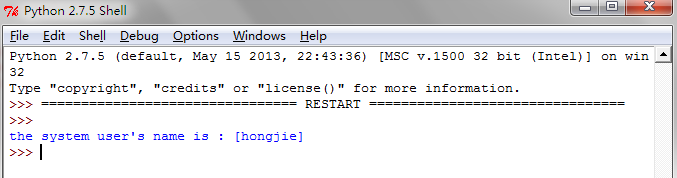
==================================================
代码部分:
==================================================
 #python getpass

 #Author   :   Hongten

 #Mailto   :   hongtenzone@foxmail.com

 #Blog     :   http://www.cnblogs.com/hongten

 #QQ       :   648719819

 #Version  :   1.0

 import getpass

 '''

     The getpass module provides two functions:

     getpass.getpass(prompt = 'Password:', stream = None)

         Prompt the user form a password without echoing.

         The user is prompted using the string prompt,which

         defaults to 'Password:' .On Unix, the prompt is written

         to the file-like object stream.stream defaults to the

         controlling terminal(/dev/tty) or if that is unavailable

         to sys.stderr(this argument is ignoed on Windows)

         if echo free input is unavailable getpass() falls back to

         printing a warning message to stream and reading from

         sys.stdin and issuing a GetPassWarning.

         Availablity:Macintosh,Unix,Windows.

         Note:

         if you call getpass from within IDLE,the input may be done in

         the terminal you launched IDLE from rather than the idle window

         itself.

         exception getpass.GetPassWarning

             A UserWarning subclass isssued when password input may be echoed.

         getpass.getuser()

             Return the 'login name' of the user.Availavility:Unix,Windows.

             This function checks the environment variables LOGNAME, USER,LNAME and

             USERNAME,in order, and returns the values of the first one which is set

             to a non-empty string.If none are set,the login name from the password

             database is returned on systems which support the pwd module,otherwise,

             an exception is raised.

 '''

 def get_system_user_name():

     '''return the 'login name' of the user.'''

     return getpass.getuser()

 def main():

     user_name = get_system_user_name()

     print('the system user\'s name is : [{}]'.format(user_name))

 if __name__ == '__main__':

     main()
python开发_getpass_获取登录名的更多相关文章
- python开发_tkinter_获取文本框内容_给文本框添加键盘输入事件
在之前的blog中有提到python的tkinter中的菜单操作 python开发_tkinter_窗口控件_自己制作的Python IDEL_博主推荐 python开发_tkinter_窗口控件_自 ...
- python开发_tkinter_获取单选菜单值
在之前的blog中有提到python的tkinter中的菜单操作 python开发_tkinter_窗口控件_自己制作的Python IDEL_博主推荐 python开发_tkinter_窗口控件_自 ...
- python开发 getpass获取操作系统登陆名
需用使用python getpass模块 import getpass def get_system_user_name(): return getpass.getuser() def main(): ...
- python开发_platform_获取操作系统详细信息工具
''' python中,platform模块给我们提供了很多方法去获取操作系统的信息 如: import platform platform.platform() #获取操作系统名称及版本号,'Win ...
- 用户管理的设计--4.jquery的ajax实现登录名的校验
页面效果 鼠标失去焦点时,不需要刷新页面进行校验,判断登录名是否重复. 实现步骤 1.引入struts2-json-plugin-2.5.10.1插件包 2.页面使用jquery的ajax实现后台校验 ...
- Python开发实战教程(8)-向网页提交获取数据
来这里找志同道合的小伙伴!↑↑↑ Python应用现在如火如荼,应用范围很广.因其效率高开发迅速的优势,快速进入编程语言排行榜前几名.本系列文章致力于可以全面系统的介绍Python语言开发知识和相关知 ...
- 测试开发Python培训:模拟登录新浪微博-技术篇
测试开发Python培训:模拟登录新浪微博-技术篇 一般一个初学者项目的起点就是登陆功能的自动化,而面临的项目不同实现的技术难度是不一样的,poptest在做测试开发培训中更加关注技术难点,掌握技 ...
- python获取函数名
Date: 20140223Auth: Jin 参考: http://hi.baidu.com/greysign/item/d11919d325c4c2e6b2f777bf 获取函数名python中获 ...
- //可以不保存在session中, 并且前面我保存在request,这里session也可以获取 chain.doFilter(request, response); //只有登录名不为空时放行,防止直接登录 成功的页面
public void doFilter(ServletRequest request, ServletResponse response, FilterChain chain) throws IOE ...
随机推荐
- XXX变种-防火墙放行自身
1.利用防火墙命令放行自身手法 netsh firewall add allowedprogram "C:\Users\USER\AppData\Local\Temp\Discord Can ...
- asp.net mvc发送邮件
参考文献: 第一篇:http://www.cnblogs.com/qinpengming/archive/2011/06/08/2075040.html 第二篇:http://www.cnblogs. ...
- Python爬虫---requests库快速上手
一.requests库简介 requests是Python的一个HTTP相关的库 requests安装: pip install requests 二.GET请求 import requests # ...
- vue总结 06组件
组件基础 基本示例 这里有一个 Vue 组件的示例: // 定义一个名为 button-counter 的新组件Vue.component('button-counter', { data: func ...
- java基础61 JavaScript循环语句之while、do...while、for及for...in循环(网页知识)
本文知识点(目录): 1.while循环语句 2.do...while循环语句 3.for循环语句 4.for...in循环语句 5.附录1(with语句) 6.附录2( ...
- 洛谷P2661信息传递
传送门啦 一个人要想知道自己的生日,就意味着信息的传递是成环的,因为每轮信息只能传递一个人,传递的轮数就等于环的大小 环的大小就等于环中的两个点到第三个点的距离之和加一,我们就可以在使用并查集时,维护 ...
- 本地为Windows,使用Xshell登录Linux云主机
以某东的云主机为实例 1. 下载并安装远程登录软件 下载Xshell软件 下载后双击xshell5_5.0.1332.exe进行安装 2. 安装完成,打开Xshell,并点击新建,根据要求输入相应参数 ...
- SourceTree 3.0.17如何跳过注册进行安装? — git图形化工具(一)
SourceTree 3.0.17个人版本的尝试跳过注册方式好几次都没成功,于是下载了企业版本https://www.sourcetreeapp.com/enterprise. 安装过程: 1.首次点 ...
- Kibana安装及简单使用
Kibana安装 参照官方文档即可,这里只做相关操作记录: wget https://artifacts.elastic.co/downloads/kibana/kibana-5.5.0-linux- ...
- python二叉树简单实现
二叉树简单实现: class Node: def __init__(self,item): self.item = item self.child1 = None self.child2 = None ...