
记一次在mac上源码编译curl,使其支持NSS的过程
一、背景
在一次学习https原理的过程中,希望客户端指定特定的cipher suites来抓包分析SSL/TLS的握手过程,就想到了使用curl工具,而不是使用浏览器。
接下来使用man curl找到—ciphers选项,同时man文档中同时提到了需要到https://curl.haxx.se/docs/ssl-ciphers.html这个地方去寻找具体的ciphers suites列表,从中我们可以看到这样一句话:The names of the known ciphers differ depending on which TLS backend that libcurl was built to use. This is an attempt to list known cipher names.大概意思就是不同的TLS实现(包括openssl、NSS、LibreSSL等),即使是同一个ciphers,curl工具能识别的名称也是不同的。
在不同的操作系统中,系统自带的curl工具,使用的SSL库是不同的,可以使用curl -V来查看:
1.1、mac自带的curl

1.2、redhat系列系统自带的curl

由于在上面提到的文档中,没有与LlibreSSL的ciphers有关的介绍,因此决定在mac上源码编译curl,使其支持NSS。
二、环境介绍
| 环境 | 版本 |
|---|---|
| 操作系统 | macOS Mojave(10.14) |
| curl | 7.65.1 |
| NSS | 3.44 |
三、过程
3.1、下载curl和nss源码包
在https://curl.haxx.se/download/中选择对应的curl源码包进行下载
在https://ftp.mozilla.org/pub/security/nss/releases/中选择对应的nss源码包进行下载
Because NSS depends on the base library NSPR, you should download the archive that combines both NSS and NSPR:因为nss依赖NSPR,所以应该选择NSS和NSPR的组合包,例如:https://ftp.mozilla.org/pub/security/nss/releases/NSS_3_45_RTM/src/nss-3.44-with-nspr-4.21.tar.gz
3.2、安装NSS
3.2.1、源码编译
tar -zxf nss-3.44-with-nspr-4.21.tar.gz

cd nss-3.44

make -C nss nss_build_all USE_64=1
编译过程参照https://developer.mozilla.org/en-US/docs/Mozilla/Projects/NSS/Building ,编译时会遇到下面的报错,暂时还没有解决掉,之所以还要进行这个明知会失败的操作,是因为下面还需要从这个编译生成的dist目录中复制一些.h文件
Undefined symbols for architecture x86_64:

  "_PK11_FindRawCertsWithSubject", referenced from:

      nss_test::PK11FindRawCertsBySubjectTest_TestNoCertsImportedNoCertsFound_Test::TestBody() in pk11_find_certs_unittest.o

      nss_test::PK11FindRawCertsBySubjectTest_TestOneCertImportedNoCertsFound_Test::TestBody() in pk11_find_certs_unittest.o

      nss_test::PK11FindRawCertsBySubjectTest_TestMultipleMatchingCertsFound_Test::TestBody() in pk11_find_certs_unittest.o

      nss_test::PK11FindRawCertsBySubjectTest_TestNoCertsOnInternalSlots_Test::TestBody() in pk11_find_certs_unittest.o

      nss_test::PK11FindRawCertsBySubjectTest_TestFindEmptySubject_Test::TestBody() in pk11_find_certs_unittest.o

      nss_test::PK11FindRawCertsBySubjectTest_TestSearchForNullSubject_Test::TestBody() in pk11_find_certs_unittest.o

ld: symbol(s) not found for architecture x86_64

clang: error: linker command failed with exit code 1 (use -v to see invocation)

make[2]: *** [Darwin18.0.0_cc_64_DBG.OBJ/pk11_gtest] Error 1

make[1]: *** [libs] Error 2

make: *** [libs] Error 2
3.2.2、brew安装
$ brew install nss
#设置环境变量

export LDFLAGS="-L/usr/local/opt/nss/lib"

export CPPFLAGS="-I/usr/local/opt/nss/include/nss"
3.2.3、复制.h文件
#还是进入到上面由nss-3.44-with-nspr-4.21.tar.gz解压出来的那个nss-3.44目录中

cd nss-3.44

cp -r dist/Darwin18.0.0_cc_64_OPT.OBJ/include/* /usr/local/opt/nss/include/nss/
上面的Darwin18.0.0_cc_64_OPT.OBJ这一级目录名与自己的操作系统版本有关,之所以要进行复制这个操作,是因为brew安装的nss会缺少很多
.h文件,导致编译curl过程中引用NSS会失败,原因暂时未知。
3.3、安装curl
tar -zxf curl-7.65.1.tar.gz

cd curl-7.65.1

./configure --prefix=/usr/local/opt/curl --without-ssl --with-nss=/usr/local/opt/nss/

make && make install
3.4、验证

四、关于根证书库的问题
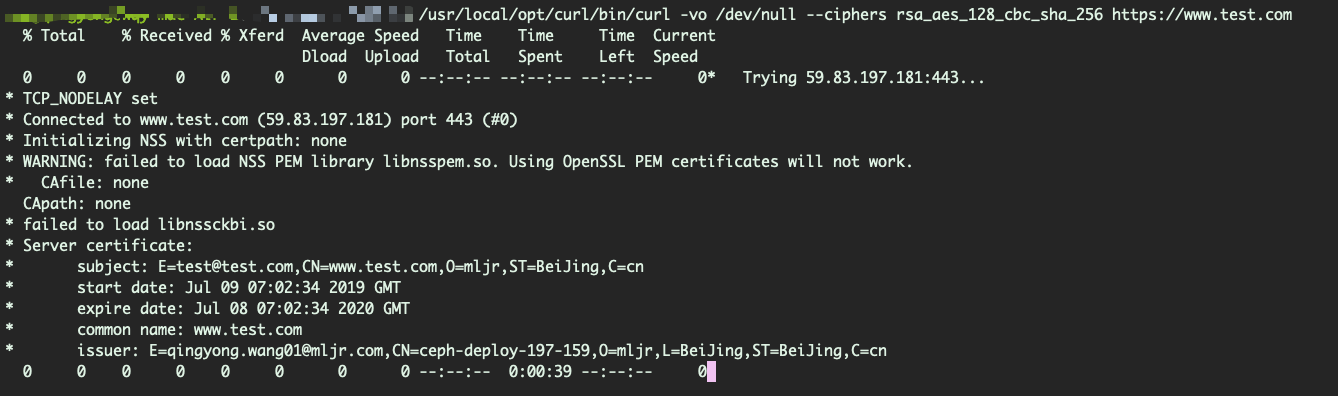
上面基于NSS源码编译生成的curl没有附带ca证书库,在使用curl访问https的url时,会卡在证书验证的环节上,如下图所示:
有人可能会说,可以给curl配置CA证书库,但是由于一些原因,好像在mac平台上暂时无法实现,可以见下面的说明:
If libcurl was built with NSS support, then depending on the OS distribution, it is probably required to take some additional steps to use the system-wide CA cert db. RedHat ships with an additional module, libnsspem.so, which enables NSS to read the OpenSSL PEM CA bundle. On openSUSE you can install p11-kit-nss-trust which makes NSS use the system wide CA certificate store. NSS also has a new database format
Starting with version 7.19.7, libcurl automatically adds the 'sql:' prefix to the certdb directory (either the hardcoded default /etc/pki/nssdb or the directory configured with SSL_DIR environment variable). To check which certdb format your distribution provides, examine the default certdb location: /etc/pki/nssdb; the new certdb format can be identified by the filenames cert9.db, key4.db, pkcs11.txt; filenames of older versions are cert8.db, key3.db, secmod.db.
摘自:https://curl.haxx.se/docs/sslcerts.html ,大致意思就是redhat系列的操作系统会有一个额外的模块libnsspem.so(/usr/lib64/libnsspem.so),可以使NSS能够使用系统级的CA证书库,openSUSE操作系统也可以通过安装p11-kit-nss-trust来实现,mac系统中好像没有相应的支持,上面的截图中有一个错误警告"WARNING: failed to load NSS PEM library libnsspem.so. Using OpenSSL PEM certificates will not work",curl好像默认是去尝试加载libnsspem.so这个库文件。
因此在使用这个curl时,需要加上-k参数来跳过证书验证的环节,也因此,我也仅仅只是用这个curl工具做一些特定的测试。
记一次在mac上源码编译curl,使其支持NSS的过程的更多相关文章
- CentOS 7上源码编译安装和配置LNMP Web+phpMyAdmin服务器环境
CentOS 7上源码编译安装和配置LNMP Web+phpMyAdmin服务器环境 什么是LNMP? LNMP(别名LEMP)是指由Linux, Nginx, MySQL/MariaDB, PHP/ ...
- ubuntu上源码编译安装mysql5.7.27
一.查看操作系统环境和目录结构,并创建mysql用户和组,以及规划安装mysql所需要的目录. #cat /etc/issue 查看发行版本信息: #cat /proc/version 查看正在运行 ...
- debian 7上源码编译MongoDB 3.4版本
此文已由作者温正湖授权网易云社区发布. 欢迎访问网易云社区,了解更多网易技术产品运营经验. 要想精通一个数据库,除了知道该数据库的功能特性.使用方法等,还需要能够看懂数据库源码,能够使用gdb工具对其 ...
- linux上源码编译安装mysql-5.6.28
在 linux 上编译安装 mysql-.tar.gz http://www.mysql.com/ mysql下载地址: http://www.mysql.com/downloads/mysql/#d ...
- ubuntu 14.04上源码编译安装php7
wget https://downloads.php.net/~ab/php-7.0.0alpha2.tar.bz2 //用winscp把下载好的文件上传到网站中 tar jxf php-7.0.0a ...
- windows 10 上源码编译OpenCV并支持CUDA | compile opencv with CUDA support on windows 10
本文首发于个人博客https://kezunlin.me/post/6580691f/,欢迎阅读! compile opencv with CUDA support on windows 10 Ser ...
- Ubuntu 16.04上源码编译和安装pytorch教程,并编写C++ Demo CMakeLists.txt | tutorial to compile and use pytorch on ubuntu 16.04
本文首发于个人博客https://kezunlin.me/post/54e7a3d8/,欢迎阅读最新内容! tutorial to compile and use pytorch on ubuntu ...
- ubuntu 16.04上源码编译dlib教程 | compile dlib on ubuntu 16.04
本文首发于个人博客https://kezunlin.me/post/c6ead512/,欢迎阅读! compile dlib on ubuntu 16.04 Series Part 1: compil ...
- windows 10上源码编译dlib教程 | compile dlib on windows 10
本文首发于个人博客https://kezunlin.me/post/654a6d04/,欢迎阅读! compile dlib on windows 10 Series Part 1: compile ...
随机推荐
- Navicat Premuim远程连接oracle 提示 cannot load oci dll,193的解决方法
转载:http://blog.51cto.com/xiao987334176/1640991 内网有一台windows server 2012,安装了Navicat 11.1.8 连接oracle的时 ...
- getAttribute和getParameter
getAttribute表示从request范围取得设置的属性,必须要先setAttribute设置属性,才能通过getAttribute来取得,设置与取得的为Object对象类型 getParame ...
- InfluxDB安装使用
influxdb简介 启动步骤 服务启停:sudo service influxdb start/stop/restart 安装过程: 1.增加yum源 cat <<EOF | sud ...
- uva live 7635 National Bomb Defusing Squad
题目链接:https://icpcarchive.ecs.baylor.edu/index.php?option=com_onlinejudge&Itemid=8&page=show_ ...
- postgresql获取表最后更新时间(通过发布订阅机制将消息发送给应用程序)
一.创建测试表 CREATE TABLE weather( city ), temp_lo int, --最低温度 temp_hi int, --最高温度 prcp real, --湿度 date d ...
- sysf接口的函数【转】
本文转载自:http://blog.csdn.net/manshq163com/article/details/7848714 说道sysfs接口,就不得不提到函数宏 DEVICE_ATTR,原型是 ...
- loj#6157 A ^ B Problem
分析 用并查集维护 每次一个连通块的每个点记录它到当前连通块的根的异或值 对于不符合的情况容易判断 最后判断是否都在一个连通块内然后记录答案即可 代码 #include<bits/stdc++. ...
- PJSIP Socket 模型
前些日子为解决项目中问题调试到PJSIP Socket收发数据部分 ,好记性不如烂笔头,记录下 PJSIP 使用的Socket 模型 ,以备后用. 不同平台下PJSIP采用不同的 Socket模型,W ...
- Delphi XE2 之 FireMonkey 入门(16) - 滤镜: 实例测试
窗体上需要 TImage.TOpenDialog 和六个按钮. unit Unit1; interface uses System.SysUtils, System.Types, System.U ...
- B-/B+树 MySQL索引结构
索引 索引的简介 简单来说,索引是一种数据结构 其目的在于提高查询效率 可以简单理解为“排好序的快速查找结构” 一般来说,索引本身也很大,不可能全部存储在内存中,因此索引往往以索引文件的形式存储在中磁 ...