
SQL: enable sa Account in SQL Server
Link:
http://sudeeptaganguly.wordpress.com/2010/04/20/how-to-enable-sa-account-in-sql-server/
引用:
When you install the SQL Server using Windows Authentication mode, by default, the “sa” account is disabled. Sometimes, due to users/customers request, you may need to enable the sa account. You need to change the authentication mode for SQL server from Windows Authentication Mode to SQL Server and Windows Authentication Mode to use the sa account.
To Change the Authentication Mode:
Follow the steps mentioned below to change the authentication mode from Windows Authentication to SQL Server and Windows Authentication. You need to remember that, the SQL Server service needs to restart to make this change effective.
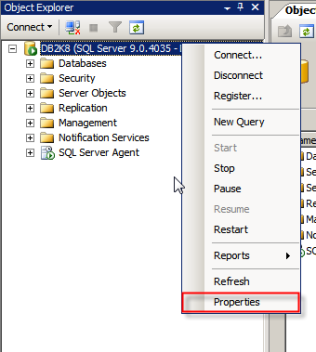
1. Login to the SQL server instance using SQL Server Management Studio. Right-click on the database instance, and go to Properties.
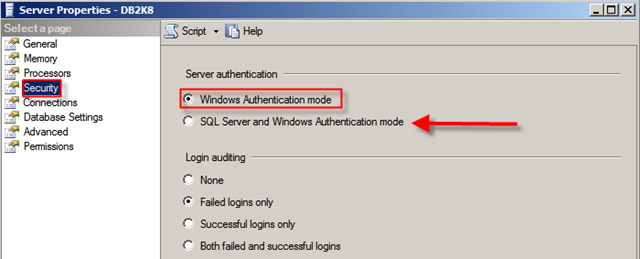
2. On the Server Properties page, Click on Security. Click on the radio button next to SQL Server and Windows Authentication mode, and click on OK to close the Server Properties page.
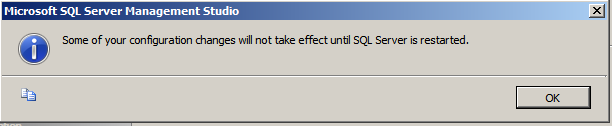
3. Once you clicked on the Ok button, we will get the following screen:
As discussed earlier, we need to restart the SQL Server service to make this change effective. After restarting the SQL Server, the authentication mode will be changed to SQL Server and Windows Authentication mode.
Enable the sa Login:
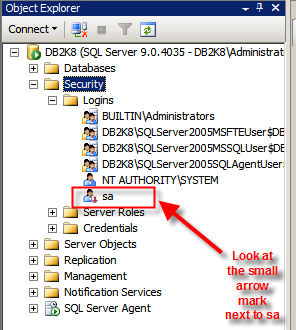
1. Connect to the SQL Server instance using SSMS and go to Security. Expand Security, go to Logins.
2. You can see the sa account is disabled when you install SQL Server using Windows Authentication mode.
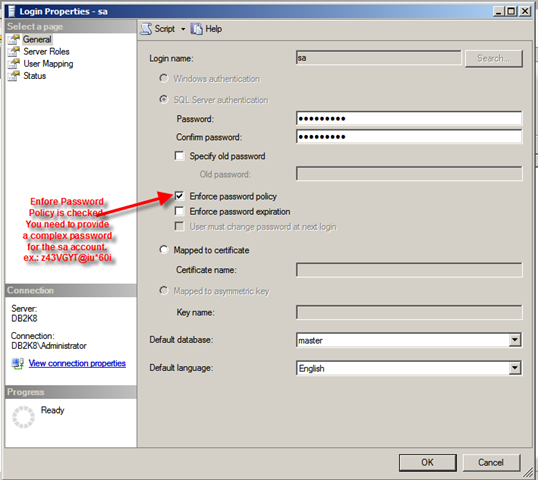
3. Right-click on the sa account and go to Login Properties. Specify a complex password for the sa account. By default, the Enforce password policy is checked. (if you don’t want to provide a complex password for the sa account, you can uncheck this option. However, this is not recommended.)
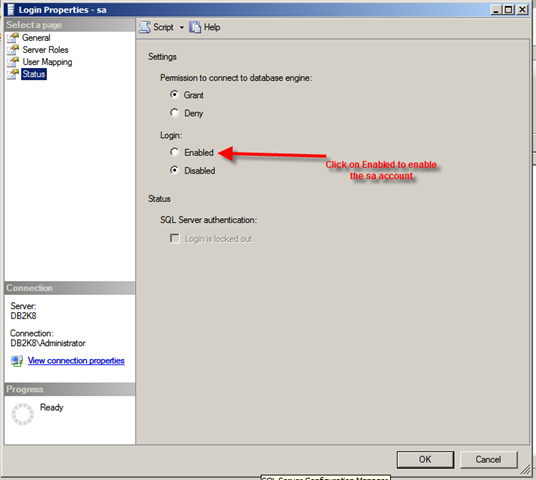
4. Click on the Status page. By default, the sa account will be disabled. Click on the Enabled button to enable the sa account. Click on Ok to close the sa Login Properties.
Thus, sa account is enabled and you will be able to login to the SQL instance using the sa account.
If you want to use a script to enable the sa account, you can use the script mentioned below:
 1: USE [master]

 2: GO

 3: ALTER LOGIN [sa] WITH PASSWORD=N'z43VGYT@Iu*60i'

 4: GO

 5: ALTER LOGIN [sa] ENABLE

 6: GO
SQL: enable sa Account in SQL Server的更多相关文章
- 浅谈SQL注入风险 - 一个Login拿下Server
前两天,带着学生们学习了简单的ASP.NET MVC,通过ADO.NET方式连接数据库,实现增删改查. 可能有一部分学生提前预习过,在我写登录SQL的时候,他们鄙视我说:“老师你这SQL有注入,随便都 ...
- 浅谈SQL注入风险 - 一个Login拿下Server(转)
前两天,带着学生们学习了简单的ASP.NET MVC,通过ADO.NET方式连接数据库,实现增删改查. 可能有一部分学生提前预习过,在我写登录SQL的时候,他们鄙视我说:“老师你这SQL有注入,随便都 ...
- 使用设置sa用户登录sql server2008
今天在net项目中添加数据库过程中出现了小问题,就是使用sql server身份验证没登录成功,经过一番调试,终于解决问题. 使用sa账户登录sql server 2008 的方法步骤如下: 1.首先 ...
- SQL Azure (14) 将云端SQL Azure中的数据库备份到本地SQL Server
<Windows Azure Platform 系列文章目录> 注意: 1.只有SQL Server 2012 CU4及以上版本才支持本章内容 2.当你的数据库文件很大时,建议优化以下内容 ...
- 智能SQL优化工具--SQL Optimizer for SQL Server(帮助提升数据库应用程序性能,最大程度地自动优化你的SQL语句 )
SQL Optimizer for SQL Server 帮助提升数据库应用程序性能,最大程度地自动优化你的SQL语句 SQL Optimizer for SQL Server 让 SQL Serve ...
- Sql性能检测工具:Sql server profiler和优化工具:Database Engine Tuning Advisor
原文:Sql性能检测工具:Sql server profiler和优化工具:Database Engine Tuning Advisor 一.工具概要 数据库应用系统性能低下,需要对其进行优化 ...
- 简单实用SQL脚本Part:查找SQL Server 自增ID值不连续记录
原文:简单实用SQL脚本Part:查找SQL Server 自增ID值不连续记录 在很多的时候,我们会在数据库的表中设置一个字段:ID,这个ID是一个IDENTITY,也就是说这是一个自增ID.当并发 ...
- SQL手工注入漏洞测试(Sql Server数据库)
还是先找到注入点,然后order by找出字段数:4 通过SQL语句中and 1=2 union select 1,2,3……,n联合查询,判断显示的是哪些字段,就是原本显示标题和内容时候的查询字段. ...
- 【转】使用SQL Tuning Advisor STA优化SQL
SQL优化器(SQL Tuning Advisor STA)是Oracle10g中推出的帮助DBA优化工具,它的特点是简单.智能,DBA值需要调用函数就可以给出一个性能很差的语句的优化结果.下面介绍一 ...
随机推荐
- Android 添加cookie
/** * 添加cookie * * @param url */ private void setCookie(String url) { // 获取uid String uid = UserData ...
- Linux进程间通讯的几种方式的特点和优缺点,和适用场合
http://blog.csdn.net/jeffcjl/article/details/5523569 由于不同的进程运行在各自不同的内存空间中.一方对于变量的修改另一方是无法感知的.因此.进程之间 ...
- NYOJ题目273字母小游戏
aaarticlea/png;base64,iVBORw0KGgoAAAANSUhEUgAAAswAAAIZCAIAAAA9QP7RAAAgAElEQVR4nO3dPXKjzBqG4bMJ5VqIU2
- 谈谈我的编程之路---WAMP(四)
WAMP的一些配置与使用心得(windows)W-windows,说到windows,其实大家都最熟悉不过了,GUI(graphic user interface)图形界面就没有什么可说的了,基本会用 ...
- 很少有人会告诉你的Android开发基本常识
原文:很少有人会告诉你的Android开发基本常识. 文章介绍了一些关于开发.测试.版本管理.工具使用等方面的知识.
- C#的yield关键字
using System; using System.Collections.Generic; using System.Reflection; using System.Text.RegularEx ...
- 【131202】SQL
SELECT TOP 2 * FROM Persons SELECT *FROM PersonsWHERE ROWNUM <= 5 SELECT * FROM Persons WHERE C ...
- php同步mysql两个数据库中表的数据
分别创建两个数据库和两张表study库-zone表teaching库-area表 //****SQL脚本****// 1.创建teaching数据库area数据表 create database te ...
- hdu 5366 组合数 *
考虑放1个,2个....的情况,相加就是最后的结果 #include<cstdio> #include<iostream> #include<algorithm> ...
- 在source insight中集成astyle
转自:http://www.cnblogs.com/xuxm2007/archive/2013/04/06/3002390.html 好吧,我有代码格式的强迫症,代码不整齐,我看的都头疼,之前一直喜欢 ...