
springboot整合视图层之freemarker
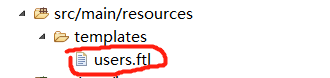
整合freemarker要求必须将视图文件放在 src/main/resources下的templates文件夹下,该文件夹是安全的不可直接访问的,必须由controller之类的接受请求类去跳转,因为如果直接访问就意味着需要及时响应,而springboot需要给展示文件去渲染,这需要时间,所以他是不允许被直接访问的。
1.pom.xml
<project xmlns="http://maven.apache.org/POM/4.0.0" xmlns:xsi="http://www.w3.org/2001/XMLSchema-instance" xsi:schemaLocation="http://maven.apache.org/POM/4.0.0 http://maven.apache.org/xsd/maven-4.0.0.xsd">

  <modelVersion>4.0.0</modelVersion>

  <parent>

    <groupId>org.springframework.boot</groupId>

    <artifactId>spring-boot-starter-parent</artifactId>

    <version>1.5.10.RELEASE</version>

  </parent>

  <groupId>com.mr.li</groupId>

  <artifactId>springboot_004</artifactId>

  <version>0.0.1-SNAPSHOT</version>

  <properties>

      <java.version>1.7</java.version>

  </properties>

  <dependencies>

      <!-- 添加启动器 -->

      <dependency>

        <groupId>org.springframework.boot</groupId>

        <artifactId>spring-boot-starter-web</artifactId>

    </dependency>

   <!-- freemarker启动器:使用模板开发-->

   <dependency>

        <groupId>org.springframework.boot</groupId>

        <artifactId>spring-boot-starter-freemarker</artifactId>

    </dependency>

  </dependencies>

</project>
2.实体类
package com.mr.li.pojo;

public class User {

    private int id;

    private String name;

    private int age;

    public User(int id, String name, int age) {

        super();

        this.id = id;

        this.name = name;

        this.age = age;

    }

    public User() {

    }

    public int getId() {

        return id;

    }

    public void setId(int id) {

        this.id = id;

    }

    public String getName() {

        return name;

    }

    public void setName(String name) {

        this.name = name;

    }

    public int getAge() {

        return age;

    }

    public void setAge(int age) {

        this.age = age;

    }

}
3.controller
    package com.mr.li.controller;

import java.util.ArrayList;

import java.util.List;

import org.springframework.stereotype.Controller;

import org.springframework.ui.Model;

import org.springframework.web.bind.annotation.RequestMapping;

import com.mr.li.pojo.User;

@Controller

public class MyController {

    @RequestMapping("/show")

    public String show(Model model) {

        //生成jsp页面需要展示的数据源

        List<User> list = new ArrayList<User>();

        list.add(new User(1, "小明", 15));

        list.add(new User(2, "小红", 16));

        list.add(new User(3, "小丽", 17));

        //这里前面的list是在jsp中使用EL表达式所使用的名称

        model.addAttribute("list", list);

        //这里返回的是jsp页面名称,前后缀在配置文件中

        return "users";

    }

}
5.users.ftl 此文件名字叫users因为controller中show方法返回的名字叫users,里面的EL表达式中的list是controller类中的model对象的addAttribute方法的key,参数名为list.
<html>

    <head>

        <title>展示用户数据</title>

        <meta charset="utf-9"></meta>

    </head>

    <body>

        <table border="1" align="center" width="50%">

            <tr>

                <th>ID</th>

                <th>Name</th>

                <th>Age</th>

            </tr>

            <#list list as user >

                <tr>

                    <td>${user.id}</td>

                    <td>${user.name}</td>

                    <td>${user.age}</td>

                </tr>

            </#list>

        </table>

    </body>

</html>
访问的url: http://localhost:8080/show

项目结构:

springboot整合视图层之freemarker的更多相关文章
- springboot整合视图层之jsp
在springboot中不推荐视图层使用jsp展示,但是人们以前已经习惯使用jsp,所以对jsp也有支持,但是是解耦性的.也就是说并没有像其他组件一样直接集成到启动器中,所以像jsp引擎之类的需要额外 ...
- springboot整合视图层之Thymeleaf
Thymeleaf中有自己的表达式,和自己的语法,可以把数据取出来后再进行判断,遍历等操作,另外它还封装了strings,dates....对象,可以利用这些对象对已有的数据进行简单的逻辑处理: 1. ...
- springboot学习入门简易版四---springboot2.0静态资源访问及整合freemarker视图层
2.4.4 SpringBoot静态资源访问(9) Springboot默认提供静态资源目录位置需放在classpath下,目录名需要符合如下规则 /static /public /resourc ...
- 【SpringBoot】09.SpringBoot整合Freemarker
SpringBoot整合Freemarker 1.修改pom文件,添加坐标freemarker启动器坐标 <project xmlns="http://maven.apache.org ...
- springboot整合freemarker
前后端分离现在越来越多,如何有效的使用springboot来整合我们的页面是一个很重要的问题. springboot整合freemarker有以下几个步骤,也总结下我所犯的错误: 1.加依赖: 2.配 ...
- springboot整合mybatis,freemarker
springboot 整合mybaits,,freemarker pom.xml文件 <?xml version="1.0" encoding="UTF-8&quo ...
- springboot 整合 freemarker
springboot 整合 freemarker 依赖 <parent> <groupId>org.springframework.boot</groupId> & ...
- SpringBoot整合freemarker 引用基础
原 ElasticSearch学习笔记Ⅲ - SpringBoot整合ES 新建一个SpringBoot项目.添加es的maven坐标如下: <dependency> <groupI ...
- 【Springboot】Springboot整合Thymeleaf模板引擎
Thymeleaf Thymeleaf是跟Velocity.FreeMarker类似的模板引擎,它可以完全替代JSP,相较与其他的模板引擎,它主要有以下几个特点: 1. Thymeleaf在有网络和无 ...
随机推荐
- Java File mkdir() mkdirs()
使用mkdir()和mkdirs()创建文件夹的区别. 1.mkdir() 如果父目录不存在,则创建失败. 2.mkdirs() 如果父目录不存在,连同父目录一起创建. 注意,在IO_Study01文 ...
- windows下bat批处理执行sql语句__Mysql
直接上代码: @ECHO OFF SET dbhost=主机名(例如:127.0.0.1)SET dbuser=用户名(例如:root)SET dbpasswd=用户密码(例如:root)SET db ...
- CentOS安装jdk的三种方法
方法一:手动解压JDK的压缩包,然后设置环境变量 方法二:用yum安装JDK,(全称为 Yellow dog Updater, Modified)是一个在Fedora和RedHat以及CentOS中的 ...
- MAC 调用GCC 提示xcrun: error: invalid active developer path
xcrun: error: invalid active developer path (/Library/Developer/CommandLineTools), missing xcrun at: ...
- java 学习中出过的错误
1. 运行异常 C:\Users\plan-B\java>java TapeDeckTestDrive.class 错误: 找不到或无法加载主类 TapeDeckTestDrive.class
- 激活函数的比较,sigmoid,tanh,relu
1. 什么是激活函数 如下图,在神经元中,输入inputs通过加权.求和后,还被作用了一个函数.这个函数就是激活函数Activation Function 2. 为什么要用激活函数 如果不用激活函数, ...
- WebApi服务以及跨域设置
WCF 它利用TCP.HTTP.MSMQ等传输协议构建“契约先行”的服务.WCF最初为基于SOAP的服务而设计[xml],繁琐.冗余.慢.沉重 WebApi 基于http协议,轻量级的,支持URL路由 ...
- 修改Elasticsearch的settings
解决:Limit of total fields [1000] in index [nginx-access-log] has been exceeded" 的问题 PUT http://1 ...
- Node 杂技
1.关于require 当文件夹a中含有index.js时,在b.js中如果有require("文件夹a的路径"),则将会自动执行index.js的语句
- 导出CSV乱码
导出CSV,无论是什么格式,excel打卡都是乱码 需要加上 echo "\xEF\xBB\xBF"; header("Content-Disposition:attac ...