
springboot整合视图层之Thymeleaf
Thymeleaf中有自己的表达式,和自己的语法,可以把数据取出来后再进行判断,遍历等操作,另外它还封装了strings,dates....对象,可以利用这些对象对已有的数据进行简单的逻辑处理;
1.pom.xml
<project xmlns="http://maven.apache.org/POM/4.0.0" xmlns:xsi="http://www.w3.org/2001/XMLSchema-instance" xsi:schemaLocation="http://maven.apache.org/POM/4.0.0 http://maven.apache.org/xsd/maven-4.0.0.xsd">

  <modelVersion>4.0.0</modelVersion>

  <parent>

    <groupId>org.springframework.boot</groupId>

    <artifactId>spring-boot-starter-parent</artifactId>

    <version>1.5.10.RELEASE</version>

  </parent>

  <groupId>com.mr.li</groupId>

  <artifactId>springboot_005</artifactId>

  <version>0.0.1-SNAPSHOT</version>

  <!-- 修改jdk版本 -->

  <properties>

       <java.version>1.7</java.version>

       <!-- 将thymeleaf的版本升级一下,好处是:不会限制自动生成的html中编码标签结束没有结束符的错误 -->

       <thymeleaf.version>3.0.2.RELEASE</thymeleaf.version>

       <thymeleaf-layout-dialect.version>2.0.4</thymeleaf-layout-dialect.version>

  </properties>

  <dependencies>

      <!-- springBoot引入web启动器 -->

          <dependency>

        <groupId>org.springframework.boot</groupId>

        <artifactId>spring-boot-starter-web</artifactId>

    </dependency>

    <!-- springBoot引入thymeleaf视图模板启动器 -->

    <dependency>

        <groupId>org.springframework.boot</groupId>

        <artifactId>spring-boot-starter-thymeleaf</artifactId>

    </dependency>

  </dependencies>

</project>
2.启动类
package com.mr.li;

import org.springframework.boot.SpringApplication;

import org.springframework.boot.autoconfigure.SpringBootApplication;

@SpringBootApplication

public class App {

    public static void main(String[] args) {

        SpringApplication.run(App.class, args);

    }

}
3.MyController:各个方法的演示,方法的返回值都是对应的html名称
package com.mr.li.controller;

import java.util.ArrayList;

import java.util.Date;

import java.util.HashMap;

import java.util.List;

import java.util.Map;

import javax.servlet.ServletContext;

import javax.servlet.http.HttpServletRequest;

import javax.servlet.http.HttpSession;

import org.springframework.stereotype.Controller;

import org.springframework.ui.Model;

import org.springframework.web.bind.annotation.RequestMapping;

import com.mr.li.pojo.User;

@Controller

public class MyController {

    /**

     * 使用thymeleaf获取字符串:str是html的名字。

     * 将字符串添加到model属性中,而model对象是springboot封装过的,在这里用于HTML中获取。

     * @param model

     * @return

     */

    @RequestMapping("/strs")

    public String show1(Model model) {

        model.addAttribute("str", "heLLLlo world");

        return "str";

    }

    /**

     * 演示:在html中遍历取出list中的内容

     * @param model

     * @return

     */

    @RequestMapping("/lists")

    public String show2(Model model) {

        List<User> list = new ArrayList<User>();

        list.add(new User(1, "小明", 15));

        list.add(new User(2, "小刚", 16));

        list.add(new User(3, "小丽", 14));

        model.addAttribute("list", list);

        return "list";

    }

    /**

     * 演示map:在html中取出map操作

     * @param model

     * @return

     */

    @RequestMapping("/maps")

    public String show3(Model model) {

        Map<String, User> map = new HashMap<String, User>();

        map.put("user1", new User(1, "张三", 15));

        map.put("user2", new User(2, "李四", 16));

        map.put("user3", new User(3, "王五", 17));

        model.addAttribute("map", map);

        return "map";

    }

    /**

     * 演示使用thymeleaf在html中操作date类型

     * @param model

     * @return

     */

    @RequestMapping("/dates")

    public String show4(Model model) {

        model.addAttribute("date", new Date());

        return "date";

    }

    /**

     * 演示作用域:在html中使用作用域

     * @param request

     * @param model

     * @return

     */

    @RequestMapping("/scopes")

    public String show5(HttpServletRequest request, Model model) {

        request.setAttribute("req", "my is request!!!");

        HttpSession session = request.getSession();

        session.setAttribute("session" , "my is httpsession");

        ServletContext context = request.getSession().getServletContext();

        context.setAttribute("application", "my is application!!!");

        return "scope";

    }

    /**

     * 演示在html判断数据

     * @param model

     * @return

     */

    @RequestMapping("/decides")

    public String show6(Model model) {

        model.addAttribute("id", 2);

        model.addAttribute("sex", "男");

        return "decide";

    }

}
4.实体类,便于生成数据源,方便演示
package com.mr.li.pojo;

public class User {

    private int id;

    private String name;

    private int age;

    public int getId() {

        return id;

    }

    public void setId(int id) {

        this.id = id;

    }

    public String getName() {

        return name;

    }

    public void setName(String name) {

        this.name = name;

    }

    public int getAge() {

        return age;

    }

    public void setAge(int age) {

        this.age = age;

    }

    public User() {

        // TODO Auto-generated constructor stub

    }

    public User(int id, String name, int age) {

        super();

        this.id = id;

        this.name = name;

        this.age = age;

    }

}
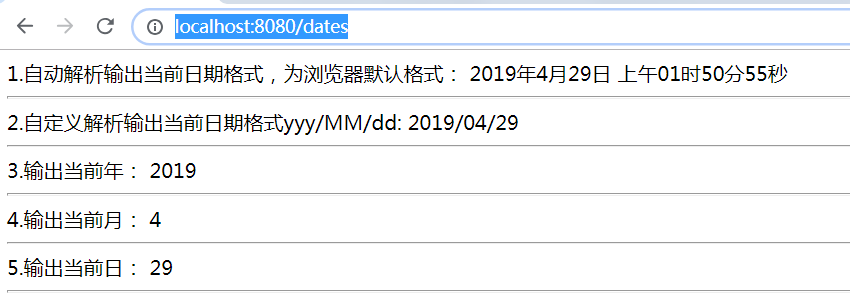
5.date.html 演示日期操作
<!DOCTYPE html>

<html>

<head>

<meta charset="UTF-8"/>

<title>使用Thymeleaf演示Date类型</title>

</head>

<body>

    <!-- date值是controller中model对象的属性key名称 -->

    1.自动解析输出当前日期格式,为浏览器默认格式:

    <span th:text="${#dates.format(date)}"></span>

    <hr/>

    2.自定义解析输出当前日期格式yyy/MM/dd:

    <span th:text="${#dates.format(date, 'yyy/MM/dd')}"></span>

    <hr/>

    3.输出当前年:

    <span th:text="${#dates.year(date)}"></span>

    <hr/>

    4.输出当前月:

    <span th:text="${#dates.month(date)}"></span>

    <hr/>

    5.输出当前日:

    <span th:text="${#dates.day(date)}"></span>

    <hr/>

</body>

</html>
访问url: http://localhost:8080/dates
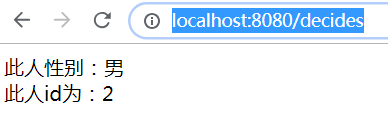
6.decide.html 用Thymeleaf演示判断
<!DOCTYPE html>

<html>

<head>

<meta charset="UTF-8">

<title>使用Thymeleaf演示if、switch判断操作</title>

</head>

<body>

    <span th:if = "${sex} == '男'">

        此人性别:男

    </span>

    <span th:if = "${sex} == '女'">

        此人性别:女

    </span>

    <div th:switch="${id}">

        <span th:case="1">此人id为:1</span>

        <span th:case="2">此人id为:2</span>

        <span th:case="3">此人id为:3</span>

    </div>

</body>

</html>
url: http://localhost:8080/decides
7.list.html list处理数据演示
<!DOCTYPE html>

<html>

<head>

<meta charset="UTF-8"/>

<title>使用Thymeleaf演示List类型</title>

</head>

<body>

        <table border="1">

        <tr>

            <th>ID</th>

            <th>名称</th>

            <th>年龄</th>

            <th>索引</th>

            <th>计数</th>

            <th>集合大小</th>

            <th>计数是否为偶数</th>

            <th>计数是否为奇数</th>

            <th>当前是否为集合中的第一个元素</th>

            <th>当前是否为集合中最后一个元素</th>

        </tr>

        <!-- u:是当前遍历的对象,var:是Thymeleaf帮我们封装的当前对象 -->

        <tr th:each="u,var : ${list}">

            <td th:text="${u.id}"></td>

            <td th:text="${u.name}"></td>

            <td th:text="${u.age}"></td>

            <td th:text="${var.index}"></td>

            <td th:text="${var.count}"></td>

            <td th:text="${var.size}"></td>

            <td th:text="${var.even}"></td>

            <td th:text="${var.odd}"></td>

            <td th:text="${var.first}"></td>

            <td th:text="${var.last}"></td>

        </tr>

    </table>

</body>

</html>
url : http://localhost:8080/lists

8.map.html map处理数据演示
<!DOCTYPE html>

<html>

<head>

<meta charset="UTF-8"/>

<title>使用Thymeleaf演示Map类型</title>

</head>

<body>

    <table border="1">

        <tr>

            <th>ID</th>

            <th>名称</th>

            <th>年龄</th>

        </tr>

        <!--遍历map方式一 -->

        <!-- <tr th:each="maps : ${map}">

            <td th:each="user : ${maps}" th:text="${user.value.id}"></td>

            <td th:each="user : ${maps}" th:text="${user.value.name}"></td>

            <td th:each="user : ${maps}" th:text="${user.value.age}"></td>

        </tr> -->

        <!-- 遍历map方式二:拿出map然后循环会拿出他的对象,输出每个对象,value为关键字 -->

        <tr th:each="user : ${map}">

            <td th:text="${user.value.id}"></td>

            <td th:text="${user.value.name}"></td>

            <td th:text="${user.value.age}"></td>

        </tr>

    </table>

</body>

</html>
url: http://localhost:8080/maps

9.str.html string类型处理数据演示
<!DOCTYPE html>

<html>

<head>

<meta charset="UTF-8"/>

<title>使用Thymeleaf演示String类型</title>

</head>

<body>

    演示输出:

    <span th:text=" ${str}"></span>

    <hr/>

    1.检查此字符串是否为空:

    <span th:text="${#strings.isEmpty(str)}"></span>

    <hr/>

    2.检查此str字符串送是否包含“h”:

    <span th:text="${#strings.contains(str,'h')}"></span>

    <hr/>

    3.检查str中的第一个字符是否为“b”:

    <span th:text="${#strings.startsWith(str,'b')}"></span>

    <hr/>

    4.检查str中最后一个字符是否为“s”:

    <span th:text="${#strings.endsWith(str,'s')}"></span>

    <hr/>

    5.输出str的长度:

    <span th:text="${#strings.length(str)}"></span>

    <hr/>

    6.截取str中某段字符的内容,包头不包尾,若只有一个值则从此值往后直到结束:

    <span th:text="${#strings.substring(str,3,5)}"></span>

    <hr/>

    7.输出此字符“o”的索引值:

    <span th:text="${#strings.indexOf(str,'o')}"></span>

    <hr/>

    8.将str所有字符转为大写:

    <span th:text="${#strings.toUpperCase(str)}"></span>

    <hr/>

    9.将str所有字符转为小写:

    <span th:text="${#strings.toLowerCase(str)}"></span>

    <hr/>

</body>

</html>
url: http://localhost:8080/strs

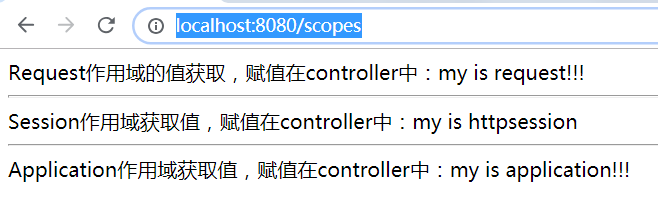
10.scope.html 作用域演示
<!DOCTYPE html>

<html>

<head>

<meta charset="UTF-8"/>

<title>使用Thymeleaf演示Request、HttpSession、Application(ServletContext)作用域类型</title>

</head>

<body>

    <!-- httpServletRequest对象是Thymeleaf提供的,方法也是,都不能错,req是controller中赋值时的key -->

    Request作用域的值获取,赋值在controller中:<span th:text="${#httpServletRequest.getAttribute('req')}"></span>

    <hr/>

    <!-- 第一个session是Thymeleaf提供的,第二个session是controller中赋值的key -->

    Session作用域获取值,赋值在controller中:<span th:text="${session.session}"></span>

    <hr/>

    <!-- 第一个application是Thymeleaf提供的,第二个application是controller中赋值的key -->

    Application作用域获取值,赋值在controller中:<span th:text="${application.application}"></span>

</body>

</html>
url: http://localhost:8080/scopes
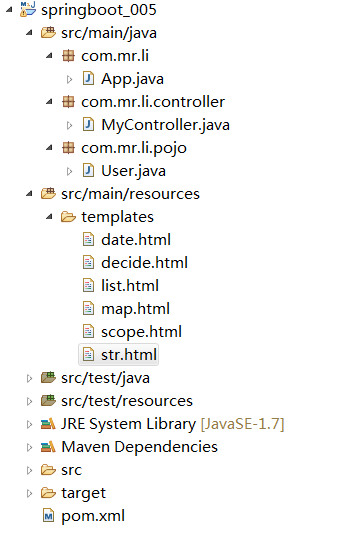
项目结构:
关于url:
<!DOCTYPE html>

<html>

<head>

<meta charset="UTF-8">

<title>Thymeleaf-URL</title>

</head>

<body>

    <a th:href="@{http://www.baidu.com}">绝对路径</a><br/>

    <a href="http://www.baidu.com">绝对路径2</a>

    <hr/>

        <!-- 此时回去找名为show的这个controller  -->

    <a th:href="@{/show}">相对路径</a>

    <hr/>

    <a th:href="@{~/project2/resourcename}">相对于服务器的根</a>

    <hr/>

    <a th:href="@{/show(id=1,name=zhagnsan)}">相对路径-传参</a>

    <hr/>

    <a th:href="@{/path/{id}/show(id=1,name=zhagnsan)}">相对路径-传参-restful</a>

</body>

</html>
以上就是thymeleaf的简单应用
springboot整合视图层之Thymeleaf的更多相关文章
- springboot整合视图层之jsp
在springboot中不推荐视图层使用jsp展示,但是人们以前已经习惯使用jsp,所以对jsp也有支持,但是是解耦性的.也就是说并没有像其他组件一样直接集成到启动器中,所以像jsp引擎之类的需要额外 ...
- springboot整合视图层之freemarker
整合freemarker要求必须将视图文件放在 src/main/resources下的templates文件夹下,该文件夹是安全的不可直接访问的,必须由controller之类的接受请求类去跳转,因 ...
- Spring MVC视图层:thymeleaf vs. JSP
本文对比了同一Spring MVC工程中相同页面(一个订阅表单)分别采用Thymeleaf和JSP(包括JSP.JSTL.Spring tag lib)两种方式的实现. 本文的所有代码来自一个可运行的 ...
- SpringBoot整合freemarker 引用基础
原 ElasticSearch学习笔记Ⅲ - SpringBoot整合ES 新建一个SpringBoot项目.添加es的maven坐标如下: <dependency> <groupI ...
- springboot学习入门简易版四---springboot2.0静态资源访问及整合freemarker视图层
2.4.4 SpringBoot静态资源访问(9) Springboot默认提供静态资源目录位置需放在classpath下,目录名需要符合如下规则 /static /public /resourc ...
- SpringBoot整合Jsp和Thymeleaf (附工程)
前言 本篇文章主要讲述SpringBoot整合Jsp以及SpringBoot整合Thymeleaf,实现一个简单的用户增删改查示例工程.事先说明,有三个项目,两个是单独整合的,一个是将它们整合在一起的 ...
- 【Springboot】Springboot整合Thymeleaf模板引擎
Thymeleaf Thymeleaf是跟Velocity.FreeMarker类似的模板引擎,它可以完全替代JSP,相较与其他的模板引擎,它主要有以下几个特点: 1. Thymeleaf在有网络和无 ...
- Springboot整合thymeleaf模板
Thymeleaf是个XML/XHTML/HTML5模板引擎,可以用于Web与非Web应用. Thymeleaf的主要目标在于提供一种可被浏览器正确显示的.格式良好的模板创建方式,因此也可以用作静态建 ...
- SpringBoot:2.SpringBoot整合Thymeleaf模板引擎渲染web视图
在Web开发过程中,Spring Boot可以通过@RestController来返回json数据,那如何渲染Web页面?Spring Boot提供了多种默认渲染html的模板引擎,主要有以下几种: ...
随机推荐
- gnuradio 打包脚本
#!/bin/sh echo "cd build" cd build echo "rm -rf **" rm -rf ** echo "cmake . ...
- Web前端渗透测试技术小结(一)
首先端正一下态度不可干违法的事 1.SQL注入测试 对于存在SQL注入的网页,使用SQL语句进行关联查询(仿照C/S模式)eg http://www.foo.com/user.php?id=1 常 ...
- hdu3949 异或空间 + 求矩阵的主元
给定n个整数,将数分解成01序列,由这n个01序列构成矩阵,这n个数构成线性空间,这就是异或空间 将这个矩阵高斯消元,求出t个主元,那么由着t个主元构成的线性空间里总共有2^t个数 设这t个数分别是a ...
- Python生成随机验证码,大乐透号码
实例笔记之生成随机号码 扩展知识 - yield(生成器) 随机生成验证码 示例代码: import random # 导入标准模块中的random if __name__ == '__main__' ...
- selenium +python webdriver运行时报错cannot find Chrome binary
今日在公司电脑运行自动化测试脚本,出现cannot find Chrome binary报错 百思不得其解,排错后发现应该是电脑以前有配置driver文件路径,driver所在文件路径已变更,现pyt ...
- 如果拷贝项目出现各种找不到文件的时候,基本就是没有标记,或者文件名的问题,Could not find resource mybatis.xml,解决方法
Could not find resource mybatis.xml
- IDEA中tomcat的部署
创建一个项目就要部署tomcat
- 目标检测算法之Faster R-CNN算法详解
Fast R-CNN存在的问题:选择性搜索,非常耗时. 解决:加入一个提取边缘的神经网络,将候选框的选取交给神经网络. 在Fast R-CNN中引入Region Proposal Network(RP ...
- vue 引入Element组件
1.打开cmd,在当前目录中运行: npm i element-ui -S 2.src/main.js(红色的) import Vue from 'vue' import App from './Ap ...
- GZipStream 压缩与解压数据
简介:此类表示 GZip 数据格式,它使用无损压缩和解压缩文件的行业标准算法.这种格式包括一个检测数据损坏的循环冗余校验值.GZip 数据格式使用的算法与 DeflateStream 类的算法相同,但 ...