
springboot整合视图层之jsp
在springboot中不推荐视图层使用jsp展示,但是人们以前已经习惯使用jsp,所以对jsp也有支持,但是是解耦性的。也就是说并没有像其他组件一样直接集成到启动器中,所以像jsp引擎之类的需要额外在pom文件中引入坐标
1.pom.xml
<project xmlns="http://maven.apache.org/POM/4.0.0" xmlns:xsi="http://www.w3.org/2001/XMLSchema-instance" xsi:schemaLocation="http://maven.apache.org/POM/4.0.0 http://maven.apache.org/xsd/maven-4.0.0.xsd">

  <modelVersion>4.0.0</modelVersion>

  <parent>

    <groupId>org.springframework.boot</groupId>

    <artifactId>spring-boot-starter-parent</artifactId>

    <version>1.5.10.RELEASE</version>

  </parent>

  <groupId>com.mr.li</groupId>

  <artifactId>springboot_003</artifactId>

  <version>0.0.1-SNAPSHOT</version>

  <properties>

      <java.version>1.7</java.version>

  </properties>

  <dependencies>

      <!-- 添加web启动器 -->

      <dependency>

        <groupId>org.springframework.boot</groupId>

        <artifactId>spring-boot-starter-web</artifactId>

     </dependency>

     <!-- springboot不推荐视图层用jsp展示,但考虑到很多人使用jsp习惯了,所以也支持,不过没在web启动器中集成 -->

     <!-- jstl:servlet的标签库 -->

     <dependency>

        <groupId>javax.servlet</groupId>

        <artifactId>jstl</artifactId>

     </dependency>

     <!-- jasper:tomcat提供的jsp引擎 -->

     <dependency>

        <groupId>org.apache.tomcat.embed</groupId>

        <artifactId>tomcat-embed-jasper</artifactId>

        <scope>provided</scope>

     </dependency>

  </dependencies>

</project>
2.启动类
package com.mr.li;

import org.springframework.boot.SpringApplication;

import org.springframework.boot.autoconfigure.SpringBootApplication;

@SpringBootApplication

public class App {

    public static void main(String[] args) {

        SpringApplication.run(App.class, args);

    }

}
3.实体类
package com.mr.li.pojo;

public class User {

    private int id;

    private String name;

    private int age;

    public User(int id, String name, int age) {

        super();

        this.id = id;

        this.name = name;

        this.age = age;

    }

    public User() {

    }

    public int getId() {

        return id;

    }

    public void setId(int id) {

        this.id = id;

    }

    public String getName() {

        return name;

    }

    public void setName(String name) {

        this.name = name;

    }

    public int getAge() {

        return age;

    }

    public void setAge(int age) {

        this.age = age;

    }

}
4.jsp视图解析器配置:application.properties
#访问controller方法返回值加的前缀,相当于springmvc项目中的视图解析器的配置
spring.mvc.view.prefix=/WEB-INF/jsp/
#访问controller方法返回值的后缀
spring.mvc.view.suffix=.jsp
5.controller
package com.mr.li.controller;

import java.util.ArrayList;

import java.util.List;

import org.springframework.stereotype.Controller;

import org.springframework.ui.Model;

import org.springframework.web.bind.annotation.RequestMapping;

import com.mr.li.pojo.User;

@Controller

public class MyController {

    @RequestMapping("/show")

    public String show(Model model) {

        //生成jsp页面需要展示的数据源

        List<User> list = new ArrayList<User>();

        list.add(new User(1, "张三", 15));

        list.add(new User(2, "李四", 16));

        list.add(new User(3, "王五", 17));

        //这里前面的list是在jsp中使用EL表达式所使用的名称

        model.addAttribute("list", list);

        //这里返回的是jsp页面名称,前后缀在配置文件中

        return "users";

    }

}
6.user.jsp
<%@ page language="java" contentType="text/html; charset=UTF-8"

    pageEncoding="UTF-8"%>

<%@ taglib uri="http://java.sun.com/jsp/jstl/core" prefix="c"%>

<!DOCTYPE html PUBLIC "-//W3C//DTD HTML 4.01 Transitional//EN" "http://www.w3.org/TR/html4/loose.dtd">

<html>

<head>

<meta http-equiv="Content-Type" content="text/html; charset=UTF-8">

<title>Insert title here</title>

</head>

<body>

    <table border="1" align="center" width="50%">

        <tr>

            <th>ID</th>

            <th>Name</th>

            <th>Age</th>

        </tr>

        <c:forEach items="${list }" var="user">

            <tr>

                <td>${user.id }</td>

                <td>${user.name }</td>

                <td>${user.age }</td>

            </tr>

        </c:forEach>

    </table>

</body>

</html>
访问url: http://localhost:8080/show

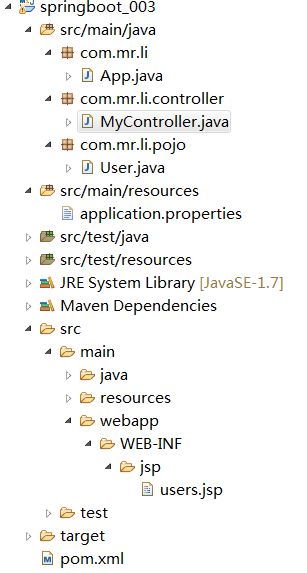
项目结构:
springboot整合视图层之jsp的更多相关文章
- springboot整合视图层之freemarker
整合freemarker要求必须将视图文件放在 src/main/resources下的templates文件夹下,该文件夹是安全的不可直接访问的,必须由controller之类的接受请求类去跳转,因 ...
- springboot整合视图层之Thymeleaf
Thymeleaf中有自己的表达式,和自己的语法,可以把数据取出来后再进行判断,遍历等操作,另外它还封装了strings,dates....对象,可以利用这些对象对已有的数据进行简单的逻辑处理: 1. ...
- springboot学习入门简易版四---springboot2.0静态资源访问及整合freemarker视图层
2.4.4 SpringBoot静态资源访问(9) Springboot默认提供静态资源目录位置需放在classpath下,目录名需要符合如下规则 /static /public /resourc ...
- SpringBoot整合Jsp和Thymeleaf (附工程)
前言 本篇文章主要讲述SpringBoot整合Jsp以及SpringBoot整合Thymeleaf,实现一个简单的用户增删改查示例工程.事先说明,有三个项目,两个是单独整合的,一个是将它们整合在一起的 ...
- springBoot整合mybatis、jsp 或 HTML
springBoot整合mybatis.jsp Spring Boot的主要优点: 1: 为所有Spring开发者更快的入门: 2: 开箱即用,提供各种默认配置来简化项目配置: 3: 内嵌式容器 ...
- springboot整合JSP以及发布项目到独立的tomcat中与打成jar包使用
之前研究了springboot整合freemarker与thymeleaf的使用.也研究了springboot发布到独立的tomcat的使用以及使用自带的tomcat打成jar包的使用,下面研究集成J ...
- 03-01:springboot 整合jsp
1.修改pom文件,添加坐标 <!-- jstl --> <dependency> <groupId>javax.servlet ...
- springboot整合jsp模板
springboot整合jsp模板 在使用springboot框架里使用jsp的时候,页面模板使用jsp在pom.xnl中需要引入相关的依赖,否则在controller中无法返回到指定页面 〇.搭建s ...
- springboot 整合 web 项目找不到 jsp 文件
今天遇到一个问题,就是使用springboot整合web项目的时候,怎么都访问不到 \webapp\WEB-INF\jsp\index.jsp 页面.这个问题搞了半天,试了各种方式.最后是因为在启动的 ...
随机推荐
- Confluence 6 用户提交的备份和恢复脚本
下面的代码是用户提交的,在使用的时候需要小心,因为 Atlassian 不提供这些代码的技术支持.如果你在使用或者修改这些代码的时候有任何问题,请粘贴到 post them to Atlassian ...
- python之dict与set实现原理之hash算法
理解不透彻,下回分解 http://www.cnblogs.com/pengsixiong/p/5326893.html https://blog.csdn.net/zhao_crystal/arti ...
- bat如何提取文本指定行的内容
背景:使用CTS框架运行完测试后,会在logs中生成devices_log和host_log,在results中生成相应的结果(报告).根据报告信息我们可以得知失败的用例,但是却不能知道为什么用例会失 ...
- python面试1-30题
1.一行代码实现1--100之和 利用sum()函数求和 2.如何在一个函数内部修改全局变量 利用global 修改全局变量 3.列出5个python标准库 os:提供了不少与操作系统相关联的函数 s ...
- mysql服务器没有响应
第一步删除c:\windowns下面的my.ini(可以先改成其它的名字也行) 第二步打开对应安装目录下\mysql\bin\winmysqladmin.exe 输入用户名 和密码(也可以忽略此步) ...
- JavaScript(JS)之Javascript对象
简介: 在JavaScript中除了null和undefined以外其他的数据类型都被定义成了对象,也可以用创建对象的方法定义变量,String.Math.Array.Date.RegExp都是Jav ...
- shiro配合html页面完成细粒化权限控制
shiro配合html页面完成细粒化权限控制 原创 2016年10月04日 12:02:34 标签: shiro / 框架 / 界面 / 权限 8924 shiro是现在非常普遍使用的java权限框架 ...
- 处理Task引发的异常
处理方法:线程启动后,使用try-catch,通过wait或者waitall来捕获异常. 单个Task的情况: System.Threading.Tasks.Task task1 = new Syst ...
- Visual Studio 2017 IDE之xml过大报错
XML处理时遇到这个错误 在powershell中输入 $vsWherePath = Join-Path ${env:ProgramFiles(x86)} "Microsoft Visual ...
- Angularjs 学习笔记-2017-02-05-初识Angular及app、model、controller、repeat指令和fileter、orderBy
ng-app 定义作用域,从作用域处开始执行ng命令指令 ng-model 数据绑定字符,用于双向数据绑定 ng-controller ng控制台,定义function name($scope)来 ...