
UINavigationController详解三(转)ToolBar
原文出自:http://blog.csdn.net/totogo2010/article/details/7682641,特别感谢。
1、显示Toolbar
在RootViewController.m的- (void)viewDidLoad方法中添加代码,这样Toobar就显示出来了。
- [self.navigationController setToolbarHidden:NO animated:YES];

2、在ToolBar上添加UIBarButtonItem
新建几个UIBarButtonItem,然后以数组的形式添加到Toolbar中
- UIBarButtonItem *one = [[UIBarButtonItem alloc] initWithBarButtonSystemItem:UIBarButtonSystemItemAdd target:nil action:nil];
- UIBarButtonItem *two = [[UIBarButtonItem alloc] initWithBarButtonSystemItem:UIBarButtonSystemItemBookmarks target:nil action:nil];
- UIBarButtonItem *three = [[UIBarButtonItem alloc] initWithBarButtonSystemItem:UIBarButtonSystemItemAction target:nil action:nil];
- UIBarButtonItem *four = [[UIBarButtonItem alloc] initWithBarButtonSystemItem:UIBarButtonSystemItemEdit target:nil action:nil];
- UIBarButtonItem *flexItem = [[UIBarButtonItem alloc] initWithBarButtonSystemItem:UIBarButtonSystemItemFlexibleSpace target:nil action:nil];
- [self setToolbarItems:[NSArray arrayWithObjects:flexItem, one, flexItem, two, flexItem, three, flexItem, four, flexItem, nil]];
效果:
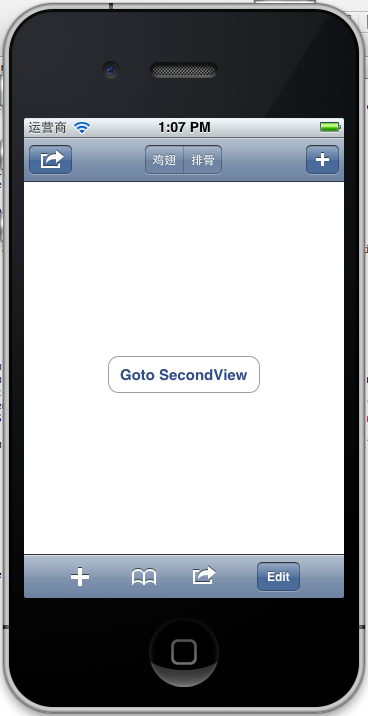
注意:用 [self.navigationController.toolbar setItems:(NSArray *) animated:<#(BOOL)#>]这个方法添加item是不起效果的。下面我动态自己添加Toolbar时,这个才起效果。
3、动态添加Toolbar
我们在SecondView添加动态的Toolbar。
在SecondViewController.h添加
- #import <UIKit/UIKit.h>
- @interface SecondViewController : UIViewController
- {
- UIToolbar *toolBar;
- }
- @end
在SecondViewController.m添加
- - (void)viewDidLoad
- {
- [super viewDidLoad];
- [self.navigationController setToolbarHidden:YES animated:YES];
- UIBarButtonItem *addButton = [[UIBarButtonItem alloc] initWithBarButtonSystemItem:UIBarButtonSystemItemSearch target:self action:@selector(gotoThridView:)];
- toolBar = [[UIToolbar alloc] initWithFrame:CGRectMake(0.0, self.view.frame.size.height - toolBar.frame.size.height - 44.0, self.view.frame.size.width, 44.0)];
- [toolBar setBarStyle:UIBarStyleDefault];
- toolBar.autoresizingMask = UIViewAutoresizingFlexibleTopMargin;
- [toolBar setItems:[NSArray arrayWithObject:addButton]];
- [self.view addSubview:toolBar];
- // Do any additional setup after loading the view from its nib.
- }
先把RootView时显示的Toobar隐藏
[self.navigationController setToolbarHidden:YESanimated:YES];然后把新建的Toolbar添加的SecondView中,并为Toobar设置了一个Item.
[toolBarsetItems:[NSArrayarrayWithObject:addButton]];
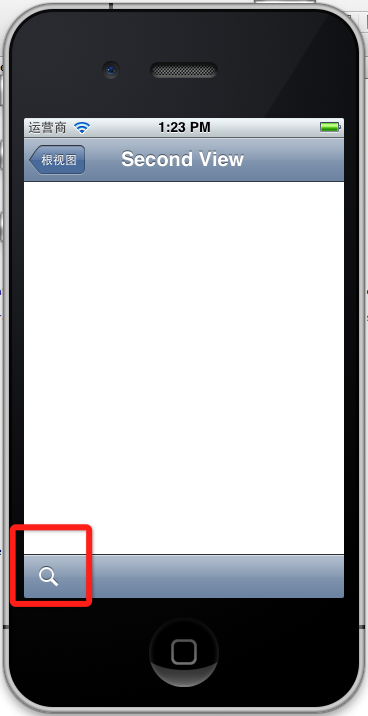
BarButtonItem用 的是UIBarButtonSystemItemSearch, 效果如下:
4、新建ThridView,从SecondView跳转到
Commad+N新建一个ThridViewController,
这个addButton跳转到ThridView
- -(void)gotoThridView:(id)sender
- {
- ThridViewController *thridView = [[ThridViewController alloc] init];
- [self.navigationController pushViewController:thridView animated:YES];
- thridView.title = @"Thrid View";
- }
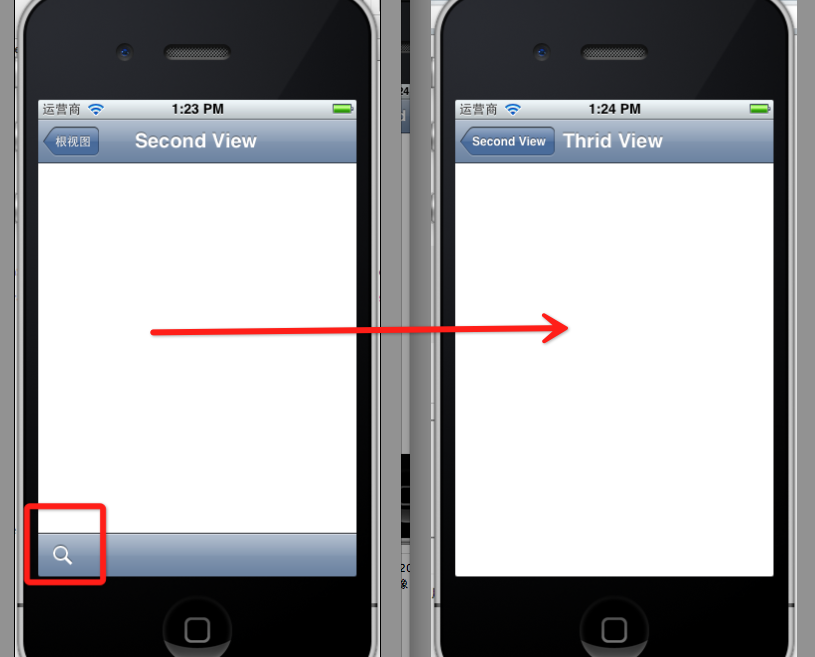
跳转Second到Third效果:
到此UINavigationController练习的差不多了。
UINavigationController详解三(转)ToolBar的更多相关文章
- [转]iOS学习之UINavigationController详解与使用(三)ToolBar
转载地址:http://blog.csdn.net/totogo2010/article/details/7682641 iOS学习之UINavigationController详解与使用(二)页面切 ...
- iOS学习之UINavigationController详解与使用(三)ToolBar
1.显示Toolbar 在RootViewController.m的- (void)viewDidLoad方法中添加代码,这样Toobar就显示出来了. [cpp] view plaincopy [ ...
- iOS学习之UINavigationController详解与使用(二)页面切换和segmentedController
iOS学习之UINavigationController详解与使用(一)添加UIBarButtonItem是上篇,我们接着讲UINavigationController的重要作用,页面的管理和切换. ...
- iOS学习之UINavigationController详解与使用(一)添加UIBarButtonItem
http://blog.csdn.net/totogo2010/article/details/7681879 1.UINavigationController导航控制器如何使用 UINavigati ...
- UINavigationController详解一(转)UIBarButtonItem
本文出自:http://www.cnblogs.com/smileEvday/archive/2012/05/14/2495153.html 特别感谢. 1.UINavigationControlle ...
- [转]iOS学习之UINavigationController详解与使用(二)页面切换和segmentedController
转载地址:http://blog.csdn.net/totogo2010/article/details/7682433 iOS学习之UINavigationController详解与使用(一)添加U ...
- .NET DLL 保护措施详解(三)最终效果
针对.NET DLL 保护措施详解所述思路完成最终的实现,以下为程序包下载地址 下载 注意: 运行环境为.net4.0,需要安装VS2015 C++可发行组件包vc_redist.x86.exe.然后 ...
- Android 之窗口小部件详解(三) 部分转载
原文地址:http://blog.csdn.net/iefreer/article/details/4626274. (一) 应用程序窗口小部件App Widgets 应用程序窗口小部件(Widget ...
- WebSocket安卓客户端实现详解(三)–服务端主动通知
WebSocket安卓客户端实现详解(三)–服务端主动通知 本篇依旧是接着上一篇继续扩展,还没看过之前博客的小伙伴,这里附上前几篇地址 WebSocket安卓客户端实现详解(一)–连接建立与重连 We ...
随机推荐
- JMeter学习-013-JMeter 逻辑控制器之-如果(If)控制器
前文简述了 JMeter 如何通过 HTTP Cookie管理器,实现了在不执行登录操作的情况下,通过 Cookie 实现登录态的操作,具体请参阅:JMeter学习-012-JMeter 配置元件之- ...
- MySQL注释符
mysql注释符有三种:1.#...(注释至行末,推荐)2.-- ...(两条短线之后又一个空格)3./*...*/(多行注释) 1.
- 用get方式提交请求的url带有中文参数
又碰到JSP页面中文乱码问题,经过一次encodeURI处理后仍旧是乱码,后来经过两次encodeURI后正常显示中文 以前也碰到过同样的问题,没深究,这次网上搜集了一些资料,记录下来留做备份 ___ ...
- Building a RESTful Web Service Using Spring Boot In Eclipse
一.构建restful web service 创建Maven的java web工程,maven的pom文件加入依赖包 创建包hello Greeting.java package hello; pu ...
- python 安装扩展库
直接使用pip安装时非常慢,而且还非常容易失败.通过在网上查找,发现可以使用镜像安装,如下: pip install xxx -i http://pypi.douban.com/simple/ 但是在 ...
- C++Primer STL算法
//1.概览: // A:beg和end是表示元素范围的迭代器. // B:beg2是表示第二个输入序列开始位置的迭代器.end2表示第二个序列的末尾位置,若没有end2,则假定beg2表示的序列至少 ...
- PostgreSQL Replication之第十一章 使用Skytools(4)
11.4 使用 londiste 复制数据 pgq是一个叫做londiste的复制工具的核心.londiste 的核心是有一个比如比Slony 更加简单,容易使用的机制.如果您在一个大的安装中使用Sl ...
- Eclipse下Ruby的配置]
简述: 在Eclipse中开发Ruby开发环境 步骤: 第一步, 1. 在Eclipse的Help -> Install New Software输入 http://download. ...
- Java基础(37):Java中日期的显示与格式定值----Date与SimpleDateFormat的试用
使用 Date 和 SimpleDateFormat 类表示时间 在程序开发中,经常需要处理日期和时间的相关数据,此时我们可以使用 java.util 包中的 Date 类.这个类最主要的作用就是获取 ...
- BroadCast Receive 生命周期
BroadCastReceiver 简介 BroadCastReceiver 源码位于: framework/base/core/java/android.content.BroadcastRecei ...