
UINavigationController详解三(转)ToolBar
原文出自:http://blog.csdn.net/totogo2010/article/details/7682641,特别感谢。
1、显示Toolbar
在RootViewController.m的- (void)viewDidLoad方法中添加代码,这样Toobar就显示出来了。
- [self.navigationController setToolbarHidden:NO animated:YES];

2、在ToolBar上添加UIBarButtonItem
新建几个UIBarButtonItem,然后以数组的形式添加到Toolbar中
- UIBarButtonItem *one = [[UIBarButtonItem alloc] initWithBarButtonSystemItem:UIBarButtonSystemItemAdd target:nil action:nil];
- UIBarButtonItem *two = [[UIBarButtonItem alloc] initWithBarButtonSystemItem:UIBarButtonSystemItemBookmarks target:nil action:nil];
- UIBarButtonItem *three = [[UIBarButtonItem alloc] initWithBarButtonSystemItem:UIBarButtonSystemItemAction target:nil action:nil];
- UIBarButtonItem *four = [[UIBarButtonItem alloc] initWithBarButtonSystemItem:UIBarButtonSystemItemEdit target:nil action:nil];
- UIBarButtonItem *flexItem = [[UIBarButtonItem alloc] initWithBarButtonSystemItem:UIBarButtonSystemItemFlexibleSpace target:nil action:nil];
- [self setToolbarItems:[NSArray arrayWithObjects:flexItem, one, flexItem, two, flexItem, three, flexItem, four, flexItem, nil]];
效果:
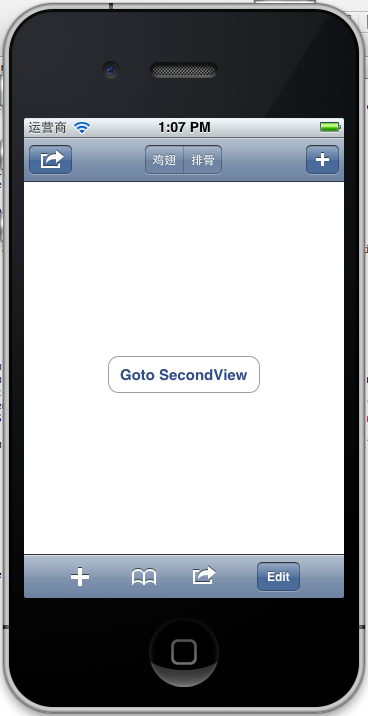
注意:用 [self.navigationController.toolbar setItems:(NSArray *) animated:<#(BOOL)#>]这个方法添加item是不起效果的。下面我动态自己添加Toolbar时,这个才起效果。
3、动态添加Toolbar
我们在SecondView添加动态的Toolbar。
在SecondViewController.h添加
- #import <UIKit/UIKit.h>
- @interface SecondViewController : UIViewController
- {
- UIToolbar *toolBar;
- }
- @end
在SecondViewController.m添加
- - (void)viewDidLoad
- {
- [super viewDidLoad];
- [self.navigationController setToolbarHidden:YES animated:YES];
- UIBarButtonItem *addButton = [[UIBarButtonItem alloc] initWithBarButtonSystemItem:UIBarButtonSystemItemSearch target:self action:@selector(gotoThridView:)];
- toolBar = [[UIToolbar alloc] initWithFrame:CGRectMake(0.0, self.view.frame.size.height - toolBar.frame.size.height - 44.0, self.view.frame.size.width, 44.0)];
- [toolBar setBarStyle:UIBarStyleDefault];
- toolBar.autoresizingMask = UIViewAutoresizingFlexibleTopMargin;
- [toolBar setItems:[NSArray arrayWithObject:addButton]];
- [self.view addSubview:toolBar];
- // Do any additional setup after loading the view from its nib.
- }
先把RootView时显示的Toobar隐藏
[self.navigationController setToolbarHidden:YESanimated:YES];然后把新建的Toolbar添加的SecondView中,并为Toobar设置了一个Item.
[toolBarsetItems:[NSArrayarrayWithObject:addButton]];
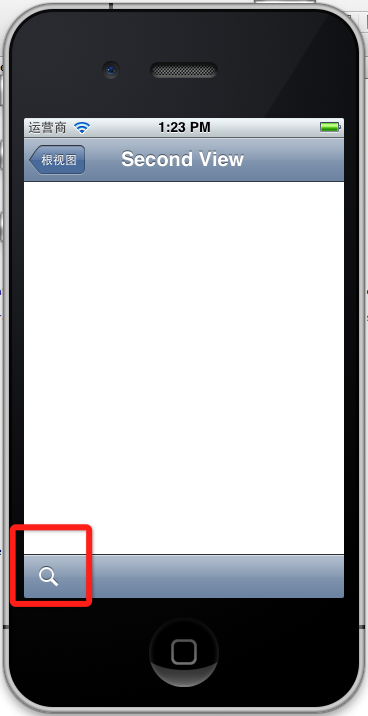
BarButtonItem用 的是UIBarButtonSystemItemSearch, 效果如下:
4、新建ThridView,从SecondView跳转到
Commad+N新建一个ThridViewController,
这个addButton跳转到ThridView
- -(void)gotoThridView:(id)sender
- {
- ThridViewController *thridView = [[ThridViewController alloc] init];
- [self.navigationController pushViewController:thridView animated:YES];
- thridView.title = @"Thrid View";
- }
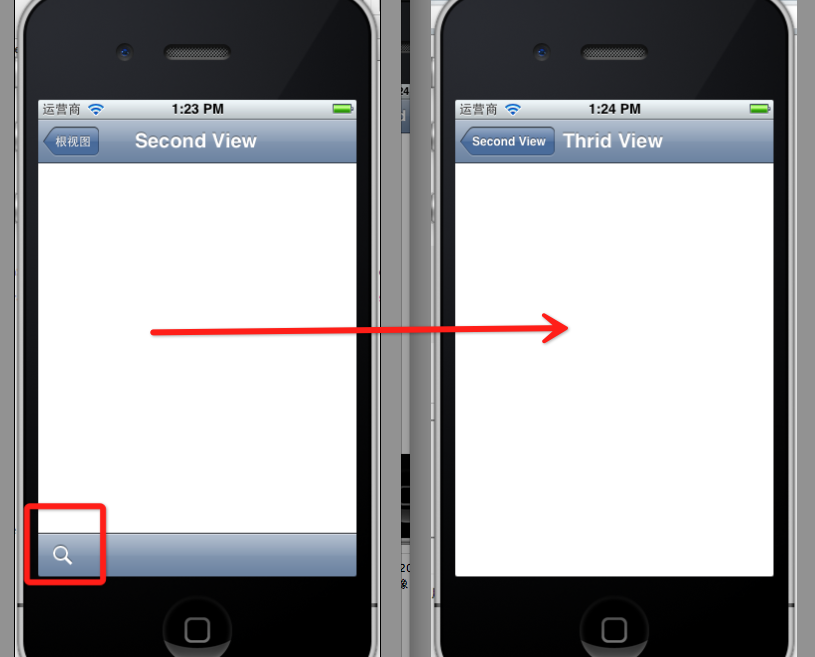
跳转Second到Third效果:
到此UINavigationController练习的差不多了。
UINavigationController详解三(转)ToolBar的更多相关文章
- [转]iOS学习之UINavigationController详解与使用(三)ToolBar
转载地址:http://blog.csdn.net/totogo2010/article/details/7682641 iOS学习之UINavigationController详解与使用(二)页面切 ...
- iOS学习之UINavigationController详解与使用(三)ToolBar
1.显示Toolbar 在RootViewController.m的- (void)viewDidLoad方法中添加代码,这样Toobar就显示出来了. [cpp] view plaincopy [ ...
- iOS学习之UINavigationController详解与使用(二)页面切换和segmentedController
iOS学习之UINavigationController详解与使用(一)添加UIBarButtonItem是上篇,我们接着讲UINavigationController的重要作用,页面的管理和切换. ...
- iOS学习之UINavigationController详解与使用(一)添加UIBarButtonItem
http://blog.csdn.net/totogo2010/article/details/7681879 1.UINavigationController导航控制器如何使用 UINavigati ...
- UINavigationController详解一(转)UIBarButtonItem
本文出自:http://www.cnblogs.com/smileEvday/archive/2012/05/14/2495153.html 特别感谢. 1.UINavigationControlle ...
- [转]iOS学习之UINavigationController详解与使用(二)页面切换和segmentedController
转载地址:http://blog.csdn.net/totogo2010/article/details/7682433 iOS学习之UINavigationController详解与使用(一)添加U ...
- .NET DLL 保护措施详解(三)最终效果
针对.NET DLL 保护措施详解所述思路完成最终的实现,以下为程序包下载地址 下载 注意: 运行环境为.net4.0,需要安装VS2015 C++可发行组件包vc_redist.x86.exe.然后 ...
- Android 之窗口小部件详解(三) 部分转载
原文地址:http://blog.csdn.net/iefreer/article/details/4626274. (一) 应用程序窗口小部件App Widgets 应用程序窗口小部件(Widget ...
- WebSocket安卓客户端实现详解(三)–服务端主动通知
WebSocket安卓客户端实现详解(三)–服务端主动通知 本篇依旧是接着上一篇继续扩展,还没看过之前博客的小伙伴,这里附上前几篇地址 WebSocket安卓客户端实现详解(一)–连接建立与重连 We ...
随机推荐
- JS-007-富文本域操作
在日常 web 编写过程中,富文本域几乎成为了一个网站不可页面元素,同时,其也有着各种各样的实现方式,网络上也存在着各种各样的集成插件可供引用.此文以 js 获取.修改 163 邮箱写邮件时的邮件内容 ...
- 包含Blob字段的表无法Export/Import
最近一直用MySQL-Front的导出导出工具完成数据库的备份,确实比较方便快捷. 后来增加了一张表,其中有blob字段,上传几个文件后,发现导出不好用了,进度条长期处于停滞状态. 想想也是,要把bl ...
- 一些Perl例程(全部手打并执行过)
#-1-变量使用,打印#!/usr/local/bin/perl$value=100+30+3+8;print("Value=",$value,"\n"); # ...
- LeetCode Inorder Successor in BST
原题链接在这里:https://leetcode.com/problems/inorder-successor-in-bst/ Given a binary search tree and a nod ...
- SqlServer基础:类型转换Cast和Convert
在SqlServer要对不同类型的数据进行运算时,需要将其转换为相同类型之后再做操作,而SqlServer中有两个函数可以进行数据转换,即:Cast和Convert 1.Cast CAST(expre ...
- APP源码集中打包大放送!十一个千万级别APP源码随意处置!
小伙伴们还在一个一个苦苦寻找各类APP源码吗?此贴集中打包最常用APP的源码,你想得到的APP,这里都有! 想做商城?这里有天猫! 想做同城服务?这里有大众点评! 想做外卖?这里有饿了么! 想做视频? ...
- Inno Setup 教程
参考博客:制作部署安装包:Inno Setup 参考资料:Inno Setup详细教程 参考资料:Innosetup使用详细全面教程 个人使用的 风铃夜思雨 的汉化版,版本:5.5.5 ; 脚本由 I ...
- startssl 申请证书,并在Nginx, apache, Tomcat上使用
tomcat: http://blog.csdn.net/buyaore_wo/article/details/5771470 apache: http://blog.mowd.tw/index.ph ...
- 12C RAC中的一个数据库实例自动crash并报ORA-27157、ORA-27300等错误
rhel7.2上安装12C RAC数据库后,其中一个数据库实例经常会自动crash.查看alert日志发现以下错误信息: Errors in file /d12/app/oracle/diag/rdb ...
- IntelliJ IDEA 编译方式介绍
编译方式介绍 相比较于 Eclipse 的实时自动编译,IntelliJ IDEA 的编译更加手动化,虽然 IntelliJ IDEA 也支持通过设置开启实时编译,但是不建议,因为太占资源了.Inte ...