
WCF basicHttpBinding之Message Security Mode
原创地址:http://www.cnblogs.com/jfzhu/p/4067873.html
转载请注明出处
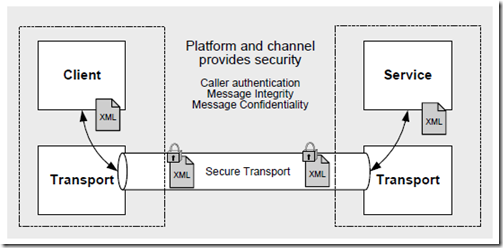
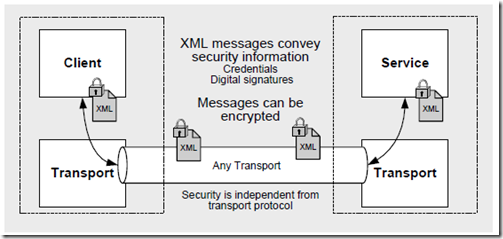
前面的文章《WCF Security基本概念》介绍了WCF的security mode,简单说Transport是transport级别上的加密,Message是message级别上的加密,参见下图:
Transport Security
Message Security
(一)Demo代码
IDemoService.cs:
using System.ServiceModel;

namespace WCFDemo

{

    [ServiceContract(Name = "IDemoService")]

    public interface IDemoService

    {

        [OperationContract]

        [FaultContract(typeof(DivideByZeroFault))]

        int Divide(int numerator, int denominator);

    }

}
DemoService.cs:
using System;

using System.ServiceModel;

using System.ServiceModel.Activation;

namespace WCFDemo

{

    [AspNetCompatibilityRequirements(RequirementsMode = AspNetCompatibilityRequirementsMode.Allowed)]

    public class DemoService : IDemoService

    {

        public int Divide(int numerator, int denominator)

        {

            try

            {

                return numerator / denominator;

            }

            catch (DivideByZeroException ex)

            {

                DivideByZeroFault fault = new DivideByZeroFault();

                fault.Error = ex.Message;

                fault.Detail = "Denominator cannot be ZERO!";

                throw new FaultException<DivideByZeroFault>(fault);

            }

        }

    }

}
(二)创建证书
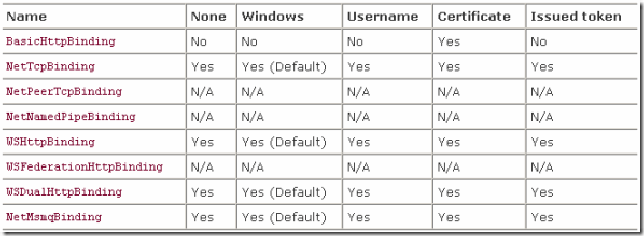
basicHttpBinding使用Message Security mode时,credential type只能为Certificate(参见《WCF Security基本概念》)
在服务器上创建服务器端证书。
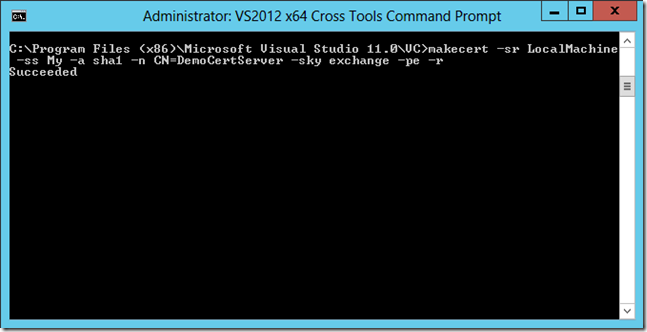
属性解析
-sr 指定的证书存储区中的注册表位置。
- currentUser 指定注册版存储位置为 HKEY_CURRENT_USER.
- localMachine 指定注册版存储位置为 HKEY_LOCAL_MACHINE.
-ss 指定证书存储的位置。
-a 指定相关的算法,可以选择 MD5 算法或者 SHA1算法
-n 指定证书的名称。该名称遵循X.500命名标准。简单例子如 "CN=MyName" 格式,如果没有指定/n开关,证书默认的名称是"Joe's Software Emporium"。
-sky 证书键类型。可以设置为 exchange 或者 signature。
-pe 证书可导出
-r Self-signed Certificate
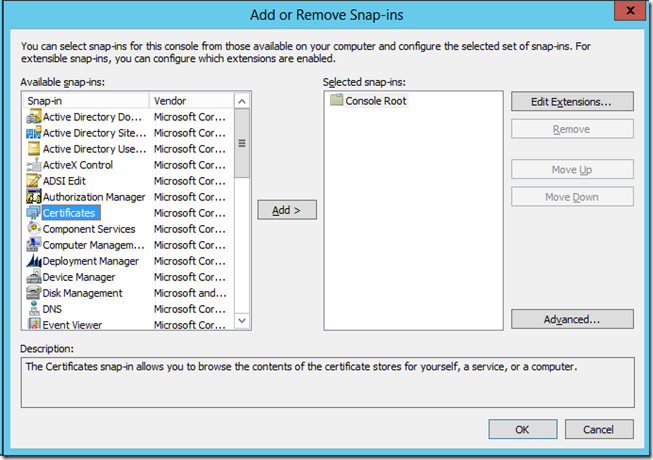
证书创建成功,下面在证书控制单元查看证书的信息
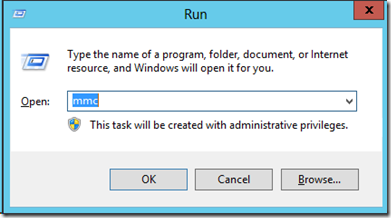
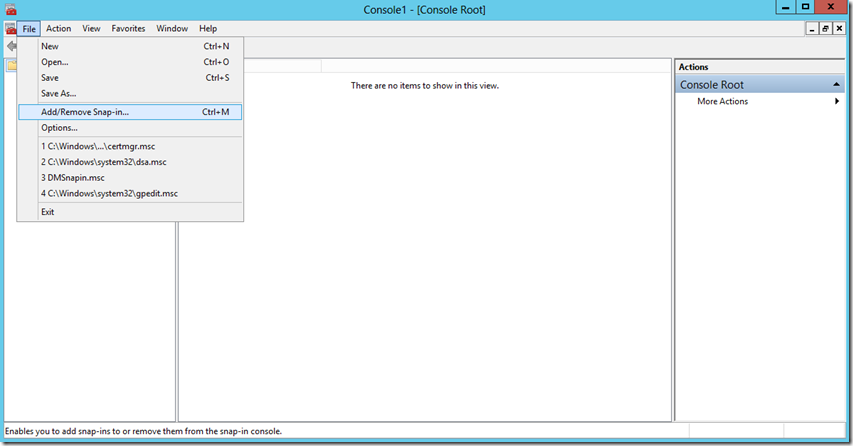
选择Certificates –> Add
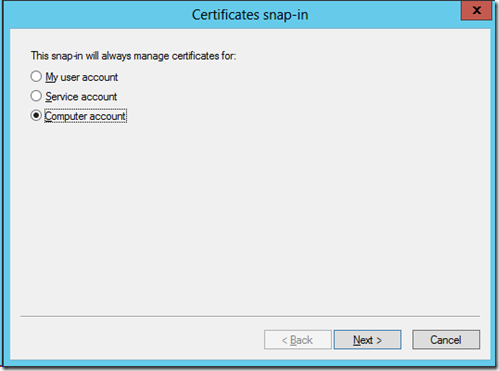
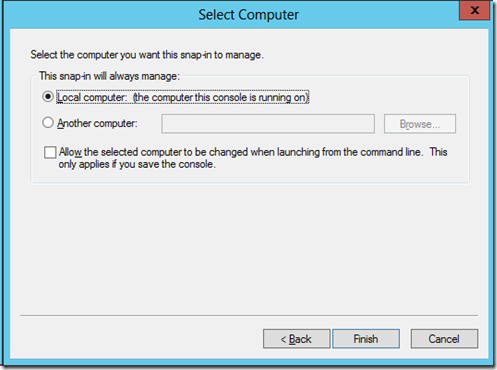
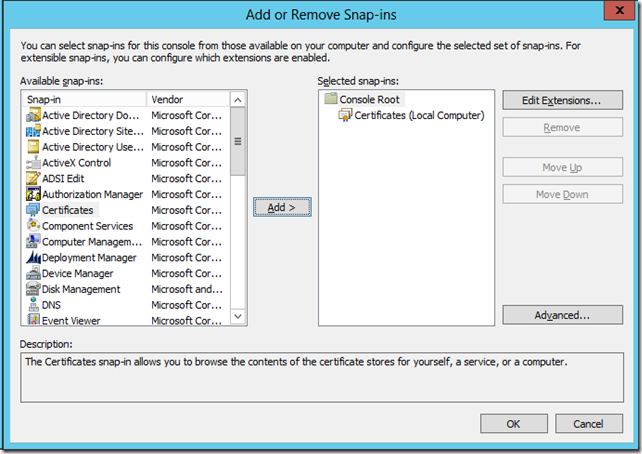
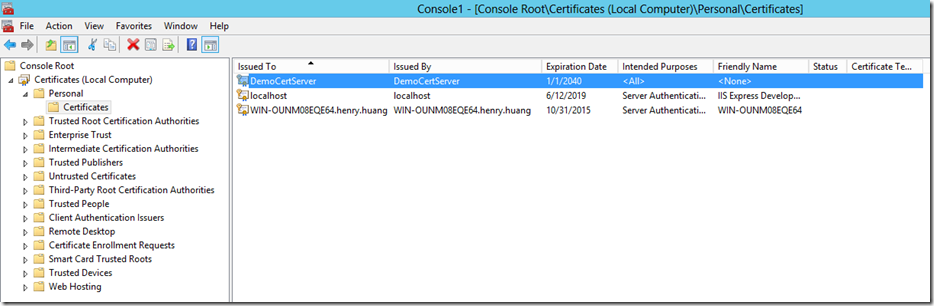
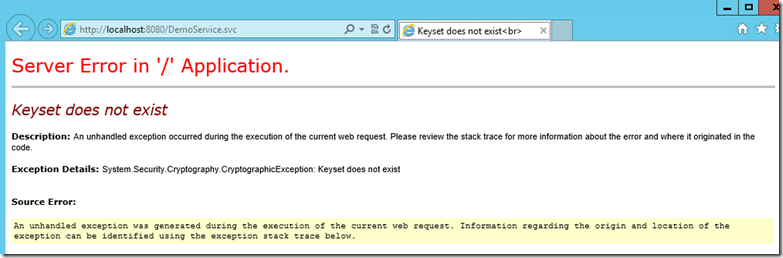
需要给IIS运行WCF Service的Application Pool的帐号对这个证书私钥的读权限(参考《IIS ApplicationPoolIdentity》)
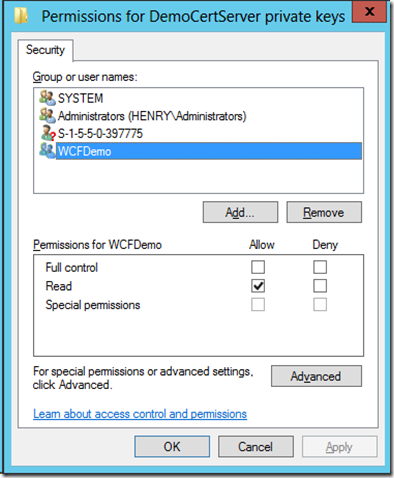
否则会报出以下错误
将服务器端的证书导出,然后导入到客户端。
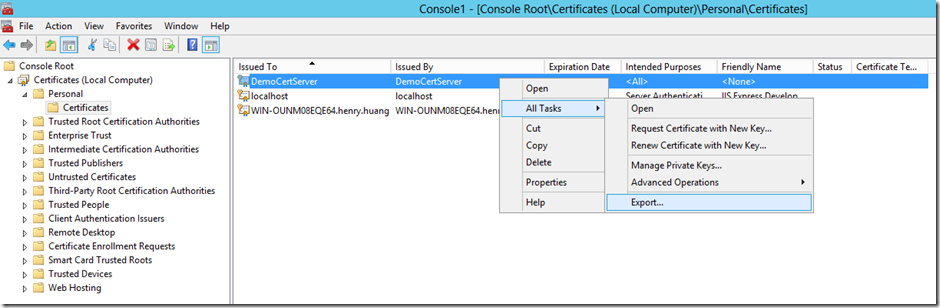
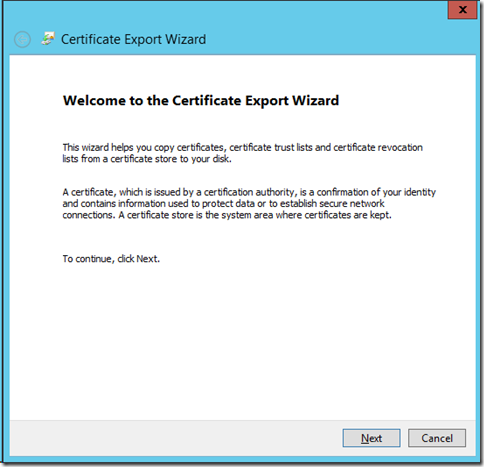
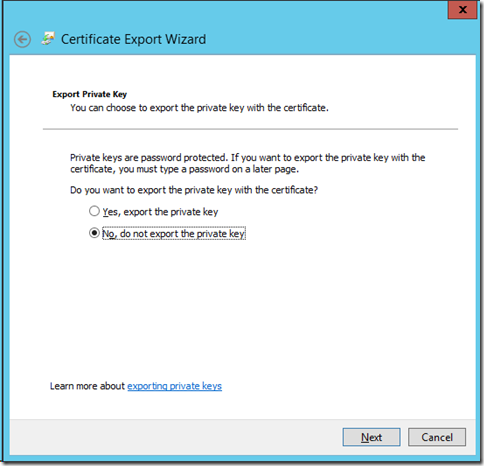
从服务器导出证书:
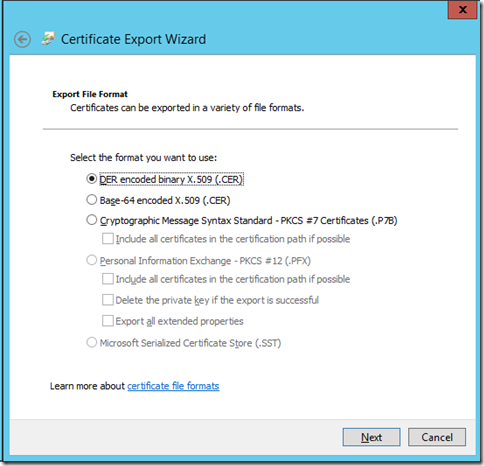
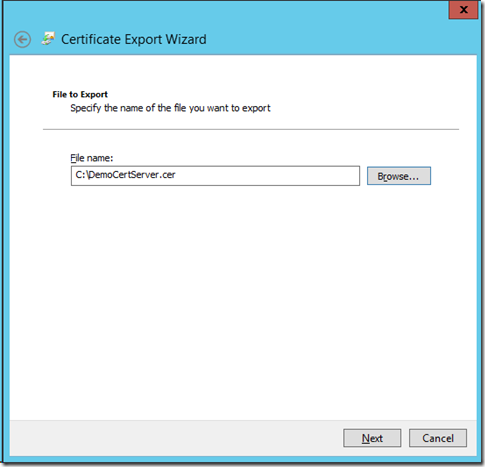
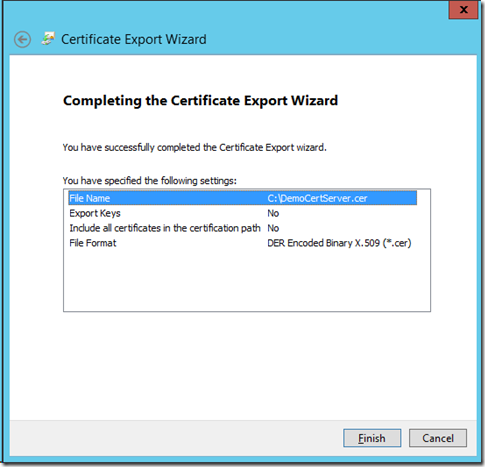
将导出的证书复制到客户端,然后导入:
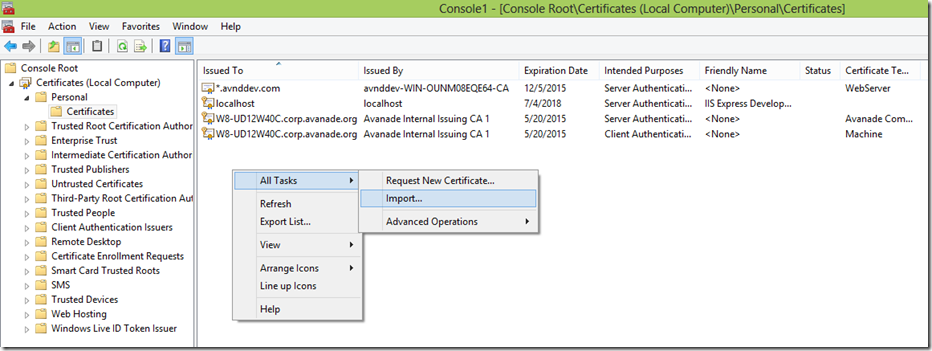
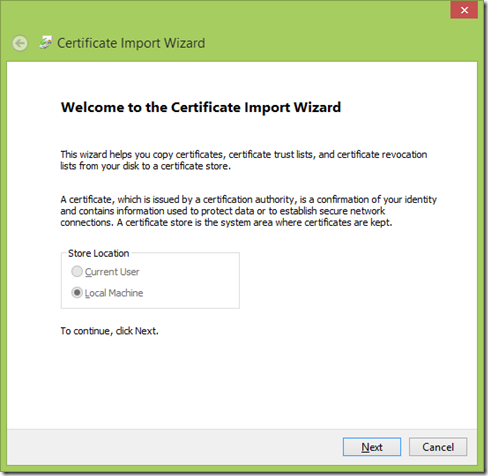
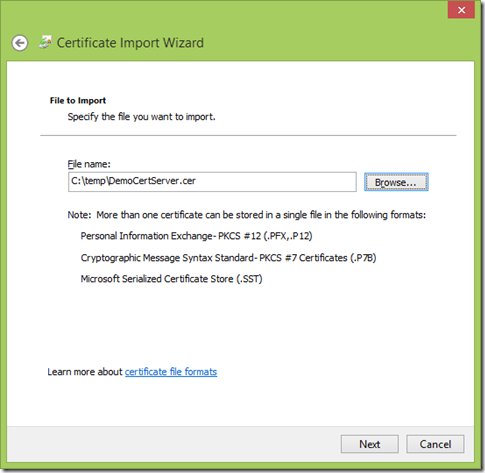
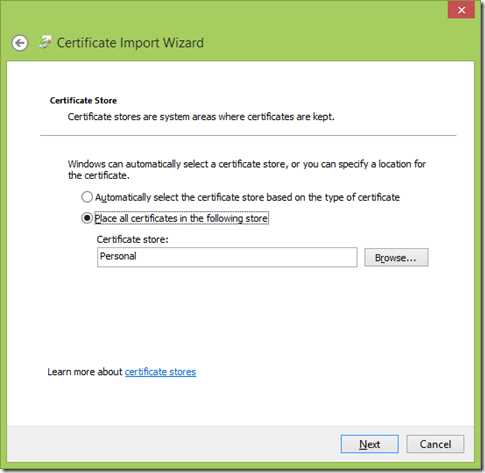
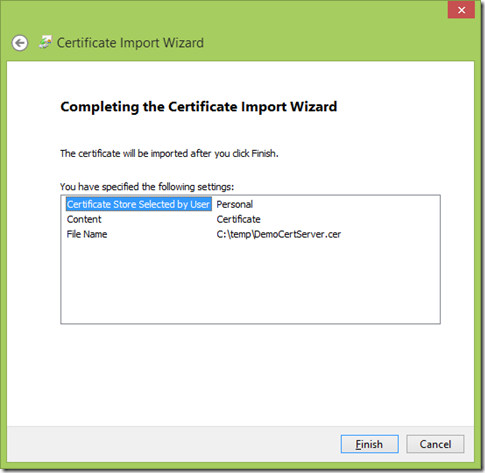
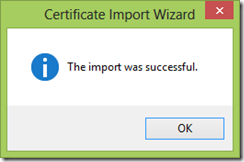
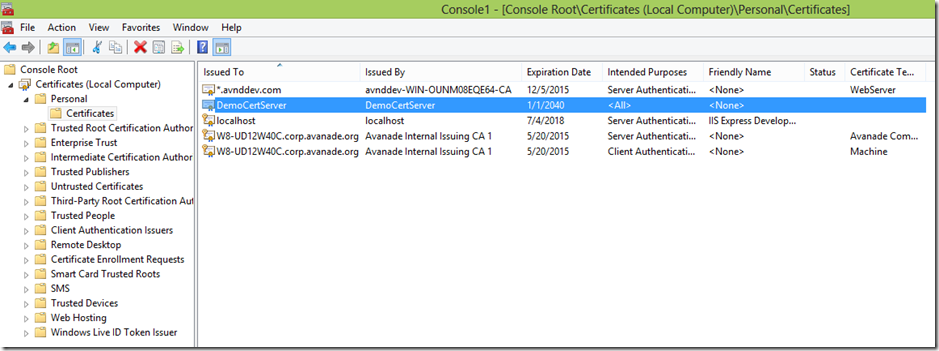
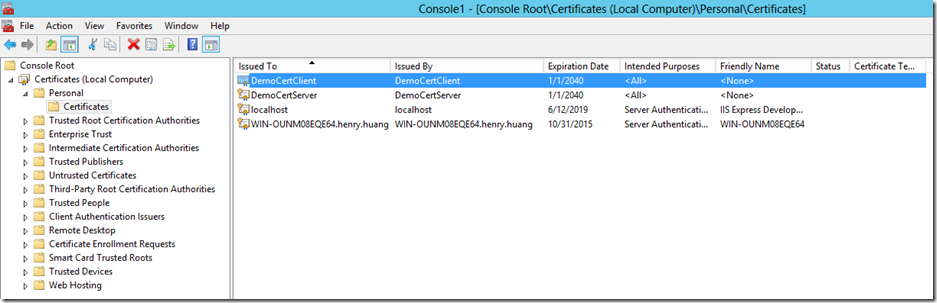
用同样的方法在客户端创建DemoCertClient证书,然后导入到服务器。
客户端(不要忘记给调用WCF Service的程序帐号赋予对私钥的读权限),客户端保存DemoCertClient的证书加私钥和DemoCertServer的证书(无私钥)。
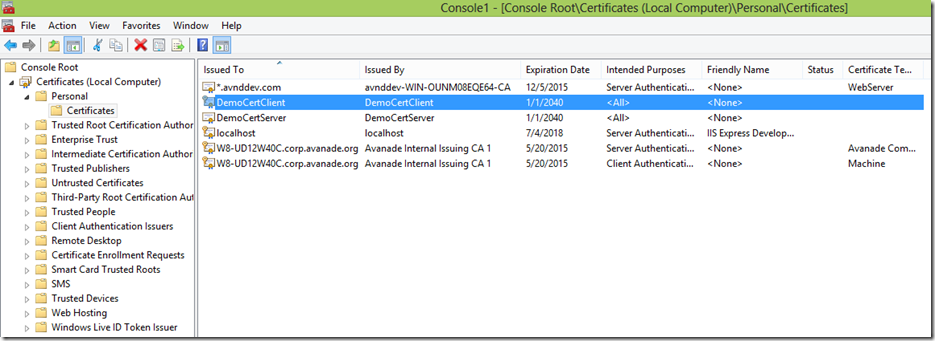
服务器端保存DemoCertServer的证书加私钥和DemoCertClient的证书(无私钥)。
(三)服务器端配置文件
Server web.config:
<?xml version="1.0"?>

<configuration>

    <system.web>

      <compilation debug="true" targetFramework="4.0" />

    </system.web>

    <system.serviceModel>

      <bindings>

        <basicHttpBinding>

          <binding name="basicBinding">

            <security mode="Message">

              <message clientCredentialType="Certificate" />

            </security>

          </binding>

        </basicHttpBinding>

      </bindings>

      <services>

        <service name="WCFDemo.DemoService" behaviorConfiguration="CustomBehavior">

          <endpoint address="DemoService" binding="basicHttpBinding" contract="WCFDemo.IDemoService" bindingConfiguration="basicBinding">

            <identity>

              <dns value="DemoCertServer"/>

            </identity>

          </endpoint>

          <endpoint address="mex" binding="mexHttpBinding" contract="IMetadataExchange"></endpoint>

        </service>

      </services>

        <behaviors>

            <serviceBehaviors>

                <behavior name="CustomBehavior">

                    <serviceMetadata httpGetEnabled="true" />

                    <serviceDebug includeExceptionDetailInFaults="false" />

                    <serviceCredentials>

                      <serviceCertificate findValue="DemoCertServer" storeName="My" storeLocation="LocalMachine" x509FindType="FindBySubjectName"/>

                      <clientCertificate>

                        <authentication certificateValidationMode="None"/>

                      </clientCertificate>

                    </serviceCredentials>

                </behavior>

            </serviceBehaviors>

        </behaviors>

        <serviceHostingEnvironment multipleSiteBindingsEnabled="true" />

    </system.serviceModel>

</configuration>
<dns value="DemoCertServer"/>应该使用Server证书的名字。
(四)客户端配置文件
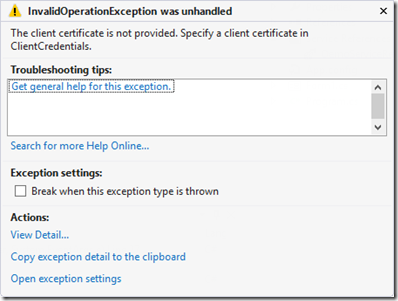
client app.config中如果没有定义clientCertificate
<clientCertificate findValue="DemoCertClient" storeName="My" storeLocation="LocalMachine" x509FindType="FindBySubjectName"/>
会有如下的异常:
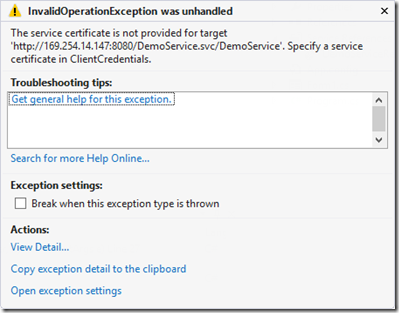
client app.config中如果没有定义serviceCertificate:
<serviceCertificate>

  <authentication certificateValidationMode="None"/>

  <defaultCertificate findValue="DemoCertServer" storeName="My" storeLocation="LocalMachine" x509FindType="FindBySubjectName"/>

</serviceCertificate>
会有如下异常:
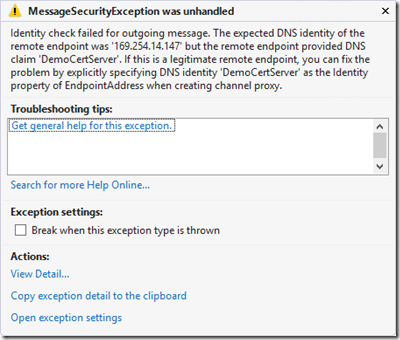
如果没有对identy.dns定义
<identity>

  <dns value="DemoCertServer"/>

</identity>
会有如下错误(dns的值应为服务器证书名称)
client app.config:
<?xml version="1.0" encoding="utf-8" ?>

<configuration>

    <system.serviceModel>

        <bindings>

            <basicHttpBinding>

                <binding name="BasicHttpBinding_IDemoService">

                    <security mode="Message">

                        <message clientCredentialType="Certificate" />

                    </security>

                </binding>

            </basicHttpBinding>

        </bindings>

        <client>

          <endpoint address="http://169.254.14.147:8080/DemoService.svc/DemoService"

              binding="basicHttpBinding" bindingConfiguration="BasicHttpBinding_IDemoService"

              contract="DemoServiceReference.IDemoService" name="BasicHttpBinding_IDemoService"

              behaviorConfiguration="CustomBehavior" >

            <identity>

              <dns value="DemoCertServer"/>

            </identity>

          </endpoint>

        </client>

        <behaviors>

          <endpointBehaviors>

            <behavior name="CustomBehavior">

              <clientCredentials>

                <!--客户端证书-->

                <clientCertificate findValue="DemoCertClient" storeName="My" storeLocation="LocalMachine" x509FindType="FindBySubjectName"/>

                <serviceCertificate>

                  <authentication certificateValidationMode="None"/>

                  <defaultCertificate findValue="DemoCertServer" storeName="My" storeLocation="LocalMachine" x509FindType="FindBySubjectName"/>

                </serviceCertificate>

              </clientCredentials>

            </behavior>

          </endpointBehaviors>

        </behaviors>

    </system.serviceModel>

</configuration>
生面高亮部分如果没有需要手动填加。
(五)运行程序,监听Message
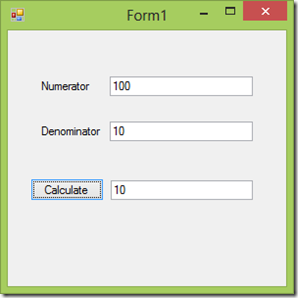
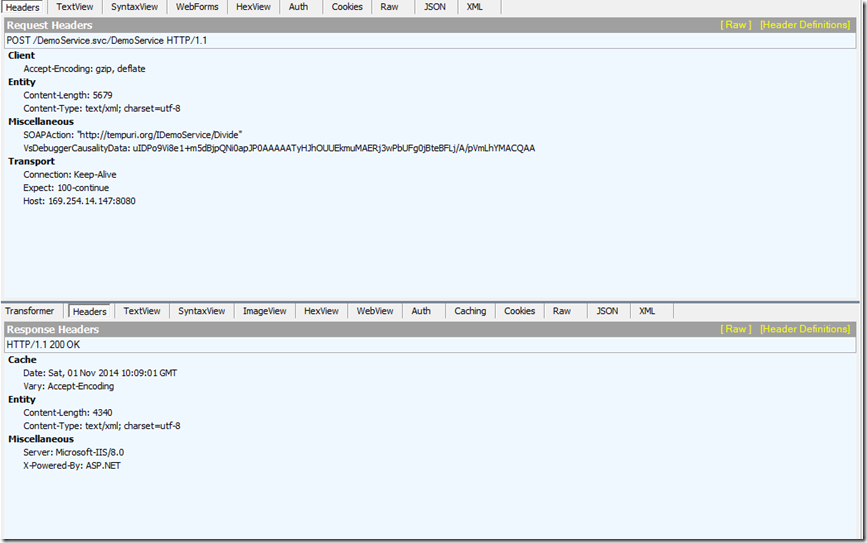
最后运行程序,调用WCF Service成功。
request:
<MessageLogTraceRecord>

  <HttpRequest xmlns="http://schemas.microsoft.com/2004/06/ServiceModel/Management/MessageTrace">

    <Method>POST</Method>

    <QueryString></QueryString>

    <WebHeaders>

      <Connection>Keep-Alive</Connection>

      <Content-Length>5679</Content-Length>

      <Content-Type>text/xml; charset=utf-8</Content-Type>

      <Accept-Encoding>gzip, deflate</Accept-Encoding>

      <Expect>100-continue</Expect>

      <Host>169.254.14.147:8080</Host>

      <VsDebuggerCausalityData>uIDPo9Vi8e1+m5dBjpQNi0apJP0AAAAATyHJhOUUEkmuMAERj3wPbUFg0jBteBFLj/A/pVmLhYMACQAA</VsDebuggerCausalityData>

      <SOAPAction>"http://tempuri.org/IDemoService/Divide"</SOAPAction>

    </WebHeaders>

  </HttpRequest>

  <s:Envelope xmlns:s="http://schemas.xmlsoap.org/soap/envelope/" xmlns:u="http://docs.oasis-open.org/wss/2004/01/oasis-200401-wss-wssecurity-utility-1.0.xsd">

    <s:Header>

      <o:Security s:mustUnderstand="1" xmlns:o="http://docs.oasis-open.org/wss/2004/01/oasis-200401-wss-wssecurity-secext-1.0.xsd">

        <u:Timestamp u:Id="uuid-c99aa3d8-badd-4da0-8f75-66a613cca7e6-1">

          <u:Created>2014-11-01T10:09:00.392Z</u:Created>

          <u:Expires>2014-11-01T10:14:00.392Z</u:Expires>

        </u:Timestamp>

        <o:BinarySecurityToken>

          <!-- Removed-->

        </o:BinarySecurityToken>

        <e:EncryptedKey Id="_0" xmlns:e="http://www.w3.org/2001/04/xmlenc#">

          <e:EncryptionMethod Algorithm="http://www.w3.org/2001/04/xmlenc#rsa-oaep-mgf1p">

            <DigestMethod Algorithm="http://www.w3.org/2000/09/xmldsig#sha1" xmlns="http://www.w3.org/2000/09/xmldsig#"></DigestMethod>

          </e:EncryptionMethod>

          <KeyInfo xmlns="http://www.w3.org/2000/09/xmldsig#">

            <o:SecurityTokenReference>

              <X509Data>

                <X509IssuerSerial>

                  <X509IssuerName>CN=DemoCertServer</X509IssuerName>

                  <X509SerialNumber>-30526433464546109314442804636326321278</X509SerialNumber>

                </X509IssuerSerial>

              </X509Data>

            </o:SecurityTokenReference>

          </KeyInfo>

          <e:CipherData>

            <e:CipherValue>eCF+OqdyUWdJPIQdAX1yN1sUkMyKdxXPZvx1F5s/NuqEaGMR/kj0vCXok27J46fjN31K9VgrcqWcZn/lbiNzjGGinAI7NDTZJwDkHDCzJvgwG8zXun9OB7XxaRoJ2PnokbtkAcjIB1A2wXlulD8O1Zopf4UfTj6gSp+69eNYK+//6gIu+Udszo0D0TlM9GbQkdhZnu/+TwWOLYqpaNBO6p2bynxKl99Zf/3Ghclps++pan1umxCb1XIe6T4A/DbG6SXJ/uND0W9cOt1w5VyP54EclTjTCfEK9KD7n97Xjxu45a6nkU4+svBetBYm0hD/vCNyIS8kAs30UiOA0AQP+A==</e:CipherValue>

          </e:CipherData>

          <e:ReferenceList>

            <e:DataReference URI="#_2"></e:DataReference>

            <e:DataReference URI="#_3"></e:DataReference>

          </e:ReferenceList>

        </e:EncryptedKey>

        <e:EncryptedData Id="_3" Type="http://www.w3.org/2001/04/xmlenc#Element" xmlns:e="http://www.w3.org/2001/04/xmlenc#">

          <e:EncryptionMethod Algorithm="http://www.w3.org/2001/04/xmlenc#aes256-cbc"></e:EncryptionMethod>

          <e:CipherData>

            <e:CipherValue>XvuuOuqInRdHz5TMd5laV2OWf+MeqyJmT9p2KBJd0KhZMv+MOTbUshxUvIrfMPgFQv7aVRDTB6BlQ9Dl9peHzpYd7rSGvt2GmcUOw/XmBEi12/zjGkQwGch6LH2E2SzGnqarQlu+xV587not/0PJvxjy+oV1e/magOuL8F9BRF4bHkknUH1PgENpRmM+jwCM5mjhne6RmBflAu81PqtBxGDqYJC2qXmvhNGRghvGiQyRuIMUpWqNl9yX1MlfKucN4JmfMfNvxk85cFQq5g3O/DQwhdwY3AaHQKBv4/3oNacp9r2mYRI5OEUi+6rE9b7Frkurve7hUvLeNs1SdTbzvDQoPxPpBu8oYXg9eABLC072Mo0JyflAecYQAH9r/8OC+5Dyer+f100zx9Bvh4GGsiza/KZFFAnyBkfYxytdVv9yhRpIAqzxVOn4rdn2BQLxstZeZdrPrmLV2N0gTtHW9/Gi9RK45pcBt/0RmwA1jdmds4TRuk8GDiyBH4DgWZI6MT+hXN/9LAxphf56Mm0lc6+da1+QOOQCpOjBi+G8N0a2QRwTVfNLn9EXYQiQGS1na6AB/STpT/7zWO+UV1zry9IVSGLOfsFFamwNWtnV6HQvrmpFlsK/30UG1CTA7VOStuL3F44oj2wZq4E2WBsxyUTwFPoeHS4qBa333RT9D+OSdJyDKERBZgI+4/udvG/vtDOF2TCTO8z3Ypqxj3+L/HCnB1pB/U0jtDZuFrzpRiRFTXgB/dDzQmLhKDSIAXzf/BhNzKJjKJeMWG1e+gLfEbHlygBS9QiMCz+QxL8vROxAdD2Cqk2aB8rtn2E3G7Qlso9wq6ZrRqJngB/iaEW4mdcfbv2Uultz8IGUokBaLAe4t8QsPpZ3F49+wBYRtccqf0Qvnp/dLjsDBCbkbOo4FkWkYZkjPIS1wEFnv5P2LJUYdYDzVdjDVN8wQCFZSIW0U9zpv8pIvalYV87shy/zxS9c5TiGVGtwd3euvaonzoDhqFVexOOkHdvJ7nLEpr4I6861mHjLRrTKxyyB/KE8N7B8ZBIi5pXQkYYy3wu6D0qTf24cJSNNdUoIrRIbGAfzGFBaNWdOIznhnco20e8Y6T0vVWQn6Z6xvOp/N8tedcT17LMkAg+W/rNmD16b1hdLXgRFyLzKBUAIM89u8JGk4zsJcqhKHS2t8iOXV2NNAS1a1/KYdhCek5zPSJs6f0uaJ9fEnviIe5djVKFrZaQKCHaSgxXYU4cIx805ATbk0JZNX/D+Wwasz1x4BCIUv2Myol8QbqmRMOKXE0b1LI516pGUnq6Q5RJ3tA9nB+I17HEQFQGsheiS/ZXZEHE2MLKPaaDTu8V+PGbtB1Y/swtCz3qqrzmrgRI7Po0uh36VzMyxx9fF3QyAoUexbQWb9PEJQKfMIKBY30kDPKFob3MeQkVbouNydebFCCSW5vefr9g6Cmv4mRjmTwuS98KAHxlRwwqZ8WYxR5YtPg+vQvIbdBJTKd8A7n39a1/0Y3YXNWxC24hNGOT89hHjPtQqCC0iTgSdf7yepy7btlixd4t+SsAHi/2zKkNZVqWTOBZp10yy6JuC24fOybRp3ySwfZLpH2J9QZkmIptqXruPOX5Hwig9SWmMkB6NJUQHvNx1GHb2JMXw1M4uQ/NV4uqewqztPKAgz+puKPW3set2+9jP/e/eWrxeoA7SpmLcYTeW0xM84D6c1xnizTF89k9FzrqueYqKv+5ndWOhN4Fym5NPlbsMSInAxYzh+JOZjzA+ny0VIDjX3LeMyZjAJnzigzwmRCnHYLuX6/tk0YGzZptNyo5tXlv9L5NAqel4QgrUY2Zcm4uBa8AUBcdKwM2xJ8nXgj5ArqXzF3+gt3otlfrTr0lMEjRBRjHAivPYpkP8iMtrhLjRSo837PaRV/l5xf+l0vWmjqHK6WGgtkuW75VssKv/v/ej18dc52pndcPKyCS0DJrmE4CpXPShyEq11wT7xu0TEtmKp5sFIDQ7vB3w1A==</e:CipherValue>

          </e:CipherData>

        </e:EncryptedData>

      </o:Security>

      <To s:mustUnderstand="1" xmlns="http://schemas.microsoft.com/ws/2005/05/addressing/none">http://win-ounm08eqe64.henry.huang:8080/DemoService.svc/DemoService</To>

      <Action s:mustUnderstand="1" xmlns="http://schemas.microsoft.com/ws/2005/05/addressing/none">http://tempuri.org/IDemoService/Divide</Action>

    </s:Header>

    <s:Body u:Id="_1">

      <e:EncryptedData Id="_2" Type="http://www.w3.org/2001/04/xmlenc#Content" xmlns:e="http://www.w3.org/2001/04/xmlenc#">

        <e:EncryptionMethod Algorithm="http://www.w3.org/2001/04/xmlenc#aes256-cbc"></e:EncryptionMethod>

        <e:CipherData>

          <e:CipherValue>MW5NSJm9V6HE2u7Q5ZKMbZ0vn/T6CA/muPY0YvvV1F06Pq01NsCE5t0OovNYlvSAJtII/lB7y815CVQDqfvid1WFRNfDJvr5LKfw+HC6WF0qpyVHvgbjgXhMkW12kj9pa5nc6LzVJYi0VEm7+gcae/VA+OCyFu5Ch0GQM4eEFDk=</e:CipherValue>

        </e:CipherData>

      </e:EncryptedData>

    </s:Body>

  </s:Envelope>

</MessageLogTraceRecord>
response:
<MessageLogTraceRecord>

  <Addressing xmlns="http://schemas.microsoft.com/2004/06/ServiceModel/Management/MessageTrace">

    <Action>http://tempuri.org/IDemoService/DivideResponse</Action>

  </Addressing>

  <s:Envelope xmlns:s="http://schemas.xmlsoap.org/soap/envelope/" xmlns:u="http://docs.oasis-open.org/wss/2004/01/oasis-200401-wss-wssecurity-utility-1.0.xsd">

    <s:Header>

      <o:Security s:mustUnderstand="1" xmlns:o="http://docs.oasis-open.org/wss/2004/01/oasis-200401-wss-wssecurity-secext-1.0.xsd">

        <u:Timestamp u:Id="uuid-4537aa5c-6e49-467b-8f7c-0c1406bbdd4c-1">

          <u:Created>2014-11-01T10:09:01.290Z</u:Created>

          <u:Expires>2014-11-01T10:14:01.290Z</u:Expires>

        </u:Timestamp>

        <e:EncryptedKey Id="_0" xmlns:e="http://www.w3.org/2001/04/xmlenc#">

          <e:EncryptionMethod Algorithm="http://www.w3.org/2001/04/xmlenc#rsa-oaep-mgf1p">

            <DigestMethod Algorithm="http://www.w3.org/2000/09/xmldsig#sha1" xmlns="http://www.w3.org/2000/09/xmldsig#"></DigestMethod>

          </e:EncryptionMethod>

          <KeyInfo xmlns="http://www.w3.org/2000/09/xmldsig#">

            <o:SecurityTokenReference>

              <X509Data>

                <X509IssuerSerial>

                  <X509IssuerName>CN=DemoCertClient</X509IssuerName>

                  <X509SerialNumber>44895421441865058621951489303975545421</X509SerialNumber>

                </X509IssuerSerial>

              </X509Data>

            </o:SecurityTokenReference>

          </KeyInfo>

          <e:CipherData>

            <e:CipherValue>hbA9quGesDhaEmybXgczWaEC//Pfo9rn1o8nM1JDw1oDVZzfiOx+DHnnhyzKi8SqWqIyjZ0WGcJ4hr1gnxXj4XEW1nBhSIu1EWaVP/ooKFE9DgHwXjT3bSpG/zcoWDbCEA5dIGmU0mcDtunOStPYi4mTRueI6JABmcC2BdpNL9Y002CYLwlPHjwsfTD1+frewRvO6Czmtjjk6/3cc7RaN9GLP1tDNYManlpG7cvZWYn89l/N60ra16w+Ktr/EbjWol2HAj67jG7R02x/Gk7mze6dwMzp2Ll6UHc4EqYMRdGF3T6lPilGkkvtfWuQPlSvZq8osK2/ornu0taeg05j5w==</e:CipherValue>

          </e:CipherData>

          <e:ReferenceList>

            <e:DataReference URI="#_2"></e:DataReference>

            <e:DataReference URI="#_3"></e:DataReference>

          </e:ReferenceList>

        </e:EncryptedKey>

        <e:EncryptedData Id="_3" Type="http://www.w3.org/2001/04/xmlenc#Element" xmlns:e="http://www.w3.org/2001/04/xmlenc#">

          <e:EncryptionMethod Algorithm="http://www.w3.org/2001/04/xmlenc#aes256-cbc"></e:EncryptionMethod>

          <e:CipherData>

            <e:CipherValue>F6LRB7VUwjAFZAaVmh8PLzC69H2qBRI/Gxpr3ej8oBi4spHKfJV7VF9eqKB0L+7KkD5fAiDO+J0iDmvLAcAeEm0ec0qHfoe5ln2m6YL7V67u/AkUu1Pawp6Kw68bzPxibzzLr1bJ5pNtUHNUaa2LfaEVR6dMZPv/X/pmPwl2qzlts4dVm+sZ5LHHAqHBAct1x1/mfQr5e+L0Z6m/aU5ti8zc5rxwASG7nf2fyOKcdFaqevDQ/gV8hZjXcNzw/l8zi3lEH+yf7ALxRYXQyxj8SsGVza+mV0Nbb603Dx5QzxcrEMtjE9IO2q7jk8wjQeothLryXNlDN636l3L+k6rzd2IalVhoXqTZIi+7aQU3e6K1ljKIKJfxC/+QwAdTdsrsXtgiiDRFaAQzqe2PsnlL8hjU1jedKCwEYILgGpKp/jB9Oyz+3qU7gaq+tZp4kralmVD/2Brehzjcu79UjSmpVKn7Ul36z7xMoPcAEqDZxzyUCp/jcA63g81LML3eW1xTvmAZJrTp0IVghm7frbyZ0ZbszOOPbXltvaQamNanE4hoFkwCkWN95Dm9L92u608CRA4GVeQDw1IkZZP/JmAIZco6sb0AO3Kf30WrHVmECM5iIqNY+hCoLM/9XKztigqM3yLQ/rwzcPK42eEmVJJrGaqX06cXawvTcInoGYFHIv8SgkqnvvDiaLrdKb/GPW+cu+ygxzWC6PY+sO8egqdLkQlWWBlE3TpqFIg7KEAkwINFr5kt9fUz2cIvQMReV54l136HvvIqhyJpKPzGcTyBFfDfzocXYtSCS8SrolHkKuuuMqXGkLri7n7TtmVrztQhpgSg/p0gSmUb7OXuHpnBuBgvrJlyQTYaTjzmbLj54J+JwSz8xrOLdbJU60n1bj81X7T3gHHEW6xLMHhR5I2fOTdcmOM+C8gEhVyXnf9K7J3WT2ZMvg/iBkdpdga68Z1CZaLV1F4UcVO9PPnkvT/BimROxe3usjmU6aGKI1opMI0KO0Td2pTs4b963AdOR9Ld3MbYvt5ycg4Ii/iTbo8DHTs/92uyq1I/0g3CsBGFvAwKGufKBwmpFQb0TiZvfG2SUGld53UyZaWOUrubptZLg6Pt17f8EtPMF4PjgC8yQFqUgd2GzRSJu8Nt16Iz3dXM2SOd12qtGhvyGp2C2ypq9N6X0ZNxz/EDsRMRvpR9XsxBLOJ8i6MyXkpr5RGumBTfCqjidhDCMrOgKzhB32MWkiVnwRJX9jidhKHiMeYAg9cSL7ObVXb4x5eUrSfIbxVSZuyyIcbKB8ZDSsCO7EFGu35iY/ZuOfCKfw8OWeTg1XhAQC/U9kxNOHIhX6XBNDAnUnNdIz6Qds7dVgw70Q+hH9If3cVJauuxTfxW2jr5UJ5K4IIZDmPdV8XM8mg03XrCUlpyDMNNyhrC9D8GI7MKGzZI2YvshDHJxXD+NBWnWjYIOoHnZyZ45DXN3ONQiHvIWmKNrWdQMGH8FOtwjKCV98WoFSCBQeGJbJFLuRtUVR8ojJlYEkQfWsHsVDAUuFjrzETHfM45WbMH48wwuoca4/6lV8iYhCHn9WnAbFkM6bmEpBh6u+Cy8wZIhnoHvd2HfJmiRQWbUmIZi6FwpS6krF+prcEBJIPI4FFBe8uk0r3l7UQ80DRaTzji00R7bCopAfcFcXgKpFrL0wMjrUi4VNudvo6Er8rWQBDo4Bl0pu682HNQcwvhqApYcBnvx/GpseQIXSI345eqewd/JeK8Ss0Uzl58adAKdq5aNaan+LY26x6k+kSiP2rHAiJKG5F8KyP/lAdCiS75HDf7JMNPf1GNYIcEXlJ3itKTmn8jOWvlsdqhYNTqhdg7zR+Bf/eqnZF6+F1aRg/SAxWdPjNRk4YXk0vhmqkBWhS++li842o6bpuh2mZBjSjOVbUPkVQBSN6rxG5NHCU7U1bLGkBtuyy+s5nbLy35Lk9BW7i9othC8HKOD2U5jWW3PIWPD+/dhuLNM/OqNrjNdTH+kAZbJ9G5+2/jw9V/Iz52RjGo0c4=</e:CipherValue>

          </e:CipherData>

        </e:EncryptedData>

      </o:Security>

    </s:Header>

    <s:Body u:Id="_1">

      <e:EncryptedData Id="_2" Type="http://www.w3.org/2001/04/xmlenc#Content" xmlns:e="http://www.w3.org/2001/04/xmlenc#">

        <e:EncryptionMethod Algorithm="http://www.w3.org/2001/04/xmlenc#aes256-cbc"></e:EncryptionMethod>

        <e:CipherData>

          <e:CipherValue>XHR3ci6ob5bXSsEzeL+UE3RJLRHkvk7oLBoHF8zkGuPH/oK7rqq6Pu4GWyPH0rOt33oNoociNCG53KcvtcJWygnoy8h47L8nuYka95fOBx7W4jlYlU5Zad0LjiydAAVlu3zi7LiQ6nH4osrLD1I80Q==</e:CipherValue>

        </e:CipherData>

      </e:EncryptedData>

    </s:Body>

  </s:Envelope>

</MessageLogTraceRecord>
可以看到request和response的信息都已经被加密了。
(六)总结
basicHttpBinding的Message Security Mode必须使用Certificate credential type。
它的原理是服务器端和客户端各自有自己创建的证书:
(1)客户端向服务器端发送请求时,客户端使用服务器端的公钥进行加密,服务器端使用自己的私钥解密。
(2)服务器向客户端响应时,使用客户端的公钥进行加密,客户端使用自己的私钥解密。
另外注意服务器端的Application Pool的运行帐号需要对服务器证书的私钥有读取权限;客户端运行调用WCF程序的帐号需要对客户端证书的私钥有读取权限。
说明 certificateValidationMode共有以下五种模式。
None: 未执行任何证书验证。
PeerTrust:如果证书位于被信任的人的存储区中,则有效。
ChainTrust:如果证书链在受信任的根存储区生成证书颁发机构,则证书有效。
PeerOrChainTrust:如果证书位于被信任的人的存储区或证书链在受信任的根存储区生成证书颁发机构,则证书有效。
Custom:用户必须插入自定义 X509CertificateValidator 以验证证书。
因为本文目的在于演示,所以certificateValidationMode都使用的是None,在生产环境中,应该使用有效的证书,并使用ChainTrust。
WCF basicHttpBinding之Message Security Mode的更多相关文章
- WCF basicHttpBinding之Transport Security Mode, clientCredentialType="None"
原创地址:http://www.cnblogs.com/jfzhu/p/4071342.html 转载请注明出处 前面文章介绍了<WCF basicHttpBinding之Message Sec ...
- WCF wsHttpBinding之Transport security Mode, clientCredentialType=”Basic”
原创地址:http://www.cnblogs.com/jfzhu/p/4071342.html 转载请注明出处 如何在WCF中使用Transport Security Mode,以及如何创建证书,请 ...
- 网络负载均衡环境下wsHttpBinding+Message Security+Windows Authentication的常见异常
提高Windows Communication Foundation (WCF) 应用程序负载能力的方法之一就是通过把它们部署到负载均衡的服务器场中. 其中可以使用标准的负载均衡技术, Windows ...
- WCF初探-22:WCF中使用Message类(上)
前言 从我们学习WCF以来,就一直强调WCF是基于消息的通信机制.但是由于WCF给我们做了高级封装,以至于我们在使用WCF的时候很少了解到消息的内部机制.由于WCF的架构的可扩展性,针对一些特殊情况, ...
- WCF初探-23:WCF中使用Message类(下)
前言 在上一篇WCF中使用Message类(上)中,文章介绍了WCF中使用Message类的基本知识和怎样创建消息,本文是承接上一篇文章,如果想要更好的阅读本文,请先阅读上一篇文章.在这篇文章中,我将 ...
- wcf中的Message类
客户端->服务端—>客户端 客户端代码: using (new OperationContextScope(client.InnerChannel)) { ...
- WCF基础之Message类
客户端和服务端的通信都是通过接收和发送的Message实例建立起来的,大多数情况我们通过服务协定.数据协定和消息协定来构造传入和传出消息的. 一般什么时候使用Message类呢?不需要将消息序列化或者 ...
- WCF Security基本概念(转载)
WCF Security 主要包括 "Transfer Security"."Access Control"."Auditing" 几个部分 ...
- WCF Security(转载)
WCF Security 主要包括 "Transfer Security"."Access Control"."Auditing" 几个部分 ...
随机推荐
- FragmentActivity_左右滑动的碎片
test1.xml <?xml version="1.0" encoding="utf-8"?> <LinearLayout xmlns:an ...
- Angular表单验证
novalidate 去掉html5自带的验证 ng-minlength 规定输入文本的最小长度 ng-maxlength 规定输入文本的最大长度 ng-submit 接收一个方法名 ...
- iOS SQLite3的使用
1.创建可修改的数据库文件 //应用包内的内容是不可写的,所以需要把应用包内的数据库拷贝一个副本到资源路径去 - (void)createEditableDatabase{ BOOL success; ...
- C++-Qt【5】-QT的QString,char*,QByteArray转化以及中文乱码的问题
引用:http://blog.sina.com.cn/s/blog_a7e2c7490101oatt.html QTextCodec *codec = QTextCodec::codecForName ...
- 关于WM_GETTEXT的应用
HWND hw = ::FindWindow(NULL,"Form1"); HWND hw2 = ::FindWindowEx(hw,NULL,NULL,NULL); int le ...
- ACM :漫漫上学路 -DP -水题
CSU 1772 漫漫上学路 Time Limit: 1000MS Memory Limit: 131072KB 64bit IO Format: %lld & %llu Submit ...
- 如何查看bash shell 帮助信息?
man bash 查看bash的命令帮助 info bash 查看bash的文档 help 命令显示bash支持的命令: 如果想看某个命令的帮助可以 help 命令.如 help cd 对bash的命 ...
- 微软官方提供的免费正版 Windows 8.1/Win10/7/XP/Vista 操作系统虚拟机镜像下载
https://dev.windows.com/en-us/microsoft-edge/tools/vms/windows/
- Files 的值“<<<<<<< .mine”无效。路径中具有非法字符
解决冲突,告诉SVN这个问题已解决(Resolved). 一般更简单些:在你的工程OBJ/DEBUG目录下,找到 工程名.csproj.FileListAbsolute.txt的文件打开并删除含有'& ...
- java分享第十六天( java读取properties文件的几种方法&java配置文件持久化:static块的作用)
java读取properties文件的几种方法一.项目中经常会需要读取配置文件(properties文件),因此读取方法总结如下: 1.通过java.util.Properties读取Propert ...