
使用Pillow库 创建简单验证码
使用Pillow生成简单的验证码
本想做成字体各自按随机角度倾斜, 但没有在Pillow中找到相关的方法
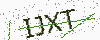
import random
from PIL import Image, ImageDraw, ImageFont
import time
import os
import string

class GetCaptcha:
    size = (100, 40)
    source = tuple(string.digits + string.ascii_letters)
    number = 4
    background_color = (250, 250, 250)
    fontsize = 25
    font_path = os.path.join(os.path.dirname(__file__), 'verdana.ttf')
    random.seed(time.time())
    fontcolor = (random.randint(0, 80), random.randint(0, 80), random.randint(0, 80))
    draw_line = True
    line_number = 3
    line_color = (random.randint(0, 250), random.randint(0, 255), random.randint(0, 250))
    draw_point = True
    rotate = True

    @classmethod
    def image_rotate(cls, original_image):
        image = original_image.rotate(random.randint(-15, 15), expand=0)
        back_ground = Image.new('RGBA', cls.size,cls.background_color)
        return Image.composite(image, back_ground, image)

    @classmethod
    def draw_text(cls):
        """return a captcha include digit and letter"""
        return ''.join(random.sample(cls.source, cls.number))

    @classmethod
    def __draw_line(cls, draw, width, height):
        begin = (random.randint(0, width), random.randint(0, height))
        end = (random.randint(0, width), random.randint(0, height))
        draw.line([begin, end], fill=cls.line_color)

    @classmethod
    def __draw_point(cls, draw, point_size, width, height):
        size = min(100, max(0, int(point_size)))
        for w in range(width):
            for h in range(height):
                tmp = random.randint(0, 100)
                if tmp > 100 - size:        # make sure would not point too much
                    draw.point((w, h), fill=(150, 150, 150))

    @classmethod
    def draw_captcha(cls):
        width, height = cls.size
        image = Image.new('RGBA', (width, height), cls.background_color)
        font = ImageFont.truetype(cls.font_path, cls.fontsize)
        draw = ImageDraw.Draw(image)
        text = cls.draw_text()
        font_width, font_height = font.getsize(text)
        draw.text(((width - font_width) / 2, (height - font_height) / 2), text, font=font, fill=cls.fontcolor)

        if cls.draw_line:
            for x in range(0, cls.line_number):
                cls.__draw_line(draw, width, height)

        if cls.draw_point:
            cls.__draw_point(draw, 5, width, height)

        return (text, cls.image_rotate(image))

if __name__ == "__main__":
    captcha = GetCaptcha()
    text, image = captcha.draw_captcha()
    image.save('code.png', "PNG")
在Django的视图中返回
def captcha_view(request):
    text, image = GetCaptcha.draw_captcha()
    output = BytesIO()
    image.save(output,'png')
    output.seek(0)
    response = HttpResponse()
    response['content/type'] = "image/png"
    response.write(output.read())
    return response
使用Pillow库 创建简单验证码的更多相关文章
- php笔记之GD库图片创建/简单验证码
燕十八 公益PHP培训 课堂地址:YY频道88354001 学习社区:www.zixue.it php画图:比如说验证码,缩略图,加水印都要用到GD库,所以要开启gd2库,才能用 首先找到php.in ...
- php中运用GD库实现简单验证码
昨天学习了运用php的GD库进行验证码的实现. 首先可以用phpinfo()函数看一下GD库有没有安装,我用的wampserver是自动给安装的. 主要的步骤是: 1.生成验证码图片 2.随机生成字符 ...
- PHP 用session与gd库实现简单验证码生成与验证的类
验证码是为了防止机器灌水给网站带来污染以及增加服务器负担而出现的.目前大大小小的网站都有验证码.今天自己实现了一个简单的验证码类.说简单是因为没有加一些干扰的弧线等等,只是将文字旋转了一下.当然,因为 ...
- 基于Python Pillow库生成随机验证码
from PIL import Image from PIL import ImageDraw from PIL import ImageFont import random class ValidC ...
- python基于pillow库的简单图像处理
from PIL import Image from PIL import ImageFilter from PIL import ImageEnhance import matplotlib.pyp ...
- php中GD库的简单使用
在php中需要图像处理的地方GD库会发挥重要的作用,php可以创建并处理包括GIF,PNG,JPEG,WBMP以及XPM在内的多种图像格式,简单的举几个例子: 1.用GD库会创建一块空白图片,然后绘制 ...
- 用imagemagick和tesseract-ocr破解简单验证码
用imagemagick和tesseract-ocr破解简单验证码 Tesseract-ocr据说辨识程度是世界排名第三,可谓神器啊. 准备工作: 1.安装tesseract-ocr sudo apt ...
- 基于TensorFlow的简单验证码识别
TensorFlow 可以用来实现验证码识别的过程,这里识别的验证码是图形验证码,首先用标注好的数据来训练一个模型,然后再用模型来实现这个验证码的识别. 生成验证码 首先生成验证码,这里使用 Pyth ...
- php生成动态验证码 加减算法验证码 简单验证码
预览效果: <?php /** *ImageCode 生成包含验证码的GIF图片的函数 *@param $string 字符串 *@param $width 宽度 *@param $height ...
随机推荐
- hadoop 安装之 hadoop、hive环境配置
总结了一下hadoop的大致安装过程,按照master . slave的hadoop主从类别,以及root和hadoop集群用户两种角色,以职责图的方式展现,更加清晰一些
- Java使用Redis--jedis
参考:菜鸟教程 http://www.runoob.com/redis/redis-java.html 1.Java 使用 Redis 开始在 Java 中使用 Redis 前, 我们需要确保已经安装 ...
- Element-ui上传文件(删除、添加、预览)
先看下效果是不是你所需要的.... 上传文件进度条后续会加上的.... 功能需求:默认为上传状态 1.未上传:点击可上传文件 2.已上传:点击可上传文件 (1).鼠标移入[删除] (2).鼠标点击[预 ...
- Linux下启动weblogic服务
第一步找到目录:cd weblogic/user_projects/domains/odm_dat_dc_domain/bin/ 第二步查看进程: ps -ef|grep java 第三步杀进程: k ...
- 简述 JVM 垃圾回收算法
经典垃圾回收 标记-清除(Mark-Sweep) 研发园开了家新餐厅,餐厅老板在考虑如何回收餐盘时首先使用了最简单的方式,那就是服务员在顾客用餐的过程中,不定时的观察餐厅,针对用完餐的顾客记录他们的位 ...
- Webpack学习-Plugin
原文地址:http://wushaobin.top/2019/03/15/webpackPlugin/ 什么是Plugin? 在Webpack学习-工作原理(上)一文中我们就已经介绍了Plugin的基 ...
- dot.js模板实现分离式
<!DOCTYPE html><html lang="en"> <head> <meta charset="UTF-8" ...
- Centos7 Firewall
1.1 firewall启停设置 [root@tomcat ~]# systemctl stop firewalld.service #关闭firewall [root@tomcat ~]# syst ...
- 终端的rz命令,覆盖原文件。
不覆盖:rz 覆盖 同名文件:rz -y
- SpringBoot配置ActiveMQ
1.添加依赖 <!-- activeMQ --> <dependency> <groupId>org.springframework.boot</groupI ...