
Elasticsearch:inverted index,doc_values及source
以后会用到的相关知识:索引中某些字段禁止搜索,排序等操作
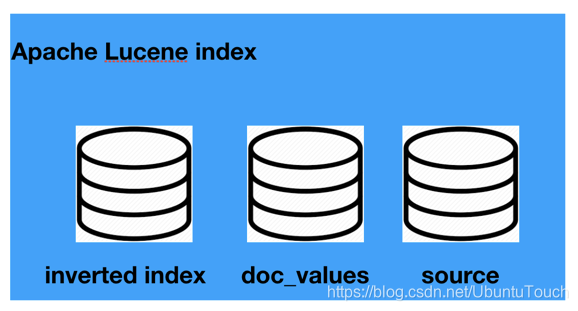
当我们学习Elasticsearch时,经常会遇到如下的几个概念:
- Reverted index
- doc_values
- source?
这个几个概念分别指的是什么?有什么用处?如何配置它们?只有我们熟练地掌握了这些概念,我们才可以正确地使用它们。
Inverted index
inverted index(反向索引)是Elasticsearch和任何其他支持全文搜索的系统的核心数据结构。 反向索引类似于您在任何书籍结尾处看到的索引。 它将出现在文档中的术语映射到文档。
例如,您可以从以下字符串构建反向索引:

Elasticsearch从已建立索引的三个文档中构建数据结构。 以下数据结构称为反向索引(inverted index):
Term Frequency Document (postings)
choice 1 3
day 1 2
is 3 1,2,3
it 1 1
last 1 2
of 1 2
of 1 2
sunday 2 1,2
the 3 2,3
tomorrow 1 1
week 1 2
yours 1 3
在这里反向索引指的的是,我们根据term来寻找相应的文档ids。这和常规的根据文档id来寻找term相反。
请注意以下几点:
- 删除标点符号并将其小写后,文档会按术语进行细分。
- 术语按字母顺序排序
- “Frequency”列捕获该术语在整个文档集中出现的次数
- 第三列捕获了在其中找到该术语的文档。 此外,它还可能包含找到该术语的确切位置(文档中的偏移)
在文档中搜索术语时,查找给定术语出现在其中的文档非常快捷。 如果用户搜索术语“sunday”,那么从“Term”列中查找sunday将非常快,因为这些术语在索引中进行了排序。 即使有数百万个术语,也可以在对术语进行排序时快速查找它们。
随后,考虑一种情况,其中用户搜索两个单词,例如last sunday。 反向索引可用于分别搜索last和sunday的发生; 文档2包含这两个术语,因此比仅包含一个术语的文档1更好。
反向索引是执行快速搜索的基础。 同样,很容易查明索引中出现了多少次术语。 这是一个简单的计数汇总。 当然,Elasticsearch在我们在这里解释的简单的反向排索引的基础上使用了很多创新。 它兼顾搜索和分析。
默认情况下,Elasticsearch在文档中的所有字段上构建一个反向索引,指向该字段所在的Elasticsearch文档。也就是说在每个Elasticsearch的Lucene里,有一个位置存放这个inverted index。
在Kibana中,我们建立一个如下的文档:
    PUT twitter/_doc/1

    {

      "user" : "双榆树-张三",

      "message" : "今儿天气不错啊,出去转转去",

      "uid" : 2,

      "age" : 20,

      "city" : "北京",

      "province" : "北京",

      "country" : "中国",

      "name": {

        "firstname": "三",

        "surname": "张"

      },

      "address" : [

        "中国北京市海淀区",

        "中关村29号"

      ],

      "location" : {

        "lat" : "39.970718",

        "lon" : "116.325747"

      }

    }
当这个文档被建立好以后,Elastic就已经帮我们建立好了相应的inverted index供我们进行搜索,比如:
    GET twitter/_search

    {

      "query": {

        "match": {

          "user": "张三"

        }

      }

    }
我们可与得到相应的搜索结果:
    {

      "took" : 0,

      "timed_out" : false,

      "_shards" : {

        "total" : 1,

        "successful" : 1,

        "skipped" : 0,

        "failed" : 0

      },

      "hits" : {

        "total" : {

          "value" : 1,

          "relation" : "eq"

        },

        "max_score" : 0.5753642,

        "hits" : [

          {

            "_index" : "twitter",

            "_type" : "_doc",

            "_id" : "1",

            "_score" : 0.5753642,

            "_source" : {

              "user" : "双榆树-张三",

              "message" : "今儿天气不错啊,出去转转去",

              "uid" : 2,

              "age" : 20,

              "city" : "北京",

              "province" : "北京",

              "country" : "中国",

              "name" : {

                "firstname" : "三",

                "surname" : "张"

              },

              "address" : [

                "中国北京市海淀区",

                "中关村29号"

              ],

              "location" : {

                "lat" : "39.970718",

                "lon" : "116.325747"

              }

            }

          }

        ]

      }

    }
如果我们想不让我们的某个字段不被搜索,也就是说不想为这个字段建立inverted index,那么我们可以这么做:
    DELETE twitter

    PUT twitter

    {

      "mappings": {

        "properties": {

          "city": {

            "type": "keyword",

            "ignore_above": 256

          },

          "address": {

            "type": "text",

            "fields": {

              "keyword": {

                "type": "keyword",

                "ignore_above": 256

              }

            }

          },

          "age": {

            "type": "long"

          },

          "country": {

            "type": "text",

            "fields": {

              "keyword": {

                "type": "keyword",

                "ignore_above": 256

              }

            }

          },

          "location": {

            "properties": {

              "lat": {

                "type": "text",

                "fields": {

                  "keyword": {

                    "type": "keyword",

                    "ignore_above": 256

                  }

                }

              },

              "lon": {

                "type": "text",

                "fields": {

                  "keyword": {

                    "type": "keyword",

                    "ignore_above": 256

                  }

                }

              }

            }

          },

          "message": {

            "type": "text",

            "fields": {

              "keyword": {

                "type": "keyword",

                "ignore_above": 256

              }

            }

          },

          "name": {

            "properties": {

              "firstname": {

                "type": "text",

                "fields": {

                  "keyword": {

                    "type": "keyword",

                    "ignore_above": 256

                  }

                }

              },

              "surname": {

                "type": "text",

                "fields": {

                  "keyword": {

                    "type": "keyword",

                    "ignore_above": 256

                  }

                }

              }

            }

          },

          "province": {

            "type": "text",

            "fields": {

              "keyword": {

                "type": "keyword",

                "ignore_above": 256

              }

            }

          },

          "uid": {

            "type": "long"

          },

          "user": {

            "type": "object",

            "enabled": false

          }

        }

      }

    }

    PUT twitter/_doc/1

    {

      "user" : "双榆树-张三",

      "message" : "今儿天气不错啊,出去转转去",

      "uid" : 2,

      "age" : 20,

      "city" : "北京",

      "province" : "北京",

      "country" : "中国",

      "name": {

        "firstname": "三",

        "surname": "张"

      },

      "address" : [

        "中国北京市海淀区",

        "中关村29号"

      ],

      "location" : {

        "lat" : "39.970718",

        "lon" : "116.325747"

      }

    }
在上面,我们通过mapping对user字段进行了修改:
     "user": {

            "type": "object",

            "enabled": false

      }
也就是说这个字段将不被建立索引,我们如果使用这个字段进行搜索的话,不会产生任何的结果:
    GET twitter/_search

    {

      "query": {

        "match": {

          "user": "张三"

        }

      }

    }
搜索的结果为:
    {

      "took" : 0,

      "timed_out" : false,

      "_shards" : {

        "total" : 1,

        "successful" : 1,

        "skipped" : 0,

        "failed" : 0

      },

      "hits" : {

        "total" : {

          "value" : 0,

          "relation" : "eq"

        },

        "max_score" : null,

        "hits" : [ ]

      }

    }
显然是没有任何的结果。但是如果我们对这个文档进行查询的话:
GET twitter/_doc/1
显示的结果是:
    {

      "_index" : "twitter",

      "_type" : "_doc",

      "_id" : "1",

      "_version" : 1,

      "_seq_no" : 0,

      "_primary_term" : 1,

      "found" : true,

      "_source" : {

        "user" : "双榆树-张三",

        "message" : "今儿天气不错啊,出去转转去",

        "uid" : 2,

        "age" : 20,

        "city" : "北京",

        "province" : "北京",

        "country" : "中国",

        "name" : {

          "firstname" : "三",

          "surname" : "张"

        },

        "address" : [

          "中国北京市海淀区",

          "中关村29号"

        ],

        "location" : {

          "lat" : "39.970718",

          "lon" : "116.325747"

        }

      }

    }
显然user的信息是存放于source里的。只是它不被我们所搜索而已。
如果我们不想我们的整个文档被搜索,我们甚至可以直接采用如下的方法:
    DELETE twitter

    PUT twitter

    {

      "mappings": {

        "enabled": false

      }

    }
那么整个twitter索引将不建立任何的inverted index,那么我们通过如下的命令:
    PUT twitter/_doc/1

    {

      "user" : "双榆树-张三",

      "message" : "今儿天气不错啊,出去转转去",

      "uid" : 2,

      "age" : 20,

      "city" : "北京",

      "province" : "北京",

      "country" : "中国",

      "name": {

        "firstname": "三",

        "surname": "张"

      },

      "address" : [

        "中国北京市海淀区",

        "中关村29号"

      ],

      "location" : {

        "lat" : "39.970718",

        "lon" : "116.325747"

      }

    }

    GET twitter/_search

    {

      "query": {

        "match": {

          "city": "北京"

        }

      }

    }
上面的命令执行的结果是,没有任何搜索的结果。更多阅读,可以参阅“Mapping parameters: enabled”(https://www.elastic.co/guide/en/elasticsearch/reference/current/enabled.html)。
Source
在Elasticsearch中,通常每个文档的每一个字段都会被存储在shard里存放source的地方,比如:
    PUT twitter/_doc/2

    {

      "user" : "双榆树-张三",

      "message" : "今儿天气不错啊,出去转转去",

      "uid" : 2,

      "age" : 20,

      "city" : "北京",

      "province" : "北京",

      "country" : "中国",

      "name": {

        "firstname": "三",

        "surname": "张"

      },

      "address" : [

        "中国北京市海淀区",

        "中关村29号"

      ],

      "location" : {

        "lat" : "39.970718",

        "lon" : "116.325747"

      }

    }
在这里,我们创建了一个id为2的文档。我们可以通过如下的命令来获得它的所有的存储的信息。
GET twitter/_doc/2
它将返回:
    {

      "_index" : "twitter",

      "_type" : "_doc",

      "_id" : "2",

      "_version" : 1,

      "_seq_no" : 1,

      "_primary_term" : 1,

      "found" : true,

      "_source" : {

        "user" : "双榆树-张三",

        "message" : "今儿天气不错啊,出去转转去",

        "uid" : 2,

        "age" : 20,

        "city" : "北京",

        "province" : "北京",

        "country" : "中国",

        "name" : {

          "firstname" : "三",

          "surname" : "张"

        },

        "address" : [

          "中国北京市海淀区",

          "中关村29号"

        ],

        "location" : {

          "lat" : "39.970718",

          "lon" : "116.325747"

        }

      }

    }
在上面的_source里我们可以看到Elasticsearch为我们所存下的所有的字段。如果我们不想存储任何的字段,那么我们可以做如下的设置:
    DELETE twitter

    PUT twitter

    {

      "mappings": {

        "_source": {

          "enabled": false

        }

      }

    }
那么我们使用如下的命令来创建一个id为1的文档:
    PUT twitter/_doc/1

    {

      "user" : "双榆树-张三",

      "message" : "今儿天气不错啊,出去转转去",

      "uid" : 2,

      "age" : 20,

      "city" : "北京",

      "province" : "北京",

      "country" : "中国",

      "name": {

        "firstname": "三",

        "surname": "张"

      },

      "address" : [

        "中国北京市海淀区",

        "中关村29号"

      ],

      "location" : {

        "lat" : "39.970718",

        "lon" : "116.325747"

      }

    }
那么同样地,我们来查询一下这个文档:
GET witter/_doc/1
显示的结果为:
    {

      "_index" : "twitter",

      "_type" : "_doc",

      "_id" : "1",

      "_version" : 1,

      "_seq_no" : 0,

      "_primary_term" : 1,

      "found" : true

    }
显然我们的文档是被找到了,但是我们看不到任何的source。那么我们能对这个文档进行搜索吗?尝试如下的命令:
    GET twitter/_search

    {

      "query": {

        "match": {

          "city": "北京"

        }

      }

    }
显示的结果为:
    {

      "took" : 0,

      "timed_out" : false,

      "_shards" : {

        "total" : 1,

        "successful" : 1,

        "skipped" : 0,

        "failed" : 0

      },

      "hits" : {

        "total" : {

          "value" : 1,

          "relation" : "eq"

        },

        "max_score" : 0.5753642,

        "hits" : [

          {

            "_index" : "twitter",

            "_type" : "_doc",

            "_id" : "1",

            "_score" : 0.5753642

          }

        ]

      }

    }
显然这个文档id为1的文档可以被正确地搜索,也就是说它有完好的inverted index供我们查询,虽然它没有字的source。
那么我们如何有选择地进行存储我们想要的字段呢?这种情况适用于我们想节省自己的存储空间,只存储那些我们需要的字段到source里去。我们可以做如下的设置:
    DELETE twitter

    PUT twitter

    {

      "mappings": {

        "_source": {

          "includes": [

            "*.lat",

            "address",

            "name.*"

          ],

          "excludes": [

            "name.surname"

          ]

        }

      }

    }
在上面,我们使用include来包含我们想要的字段,同时我们通过exclude来去除那些不需要的字段。我们尝试如下的文档输入:
    PUT twitter/_doc/1

    {

      "user" : "双榆树-张三",

      "message" : "今儿天气不错啊,出去转转去",

      "uid" : 2,

      "age" : 20,

      "city" : "北京",

      "province" : "北京",

      "country" : "中国",

      "name": {

        "firstname": "三",

        "surname": "张"

      },

      "address" : [

        "中国北京市海淀区",

        "中关村29号"

      ],

      "location" : {

        "lat" : "39.970718",

        "lon" : "116.325747"

      }

    }
通过如下的命令来进行查询,我们可以看到:
GET twitter/_doc/1
结果是:
    {

      "_index" : "twitter",

      "_type" : "_doc",

      "_id" : "1",

      "_version" : 1,

      "_seq_no" : 0,

      "_primary_term" : 1,

      "found" : true,

      "_source" : {

        "address" : [

          "中国北京市海淀区",

          "中关村29号"

        ],

        "name" : {

          "firstname" : "三"

        },

        "location" : {

          "lat" : "39.970718"

        }

      }

    }
显然,我们只有很少的几个字段被存储下来了。通过这样的方法,我们可以有选择地存储我们想要的字段。
在实际的使用中,我们在查询文档时,也可以有选择地进行显示我们想要的字段,尽管有很多的字段被存于source中:
GET twitter/_doc/1?_source=name,location
在这里,我们只想显示和name及location相关的字段,那么显示的结果为:
    {

      "_index" : "twitter",

      "_type" : "_doc",

      "_id" : "1",

      "_version" : 1,

      "_seq_no" : 0,

      "_primary_term" : 1,

      "found" : true,

      "_source" : {

        "name" : {

          "firstname" : "三"

        },

        "location" : {

          "lat" : "39.970718"

        }

      }

    }
更多的阅读,可以参阅文档“Mapping meta-field: _source”(https://www.elastic.co/guide/en/elasticsearch/reference/current/mapping-source-field.html)
Doc_values
默认情况下,大多数字段都已编入索引,这使它们可搜索。反向索引允许查询在唯一的术语排序列表中查找搜索词,并从中立即访问包含该词的文档列表。
sort,aggregtion和访问脚本中的字段值需要不同的数据访问模式。除了查找术语和查找文档外,我们还需要能够查找文档并查找其在字段中具有的术语。
Doc values是在文档索引时构建的磁盘数据结构,这使这种数据访问模式成为可能。它们存储与_source相同的值,但以面向列的方式存储,这对于排序和聚合而言更为有效。几乎所有字段类型都支持Doc值,但对字符串字段除外。
默认情况下,所有支持doc值的字段均已启用它们。如果您确定不需要对字段进行排序或汇总,也不需要通过脚本访问字段值,则可以禁用doc值以节省磁盘空间:
比如我们可以通过如下的方式来使得city字段不可以做sort或aggregation:
    DELETE twitter

    PUT twitter

    {

      "mappings": {

        "properties": {

          "city": {

            "type": "keyword",

            "doc_values": false,

            "ignore_above": 256

          },

          "address": {

            "type": "text",

            "fields": {

              "keyword": {

                "type": "keyword",

                "ignore_above": 256

              }

            }

          },

          "age": {

            "type": "long"

          },

          "country": {

            "type": "text",

            "fields": {

              "keyword": {

                "type": "keyword",

                "ignore_above": 256

              }

            }

          },

          "location": {

            "properties": {

              "lat": {

                "type": "text",

                "fields": {

                  "keyword": {

                    "type": "keyword",

                    "ignore_above": 256

                  }

                }

              },

              "lon": {

                "type": "text",

                "fields": {

                  "keyword": {

                    "type": "keyword",

                    "ignore_above": 256

                  }

                }

              }

            }

          },

          "message": {

            "type": "text",

            "fields": {

              "keyword": {

                "type": "keyword",

                "ignore_above": 256

              }

            }

          },

          "name": {

            "properties": {

              "firstname": {

                "type": "text",

                "fields": {

                  "keyword": {

                    "type": "keyword",

                    "ignore_above": 256

                  }

                }

              },

              "surname": {

                "type": "text",

                "fields": {

                  "keyword": {

                    "type": "keyword",

                    "ignore_above": 256

                  }

                }

              }

            }

          },

          "province": {

            "type": "text",

            "fields": {

              "keyword": {

                "type": "keyword",

                "ignore_above": 256

              }

            }

          },

          "uid": {

            "type": "long"

          },

          "user": {

            "type": "text",

            "fields": {

              "keyword": {

                "type": "keyword",

                "ignore_above": 256

              }

            }

          }

        }

      }

    }
在上面,我们把city字段的doc_values设置为false。
          "city": {

            "type": "keyword",

            "doc_values": false,

            "ignore_above": 256

          },
我们通过如下的方法来创建一个文档:
    PUT twitter/_doc/1

    {

      "user" : "双榆树-张三",

      "message" : "今儿天气不错啊,出去转转去",

      "uid" : 2,

      "age" : 20,

      "city" : "北京",

      "province" : "北京",

      "country" : "中国",

      "name": {

        "firstname": "三",

        "surname": "张"

      },

      "address" : [

        "中国北京市海淀区",

        "中关村29号"

      ],

      "location" : {

        "lat" : "39.970718",

        "lon" : "116.325747"

      }

    }
那么,当我们使用如下的方法来进行aggregation时:
    GET twitter/_search

    {

      "size": 0,

      "aggs": {

        "city_bucket": {

          "terms": {

            "field": "city",

            "size": 10

          }

        }

      }

    }
在我们的Kibana上我们可以看到:
    {

      "error": {

        "root_cause": [

          {

            "type": "illegal_argument_exception",

            "reason": "Can't load fielddata on [city] because fielddata is unsupported on fields of type [keyword]. Use doc values instead."

          }

        ],

        "type": "search_phase_execution_exception",

        "reason": "all shards failed",

        "phase": "query",

        "grouped": true,

        "failed_shards": [

          {

            "shard": 0,

            "index": "twitter",

            "node": "IyyZ30-hRi2rnOpfx4n1-A",

            "reason": {

              "type": "illegal_argument_exception",

              "reason": "Can't load fielddata on [city] because fielddata is unsupported on fields of type [keyword]. Use doc values instead."

            }

          }

        ],

        "caused_by": {

          "type": "illegal_argument_exception",

          "reason": "Can't load fielddata on [city] because fielddata is unsupported on fields of type [keyword]. Use doc values instead.",

          "caused_by": {

            "type": "illegal_argument_exception",

            "reason": "Can't load fielddata on [city] because fielddata is unsupported on fields of type [keyword]. Use doc values instead."

          }

        }

      },

      "status": 400

    }
显然,我们的操作是失败的。尽管我们不能做aggregation及sort,但是我们还是可以通过如下的命令来得到它的source:
GET twitter/_doc/1
显示结果为:
    {

      "_index" : "twitter",

      "_type" : "_doc",

      "_id" : "1",

      "_version" : 1,

      "_seq_no" : 0,

      "_primary_term" : 1,

      "found" : true,

      "_source" : {

        "user" : "双榆树-张三",

        "message" : "今儿天气不错啊,出去转转去",

        "uid" : 2,

        "age" : 20,

        "city" : "北京",

        "province" : "北京",

        "country" : "中国",

        "name" : {

          "firstname" : "三",

          "surname" : "张"

        },

        "address" : [

          "中国北京市海淀区",

          "中关村29号"

        ],

        "location" : {

          "lat" : "39.970718",

          "lon" : "116.325747"

        }

      }

    }
更多阅读请参阅“Mapping parameters: doc_values”(https://www.elastic.co/guide/en/elasticsearch/reference/7.4/doc-values.html)。
Elasticsearch:inverted index,doc_values及source的更多相关文章
- Elasticsearch 报错:Fielddata is disabled on text fields by default. Set `fielddata=true` on [`your_field_name`] in order to load fielddata in memory by uninverting the inverted index.
Elasticsearch 报错: Fielddata is disabled on text fields by default. Set `fielddata=true` on [`your_fi ...
- Fielddata is disabled on text fields by default. Set fielddata=true on [gender] in order to load fielddata in memory by uninverting the inverted index. Note that this can however use significant memor
ES进行如下聚合操作时,会报如题所示错误: ➜ Downloads curl -XPOST 'localhost:9200/bank/_search?pretty' -d ' { "size ...
- 使用curator 来管理elasticsearch的index
这里我们参考官网安装curator https://www.cookiesinn.org/elasticsearch_curator_delete_indices/ https://www.elast ...
- 正排索引(forward index)与倒排索引(inverted index)
正常的索引一般是指关系型数据库里的索引. 把不同的数据存放到不同的字段中.如果要实现baidu或google那种搜索,就需要与一条记录的多个字段进行比对,需要 全表扫描,如果数据量比较大的话,性能就很 ...
- [Search Engine] Compression in Inverted Index
最近在学一些搜索引擎的内容,感觉挺费劲,所以就用博客当做自己的笔记,遇到一些需要整理的部分,就在这里整理一下. 今天的内容是对inverted index进行压缩.核心思想,用我自己的话来总结,就是“ ...
- 倒排索引(Inverted Index)
倒排索引(Inverted Index) 倒排索引是一种索引结构,它存储了单词与单词自身在一个或多个文档中所在位置之间的映射.倒排索引通常利用关联数组实现.它拥有两种表现形式: inverted fi ...
- 反向索引(Inverted Index)
转自:http://zhangyu8374.iteye.com/blog/86307 反向索引是一种索引结构,它存储了单词与单词自身在一个或多个文档中所在位置之间的映射.反向索引通常利用关联数组实现. ...
- [IR] Inverted Index & Boolean retrieval
教材:<信息检索导论> 倒排索引 How to build Inverted Index? 1. Token sequence. 2. Sort by terms. 3. Dictiona ...
- Elasticsearch:Index生命周期管理入门
如果您要处理时间序列数据,则不想将所有内容连续转储到单个索引中. 取而代之的是,您可以定期将数据滚动到新索引,以防止数据过大而又缓慢又昂贵. 随着索引的老化和查询频率的降低,您可能会将其转移到价格较低 ...
随机推荐
- 前 K 个高频元素问题
前 K 个高频元素问题 作者:Grey 原文地址: 前 K 个高频元素问题 题目描述 LeetCode 347. Top K Frequent Elements 思路 第一步,针对数组元素封装一个数据 ...
- 时间模块之datatime模块、os模块、sys模块、json模块、json模块实操
目录 一.模块的绝对导入和相对导入 二.包的概念 三.编程思想的转变 四.软件开发目录规范 五.常见的内置模块 一.时间模块之datatime模块 1.datetime.datetime.today( ...
- vite搭建一个vue2的框架
01-创建一个基础的模板框架 npm init vite@latest 02-安装依赖 npm install npm install vue@2.x vue-template-compiler@2 ...
- Python词频分析
Python词频分析 一.前言 在日常工作或者生活中,有时候会遇到词频分析的场景.如果是要进行词频分析,那么首先需要对句子进行分词,将句子中的单词进行切割并按照词性进行归类. 在Python中有个第三 ...
- electron-vue打包出现问题汇总
打包过程中出现下载status code 404 1.可能是网络不好,导致相关electron包无法正常下载,也有可能是需要挂代理 2.可能是编译过程的链接出现错误,一般为网址中缺少或多了一个v,建议 ...
- 【Azure 应用服务】本地创建Azure Function Kafka Trigger 函数和Kafka output的HTTP Trigger函数实验
问题描述 在上一篇博文(https://www.cnblogs.com/lulight/p/16525902.html)中,我们成功的以VM作为Kafka服务器运行,并且验证了从其他机器中远程访问.在 ...
- CSS 上下居中和最低高度语法
/*上下居中*/ vertical-align:center; font-size=line-height; /*最低高度*/ height:auto!important; height:400px; ...
- Spring 请求方法的调用原理(Controller)和请求参数的获取的原理
1.请求映射原理 所有的请求都会经过DispatcherServlet这个类,先了解它的继承树 本质还是httpServlet 原理图 测试 request请求携带的参数 从requestMapp ...
- 万答#1,MySQL中如何查询某个表上的IS(意向共享)锁
欢迎来到 GreatSQL社区分享的MySQL技术文章,如有疑问或想学习的内容,可以在下方评论区留言,看到后会进行解答 问题 问题原文是这样的: 假如在MySQL事务里,给某个表的一行加了 共享锁,理 ...
- MybatisPlus高级特性
MybatisPlus高级特性 1. 公共字段自动填充 1.1 问题分析 在新增员工时需要设置创建时间.创建人.修改时间.修改人等字段,在编辑员工时需要设置修改时间.修改人等字段.这些字段属于公共字段 ...