
.netcore consul实现服务注册与发现-单节点部署
原文:.netcore consul实现服务注册与发现-单节点部署
一、Consul的基础介绍
Consul是HashiCorp公司推出的开源工具,用于实现分布式系统的服务发现与配置。与其他分布式服务注册与发现的方案,比如 Airbnb的SmartStack等相比,Consul的方案更“一站式”,内置了服务注册与发现框 架、分布一致性协议实现、健康检查、Key/Value存储、多数据中心方案,不再需要依赖其他工具(比如ZooKeeper等),使用起来也较 为简单。Consul用Golang实现,因此具有天然可移植性(支持Linux、windows和Mac OS X);安装包仅包含一个可执行文件,方便部署,与Docker等轻量级容器可无缝配合。
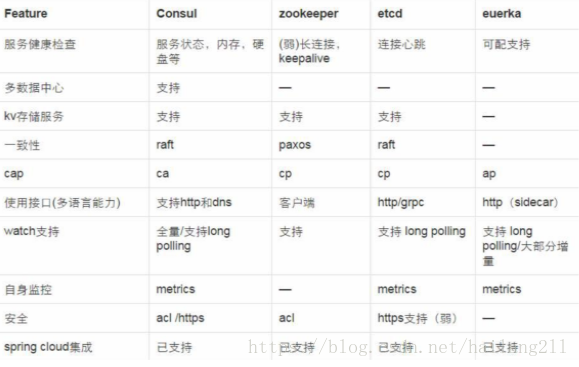
关于Consul的更多介绍,比如优点,这里就不再赘述了,上网一搜就可以随处找到了。但是,必须贴一个和其他类似软件的对比:
二、Consul安装前的理解
Consul Agent有两种运行模式:Server和Client。这里的Server和Client只是Consul集群层面的区分,与搭建在Cluster之上的应用服务无关, 以Server模式运行的Consul Agent节点用于维护Consul集群的状态,官方建议每个Consul Cluster至少有3个或以上的运行在Server Mode的Agent,Client节点不限。
Consul支持多数据中心,每个数据中心的Consul Cluster都会在运行于Server模式下的Agent节点中选出一个Leader节点,这个选举过程通过Consul实现的raft协议保证,多个 Server节点上的Consul数据信息是强一致的。处于Client Mode的Consul Agent节点比较简单,无状态,仅仅负责将请求转发给Server Agent节点。
这里我们会演示两种情况的安装:一种单节点部署,二种集群部署,由简单到复杂的部署会更容易理解。
三、Consul正式安装(单节点)
1、下载Consul
官网地址:https://www.consul.io/downloads.html,下载对应的版本即可
确认好版本好,下载到我们的本机目录命令:
> wget -P /opt/consul/ https://releases.hashicorp.com/consul/1.2.2/consul_1.2.2_linux_amd64.zip
2、安装Consul
#先解压Consul文件

> unzip consul_1.2.2_linux_amd64.zip

#将Consul文件拷贝到执行目录

> mv consul /usr/local/bin/

注:如果找不到unzip命令请安装,命令如:yum install -y unzip
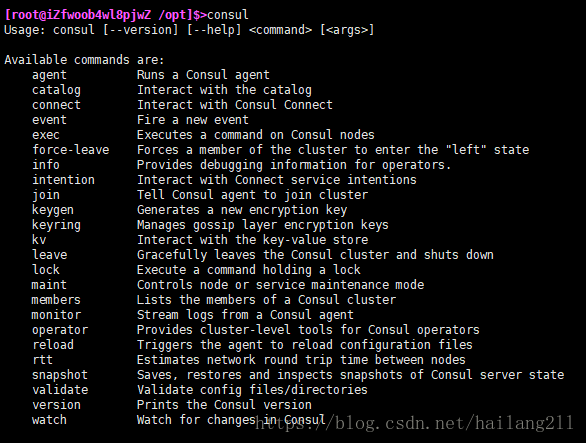
3、测试Consul是否安装成功
> consul
如下图表示成功:
4、启动与配置Consul服务
consul agent -server -ui -bootstrap-expect=1 -data-dir=/tmp/consul -node=consul-1 -client=0.0.0.0 -bind=172.16.1.174 -datacenter=dc1
如下图表示启动成功:
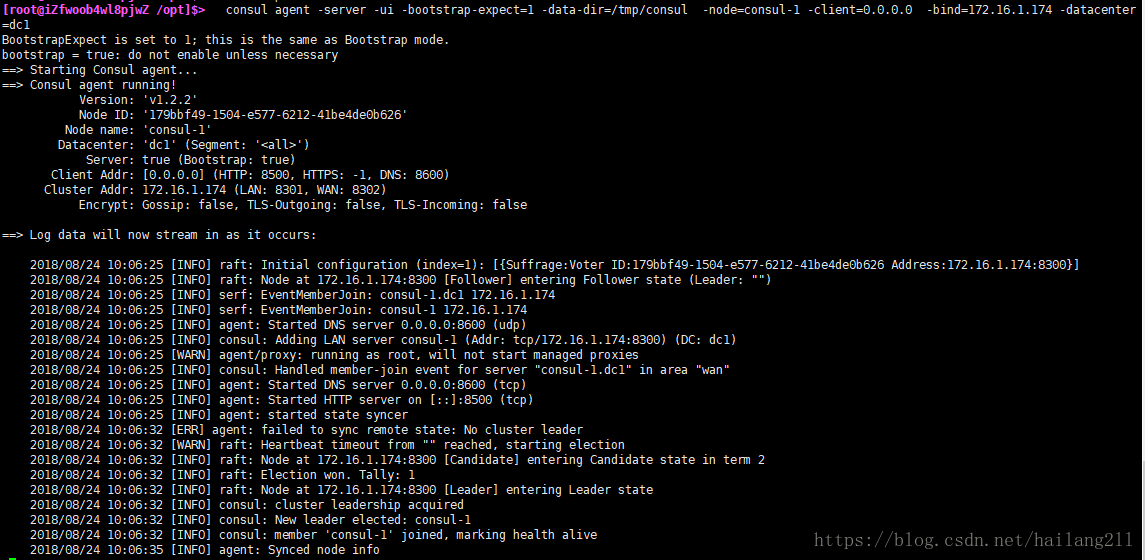
输入地址查看服务状态:目前Consul正常运行

进一步查看server的情况与角色状态
查看各个server的情况

> consul members

查看目前全部的consul的角色状态:

> consul operator raft list-peers

5、通过配置文件来注册服务(也可以从consul api 接口添加服务注册,他会自动持久化)
vi /etc/consul/services_config.json

{

    "services":[

        {

            "id": "CLIENT_SERVICE_01",

            "name" : "MVCClientService",

            "tags": [

                "urlprefix-/MVCClientService01"

            ],

            "address": "172.16.1.110",

            "port": 5000,

            "checks": [

                {

                    "name": "clientservice_check",

                    "http": "http://172.16.1.110:5000",

                    "interval": "10s",

                    "timeout": "5s"

                }

            ]

        },

         {

            "id": "CLIENT_SERVICE_02",

            "name" : "APIClientService",

            "tags": [

                "urlprefix-/APIClientService02"

            ],

            "address": "172.16.1.110",

            "port": 5000,

            "checks": [

                {

                    "name": "clientservice_check",

                    "http": "http://172.16.1.110:5001/api/values",

                    "interval": "10s",

                    "timeout": "5s"

                }

            ]

        }

     ]

}
重新运行命令:
consul agent -server -ui -bootstrap-expect=1 -config-dir=/etc/consul -data-dir=/tmp/consul -node=consul-1 -client=0.0.0.0 -bind=172.16.1.174 -datacenter=dc1
注:一定要保证后端服务正常运行:端口5000,5001
运行成功后,如下图:
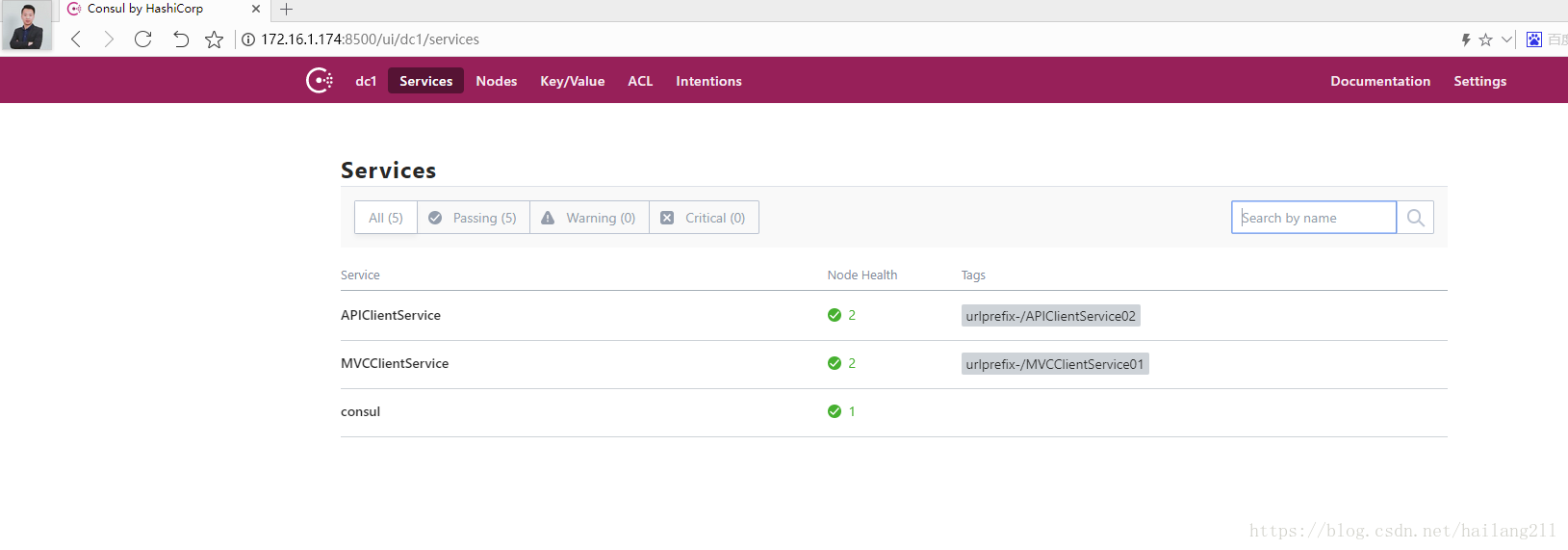
6、通过consul api 接口注册服务
创建一个ASP.NET Core WebAPI程序
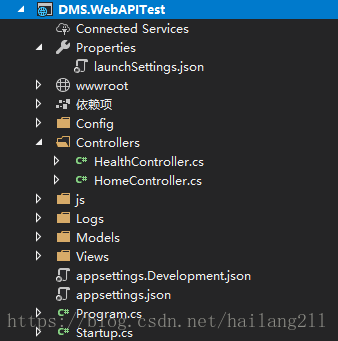
创建一个HealthController用于Consul的健康检查
[Produces("application/json")]

[Route("api/Health")]

public class HealthController : Controller

{

[HttpGet]

public IActionResult Get() => Ok("ok");

}
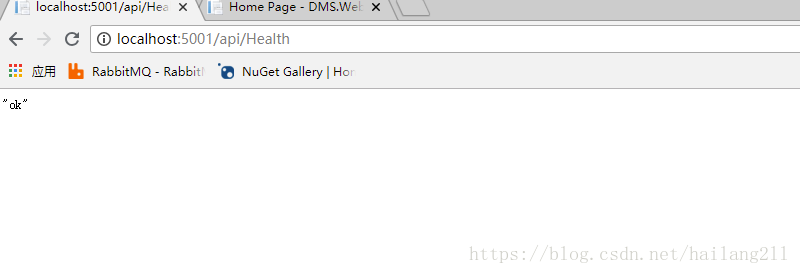
注:Consul会通过call这个API来确认Service的健康状态。
基于IApplicationBuilder写一个扩展方法,用于调用Consul API
在nuge管理器中引入Consul包
public static class ConsulBuilderExtensions

    {

        // 服务注册

        public static IApplicationBuilder RegisterConsul(this IApplicationBuilder app, IApplicationLifetime lifetime, HealthService healthService, ConsulService consulService)

        {

            var consulClient = new ConsulClient(x => x.Address = new Uri($"http://{consulService.IP}:{consulService.Port}"));//请求注册的 Consul 地址

            var httpCheck = new AgentServiceCheck()

            {

                DeregisterCriticalServiceAfter = TimeSpan.FromSeconds(5),//服务启动多久后注册

                Interval = TimeSpan.FromSeconds(10),//健康检查时间间隔,或者称为心跳间隔

                HTTP = $"http://{healthService.IP}:{healthService.Port}/api/health",//健康检查地址

                Timeout = TimeSpan.FromSeconds(5)

            };

            // Register service with consul

            var registration = new AgentServiceRegistration()

            {

                Checks = new[] { httpCheck },

                ID = healthService.Name + "_" + healthService.Port,

                Name = healthService.Name,

                Address = healthService.IP,

                Port = healthService.Port,

                Tags = new[] { $"urlprefix-/{healthService.Name}" }//添加 urlprefix-/servicename 格式的 tag 标签,以便 Fabio 识别

            };

            consulClient.Agent.ServiceRegister(registration).Wait();//服务启动时注册,内部实现其实就是使用 Consul API 进行注册(HttpClient发起)

            lifetime.ApplicationStopping.Register(() =>

            {

                consulClient.Agent.ServiceDeregister(registration.ID).Wait();//服务停止时取消注册

            });

            return app;

        }

    }
在Starup类的Configure方法中,调用此扩展方法
 #region register this service

            ConsulService consulService = new ConsulService()

            {

                IP = Configuration["Consul:IP"],

                Port = Convert.ToInt32(Configuration["Consul:Port"])

            };

            HealthService healthService = new HealthService()

            {

                IP = Configuration["Service:IP"],

                Port = Convert.ToInt32(Configuration["Service:Port"]),

                Name = Configuration["Service:Name"],

            };

            app.RegisterConsul(lifetime, healthService, consulService);

            #endregion
其中用到了appSettings.json配置文件,其定义如下:
  "Service": {

    "Name": "DMSWebAPITest",

    "IP": "localhost",

    "Port": "5001"

  },

  "Consul": {

    "IP": "localhost",

    "Port": "8500"

  }
其中ConsulService类定义如下:
public class ConsulService

    {

        public string IP { get; set; }

        public int Port { get; set; }

    }
其中HealthService类定义如下:
public class HealthService

    {

        public string Name { get; set; }

        public string IP { get; set; }

        public int Port { get; set; }

    }
确保HealthController的API能正常访问,以便做健康检查
成功运行后,查看Consul集群的状态,UI界面
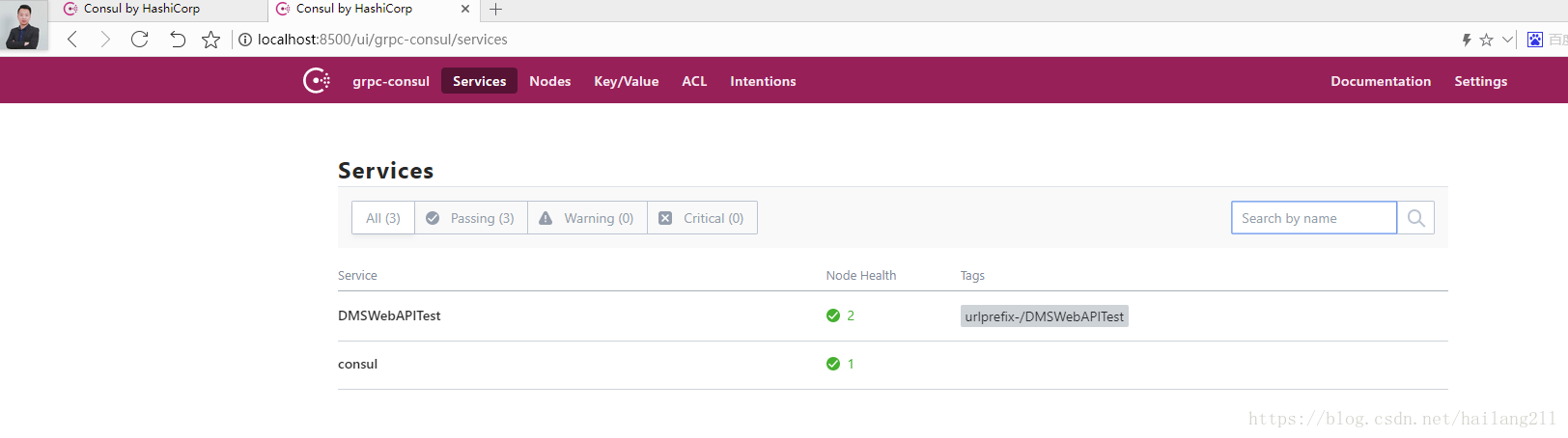
以上实现了通过配置文件注册,API接口注册到Consul实例,后续加入Ocelot构建API网关,到时会结合Consul进行进一步的集成,另外,还会尝试Polly进行熔断降级。
以上操作都是在Consul Server 端进行操作的,按官方说明:Consul Server与Consul Client要进行区分,后端的服务应该部署在Consul Client上,他们分别处理自己的事情就好。
下一篇文章已更新:.netcore consul实现服务注册与发现-集群
实战中参考的资料:https://www.cnblogs.com/edisonchou/p/9124985.html
交流qq群:18362376
.netcore consul实现服务注册与发现-单节点部署的更多相关文章
- .netcore consul实现服务注册与发现-集群部署
一.Consul的集群介绍 Consul Agent有两种运行模式:Server和Client.这里的Server和Client只是Consul集群层面的区分,与搭建在Cluster之上的应用服务无关 ...
- .netcore consul实现服务注册与发现-集群完整版
原文:.netcore consul实现服务注册与发现-集群完整版 一.Consul的集群介绍 Consul Agent有两种运行模式:Server和Client.这里的Server和Clien ...
- Consul初探-服务注册和发现
前言 经过上一篇的学习,现在已经来到了服务注册发现环节:Consul 的核心功能就是服务注册和发现,Consul 客户端通过将自己注册到 Consul 服务器集群,然后等待调用方去发现服务,实现代理转 ...
- 一个故事,一段代码告诉你如何使用不同语言(Golang&C#)提供相同的能力基于Consul做服务注册与发现
目录 引言 什么是微服务 传统服务 微服务 什么是服务注册与服务发现 为什么要使用不同的语言提供相同的服务能力 服务协调器 服务注册 Golang C#(.NetCore3.1) 服务发现 通过Htt ...
- Spring Cloud Consul 实现服务注册和发现
Spring Cloud 是一个基于 Spring Boot 实现的云应用开发工具,它为基于 JVM 的云应用开发中涉及的配置管理.服务发现.断路器.智能路由.微代理.控制总线.全局锁.决策竞选.分布 ...
- 简单RPC框架-基于Consul的服务注册与发现
*:first-child { margin-top: 0 !important; } body>*:last-child { margin-bottom: 0 !important; } /* ...
- Spring Cloud Consul使用——服务注册与发现(注册中心)
整理自该文章 一.Consul 服务端接下来我们开发 Consul 的服务端,创建一个 spring-cloud-consul-producer 项目 1.添加依赖包 <dependencies ...
- spring boot2X整合Consul一服务注册与发现
Consul 是HashiCorp公司推出的开源工具,用于实现分布式系统的服务发现与配置. 关键特性: 服务注册/发现 数据强一致性保证 多数据中心 健康检查 key/value存储 1.下载 htt ...
- python使用consul进行服务注册和发现
阅读目录 一.安装启动consul 二.python服务注册 三.golang服务注册 四.通过API的方式获取信息 回到顶部 一.安装启动consul 1.通过docker快速安装 #获取docke ...
随机推荐
- ViewPager+Fragmrnt最简单结合方法
Fragment和ViewPager 本博文系本菜鸟第一次博文展示,有错误之处请虽然提出 FragmentPagerAdapter 谷歌官方提供了这么一个adapter(FragmentPagerAd ...
- 1.10 Python基础知识 - 序列:列表
在Python中有很多的组合数据类型,其中包括列表,元组,字符串等数据类型,这些数据类型统称为序列类型,用他们可以处理复杂的数据. 列表,是一组有序元素组合的数据结构.列表是可变的数据类型. 列表采用 ...
- ThinkPHP5.0---URL访问
ThinkPHP 5.0 在没有启用路由的情况下典型的URL访问规则是(采用 PATH_INFO 访问地址): http://serverName/index.php(或者其它应用入口文件)/模块/控 ...
- 【例题 7-10 UVA - 11212】Editing a Book
[链接] 我是链接,点我呀:) [题意] 在这里输入题意 [题解] 迭代加深搜. 很容易想到,最多只要搜8层就可以得到答案了 ->最多8下肯定可以还原. 则枚举一下最大层数.然后做个深搜就好. ...
- Jpa 的Persistence.xml配置讲解
<?xml version="1.0"?> <persistence xmlns="http://java.sun.com/xml/ns/persist ...
- Nginx分发服务
nginx配置分发tomcat服务 http://blog.csdn.net/yan_chou/article/details/53265775 http://www.cnblogs.com/deng ...
- 忍者无敌-实例解说Cocos2d-x瓦片地图
实例比較简单,如图所看到的,地图上有一个忍者精灵,玩家点击他周围的上.下.左.右,他能够向这个方向行走. 当他遇到障碍物后是无法穿越的,障碍物是除了草地以为部分,包含了:树.山.河流等. 忍者实例地图 ...
- JS学习笔记 - fgm练习 2-5 - 函数传参 设置div样式
练习地址:http://www.fgm.cc/learn/lesson2/05.html <script> window.onload = function(){ var oDiv = d ...
- OpenNI2获取华硕XtionProLive深度图和彩色图并用OpenCV显示
使用OpenNI2打开XtionProLive时有个问题,彩色图分辨率不管怎样设置始终是320*240,深度图倒是能够设成640*480,而OpenNI1.x是能够获取640*480的彩色图的. 彩色 ...
- Android 底部TabActivity(0)——开篇(界面分析|系列文章文件夹)
当下主流的软件没有一个统一明白的风格,App框架什么样的都有,但个人钟情于页面底部Tab分签架构,移动设备的屏幕尽管越来越大,可是显示的内容还是有限,为了能展示很多其它的内容,方便简洁的操作习惯中Ta ...