
python使用consul进行服务注册和发现
一、安装启动consul
1.通过docker快速安装
#获取docker镜像

docker pull consul
2.启动consul
然后就可以启动集群了,这里启动4个Consul Agent,3个Server(会选举出一个leader),1个Client

#启动第1个Server节点,集群要求要有3个Server,将容器8500端口映射到主机8900端口,同时开启管理界面

docker run -d --name=consul1 -p 8900:8500 -e CONSUL_BIND_INTERFACE=eth0 consul agent --server=true --bootstrap-expect=3 --client=0.0.0.0 -ui

#启动第2个Server节点,并加入集群

docker run -d --name=consul2 -e CONSUL_BIND_INTERFACE=eth0 consul agent --server=true --client=0.0.0.0 --join 172.17.0.2

#启动第3个Server节点,并加入集群

docker run -d --name=consul3 -e CONSUL_BIND_INTERFACE=eth0 consul agent --server=true --client=0.0.0.0 --join 172.17.0.2

#启动第4个Client节点,并加入集群

docker run -d --name=consul4 -e CONSUL_BIND_INTERFACE=eth0 consul agent --server=false --client=0.0.0.0 --join 172.17.0.2
第1个启动容器的IP一般是172.17.0.2,后边启动的几个容器IP会排着来:172.17.0.3、172.17.0.4、172.17.0.5。
这些Consul节点在Docker的容器内是互通的,他们通过桥接的模式通信。但是如果主机要访问容器内的网络,需要做端口映射。在启动第一个容器时,将Consul的8500端口映射到了主机的8900端口,这样就可以方便的通过主机的浏览器查看集群信息。
二、python服务注册
#pip install python-consul

import consul

class Consul(object):

    def __init__(self, host, port):

        '''初始化,连接consul服务器'''

        self._consul = consul.Consul(host, port)

    def RegisterService(self, name, host, port, tags=None):

        tags = tags or []

        # 注册服务

        self._consul.agent.service.register(

            name,

            name,

            host,

            port,

            tags,

            # 健康检查ip端口,检查时间:5,超时时间:30,注销时间:30s

            check=consul.Check().tcp(host, port, "5s", "30s", "30s"))

    def GetService(self, name):

        services = self._consul.agent.services()

        service = services.get(name)

        if not service:

            return None, None

        addr = "{0}:{1}".format(service['Address'], service['Port'])

        return service, addr

if __name__ == '__main__':

    host="10.0.0.11" #consul服务器的ip

    port="" #consul服务器对外的端口

    consul_client=Consul(host,port)

    name="maple"

    host="10.0.0.11"

    port=8900

    consul_client.RegisterService(name,host,port)

    check = consul.Check().tcp(host, port, "5s", "30s", "30s")

    print(check)

    res=consul_client.GetService("maple")

    print(res)
#执行效果

{'tcp': '10.0.0.11:8900', 'interval': '5s', 'timeout': '30s', 'DeregisterCriticalServiceAfter': '30s'}

({'ID': 'maple', 'Service': 'maple', 'Tags': [], 'Meta': {}, 'Port': 8900, 'Address': '10.0.0.11', 'Weights': {'Passing': 1, 'Warning': 1}, 'EnableTagOverride': False}, '10.0.0.11:8900')
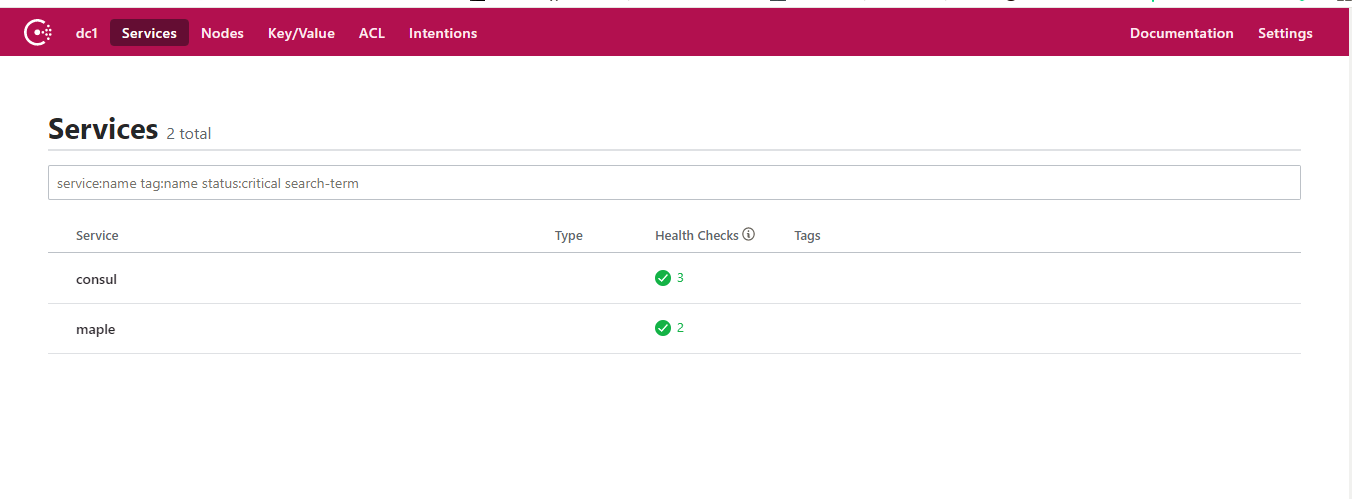
通过10.0.0.11:8900访问注册后的效果

三、golang服务注册
package main

import (

    "fmt"

    consul "github.com/hashicorp/consul/api"

    "strconv"

    "strings"

)

type Consul struct {

    consul *consul.Client

}

//服务发现 用来注册自己的服务端口给别的服务器调用和发现其他服务器

func InitConsul(host string, port int) (*Consul) {

    config := consul.DefaultConfig()

    config.Address = fmt.Sprintf("%s:%d", host, port)

    c, err := consul.NewClient(config)

    if err != nil {

        panic(err)

    }

    return &Consul{

        c,

    }

}

func (c *Consul) RegisterService(Name, Addr string, Port int, Tags ...string) error {

    return c.consul.Agent().ServiceRegister(&consul.AgentServiceRegistration{

        ID:      Name,

        Name:    Name,

        Port:    Port,

        Tags:    Tags,

        Address: Addr,

        Check: &consul.AgentServiceCheck{

            Timeout:                        "5s",

            Interval:                       "10s",

            TCP:                            fmt.Sprintf("%v:%v", Addr, Port, ),

            DeregisterCriticalServiceAfter: "30s",

        },

    })

}

func (c *Consul) GetService(Name string) (service *consul.AgentService, err error) {

    service, _, err = c.consul.Agent().Service(Name, &consul.QueryOptions{})

    return

}

func main() {

    var Consul *Consul

    //注册consul服务地址

    Host:="10.0.0.11"

    Port:=8900

    Server:="10.0.0.11:8900"

    Name:="go_maple"

    Consul = InitConsul(Host,Port)

    serverHost, err := strconv.Atoi(strings.Split(Server, ":")[1])

    if err != nil {

        panic(err)

    }

    err = Consul.RegisterService(Name,Host,serverHost)

    if err != nil {

        panic(err)

    }

    //获取服务

    res,err:=Consul.GetService("go_maple")

    if err != nil {

        panic(err)

    }

    fmt.Println(res)

}
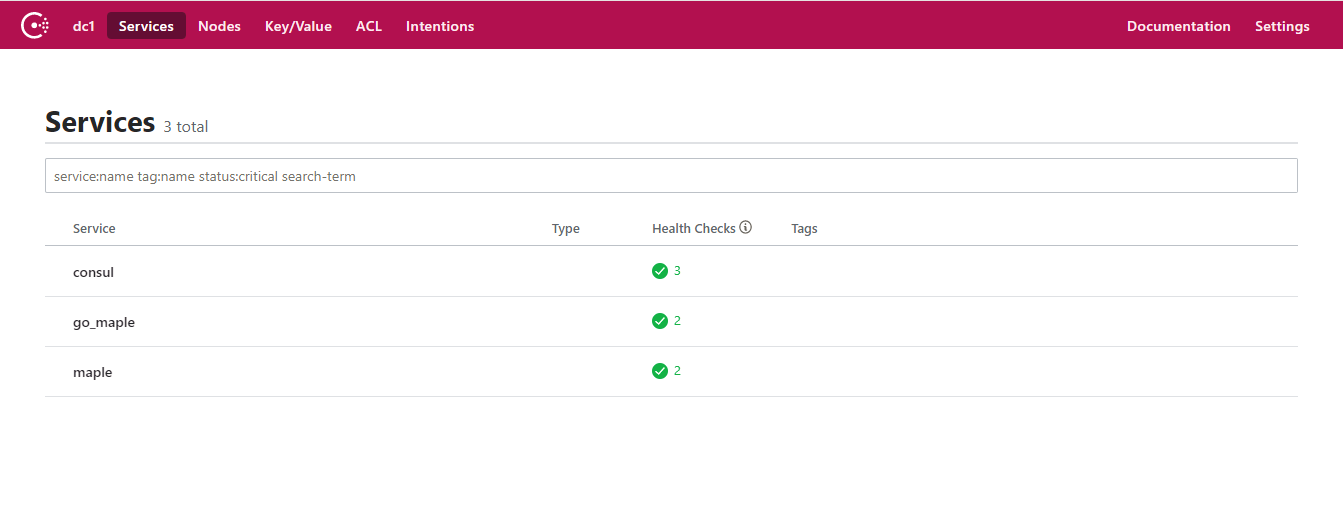
四、通过API的方式获取信息
#http://10.0.0.11:8900/v1/health/service/maple

[

    {

        "Node": {

            "ID": "db46c9ad-5c8d-bb9b-0543-9edb48e7bccc",

            "Node": "71a1355e94b6",

            "Address": "172.17.0.2",

            "Datacenter": "dc1",

            "TaggedAddresses": {

                "lan": "172.17.0.2",

                "wan": "172.17.0.2"

            },

            "Meta": {

                "consul-network-segment": ""

            },

            "CreateIndex": 5,

            "ModifyIndex": 9

        },

        "Service": {

            "ID": "maple",

            "Service": "maple",

            "Tags": [],

            "Address": "10.0.0.11",

            "Meta": null,

            "Port": 8900,

            "Weights": {

                "Passing": 1,

                "Warning": 1

            },

            "EnableTagOverride": false,

            "ProxyDestination": "",

            "Proxy": {},

            "Connect": {},

            "CreateIndex": 4296,

            "ModifyIndex": 4296

        },

        "Checks": [

            {

                "Node": "71a1355e94b6",

                "CheckID": "serfHealth",

                "Name": "Serf Health Status",

                "Status": "passing",

                "Notes": "",

                "Output": "Agent alive and reachable",

                "ServiceID": "",

                "ServiceName": "",

                "ServiceTags": [],

                "Definition": {},

                "CreateIndex": 5,

                "ModifyIndex": 5

            },

            {

                "Node": "71a1355e94b6",

                "CheckID": "service:maple",

                "Name": "Service 'maple' check",

                "Status": "passing",

                "Notes": "",

                "Output": "TCP connect 10.0.0.11:8900: Success",

                "ServiceID": "maple",

                "ServiceName": "maple",

                "ServiceTags": [],

                "Definition": {},

                "CreateIndex": 4296,

                "ModifyIndex": 4297

            }

        ]

    }

]
#http://10.0.0.11:8900/v1/health/service/go_maple

[

    {

        "Node": {

            "ID": "db46c9ad-5c8d-bb9b-0543-9edb48e7bccc",

            "Node": "71a1355e94b6",

            "Address": "172.17.0.2",

            "Datacenter": "dc1",

            "TaggedAddresses": {

                "lan": "172.17.0.2",

                "wan": "172.17.0.2"

            },

            "Meta": {

                "consul-network-segment": ""

            },

            "CreateIndex": 5,

            "ModifyIndex": 9

        },

        "Service": {

            "ID": "go_maple",

            "Service": "go_maple",

            "Tags": [],

            "Address": "10.0.0.11",

            "Meta": null,

            "Port": 8900,

            "Weights": {

                "Passing": 1,

                "Warning": 1

            },

            "EnableTagOverride": false,

            "ProxyDestination": "",

            "Proxy": {},

            "Connect": {},

            "CreateIndex": 4725,

            "ModifyIndex": 4741

        },

        "Checks": [

            {

                "Node": "71a1355e94b6",

                "CheckID": "serfHealth",

                "Name": "Serf Health Status",

                "Status": "passing",

                "Notes": "",

                "Output": "Agent alive and reachable",

                "ServiceID": "",

                "ServiceName": "",

                "ServiceTags": [],

                "Definition": {},

                "CreateIndex": 5,

                "ModifyIndex": 5

            },

            {

                "Node": "71a1355e94b6",

                "CheckID": "service:go_maple",

                "Name": "Service 'go_maple' check",

                "Status": "passing",

                "Notes": "",

                "Output": "TCP connect 10.0.0.11:8900: Success",

                "ServiceID": "go_maple",

                "ServiceName": "go_maple",

                "ServiceTags": [],

                "Definition": {},

                "CreateIndex": 4725,

                "ModifyIndex": 4742

            }

        ]

    }

]
python使用consul进行服务注册和发现的更多相关文章
- .netcore consul实现服务注册与发现-集群完整版
原文:.netcore consul实现服务注册与发现-集群完整版 一.Consul的集群介绍 Consul Agent有两种运行模式:Server和Client.这里的Server和Clien ...
- .netcore consul实现服务注册与发现-单节点部署
原文:.netcore consul实现服务注册与发现-单节点部署 一.Consul的基础介绍 Consul是HashiCorp公司推出的开源工具,用于实现分布式系统的服务发现与配置.与其他分 ...
- .netcore consul实现服务注册与发现-集群部署
一.Consul的集群介绍 Consul Agent有两种运行模式:Server和Client.这里的Server和Client只是Consul集群层面的区分,与搭建在Cluster之上的应用服务无关 ...
- Spring Cloud Consul 实现服务注册和发现
Spring Cloud 是一个基于 Spring Boot 实现的云应用开发工具,它为基于 JVM 的云应用开发中涉及的配置管理.服务发现.断路器.智能路由.微代理.控制总线.全局锁.决策竞选.分布 ...
- Consul初探-服务注册和发现
前言 经过上一篇的学习,现在已经来到了服务注册发现环节:Consul 的核心功能就是服务注册和发现,Consul 客户端通过将自己注册到 Consul 服务器集群,然后等待调用方去发现服务,实现代理转 ...
- 一个故事,一段代码告诉你如何使用不同语言(Golang&C#)提供相同的能力基于Consul做服务注册与发现
目录 引言 什么是微服务 传统服务 微服务 什么是服务注册与服务发现 为什么要使用不同的语言提供相同的服务能力 服务协调器 服务注册 Golang C#(.NetCore3.1) 服务发现 通过Htt ...
- 简单RPC框架-基于Consul的服务注册与发现
*:first-child { margin-top: 0 !important; } body>*:last-child { margin-bottom: 0 !important; } /* ...
- Spring Cloud Consul使用——服务注册与发现(注册中心)
整理自该文章 一.Consul 服务端接下来我们开发 Consul 的服务端,创建一个 spring-cloud-consul-producer 项目 1.添加依赖包 <dependencies ...
- spring boot2X整合Consul一服务注册与发现
Consul 是HashiCorp公司推出的开源工具,用于实现分布式系统的服务发现与配置. 关键特性: 服务注册/发现 数据强一致性保证 多数据中心 健康检查 key/value存储 1.下载 htt ...
随机推荐
- MySQL数据的优化方案
一.选取最使用的字段属性 mysql可以使用的支持大数据量的存取,但是一般说来,数据库中的表越小,在它上面执行的查询也就会越快,因此在创建表的时候,为了获得更好的性能,我们可以将表中的字段的宽度尽量设 ...
- CSS——设置边框渐变色
前言 最近在写一个typecho的主题,刚好遇到这样一个问题就记录下吧 步骤 这是一个CSS的过度效果,效果如下. 代码 .object{ width: 50px; height: 50px; bac ...
- nginx的alias与root的区别
root的写法: location /request_path/image/ { root /local_path/image/; } 这样配置的结果就是当客户端请求 /request_path/im ...
- 【Servlet】基于Jsp的微信Oauth2认证
作者:yongh701 挂载到微信服务器上的应用程序,能够通过微信Oauth2认证,能够抓取到用户的微信信息,当然,你首先要通过微信的帐号资质审核. 一.基本思想 二.基本过程 1.登陆微信的公众平台 ...
- SOLOR介绍
https://www.cnblogs.com/ki16/p/11209508.html
- Dubbo源码分析:ChannelHandler
背景 一个请求经过序列化二进制数据转化成对象之后.请求进入netty框架,netty框架经过业务处理把主动权转交给NettyHandler对象.NettyHandler进入ChannelHandler ...
- MongoDB TTL集合与固定集合
1.固定集合 MongoDB可以创建固定长度的集合,可以设置最大的集合空间或最大的集合数.创建集合的语法如下: db.createCollection("collection ...
- “OKR播种机”JOHN DOERR–目标是对抗纷乱思绪的一针疫苗
OKR培养出疯狂的想法,再加上对的人,奇迹就会出现 约翰·杜尔是美国最有影响力.最具创意.最不拘传统的冒险资本投资家之一.在短短10年内创造了高达1,000亿美元的经济价值.迄今为止,他已向 250家 ...
- 干货 | 10分钟教你用column generation求解vehicle routing problems
OUTLINE 前言 VRPTW description column generation Illustration code reference 00 前言 此前向大家介绍了列生成算法的详细过程, ...
- 微信小程序音乐播放器组件
wxml <image bindtap="click" src="{{isPlay?'/images/':'/images/'}}"/> JS Pa ...