
Consul初探-服务注册和发现
前言
经过上一篇的学习,现在已经来到了服务注册发现环节;Consul 的核心功能就是服务注册和发现,Consul 客户端通过将自己注册到 Consul 服务器集群,然后等待调用方去发现服务,实现代理转发到真正的业务系统,还可以基于服务发现做负载均衡,甚至可以在客户端请求到底服务之前进行拦截,做一些基础性的工作,比如身份验证、限流、熔断等等业务系统的前瞻性工作。
服务注册
引用 Consul.net 客户端
在 .NETCore 平台下,可以使用 Consul 的客户端组件,使其嵌入到业务系统中,完成服务自动注册、健康检查等工作,为了使用这些自动化的功能,需要在项目中进行 nuget 包引用
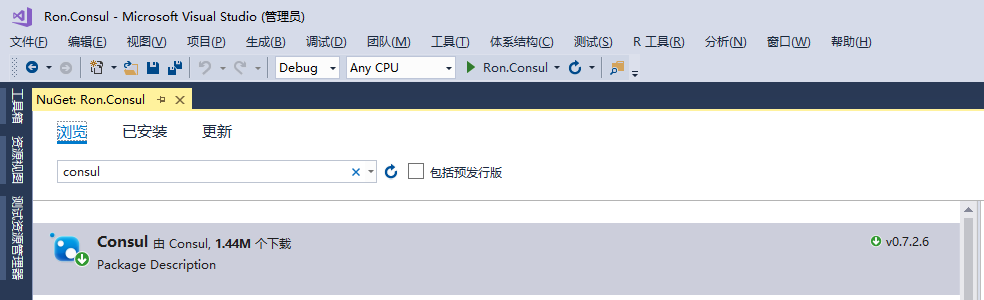
截止本文发文时,Consul 的 NETStandard 最新版本是 0.7.2.6,从版本号来看,更新的频率非常频繁,但是 Github 上的 star 数量并不多,这就表示 .NETCore 社区在 Consul 的关注度上还是非常小众的。
改造 Program.cs 程序入口
为了使用服务运行时侦听的地址和端口作为 Consul 健康检查的地址,需要对 Program.cs 进行简单的改造,代码如下:
        public static IWebHost BuildWebHost(string[] args)

        {

            var config = new ConfigurationBuilder().AddCommandLine(args).Build();

            var url = $"{config["scheme"]}://{config["ip"]}:{config["port"]}";

            return WebHost.CreateDefaultBuilder(args)

                  .UseStartup<Startup>()

                  .UseConfiguration(config)

                  .UseUrls(url)

                  .Build();

        }
上面的代码将命令行的参数编译为配置文件对象,这些参数为了方便调试,我一次性的写入了Properties\launchSettings.json 文件中,如下图

在 launchSettings.json 文件中的表现形式为:
{

  "profiles": {

    "Ron.Consul": {

      "commandName": "Project",

      "commandLineArgs": "--scheme http --ip 172.16.10.227 --port 51800"

    }

  }

}
建立 StartupExtension.cs
我们需要在服务启动后,将服务自动注册到 Consul 的代理服务器集群中,为此,需要封装一些简单的注册代码,以便复用
 public static class StartupExtension

    {

        /// <summary>

        ///  定义服务健康检查的url地址

        /// </summary>

        public const string HEALTH_CHECK_URI = "/consul/health/check";

        /// <summary>

        ///  读取 Consul 配置,注入服务

        /// </summary>

        /// <param name="service"></param>

        /// <param name="configuration"></param>

        /// <returns></returns>

        public static IServiceCollection AddConsulConfig(this IServiceCollection service,

                                                        IConfiguration configuration)

        {

            var clientConfig = configuration.GetSection("Consul").Get<ConsulConfig>();

            service.Configure<ConsulConfig>(configuration.GetSection("Consul"));

            return service;

        }

        /// <summary>

        ///  将 ConsulClient 注入管道

        /// </summary>

        /// <param name="app"></param>

        /// <param name="configuration"></param>

        /// <param name="lifetime"></param>

        /// <param name="cc"></param>

        /// <returns></returns>

        public static IApplicationBuilder UseConsul(this IApplicationBuilder app,

                                                    IConfiguration configuration,

                                                    IApplicationLifetime lifetime,

                                                    IOptions<ConsulConfig> cc)

        {

            var clientConfig = cc.Value;

            //获取服务运行侦听的地址和端口作为健康检查的地址

            var clientIP = new Uri($"{configuration["scheme"]}://{configuration["ip"]}:{configuration["port"]}");

            var serviceId = $"{clientConfig.ClientName}-{clientIP.Host}-{clientIP.Port}";

            var ipv4 = clientIP.Host;

            var consulClient = new ConsulClient(config =>

            {

                config.Address = new Uri(clientConfig.Server);

                config.Datacenter = clientConfig.DataCenter;

            });

            var healthCheck = new AgentServiceCheck()

            {

                DeregisterCriticalServiceAfter = TimeSpan.FromSeconds(7), // 服务启动 7 秒后注册服务

                Interval = TimeSpan.FromSeconds(9), // 健康检查的间隔时间为:9秒

                HTTP = $"{clientIP.Scheme}://{ipv4}:{clientIP.Port}{HEALTH_CHECK_URI}"

            };

            var regInfo = new AgentServiceRegistration()

            {

                Checks = new[] { healthCheck },

                Address = ipv4,

                ID = serviceId,

                Name = clientConfig.ClientName,

                Port = clientIP.Port

            };

            consulClient.Agent.ServiceRegister(regInfo).GetAwaiter().GetResult();

            lifetime.ApplicationStopped.Register(() =>

            {

                consulClient.Agent.ServiceRegister(regInfo);

            });

            return app;

        }

        /// <summary>

        ///  实现健康检查输出,无需另行定义 Controller

        /// </summary>

        /// <param name="app"></param>

        /// <returns></returns>

        public static IApplicationBuilder MapHealthCheck(this IApplicationBuilder app)

        {

            app.Map(HEALTH_CHECK_URI, s =>

            {

                s.Run(async context =>

                {

                    Console.ForegroundColor = ConsoleColor.Blue;

                    Console.WriteLine("Health check {0}", DateTime.Now);

                    Console.ForegroundColor = ConsoleColor.Gray;

                    await context.Response.WriteAsync("ok");

                });

            });

            return app;

        }

    }
上面的代码,实现是服务注册和健康检查的逻辑,代码比较简单,每个方法头部都有注释,应该还是比较清晰,这里就不再过多解释了,接下来开始在 Startup.cs 中启用 ConsulClient。
服务注入
        public void ConfigureServices(IServiceCollection services)

        {

            services.AddConsulConfig(this.Configuration);

            ...

        }
加入请求管道队列
        public void Configure(IApplicationBuilder app,

                              IHostingEnvironment env,

                              IApplicationLifetime lifetime,

                              IOptions<ConsulConfig> cc)

        {

            app.UseConsul(this.Configuration, lifetime, cc);

            app.MapHealthCheck();

            ...

        }
定义业务接口
下面简单的实现一个 Controller,在该 Controller 里面增加两个业务接口,方便调用就好
        [HttpGet("index")]

        public ActionResult<string> Index()

        {

            return "Hello wrold";

        }

        [HttpGet("add/{x:int}/{y:int}")]

        public ActionResult<int> Add(int x, int y)

        {

            var result = x + y;

            Console.ForegroundColor = ConsoleColor.Red;

            Console.WriteLine("x+y={0}", result);

            Console.ForegroundColor = ConsoleColor.Gray;

            return result;

        }
启动服务,执行注册
好了,到这里,服务注册的准备工作基本完成,接下来,按 F5 启动程序,程序将自动进行服务注册等工作
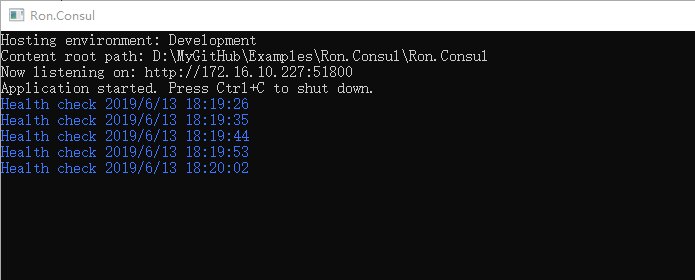
图中蓝色部分,就是 Consul 代理服务器集群对当前服务执行的健康检查,健康检查的原则只有一条,执行 http 请求,并返回 httpstatus=200 即视为健康,打开 Consul 的 Web 控制台界面,查看实际的服务状态
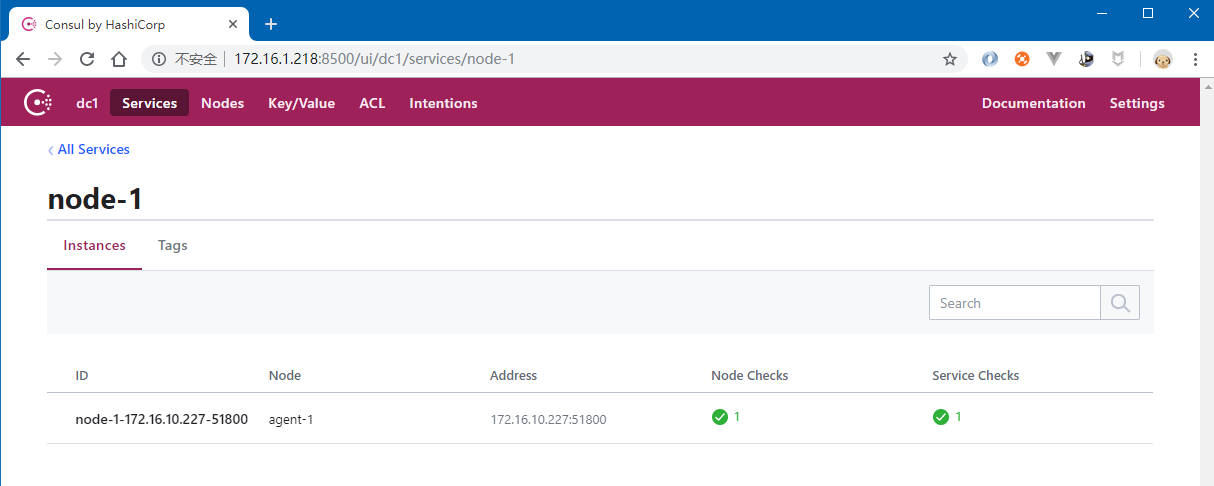
从上图中可以看到,服务状态是正常的(绿色)
服务发现
Consul 系统了许多 api 接口,供服务网关(或者代理)从 Consul 中获取已注册的健康的服务,比如下面的 api 地址
获取所有已注册的健康的服务
http://172.16.1.218:8500/v1/agent/services
获取指定的服务
http://172.16.1.218:8500/v1/agent/service/node-1-172.16.10.227-51800
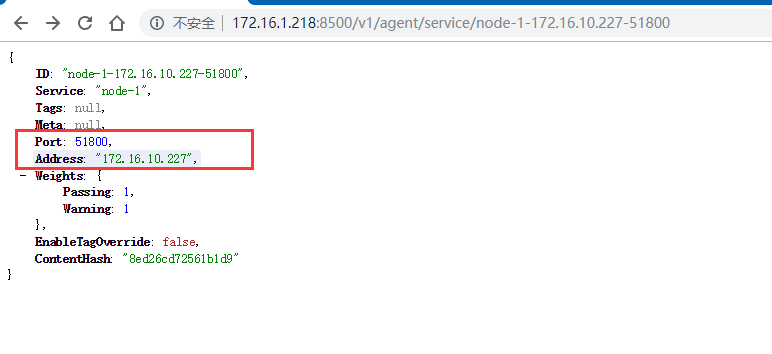
上图中的内容,就是单个服务的注册信息,图中红色部分,是真实的服务的主机地址和侦听的端口,网关代理可以将指定路由转发到该地址实现业务调用。
结束语
截止目前为止,我们实现了部署 Consul 代理服务器集群、服务注册、发现,但是目前来说,还没有完全实现业务调用,现在,还缺少关键的一环:那就是服务网关;服务网关的调用,我们放在下一篇
源代码下载
本示例所有代码都已托管到 Github,欢迎下载:https://github.com/lianggx/Examples/tree/master/Ron.Consul
Consul初探-服务注册和发现的更多相关文章
- .netcore consul实现服务注册与发现-集群完整版
原文:.netcore consul实现服务注册与发现-集群完整版 一.Consul的集群介绍 Consul Agent有两种运行模式:Server和Client.这里的Server和Clien ...
- .netcore consul实现服务注册与发现-单节点部署
原文:.netcore consul实现服务注册与发现-单节点部署 一.Consul的基础介绍 Consul是HashiCorp公司推出的开源工具,用于实现分布式系统的服务发现与配置.与其他分 ...
- .netcore consul实现服务注册与发现-集群部署
一.Consul的集群介绍 Consul Agent有两种运行模式:Server和Client.这里的Server和Client只是Consul集群层面的区分,与搭建在Cluster之上的应用服务无关 ...
- Spring Cloud Consul 实现服务注册和发现
Spring Cloud 是一个基于 Spring Boot 实现的云应用开发工具,它为基于 JVM 的云应用开发中涉及的配置管理.服务发现.断路器.智能路由.微代理.控制总线.全局锁.决策竞选.分布 ...
- 一个故事,一段代码告诉你如何使用不同语言(Golang&C#)提供相同的能力基于Consul做服务注册与发现
目录 引言 什么是微服务 传统服务 微服务 什么是服务注册与服务发现 为什么要使用不同的语言提供相同的服务能力 服务协调器 服务注册 Golang C#(.NetCore3.1) 服务发现 通过Htt ...
- 简单RPC框架-基于Consul的服务注册与发现
*:first-child { margin-top: 0 !important; } body>*:last-child { margin-bottom: 0 !important; } /* ...
- Spring Cloud Consul使用——服务注册与发现(注册中心)
整理自该文章 一.Consul 服务端接下来我们开发 Consul 的服务端,创建一个 spring-cloud-consul-producer 项目 1.添加依赖包 <dependencies ...
- spring boot2X整合Consul一服务注册与发现
Consul 是HashiCorp公司推出的开源工具,用于实现分布式系统的服务发现与配置. 关键特性: 服务注册/发现 数据强一致性保证 多数据中心 健康检查 key/value存储 1.下载 htt ...
- python使用consul进行服务注册和发现
阅读目录 一.安装启动consul 二.python服务注册 三.golang服务注册 四.通过API的方式获取信息 回到顶部 一.安装启动consul 1.通过docker快速安装 #获取docke ...
随机推荐
- ASI和AFN的区别
ASI总结 发送请求的2个对象 1.发送GET请求 ASIHttpRequest 2.发送POST请求 ASIFormDataRequest 二发送请求 1.同步请求 startSynchronous ...
- RestTemplate 中文乱码
@Configuration public class RestTemplateWithoutLoadBalance { @Bean("normalRestTemplate") p ...
- alloc 和 init都做了什么验证。
结论: alloc负责分配内存和创建对象对应的isa指针: init只是返回alloc生成的对象. 所以alloc后,多次调用init,返回的对象是同一个! 代码如下: // // main.m / ...
- Frida用法之函数操作
Frida接口功能介绍 Frida是个so级别的hook框架,它可以帮助开发.安全人员对指定的进程的so模块进行分析.它主要提供了功能简单的Python接口和功能丰富的JS接口,使得hook函数和 ...
- Vue&Cesium&Ribbon界面: 将桌面GIS搬进浏览器
上一篇文章在这里:vue集成cesium,webgis平台第一步 把界面改了一下,开始实际填充功能. Ribbon是一种以面板及标签页为架构的用户界面(User Interface),原先出现在Mic ...
- sql service 从创建访问用户到数据库访问 【SQL】
create login [LoginMame] with password=[Pwd]--创建数据库登陆用户 create user [DBLoginName] for login [LoginMa ...
- css分类和选择器
css的分类:内联,内嵌,外部 内联:写在标签里,style=样式,控制精准代码实用性差. 内嵌:嵌在<head></head>里 <style type="t ...
- Es6中箭头函数与普通函数的区别
Es6中箭头函数与普通函数的区别? 普通function的声明在变量提升中是最高的,箭头函数没有函数提升 箭头函数没有属于自己的this,arguments 箭头函数不能作为构造函数,不能被new,没 ...
- RNN循环神经网络
1.为什么还会有RNN? CNN(卷积神经网络)我们会发现, 他们的输出都是只考虑前一个输入的影响而不考虑其它时刻输入的影响, 比如简单的猫,狗,手写数字等单个物体的识别具有较好的效果. 但是, 对于 ...
- 通过url返回的状态来抢注好的用户名
之前在注册很多网站时都想取一个好的用户名,但是不知道那些被注册了没有,通常时一个一个测试,但是很慢当时就想过这个思路,由于懒并没有去搞 主要思路就是:很多网站的用户主页的Url都存在用户名,替换为自己 ...