
LFS(Linux From Scratch)构建过程全记录(一):准备工作
写在前面
本人修学了一门课,名曰《操作系统课程设计》,其任务为基于LFS以编译源代码的方式制作一个基本的Linux操作系统,并且编写在linux下的GUI软件。
本操作系统构建的全过程将分为若干章节,在我的博客中进行记录。
基本配置信息
物理机操作系统: Windows 10 , 操作系统内部版本19043.1889
物理机配置: I5-1135G7,16G LPDDR4, 512G SSD
虚拟机版本: Vmware WorkStation Pro 16.2.3 build-19376536
虚拟机操作系统: Ubuntu 16.04 LTS
虚拟机配置: 4核 4GB内存 20GB磁盘
环境准备
在LFS-BOOK-11.2中,提到了需要进行一系列的插件的版本准备
需要进行检查的插件及其版本如下:
 1 • Bash-3.2 (/bin/sh should be a symbolic or hard link to bash)

 2 • Binutils-2.13.1 (Versions greater than 2.39 are not recommended as they have not been tested)

 3 • Bison-2.7 (/usr/bin/yacc should be a link to bison or small script that executes bison)

 4 • Coreutils-6.9

 5 • Diffutils-2.8.1

 6 • Findutils-4.2.31

 7 • Gawk-4.0.1 (/usr/bin/awk should be a link to gawk)

 8 • GCC-4.8 including the C++ compiler, g++ (Versions greater than 12.2.0 are not recommended as they have not

 9 been tested). C and C++ standard libraries (with headers) must also be present so the C++ compiler can build

10 hosted programs

11 • Grep-2.5.1a

12 • Gzip-1.3.12

13 • Linux Kernel-3.2

14 The reason for the kernel version requirement is that we specify that version when building glibc in Chapter 5 and

15 Chapter 8, at the recommendation of the developers. It is also required by udev.

16 If the host kernel is earlier than 3.2 you will need to replace the kernel with a more up to date version. There

17 are two ways you can go about this. First, see if your Linux vendor provides a 3.2 or later kernel package. If so,

18 you may wish to install it. If your vendor doesn't offer an acceptable kernel package, or you would prefer not to

19 install it, you can compile a kernel yourself. Instructions for compiling the kernel and configuring the boot loader

20 (assuming the host uses GRUB) are located in Chapter 10.

21 • M4-1.4.10

22 • Make-4.0

23 • Patch-2.5.4

24 • Perl-5.8.8

25 • Python-3.4

26 • Sed-4.1.5

27 • Tar-1.22

28 • Texinfo-4.7

29 • Xz-5.0.0
在LFS-BOOK中,它贴心地准备了一个用于版本检查的bash脚本
我们打开终端,直接在终端中粘贴下面的脚本,按下回车即可自动执行
 1 cat > version-check.sh << "EOF"

 2 #!/bin/bash

 3 # Simple script to list version numbers of critical development tools

 4 export LC_ALL=C

 5 bash --version | head -n1 | cut -d" " -f2-4

 6 MYSH=$(readlink -f /bin/sh)

 7 echo "/bin/sh -> $MYSH"

 8 echo $MYSH | grep -q bash || echo "ERROR: /bin/sh does not point to bash"

 9 unset MYSH

10 echo -n "Binutils: "; ld --version | head -n1 | cut -d" " -f3-

11 bison --version | head -n1

12 if [ -h /usr/bin/yacc ]; then

13  echo "/usr/bin/yacc -> `readlink -f /usr/bin/yacc`";

14 elif [ -x /usr/bin/yacc ]; then

15  echo yacc is `/usr/bin/yacc --version | head -n1`

16 else

17  echo "yacc not found"

18 fi

19 echo -n "Coreutils: "; chown --version | head -n1 | cut -d")" -f2

20 diff --version | head -n1

21 find --version | head -n1

22 gawk --version | head -n1

23 if [ -h /usr/bin/awk ]; then

24  echo "/usr/bin/awk -> `readlink -f /usr/bin/awk`";

25 elif [ -x /usr/bin/awk ]; then

26  echo awk is `/usr/bin/awk --version | head -n1`

27 else

28  echo "awk not found"

29 fi

30 gcc --version | head -n1

31 g++ --version | head -n1

32 grep --version | head -n1

33 gzip --version | head -n1

34 cat /proc/version

35 m4 --version | head -n1

36 make --version | head -n1

37 patch --version | head -n1

38 echo Perl `perl -V:version`

39 python3 --version

40 sed --version | head -n1

41 tar --version | head -n1

42 makeinfo --version | head -n1 # texinfo version

43 xz --version | head -n1

44 echo 'int main(){}' > dummy.c && g++ -o dummy dummy.c

45 if [ -x dummy ]

46  then echo "g++ compilation OK";

47  else echo "g++ compilation failed"; fi

48 rm -f dummy.c dummy

49 EOF

50 bash version-check.sh
运行后,我的输出如下:
 1 alphainf@ubuntu:~$ bash version-check.sh

 2 bash, version 4.3.48(1)-release

 3 /bin/sh -> /bin/dash

 4 ERROR: /bin/sh does not point to bash

 5 Binutils: (GNU Binutils for Ubuntu) 2.26.1

 6 version-check.sh: line 10: bison: command not found

 7 yacc not found

 8 Coreutils:  8.25

 9 diff (GNU diffutils) 3.3

10 find (GNU findutils) 4.7.0-git

11 version-check.sh: line 21: gawk: command not found

12 /usr/bin/awk -> /usr/bin/mawk

13 gcc (Ubuntu 5.4.0-6ubuntu1~16.04.12) 5.4.0 20160609

14 g++ (Ubuntu 5.4.0-6ubuntu1~16.04.12) 5.4.0 20160609

15 grep (GNU grep) 2.25

16 gzip 1.6

17 Linux version 4.15.0-112-generic (buildd@lcy01-amd64-021) (gcc version 5.4.0 20160609 (Ubuntu 5.4.0-6ubuntu1~16.04.12)) #113~16.04.1-Ubuntu SMP Fri Jul 10 04:37:08 UTC 2020

18 version-check.sh: line 34: m4: command not found

19 GNU Make 4.1

20 GNU patch 2.7.5

21 Perl version='5.22.1';

22 Python 3.5.2

23 sed (GNU sed) 4.2.2

24 tar (GNU tar) 1.28

25 version-check.sh: line 41: makeinfo: command not found

26 xz (XZ Utils) 5.1.0alpha

27 g++ compilation OK
经过对比,我们发现存在以下的问题
1、 /bin/sh -> /bin/dash ERROR: /bin/sh does not point to bash
shell脚本未指向bash而是指向dash
sudo ln -sf bash /bin/sh
2、bison: command not found(bison是属于 GNU 项目的一个语法分析器生成器)
sudo apt-get install bison
注意:在安装bison期间,m4会自动被完成安装
3、gawk not found (linux下查找替换文本工具)
sudo apt-get install gawk
4、makeinfo:command not found
sudo apt-get install texinfo
完成上述修改后,我们运行一下指令进行检查
bash version-check.sh
输出如下:
bash, version 4.3.48(1)-release

/bin/sh -> /bin/bash

Binutils: (GNU Binutils for Ubuntu) 2.26.1

bison (GNU Bison) 3.0.4

/usr/bin/yacc -> /usr/bin/bison.yacc

Coreutils:  8.25

diff (GNU diffutils) 3.3

find (GNU findutils) 4.7.0-git

GNU Awk 4.1.3, API: 1.1 (GNU MPFR 3.1.4, GNU MP 6.1.0)

/usr/bin/awk -> /usr/bin/gawk

gcc (Ubuntu 5.4.0-6ubuntu1~16.04.12) 5.4.0 20160609

g++ (Ubuntu 5.4.0-6ubuntu1~16.04.12) 5.4.0 20160609

grep (GNU grep) 2.25

gzip 1.6

Linux version 4.15.0-112-generic (buildd@lcy01-amd64-021) (gcc version 5.4.0 20160609 (Ubuntu 5.4.0-6ubuntu1~16.04.12)) #113~16.04.1-Ubuntu SMP Fri Jul 10 04:37:08 UTC 2020

m4 (GNU M4) 1.4.17

GNU Make 4.1

GNU patch 2.7.5

Perl version='5.22.1';

Python 3.5.2

sed (GNU sed) 4.2.2

tar (GNU tar) 1.28

texi2any (GNU texinfo) 6.1

xz (XZ Utils) 5.1.0alpha

g++ compilation OK
经确认,软件版本无误
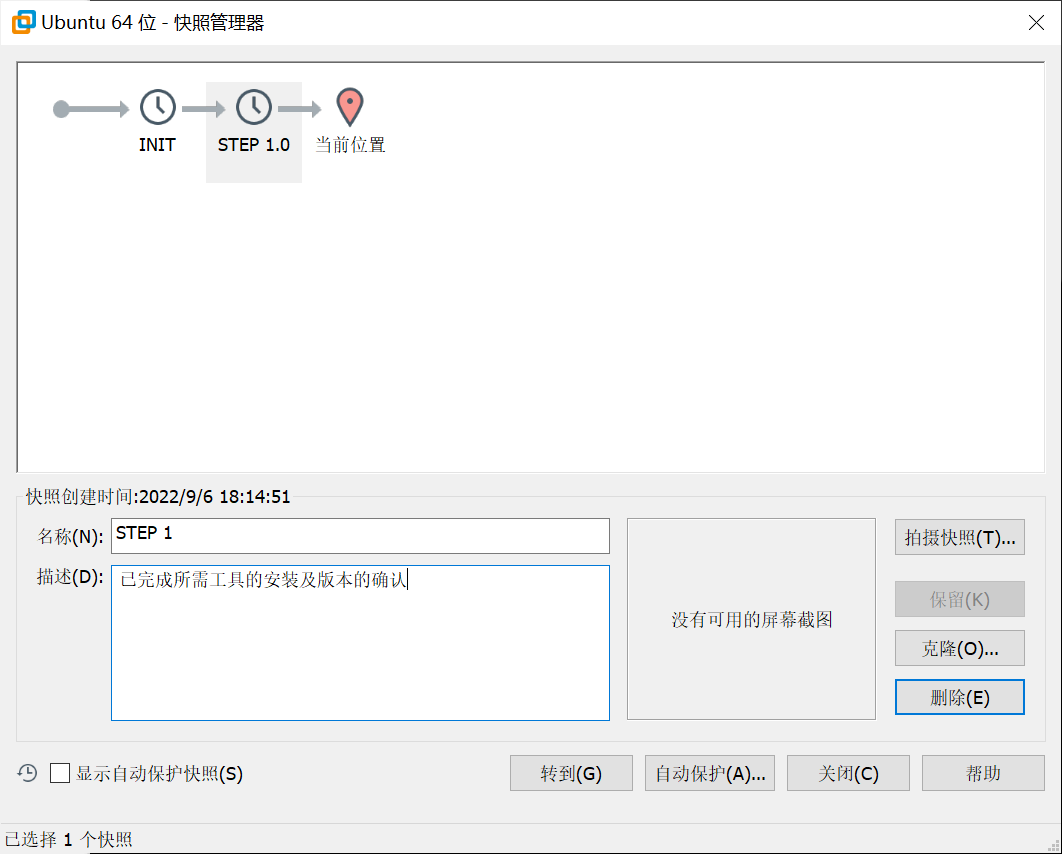
为了方便进行回滚,记得保存快照
LFS(Linux From Scratch)构建过程全记录(一):准备工作的更多相关文章
- LFS(Linux From Scratch)构建过程全记录(五):交叉工具链的构建
写在前面 本文将详细讲述如何构建工具链 前置知识 在LFS-BOOK中,我们需要学习一些关于"交叉编译"的内容,详见书本 安装Binutils-2.39 我们cd到sources文 ...
- LFS(Linux From Scratch)构建过程全记录(三):下载所需的软件包
写在前面 本文将记录构建LFS的过程中,下载软件包的全过程 准备下载的路径 注意请确保$LFS已经设置完毕 我们需要创建一个文件夹,地址为$LFS/sources,用于保存对应的源码 输入的指令如下: ...
- LFS(Linux From Scratch)构建过程全记录(二):磁盘分区
写在前面 本文将会详细记录LFS中,构建分区,构建文件系统和挂载分区的全过程 准备新硬盘 为了更加符合"从零开始构建Linux"的要求,我在虚拟机中,新建了一个磁盘 我们将会在这个 ...
- LFS(Linux From Scratch)构建过程全记录(七):进入Chroot并构建临时工具
写在前面 本章将完成临时系统构建的最后缺失部分和各种包构建所需的工具. 解决了所有循环依赖关系后,就可以使用与主机操作系统完全隔离的"chroot"环境进行构建. 注意:接下来的指 ...
- LFS(Linux From Scratch)构建过程全记录(六):交叉编译临时工具
写在前面 本章将展示如何使用刚刚构建的跨工具链来交叉编译基本实用程序. M4安装 和前文一样,先进行解压,然后cd进入 注意:不需要构建build文件夹,直接输入以下配置文件 ./configure ...
- LFS(Linux From Scratch)构建过程全记录(四):最后的准备
写在前面 本章将进行一系列的环境配置 目录创建 在LFS中创建文件目录 我们可以用以下的指令来创建一些基础的目录,并进行连接 mkdir -pv $LFS/{etc,var} $LFS/usr/{bi ...
- 在CentOS6上配置MHA过程全记录
在CentOS6上配置MHA过程全记录 MHA(Master High Availability)是一款开源的MariaDB or MySQL高可用程序,为MariaDB or MySQL主从复制架构 ...
- 在CentOS7上通过RPM安装实现LAMP+phpMyAdmin过程全记录
在CentOS7上通过RPM安装实现LAMP+phpMyAdmin过程全记录 时间:2017年9月20日 一.软件环境: IP:192.168.1.71 Hostname:centos73-2.sur ...
- SAP S4HANA1610/Fiori安装过程全记录
经历各种坑,从硬件到文件,终于安装成功. 有需要安装或使用S4HANA(含Fiori)的同学可以参考. 安装文件分享给大家 链接:http://pan.baidu.com/s/1mi7LfIS 密码: ...
随机推荐
- 由ASP.NET Core根据路径下载文件异常引发的探究
前言 最近在开发新的项目,使用的是ASP.NET Core6.0版本的框架.由于项目中存在文件下载功能,没有使用类似MinIO或OSS之类的分布式文件系统,而是下载本地文件,也就是根据本地文件路径进行 ...
- 一种让运行在CentOS下的.NET CORE的Web项目简单方便易部署的自动更新方案
一.项目运行环境 项目采用的是.NET5开发的Web系统,独立部署在省内异地多台CentOS服务器上,它们运行在甲方专网环境中(不接触互联网),甲方进行业务运作时(一段时间内)会要求异地服务器开机上线 ...
- POI导出复杂Excel,合并单元格(2)
/** * 导出excel (HSSFWorkbook) */ @GetMapping("/testExport") public void testExport1(HttpSer ...
- map集合中对应key的value为null处理办法
问题: Map集合中对应key的value为null,但是现在需要将这个value转为Integer类型,这个value如果不是null,那么get到的是long类型或者是Bigdecimal类型 处 ...
- 利用laravel-echo主动向服务端发送消息,实现在线状态管理
之前在网上翻了半天,也没有找到关于如何 通过laravel-echo主动发送消息 和 在laravel-websockets中自定义控制器 的文章或教程.无奈之下只能翻laravel-echo和lar ...
- 注意力机制最新综述:A Comprehensive Overview of the Developments in Attention Mechanism
(零)注意力模型(Attention Model) 1)本质:[选择重要的部分],注意力权重的大小体现选择概率值,以非均匀的方式重点关注感兴趣的部分. 2)注意力机制已成为人工智能的一个重要概念,其在 ...
- SSH 多密钥配置
目录 前言 一.SSH 是什么 二.密钥生成工具 三.密钥类型 四.本地配置 1.单密钥配置 2.多密钥配置 五.远端配置 1.GitHub/Gitee 2.服务器 前言 当我们从 GitHub 克隆 ...
- java.Scanner 拓展用法
package study5ran2yl.study; import java.util.Scanner; public class demo11 { public static void main( ...
- centos更改mac
centos 6更改mac vim /etc/udev/rules.d/70-persistent-net.rules
- day02-2
JAVA入门 1.C&&C++ 1972年C诞生 贴近硬件,运行极快,效率极高 操作系统,编译器,数据库,网络系统等 指针和内存管理 1982年C++诞生 面向对象 兼容C 图形领域. ...