
ReactNative: 使用输入框TextInput组件
一、简介
一个应用程序中,输入框基本不可或缺,它衍生的搜索功能在很多APP中随处可见。在iOS开发中,使用的输入框组件是UITextView和UITextField,在React-Native中使用的则是TextInput组件。TextInput组件可以通过键盘将文本输入到APP的组件,它提供了如自动校验、占位符、键盘样式、焦点函数等很多丰富的功能。
二、API
TextInput组件提供的属性和事件基本能够满足开发需求,既可以使用它做基本的输入功能,也能做列表补全的搜索功能。TextInput组件主要属性和事件如下:
| 属性或者函数 | 作用 |
autoCapitalize |
枚举类型,用于信息提示,可选值包括none、sentences、words、characters |
placeholder |
占位符,在输入前显示文本内容 |
value |
文本框输入的内容 |
placeholderTextColor |
占位符文本的颜色 |
password |
如果为true,显示为密码输入框,文本显示为"*"号 |
multiline |
如果为true,则是多行输入 |
editable |
如果为false,文本框不可以输入,默认为true |
keyboardType |
枚举类型,表示键盘类型,可选值包括'default','email-address','numeric','phone-pad','ascii-capable','numbers-and-punctuation','url','number-pad','name-phone-pad','decimal-pad','twitter','web-search', |
autoFocus |
如果为true,将自动聚焦 |
clearButtonMode |
枚举类型,用于显示清除按钮,可选值包括never、while-editing、unless-editing、always |
maxLength |
能够输入的最长字符数 |
enablesReturnKeyAutomatically |
如果为true,表示无文本时键盘不显示返回键,默认为false |
returnKeyType |
枚举类型,表示键盘返回键显示的字符串,可选值包括default、go、google、join、next、route、search、send、yahoo、done、emergency-call |
securityEntry |
如果为true,则像密码框一样隐藏输入内容,默认为false |
onchangeText |
当文本的输入框内容发生改变时调用。它会接收一个文本的参数对象 |
onChange |
当文本发生改变时,调用该函数 |
onEndEditing |
当结束编辑时,调用该函数 |
onBlur |
失去焦点触发事件 |
onFocus |
获取焦点触发事件 |
onsubmitEditing |
当结束编辑后,点击键盘的提交按钮时触发事件 |
三、使用
1、作为输入框
InputView.js
import React, { Component } from 'react';

import {

    StyleSheet,

    View,

    Text,

    TextInput

} from 'react-native'

export default class InputView extends Component{

    constructor(props){

        super(props);

        this.state = {content:"当前无内容"}

    }

    render(){

        return (

            <View style={styles.flex}>

                <View style={styles.content}>

                    <Text style={styles.text}>{this.state.content}</Text>

                </View>

                <View style={styles.flex}>

                    <TextInput

                        style={styles.input}

                        placeholder='请输入您想要的东西'

                        placeholderTextColor={"#CCC"}

                        returnKeyType='done'

                        clearButtonMode='while-editing'

                        enablesReturnKeyAutomatically={true}

                        editable={true}

                        maxLength={100}

                        keyboardType='default'

                        onFocus={()=> console.log("--获取焦点触发事件--")}

                        onBlur={()=> console.log("--失去焦点触发事件--")}

                        onChange={() => console.log("---当文本发生改变时,调用该函数--")}

                        onEndEditing={() => console.log("--当结束编辑时,调用该函数--")}

                        onSubmitEditing={ () => console.log("--当结束编辑后,点击键盘的提交按钮时触发事件--")}

                        onChangeText={(text) => this.setState({content:text})}

                    />

                </View>

            </View>

        )

    }

}

const styles = StyleSheet.create({

    flex:{

        flex: 1

    },

    content:{

        height: 200,

        backgroundColor:"red",

        justifyContent: 'center',

        alignItems:'center'

    },

    input:{

        height:45,

        borderWidth: 1,

        marginTop: 20,

        marginRight:5,

        marginLeft: 5,

        paddingLeft: 5,

        borderColor:'#CCC',

        borderRadius: 4

    },

    text:{

        fontSize:20,

        color:'white',

        textAlign:'center'

    }

})
index.ios.js
/**

 * Sample React Native App

 * https://github.com/facebook/react-native

 * @flow

 */

import React, { Component } from 'react';

import InputView from './src/InputView'

import {

  AppRegistry,

  View

} from 'react-native';

export default class ReactNativeDemo extends Component {

  render() {

    return (

        <View style={{flex: 1}}>

          <InputView/>

        </View>

    );

  }

}

AppRegistry.registerComponent('ReactNativeDemo', () => ReactNativeDemo);
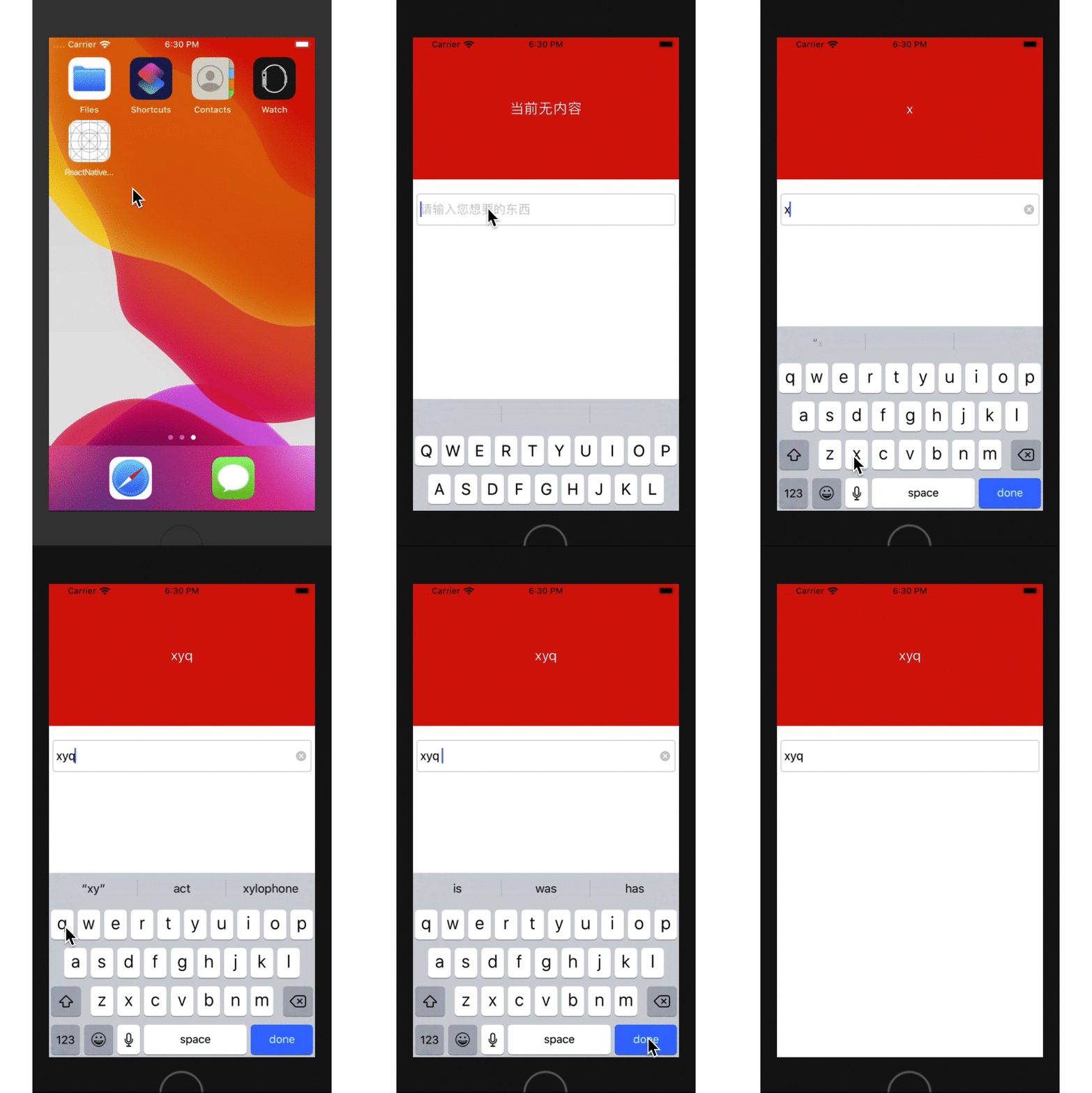
日志和gif如下:
-- ::43.022 [info][tid:com.facebook.react.JavaScript] --获取焦点触发事件--

-- ::48.992 [info][tid:com.facebook.react.JavaScript] ---当文本发生改变时,调用该函数--

-- ::49.951 [info][tid:com.facebook.react.JavaScript] ---当文本发生改变时,调用该函数--

-- ::51.016 [info][tid:com.facebook.react.JavaScript] ---当文本发生改变时,调用该函数--

-- ::52.893 [info][tid:com.facebook.react.JavaScript] ---当文本发生改变时,调用该函数--

-- ::55.243 [info][tid:com.facebook.react.JavaScript] --当结束编辑后,点击键盘的提交按钮时触发事件--

-- ::55.248 [info][tid:com.facebook.react.JavaScript] --当结束编辑时,调用该函数--

-- ::55.256 [info][tid:com.facebook.react.JavaScript] --失去焦点触发事件--
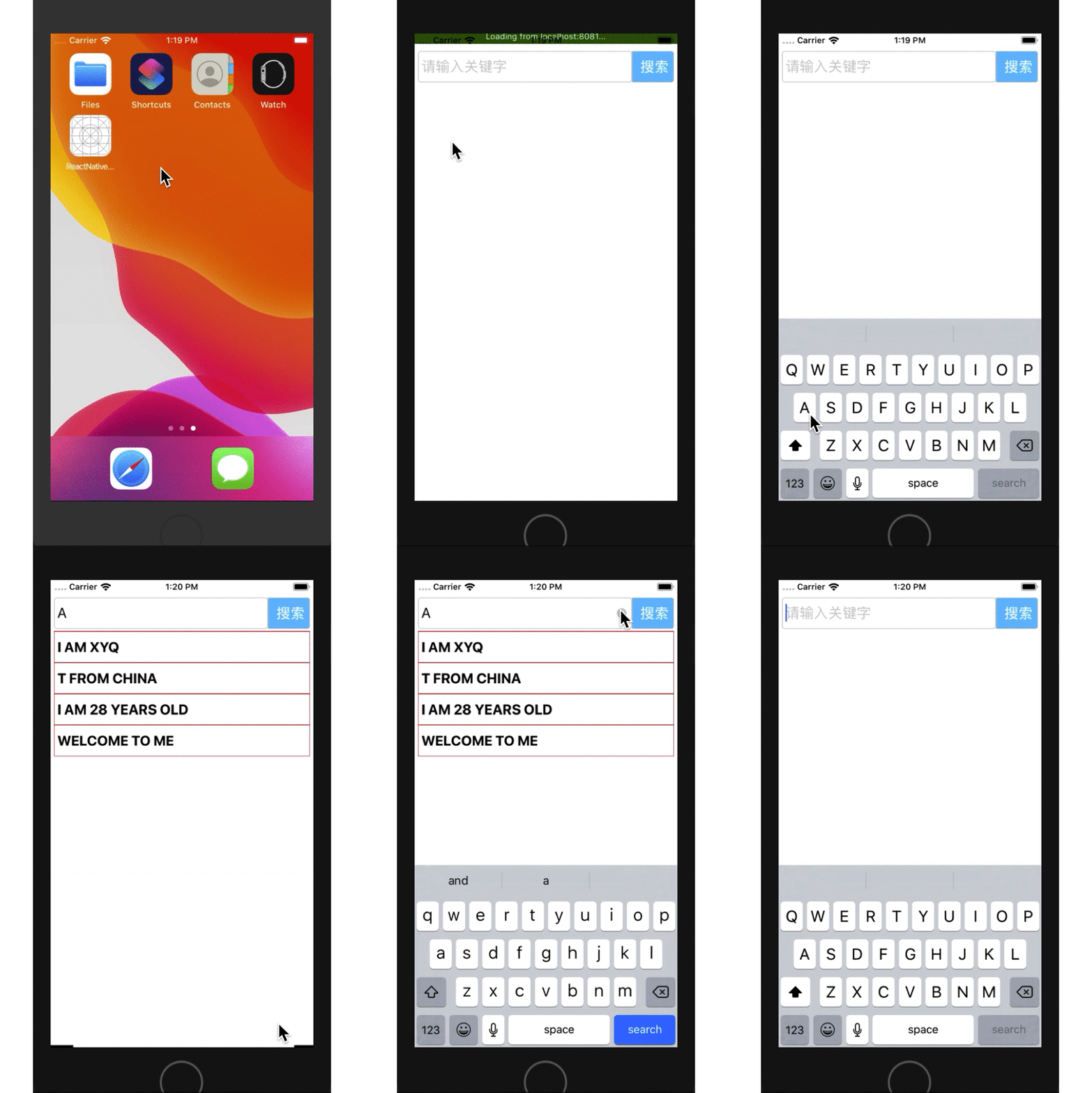
2、制作搜索框
InputSearchView.js
import React, { Component } from 'react';

import {

    StyleSheet,

    View,

    Text,

    TextInput,

    PixelRatio

} from 'react-native'

export default class InputSearchView extends Component{

    constructor(){

        super();

        this.state = {show:false, keywords:""}

    }

    show = () => {

        this.setState({show:this.state.keywords.length>0})

    };

    render(){

        return (

            <View style={styles.flex}>

                <View style={[styles.flexDirection,styles.height]}>

                    <View style={styles.flex}>

                        <TextInput

                            value={this.state.keywords}

                            style={styles.input}

                            placeholder='请输入关键字'

                            placeholderTextColor={"#CCC"}

                            returnKeyType='search'

                            clearButtonMode='while-editing'

                            enablesReturnKeyAutomatically={true}

                            onChangeText={ (text) => this.setState({keywords:text})}

                            onEndEditing={this.show.bind(this)}

                        />

                    </View>

                    <View style={styles.btn}>

                        <Text style={styles.text} onPress={this.show.bind(this)}>

                            搜索

                        </Text>

                    </View>

                </View>

                {

                    this.state.show?

                    <View style={styles.list}>

                        <Text style={styles.list_item}>I AM XYQ</Text>

                        <Text style={styles.list_item}>T FROM CHINA</Text>

                        <Text style={styles.list_item}>I AM 28 YEARS OLD</Text>

                        <Text style={styles.list_item}>WELCOME TO ME</Text>

                    </View> : null

                }

            </View>

        )

    }

}

const styles = StyleSheet.create({

    flex:{

        flex: 1

    },

    flexDirection:{

        flexDirection: 'row'

    },

    list:{

        marginTop: 28,

        height: 200,

        marginLeft: 5,

        marginRight: 5,

        borderColor:"red",

        borderTopWidth: 1/PixelRatio.get(),

    },

    list_item:{

        fontSize:20,

        fontWeight:'bold',

        padding: 5,

        paddingTop: 10,

        paddingBottom: 10,

        borderWidth: 1/PixelRatio.get(),

        borderColor: 'red',

        borderTopWidth: 0

    },

    height:{

        height: 45

    },

    input:{

        height:45,

        borderWidth: 1,

        fontSize:20,

        marginTop: 25,

        marginLeft: 5,

        paddingLeft: 5,

        borderColor:'#CCC',

        borderRadius: 4

    },

    btn:{

        width:60,

        height:45,

        borderWidth: 1,

        marginTop: 25,

        marginRight: 5,

        paddingLeft: 5,

        backgroundColor:'#23BEFF',

        borderColor:'#CCC',

        borderTopRightRadius:4,

        borderBottomRightRadius:4,

        justifyContent: 'center',

        alignItems:'center'

    },

    text:{

        fontSize:20,

        color:'white',

        fontWeight:'bold',

        textAlign:'center'

    }

})
index.ios.js
/**

 * Sample React Native App

 * https://github.com/facebook/react-native

 * @flow

 */

import React, { Component } from 'react';

import InputSearchView from './src/InputSearchView'

import {

  AppRegistry,

  View

} from 'react-native';

export default class ReactNativeDemo extends Component {

  render() {

    return (

        <View style={{flex: 1}}>

          <InputSearchView/>

        </View>

    );

  }

}

AppRegistry.registerComponent('ReactNativeDemo', () => ReactNativeDemo);
ReactNative: 使用输入框TextInput组件的更多相关文章
- react-native 学习之TextInput组件篇
/** * Sample React Native App * https://github.com/facebook/react-native */ 'use strict'; import Rea ...
- React-Native之轮播组件looped-carousel的介绍与使用
React-Native之轮播组件looped-carousel的介绍与使用 一,关于react-native轮播组件的介绍与对比 1,react-native-swiper在动态使用网页图片,多张图 ...
- TextInput组件的常用属性
1.TextInput组件基本介绍: TextInput是一个允许用户在应用中通过键盘输入文本的基本组件.本组件的属性提供了多种特性的配置,譬如自动完成.自动大小写.占位文字,以及多种不同的键盘类型( ...
- react native 封装TextInput组件
上一篇 react-native文章提到了TextInput组件对安卓的适配问题,因此对该组件进行封装很有必要. 文章地址 react native定报预披项目知识点总结 TextInput介绍 官 ...
- JS 仿支付宝input文本输入框放大组件
input输入的时候可以在后边显示数字放大镜 <!doctype html> <html lang="en"> <head> <meta ...
- [React Native]高度自增长的TextInput组件
之前我们学习了从零学React Native之11 TextInput了解了TextInput相关的属性. 在开发中,我们有时候有这样的需求, 希望输入区域的高度随着输入内容的长度而增长, 如下: 这 ...
- react-native DatePicker日期选择组件的实现
本教程的实现效果如下: 为了实现其淡入/淡出的覆盖效果, 还有取消按钮, 在此用了一个三方的组件, 大家可以先安装一下: 三方组件的地址:https://github.com/eyaleizenber ...
- react-native学习笔记——ViewStack组件
今天来写一个组件,相信很多人都会用到的——ViewStack. ViewStack组件无疑是UI中很重要的一个组件,可惜react-native并没有内嵌进去,需要开发者自己去实现. 实现原理很简单, ...
- react-native获取设备信息组件(react-native-device-info)
转载链接:http://www.ncloud.hk/%E6%8A%80%E6%9C%AF%E5%88%86%E4%BA%AB/react-native-acquisition-device-infor ...
随机推荐
- Oracle数据库备份/导出(exp/expd)、导入(imp/impd)
常用的oracle数据库备份(导入/导出)有两种,分别是exp/imp和expd/impd,前者是Orace早期版本带有的导入导出工具,后者是Oracle10g后出现的,下面进行分别介绍! 1.e ...
- mybatis源码学习(四)--springboot整合mybatis原理
我们接下来说:springboot是如何和mybatis进行整合的 1.首先,springboot中使用mybatis需要用到mybatis-spring-boot-start,可以理解为mybati ...
- 【原】MAC安装Flutter
系统环境要求 Flutter因为是新出的框架,所以对系统还是有一定的要求的. MacOS(64-bit) 磁盘空间:大于700M,如果算上Android Studio等编辑工具,尽量大于3G. 命令号 ...
- Linux7 64安装 oracle 11g Error in invoking target 'agent nmhs' of makefile
在makefile中添加链接libnnz11库的参数修改$ORACLE_HOME/sysman/lib/ins_emagent.mk,将$(MK_EMAGENT_NMECTL)修改为:$(MK_EMA ...
- React: 研究Flux设计模式
一.简介 一般来说,State管理在React中是一种最常用的实现机制,使用这种state管理系统基本可以开发各种需求的应用程序.然而,随着应用程序规模的不断扩张,原有的这种State管理系统就会暴露 ...
- GO语言编译环境采用gosublime(19新版)
环境:博主已下载好,并安装在E:/SDK,使用过sublime text3,有git 0x00 环境变量 默认已经有GOPATH(代码存放在这),PATH(安装go的bin目录即E:\SDK\bin) ...
- 安全性测试:OWASP ZAP 2.8 使用指南(四):ZAP扫描移动应用安全
在做移动应用(APP,小程序等)测试时,需要关注应用安全性. ZAP是可以用来进行手机移动应用渗透性测试扫描的. 正因为ZAP是采用“中间代理”的形式,截取并扫描所有客户端与服务器的交互请求,作为客户 ...
- spinand之data buffer
data buffer简介 spinand一般会有一个内置的data buffer. 以W25N01GV为例,一个page是2048bytes外加64bytes的spare数据,其data buffe ...
- Asp.net Core3.0 跨域配置
原文:http://www.zilaohu.cn/Jie/Detail_Jie?ID=78840a04-55b8-4988-80b2-f964fd822d63 下面配置后:被拒绝的域请求后,可以进入方 ...
- Java生鲜电商平台-深入理解微服务SpringCloud各个组件的关联与架构
Java生鲜电商平台-深入理解微服务SpringCloud各个组件的关联与架构 概述 毫无疑问,Spring Cloud是目前微服务架构领域的翘楚,无数的书籍博客都在讲解这个技术.不过大多数讲解还停留 ...