
Spring boot Sample 003之spring-boot-configuration-properties
一、环境
1.1、Idea 2020.1
1.2、JDK 1.8
二、目的
三、步骤
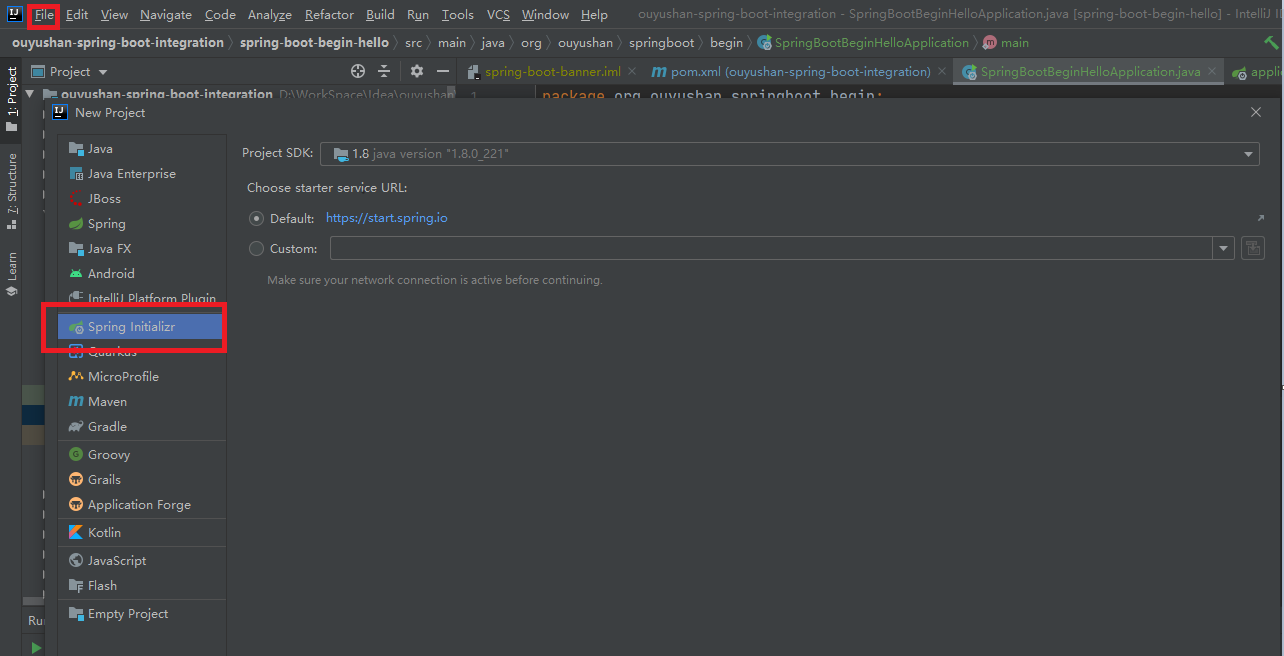
3.1、点击File -> New Project -> Spring Initializer,点击next
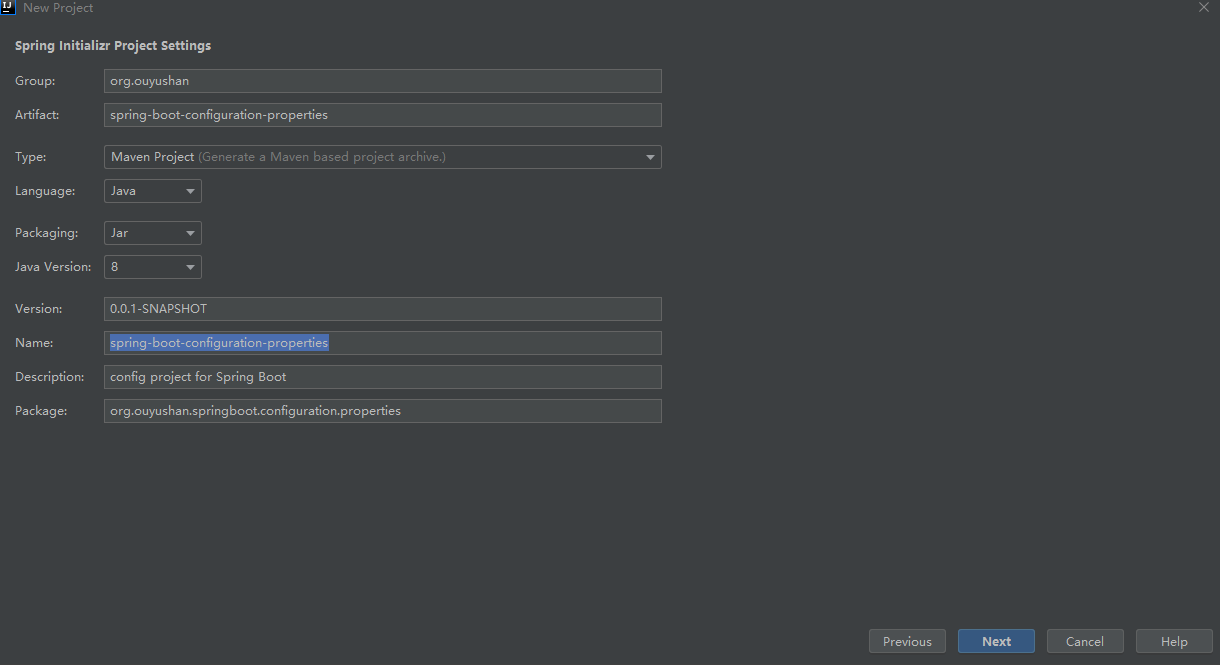
3.2、在对应地方修改自己的项目信息
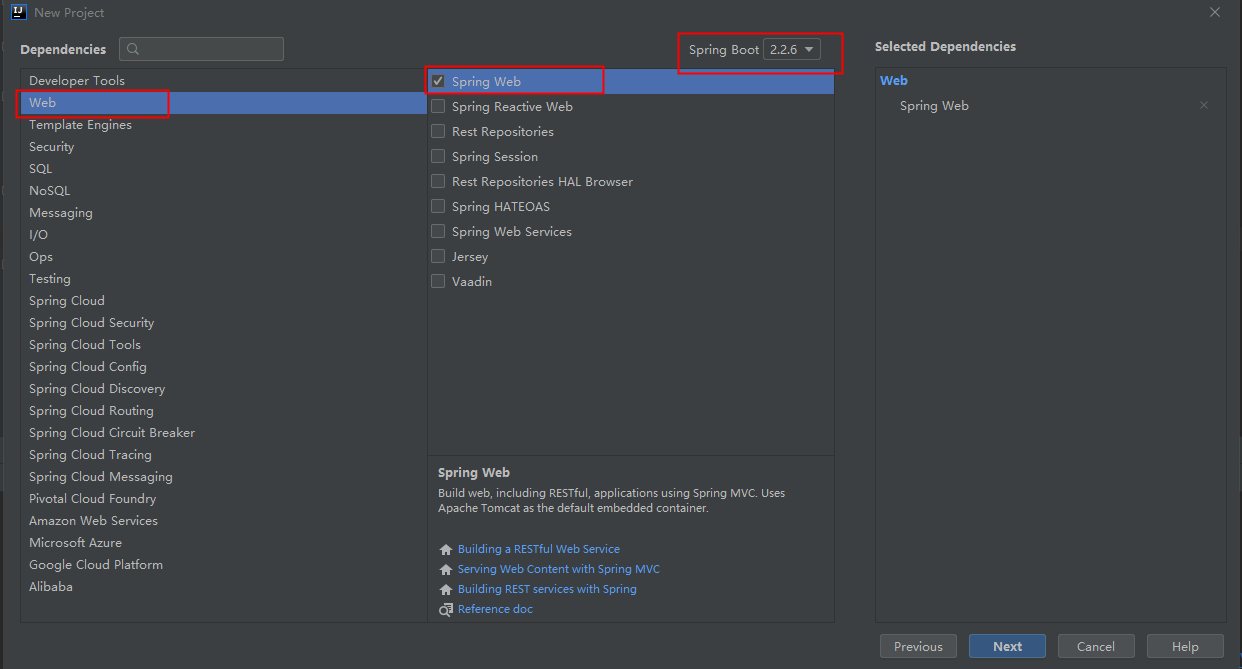
3.3、选择Web依赖,选中Spring Web。可以选择Spring Boot版本,本次默认为2.2.6,点击Next
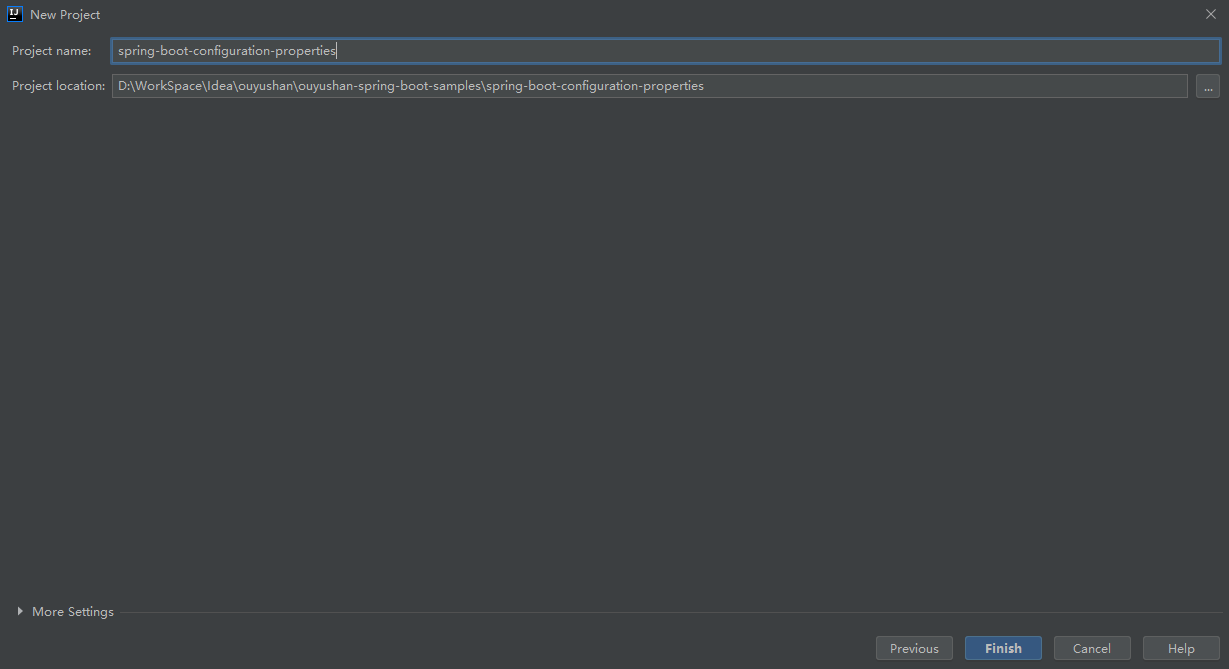
3.4、编辑工程名和项目路径,确定后点击Finish完成
3.5、项目结构
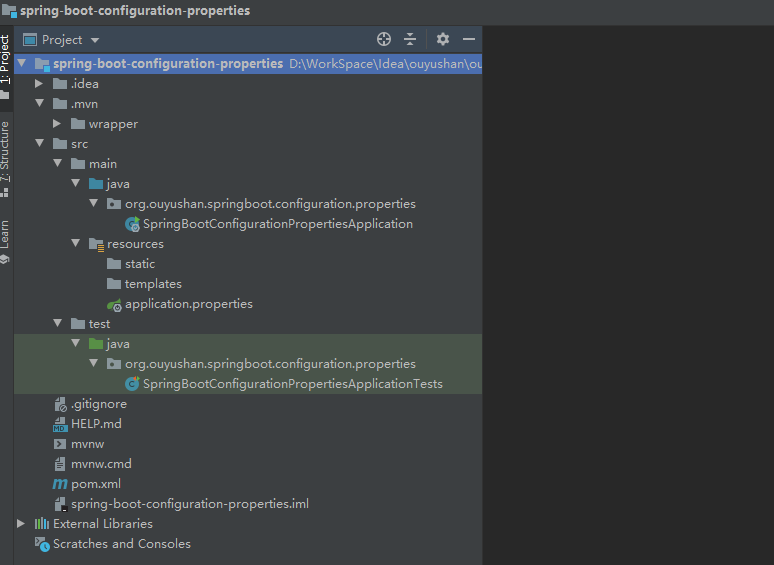
四、添加测试方法
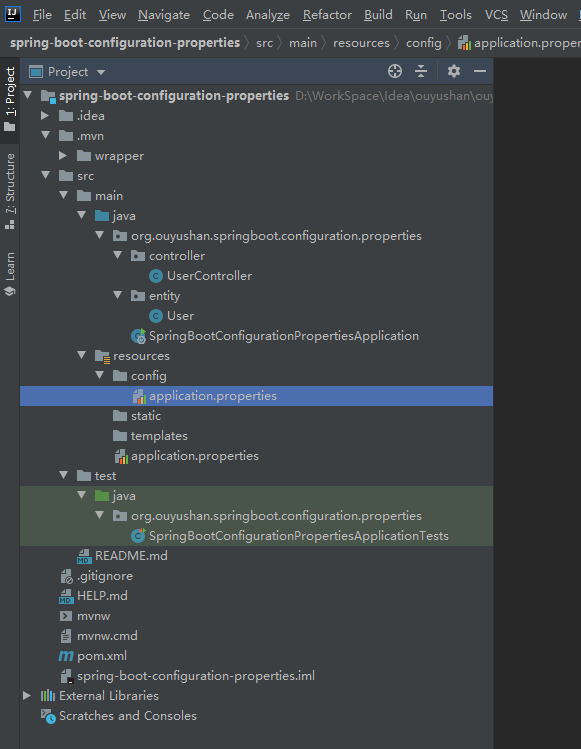
4.1、新建UserController实体类
package org.ouyushan.springboot.configuration.properties.controller;

import org.springframework.beans.factory.annotation.Value;

import org.springframework.web.bind.annotation.*;

import java.util.HashMap;

/**

 * @Description:

 * @Author: ouyushan

 * @Email: ouyushan@hotmail.com

 * @Date: 2020/4/27 13:34

 */

@RestController

@RequestMapping("/api/user")

public class UserController {

    @Value(value = "${ouyushan.secret}")

    private String secret;

    @Value(value = "${ouyushan.number}")

    private int number;

    @Value(value = "${ouyushan.desc}")

    private String desc;

    @GetMapping("/")

    public String hello() {

        return "Hello World Based On Spring-Boot";

    }

    // @RequestParam 简单类型的绑定

    @GetMapping("/getUser")

    public HashMap<String, Object> getUser(@RequestParam String username) {

        HashMap<String, Object> map = new HashMap<>();

        map.put("title", "hello world");

        map.put("username", username);

        map.put("secret",secret);

        map.put("number",number);

        map.put("desc",desc);

        return map;

    }

}
4.2、配置默认application.properties
ouyushan.secret=${random.value}

ouyushan.number=${random.int}

ouyushan.name=ouyushan

ouyushan.desc=${ouyushan.name} is a domain name

server.port=9090

spring.jackson.date-format=yyyy-MM-dd HH:mm:ss

spring.jackson.time-zone=Asia/Chongqing
{

    "number":-1860712823,

    "secret":"e1066512836d41276cbd3baf86189ac8",

    "title":"hello world",

    "username":"spring",

    "desc":"ouyushan is a domain name"

}
4.3、配置resources/config/application.properties
ouyushan.secret=${random.value}

ouyushan.number=${random.int}

ouyushan.name=ouyushan-config

ouyushan.desc=${ouyushan.name} is a domain name

server.port=7070
{

    "number":-1540619073,

    "secret":"352c725a9695f463f4edbcbd6dee1944",

    "title":"hello world",

    "username":"spring",

    "desc":"ouyushan-config is a domain name"

}
五、知识点
# 示例  spring-boot-configuration-properties  外部化配置

properties文件优先级

1. 当前目录下的一个/config子目录

2. 当前目录

3. 一个classpath下的/config包

4. classpath根路径(root)

可通过@Value取值

    @Value(value = "${ouyushan.secret}")

    private String secret;

**@ConfigurationProperties(prefix = "sample")**

读取外部配置文件中sample 开始的属性,自动映射到类中的字段,并覆盖代码中的值。
Spring boot Sample 003之spring-boot-configuration-properties的更多相关文章
- Spring boot Sample 004之spring-boot-configuration-yaml
一.环境 1.1.Idea 2020.1 1.2.JDK 1.8 二.目的 通过yaml文件配置spring boot 属性文件 三.步骤 3.1.点击File -> New Project - ...
- Spring boot Sample 009之spring-boot-web-thymeleaf
一.环境 1.1.Idea 2020.1 1.2.JDK 1.8 二.目的 spring boot 整合thymeleaf模板开发web项目 三.步骤 3.1.点击File -> New Pro ...
- Spring boot Sample 012之spring-boot-web-upload
一.环境 1.1.Idea 2020.1 1.2.JDK 1.8 二.目的 spring boot 整合web实现文件上传下载 三.步骤 3.1.点击File -> New Project -& ...
- Spring boot Sample 0010之spring-boot-web-freemarker
一.环境 1.1.Idea 2020.1 1.2.JDK 1.8 二.目的 spring boot 整合freemarker模板开发web项目 三.步骤 3.1.点击File -> New Pr ...
- Spring boot Sample 006之spring-boot-custom-servlet
一.环境 1.1.Idea 2020.1 1.2.JDK 1.8 二.步骤 2.1.点击File -> New Project -> Spring Initializer,点击next 2 ...
- Spring boot Sample 005之spring-boot-profile
一.环境 1.1.Idea 2020.1 1.2.JDK 1.8 二.目的 通过yaml文件配置spring boot 属性文件 三.步骤 3.1.点击File -> New Project - ...
- spring cloud教程之使用spring boot创建一个应用
<7天学会spring cloud>第一天,熟悉spring boot,并使用spring boot创建一个应用. Spring Boot是Spring团队推出的新框架,它所使用的核心技术 ...
- Spring Boot——2分钟构建spring web mvc REST风格HelloWorld
之前有一篇<5分钟构建spring web mvc REST风格HelloWorld>介绍了普通方式开发spring web mvc web service.接下来看看使用spring b ...
- 【Spring】关于Boot应用中集成Spring Security你必须了解的那些事
Spring Security Spring Security是Spring社区的一个顶级项目,也是Spring Boot官方推荐使用的Security框架.除了常规的Authentication和A ...
随机推荐
- Java——SSM整合所需的Maven配置文件
<?xml version="1.0" encoding="UTF-8"?> <project xmlns="http://mave ...
- CODING 敏捷实战系列课第二讲:Scrum 敏捷项目管理核心要素之 3355
Scrum 是敏捷开发流派中最著名和最落地的一支,全球 70% 以上公司的敏捷转型都是以 Scrum 起步.CODING 特邀敏捷顾问.CST & CTC 认证敏捷教练申健老师将在本课程< ...
- schedule定时任务出现问题 (大坑已填)!!
因为python每次运行完,并不清除内存,nowtime一直不变,这导致了一个致命问题,使我的脚本一直运行失败,具体如下: 我设置的是每隔30分钟登陆一次,代码如下 if __name__ == &q ...
- Java return 关键字
一.基本概念 return一方面用在循环语句中来结束循环,另一方面用来终止函数的执行或者退出类的方法,并把控制权返回该方法的调用者.如果方法有返回类型,则return的返回该类型的值:如果没有返回值, ...
- Day_14【IO流】扩展案例3_对文本文件中的字符串内容进行反转
分析以下需求,并用代码实现 项目根路径下有text.txt文件,内容如下 我爱黑马 123456 利用IO流的知识读取text.txt文件的内容反转后写入text.txt文件中 654321 马黑爱我 ...
- 一篇文章带你用Python网络爬虫实现网易云音乐歌词抓取
前几天小编给大家分享了数据可视化分析,在文尾提及了网易云音乐歌词爬取,今天小编给大家分享网易云音乐歌词爬取方法. 本文的总体思路如下: 找到正确的URL,获取源码: 利用bs4解析源码,获取歌曲名和歌 ...
- Python 的缩进是不是反人类的设计?
前些天,我写了<Python为什么使用缩进来划分代码块?>,文中详细梳理了 Python 采用缩进语法的 8 大原因.我极其喜欢这种简洁优雅的风格,所以对它赞美有加. 然而文章发出去后,非 ...
- python爬虫-直播吧
概述 这是一个我很喜欢的小网站,想了解这个网站先从爬虫开始,爬取直播吧所有的栏目及内容,再存入数据库.先写个简单点的,后期再不断的优化下. 准备阶段 直播吧网址https://www.zhibo8.c ...
- 一、线程 & 线程池
一.线程的介绍 1.1.概念 进程: 你的硬盘上有一个简单的程序,这个程序叫QQ.exe,这是一个程序,这个程序是一个静态的概念,它被扔在硬盘上也没人理他,但是当你双击它,弹出一个界面输入账号密码登录 ...
- Python --函数学习2
一.函数参数和返回值 --参数:负责给函数传递一些必要的数据或者信息 -形参(形式参数):在函数定义的时候用到的参数,没有具体值,只是一个占位符号 -实参(实际参数):在调用函数的时候输入的值 exa ...