
[UWP]了解模板化控件(2.1):理解ContentControl
UWP的UI主要由布局容器和内容控件(ContentControl)组成。布局容器是指Grid、StackPanel等继承自Panel,可以拥有多个子元素的类。与此相对,ContentControl则只能包含单个子元素。
在UWP中,Button、CheckBox、ScrollViewer、Frame、ToolTip等都继承自ContentControl,其它控件则不是在ContentTemplate中使用ContentControl,就是被ContentControl使用,可以说ContentControl是UWP中最重要的控件。
ContentControl的定义并不复杂,它主要包含这四个属性:Content,ContentTemplate,ContentTemplateSelector,ContentTransitions。
1. Content
Content支持任何类型,它的值即ContentControl要显示的对象。可以将Content的类型大致分为两大类:
- 未继承自UIElement的类型: ContentControl调用这些类的ToString()方法获取文本然后显示。
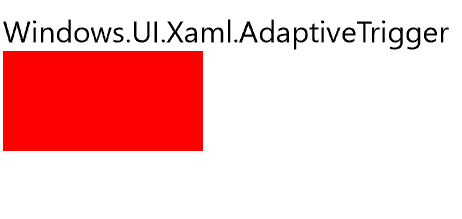
- 继承自UIElement的类型: ContentControl直接将它显示在UI上。
<StackPanel>

    <ContentControl>

        <AdaptiveTrigger />

    </ContentControl>

    <ContentControl>

        <Rectangle Height="50"

                   Fill="Red" />

    </ContentControl>

</StackPanel>
2. ContentTemplate
要将ContentControl的内容按自己的想法显示出来,可以使用ContentTemplate属性public DataTemplate ContentTemplate { get; set; })。DataTemplate是定义如何显示绑定的数据对象的XAML标记。DataTemplate定义的XAML块中元素的DataContext相当于所在ContentControl的Content。
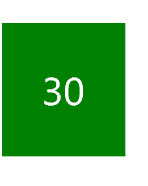
下面的示例演示了怎么将ScoreModel显示在UI上。
<Grid Background="{ThemeResource ApplicationPageBackgroundThemeBrush}">

    <Grid.Resources>

        <DataTemplate x:Key="PassTemplate">

            <Border Background="Green">

                <TextBlock Text="{Binding Score}"

                           Foreground="White"

                           FontSize="20"

                           Margin="20"

                           HorizontalAlignment="Center" />

            </Border>

        </DataTemplate>

    </Grid.Resources>

    <ContentControl ContentTemplate="{StaticResource PassTemplate}">

        <local:ScoreModel Score="30" />

    </ContentControl>

</Grid>
3. ContentTemplateSelector
如果需要根据Content动态地选择要使用的ContentTemplate,其中一个方法就是 public DataTemplateSelector ContentTemplateSelector { get; set; } 属性。
要使用ContentTemplateSelector,首先实现一个继承DataTemplateSelector的类,并重写protected override DataTemplate SelectTemplateCore(object item, DependencyObject container) 函数,在此函数中返回选中的DataTemplate。
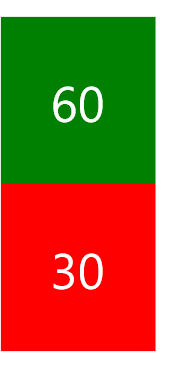
以下的示例演示了SimpleDataTemplateSelector的功能,它通过判断Score是否大于60,从而选择返回PassTemplate或者FailTemplate。PassTemplate和FailTemplate都是SimpleDataTemplateSelector 的public属性,并在XAML中注入到SimpleDataTemplateSelector。
public class SimpleDataTemplateSelector : DataTemplateSelector

{

    public DataTemplate PassTemplate { get; set; }

    public DataTemplate FailTemplate { get; set; }

    protected override DataTemplate SelectTemplateCore(object item, DependencyObject container)

    {

        var model = item as ScoreModel;

        if (model == null)

            return null;

        if (model.Score >= 60)

            return PassTemplate;

        else

            return FailTemplate;

    }

}
<StackPanel>

    <StackPanel.Resources>

        <DataTemplate x:Key="PassTemplate">

            <Border Background="Green">

                <TextBlock Text="{Binding Score}"

                           Foreground="White"

                           FontSize="20"

                           Margin="20"

                           HorizontalAlignment="Center" />

            </Border>

        </DataTemplate>

        <DataTemplate x:Key="FailTemplate">

            <Border Background="Red">

                <TextBlock Text="{Binding Score}"

                           Foreground="White"

                           FontSize="20"

                           Margin="20"

                           HorizontalAlignment="Center" />

            </Border>

        </DataTemplate>

        <local:SimpleDataTemplateSelector PassTemplate="{StaticResource PassTemplate}"

                                          FailTemplate="{StaticResource FailTemplate}"

                                          x:Key="DataTemplateSelector" />

        <Style TargetType="ContentControl">

            <Setter Property="ContentTemplateSelector"

                    Value="{StaticResource DataTemplateSelector}" />

        </Style>

    </StackPanel.Resources>

    <ContentControl>

        <local:ScoreModel Score="60" />

    </ContentControl>

    <ContentControl>

        <local:ScoreModel Score="30" />

    </ContentControl>

</StackPanel>
注意:ContentTemplateSelector的缺点是需要创建多个模板,通常同一组数据的模板只有少部分的差别,可以在同一个模板中通过IValueConverter等方式显示不同的格式。
4. ContentTransitions
public TransitionCollection ContentTransitions { get; set; } 是类型为Transition的集合,提供Content改变时的过渡动画。
<ContentControl x:Name="ContentControl">

    <ContentControl.ContentTransitions>

        <TransitionCollection>

            <AddDeleteThemeTransition  />

        </TransitionCollection>

    </ContentControl.ContentTransitions>

</ContentControl>
UWP提供了很多优秀的动画效果,适当使用可以给人很好的用户体验。如果没有优秀的UI设计,老老实实用默认的ContentTransitions就不会错。
[UWP]了解模板化控件(2.1):理解ContentControl的更多相关文章
- [UWP]了解模板化控件(2):模仿ContentControl
ContentControl是最简单的TemplatedControl,而且它在UWP出场频率很高.ContentControl和Panel是VisualTree的基础,可以说几乎所有VisualTr ...
- [UWP 自定义控件]了解模板化控件(2):模仿ContentControl
ContentControl是最简单的TemplatedControl,而且它在UWP出场频率很高.ContentControl和Panel是VisualTree的基础,可以说几乎所有VisualTr ...
- WPF:理解ContentControl——动态添加控件和查找控件
WPF:理解ContentControl--动态添加控件和查找控件 我认为WPF的核心改变之一就是控件模型发生了重要的变化,大的方面说,现在窗口中的控件(大部分)都没有独立的Hwnd了.而且控件可以通 ...
- [UWP 自定义控件]了解模板化控件(2.1):理解ContentControl
UWP的UI主要由布局容器和内容控件(ContentControl)组成.布局容器是指Grid.StackPanel等继承自Panel,可以拥有多个子元素的类.与此相对,ContentControl则 ...
- [UWP]了解模板化控件(8):ItemsControl
1. 模仿ItemsControl 顾名思义,ItemsControl是展示一组数据的控件,它是UWP UI系统中最重要的控件之一,和展示单一数据的ContentControl构成了UWP UI的绝大 ...
- [UWP]了解模板化控件(10):原则与技巧
1. 原则 推荐以符合以下原则的方式编写模板化控件: 选择合适的父类:选择合适的父类可以节省大量的工作,从UWP自带的控件中选择父类是最安全的做法,通常的选择是Control.ContentContr ...
- [UWP]了解模板化控件(1):基础知识
1.概述 UWP允许开发者通过两种方式创建自定义的控件:UserControl和TemplatedControl(模板化控件).这个主题主要讲述如何创建和理解模板化控件,目标是能理解模板化控件常见的知 ...
- [UWP]了解模板化控件(3):实现HeaderedContentControl
1. 概述 来看看这段XMAL: <StackPanel Width="300"> <TextBox Header="TextBox" /&g ...
- [UWP]了解模板化控件(4):TemplatePart
1. TemplatePart TemplatePart(部件)是指ControlTemplate中的命名元素.控件逻辑预期这些部分存在于ControlTemplate中,并且使用protected ...
随机推荐
- runloop和runtime
runloop Runloop是事件接收和分发机制的一个实现. 一个程序从main函数开始,函数执行完毕之后就会退出,iOS程序也是一样的,但是我们从没看到过iOS程序打开之后直接闪退,肯定是有一些东 ...
- PickerController 添加照片---iOS
前言 添加照片我们常用的地方有,更换头像,发布状态,朋友圈的时候等等,那我们接下来看看怎么添加上照片吧~ github: 效果图: 正文 1.你可以直接写,也可以声明一个属性.我习惯声明一个属性. @ ...
- Swift2.0 函数学习笔记
最近又有点忙,忙着找工作,忙着适应这个新环境.现在好了,上班两周周了,也适应过来了,又有时间安安静静的就行我们前面的学习了.今天这篇笔记,记录的就是函数的使用.下面这些代码基本上是理清楚了函数的额使用 ...
- UE4 RHI与Render模块简解
UE4中的RHI指的是Render hardware interface,作用像Ogre里的RenderSystem,针对Dx11,Dx12,Opengl等等平台抽象出相同的接口,我们能方便能使用相同 ...
- 基于Quartz.NET框架的WinForm任务计划管理工具
最近接到一个小需求 ——可以定期同步20个Sql Server 7.0数据库里的数据(数据量会预计>10000),并保存为cvs格式文件 ——可以设置保存文件数据量 ——该应用需要用WinFor ...
- java dbutils查询数据库时无法给部分字段赋值原因
1,javaBean如下: public class User { /** * 用户唯一标识(ID) */ private String uid; /** ...
- 学习笔记——Java字符串操作常用方法
1.创建字符串 最常用的是使用String类的构造方法:String s=new String("abcd"); 也可采用J2SE5.0添加的StringBuilder类的字符串构 ...
- 每天一个linux命令(56)--crontab命令
上一节学习了 at 命令是针对仅运行一次的任务,循环运行的例行性计划任务,Linux 系统则是由 cron(crond)这个系统服务来控制的.Linux 系统上面原本就有非常多的计划性工作,因此这个 ...
- 每天一个linux命令(33)--df命令
周末是学习的好时光. 每天一个Linux命令,接下来是磁盘存储相关的,df, du命令 Linux中 df 命令的功能是用来检查Linux 服务器的文件系统的磁盘空间占用情况.可以利用该命令来获取硬 ...
- 前端面试题总结:HTML5,JS,CSS3,兼容性。
1. 请写出至少20个HTML5标签 <article><aside> <audio><video> <canvas><datalis ...